


Roughly 97% of B2B website visitors don’t fill out a form. They land on a page, read some content, poke around the pricing page, and leave – without ever giving you their email, their name, or any clue who they were or what company they represent. For teams whose sales motion depends on knowing which accounts are interested, that’s a massive intelligence gap.
Visitor identification tools close part of that gap. They match incoming website traffic to companies (and sometimes individuals) in real time, turning anonymous pageviews into actionable sales signals. Done well, this can surface the 20-30 target accounts browsing your site this week that your SDR team would otherwise never know about. Done badly – with the wrong tool, wrong expectations, or no follow-up workflow – it produces a dashboard that nobody checks and pipeline that never materializes.
This guide covers what visitor identification actually does (and what it doesn’t), how the technology works under the hood, realistic success rates, the tool categories and how to choose between them, the setup process, and – most importantly – the outreach workflow that turns identified visitors into actual opportunities.
The short version: visitor identification is one of the highest-leverage additions to a B2B outbound stack in 2026, but only if you build the downstream workflow to act on the signals. The tool alone is dashboard decoration.
What visitor identification actually does
Visitor identification tools analyze incoming website traffic and attempt to match it to real-world identity data – companies, and in some cases individuals. The match happens through a combination of IP address resolution, device fingerprinting, third-party cookie data, and (where available) reverse lookup against professional identity databases.
The output is a stream of “company X visited your pricing page at 2:47pm Tuesday, spent 6 minutes, looked at the Enterprise tier.” Multiply that across hundreds or thousands of weekly visitors, and you have a signal-rich view of who’s actually evaluating you.
What varies between tools is the matching depth. Three categories worth knowing:
Company-level identification. The tool tells you which company visited – based primarily on reverse IP lookup. Match rates run 25-45% for B2B traffic in most markets. This is the most common and most widely available category. Tools like Leadfeeder, Albacross, and Leadinfo operate primarily here.
Intent-layered company identification. Company-level matching plus third-party intent data showing whether the company has been researching your category across other sites. Match rates are similar; the value is in the enrichment. Platforms like 6sense and Demandbase live in this tier.
Person-level identification. The tool attempts to identify the specific person, not just their employer. This is more aggressive technically, often relies on third-party data partnerships, and has varying success rates (typically 5-15% for cold traffic). Tools in this category have emerged through 2024-2026; legal and compliance considerations are more complex here.
Each category has different pricing, different accuracy, and different fit with different use cases. More on that below.
For the broader context of how visitor identification fits in a lead generation motion, best B2B lead generation tools 2026 covers the full stack, including where visitor identification sits as Layer 4 (inbound capture).
How the technology actually works
A quick, non-technical explanation. Useful for evaluating vendors and understanding why match rates aren’t 100%.
Reverse IP lookup
When someone visits your website, their browser sends an IP address. That IP address often belongs to a corporate network – a company has dedicated IPs for its office WiFi, VPN, and data center traffic. Visitor ID tools maintain databases mapping IP ranges to companies. When they see a visit from 207.154.xxx.xxx, they check the database: “that range belongs to Acme Corp.”
Why it’s not 100%. Remote work broke a lot of this. When an Acme Corp employee works from home on their personal WiFi, the IP address belongs to their ISP, not Acme. Most major VPN providers share pools of IPs across clients. Mobile traffic routes through carrier networks that aren’t company-specific. The result: reverse IP lookup catches roughly 25-45% of B2B visitors, not all of them.
Cookie-based identification
Some tools supplement IP lookup with cookie data – either first-party cookies they set themselves, or third-party cookies from data partnerships. If a visitor previously filled out a form on a partner site, their cookie can be resolved to an identity.
Why it’s declining. Browser privacy changes through 2024-2026 have made third-party cookies progressively less useful. Safari blocks most third-party tracking by default; Firefox follows similar policies; Chrome has tightened (though not fully eliminated) third-party cookies. Person-level identification via cookies works less well each year.
Device and browser fingerprinting
Matching visitors based on a combination of device characteristics – browser version, screen resolution, installed fonts, plugins, timezone. Less reliable than cookies, but works in some cases where cookies don’t.
Privacy and compliance implications. Fingerprinting is legally gray in many jurisdictions, particularly under GDPR. Vendors operating globally typically offer region-specific configuration to stay compliant.
Third-party intent data partnerships
The most sophisticated platforms combine their own signals with licensed data from intent providers (Bombora, G2 Buyer Intent, TechTarget). A company visiting your site and researching your category across three other websites in the last two weeks is a stronger signal than either data point alone.
Cost implications. Intent data is expensive. Platforms that include it typically charge 3-5x more than basic reverse-IP tools.
Realistic success rates
Vendor marketing will quote 60%, 70%, sometimes 90% “identification rates.” The real numbers in production, across most B2B sites in most markets, look different.
Company-level match rate: 25-45% of B2B traffic is typical. Higher in enterprise-heavy industries (finance, manufacturing) where corporate networks dominate. Lower in industries with high remote work or mobile traffic (tech, media).
Person-level match rate: 5-15% of B2B traffic for tools with strong data partnerships; lower for tools without them.
Accuracy of matches: When a tool matches a visit to a company, it’s typically correct 75-90% of the time. The remaining 10-25% are false positives – usually VPNs, shared IP ranges, or stale database entries.
Timeliness: Most tools report visits within seconds to minutes of the pageview. A few lag by hours, which matters if your outreach timing is tight.
The implication: a realistic expectation for a new setup is that you’ll identify 30-40% of your B2B visitors at the company level, roughly half of those will be meaningful (fit your ICP, browsed pages that indicate real interest), and your sales team will realistically act on 10-20% of the identified visits. For a site with 5,000 monthly B2B visitors, that’s 150-400 actionable identified accounts per month – enough to materially change your outbound motion, but not the flood the vendor marketing suggests.
The tool categories and how to choose
Four distinct categories with different pricing models, different strengths, and different buyer profiles.
Entry-level reverse IP tools
Examples: Leadfeeder, Leadinfo, Albacross, Snitcher, Clickback.
Pricing: $50-300/month depending on traffic volume.
What you get: Company-level identification, firmographic enrichment, basic filtering and alerts, integrations with common CRMs.
Best for: Most B2B teams under 50,000 monthly visitors. Good starting point.
Intent-layered platforms
Examples: 6sense, Demandbase, Terminus.
Pricing: $30,000-100,000+ per year for enterprise contracts.
What you get: Company identification + intent data + account scoring + multi-channel orchestration.
Best for: Enterprise B2B teams with mature ABM motions and dedicated revenue ops. Overkill for most mid-market companies.
Person-level identification tools
Examples: RB2B, Warmly, Vector (formerly Privy), Opensend.
Pricing: $200-2,000+/month depending on traffic and match volume.
What you get: Individual-level matching (name, email, LinkedIn URL in some cases), real-time alerts, integration with outreach tools.
Best for: Teams with a clear ICP and an active outbound motion that can act on individual-level signals quickly.
Analytics-focused tools with identification
Examples: Clearbit (now HubSpot Breeze Intelligence), ZoomInfo WebSights.
Pricing: Typically bundled with broader data platform contracts.
What you get: Visitor identification as one feature among many (enrichment, data management, CRM integration).
Best for: Teams already using the underlying data platform who want visitor ID added on.
For the full context on how these fit into your broader stack, automated lead generation covers the integration side of the workflow.
Selection criteria
Traffic volume. If you get under 10,000 monthly visitors, don’t buy enterprise platforms. The match economics don’t work at that scale.
ICP match rate. Before buying, ask the vendor to run a test against your actual traffic for 2-4 weeks. What percentage of identified companies actually match your ICP? This varies enormously by vendor and market.
CRM integration depth. If your SDR team lives in Salesforce or HubSpot, the visitor ID tool needs clean bi-directional integration. Manual CSV exports kill adoption.
Outreach workflow fit. How do identified visitors get surfaced to SDRs? Alert email? Slack notification? Direct queue in your outreach tool? The handoff mechanism determines whether the data gets acted on.
Compliance jurisdiction. If you serve EU customers, verify GDPR compliance. Some visitor ID methods (particularly person-level fingerprinting) have legal complications in specific regions.
The setup process
Regardless of vendor, the setup follows a consistent pattern. Plan for 2-3 weeks from contract signature to useful data.
Week 1: technical installation
Install the tracking script. Most tools provide a JavaScript snippet for your site. Add it to every page (or use your tag manager). This is the data source for the tool.
Configure tracking scope. Which pages do you want to track? Usually all pages; sometimes teams exclude authenticated sections (customer portals) or low-value pages (careers, legal).
Set up CRM integration. Connect the tool to Salesforce, HubSpot, Pipedrive, or whatever your CRM is. This typically requires admin access on both systems and takes 30-90 minutes.
Configure identity data permissions. Tools vary in what default data they surface. Configure what your team sees – some data (person-level matching, specific intent signals) may be gated by plan tier.
Week 2: filtering and alerting
Define your “actionable” criteria. What makes a visit worth a sales rep’s attention? Typical criteria: visitor matches ICP firmographics, visited a high-intent page (pricing, product, demo), spent more than a threshold time, or fits intent-score thresholds.
Build alert rules. Real-time alerts to SDRs for highest-priority visits. Daily digests for mid-priority. No alerts (but stored data) for low-priority.
Tag source campaigns. If you’re running paid or organic campaigns, link visits back to source so you can measure which channels generate the best identified traffic.
Week 3: outreach workflow
Define the handoff. When a visit matches your criteria, what happens? Does an SDR get pinged in Slack? Does the account get added to a cold email sequence? Does it go to an AE’s queue directly?
Build templates for the outreach. Cold email, LinkedIn, phone – whatever channels you use, the templates need to reference the visit without being creepy about it. More on this below.
Measure baseline metrics. Before the workflow goes live, capture your current inbound lead rate, outbound response rate, and pipeline velocity. In 60 days you’ll want to compare.
Learn about outreach setup context with our guide: 5-step Course To Help You Build a Successful Cold Email Campaign.
The outreach workflow: turning visits into opportunities
This is where most visitor identification implementations succeed or fail. The tool tells you someone from Acme Corp visited your pricing page. Now what?
The “don’t be creepy” problem
The first instinct for new teams is to email the visitor saying “I saw you were on our pricing page.” This almost never works. It feels intrusive, even when the recipient understands it’s technically possible. It signals surveillance rather than service.
The winning pattern is to treat visitor data as prioritization signal, not content. Use the signal to decide who to reach out to and when – not to lead with “I saw you visited us.”
The three-tier prioritization approach
Based on visit data, sort identified accounts into three tiers:
Tier 1 – High-intent. Visitor matches ICP, visited pricing/demo/enterprise pages, spent significant time. These get immediate outreach – SDR pings in under 24 hours, with messaging tailored to what you’ve learned about their likely situation.
Tier 2 – Mid-intent. Visitor matches ICP, visited product/solution pages, moderate time on site. These enter your standard outbound cadence with slightly elevated priority. Outreach within a week.
Tier 3 – Research-level. Visitor matches ICP, visited blog/content pages, low dwell time. These go into a nurture track – content-first engagement, not direct outreach. Sales reach-out comes later or not at all.
This tiering is what separates teams that get ROI from visitor ID from teams that don’t. The tool generates signal; the tiering converts signal into action.
The outreach message itself
The email to a Tier 1 identified visitor shouldn’t say “I saw you were on our site.” It should reference something observable about their company that could reasonably prompt outreach – a recent announcement, a hire, a product launch, a piece of their content. The visit is your reason to write; the external observation is what you lead with.
Example of what works (referring to a visit implicitly):
Hi [Name] – noticed [Company] recently [specific external observation]. In my experience that usually creates [specific downstream consideration]. We’ve worked with [similar companies] on exactly this – worth 15 minutes to compare notes?
Example of what doesn’t work (referring to the visit explicitly):
Hi [Name], I saw someone from [Company] visited our pricing page yesterday. I wanted to reach out to…
The first email converts. The second one gets reported as spam.
The multi-channel reinforcement layer
For Tier 1 identified accounts, single-channel outreach underperforms. The best-converting motions combine email, LinkedIn, and sometimes phone touches over 2-3 weeks. LinkedIn profile visits and connection requests warm the prospect between email sends; phone attempts for the highest-priority accounts add another touchpoint.
Woodpecker integrates LinkedIn actions directly into email sequences – profile visits, connection requests, and messages as steps inside a single campaign. For identified-visitor workflows specifically, this matters because the follow-up cadence needs to be coordinated, not random. LinkedIn outreach covers the LinkedIn side of multi-channel.
Compliance considerations
Visitor identification sits in a legally nuanced space. Worth knowing the main issues before you buy.
GDPR (EU)
Visitor ID in the EU requires lawful basis – typically “legitimate interest” for B2B purposes, but only when narrowly applied and properly documented. Key requirements:
- Users must be informed that their data is being collected (usually via privacy policy)
- You must provide a way to opt out
- Data retention must be minimized – don’t hold visitor data indefinitely
- Person-level identification has a higher bar than company-level
Some visitor ID methods (particularly those relying on device fingerprinting) are more legally complex in the EU than company-level reverse IP. Consult legal counsel before deploying person-level tools against EU traffic.
CCPA (California)
CCPA requires disclosure and opt-out for “sale” of personal information, which includes some visitor ID data in certain configurations. Companies selling to California residents should ensure their privacy policy discloses visitor identification practices and provides an opt-out mechanism.
Compliance-friendly deployment pattern
Most teams running visitor ID at scale in 2026 follow this pattern:
- Disclosure in privacy policy (transparent, specific)
- Cookie consent banners that include visitor tracking opt-out
- Company-level identification (lower legal risk) as primary mode
- Person-level identification reserved for jurisdictions where it’s clearly permissible
- Data retention windows of 90-180 days for visitor records
- Clear data subject request processes for GDPR/CCPA compliance
The vendor you choose should support all of the above natively – not require you to build it yourself. This is an important selection criterion.
How Woodpecker fits in the visitor identification workflow
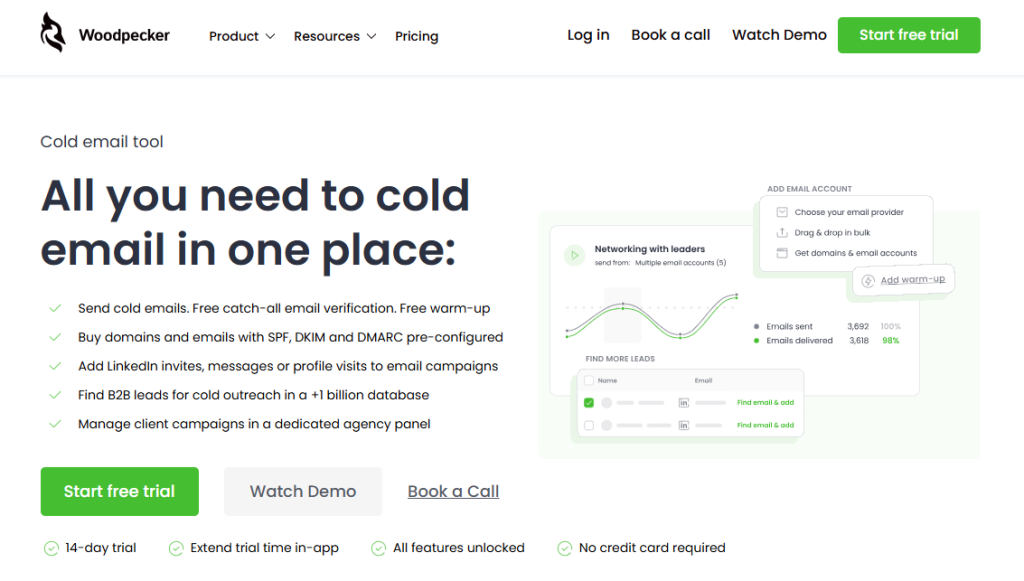
Woodpecker isn’t a visitor identification tool. It doesn’t run reverse IP lookup on your site traffic, and it doesn’t identify anonymous visitors itself. What it does is handle the outreach execution layer that visitor ID tools feed into – which for most B2B teams is the load-bearing part of the whole workflow.
Specifically, here’s how Woodpecker fits alongside visitor ID tools:
CRM integration as the handoff layer. When a visitor ID tool identifies a qualifying account and pushes it to your CRM (HubSpot, Pipedrive, or Salesforce), Woodpecker’s bi-directional CRM sync picks that up. Identified accounts can flow into segmented campaigns automatically based on CRM triggers – new lead in “visited pricing” segment triggers the Tier 1 outreach sequence, new lead in “visited content” triggers the nurture track.
Sequencing for tiered outreach. Different identified visitor tiers get different sequences. Tier 1 high-intent accounts into a short, direct sequence. Tier 2 mid-intent into a longer educational sequence. Tier 3 research-level into nurture. Woodpecker’s conditional logic (if/then branching based on opens, clicks, replies) handles this coordination without manual campaign management.
LinkedIn integration for multi-channel. For identified Tier 1 accounts, Woodpecker runs LinkedIn profile visits, connection requests, and messages as steps inside the email sequence. The multi-channel reinforcement that identified-visitor workflows benefit from happens in one platform rather than being spread across tools.
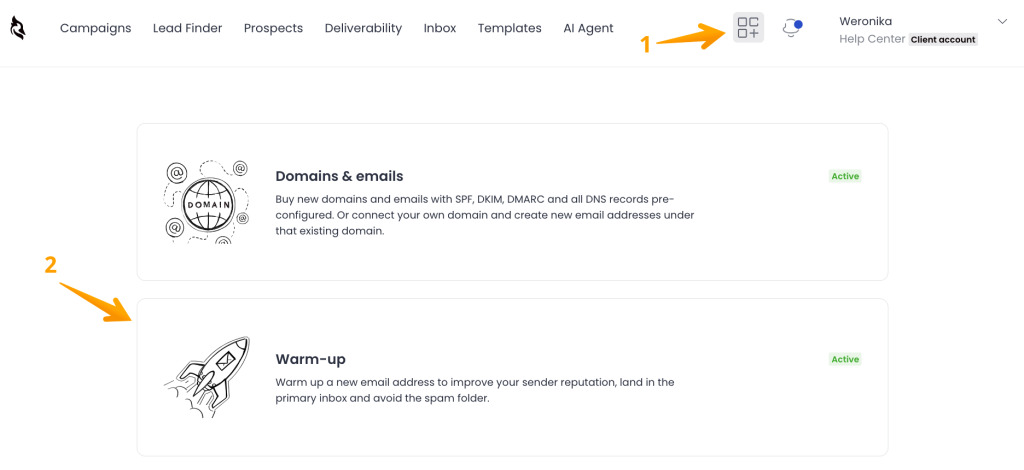
Deliverability infrastructure. Identified visitors are real prospects; they need to receive your emails in their primary inbox, not spam.
Woodpecker’s Adaptive Sending (inbox rotation, randomized intervals, automatic throttling), free catch-all email verification, and free warmup via partnerships with Warmy and Mailivery handle the deliverability layer that makes the whole motion work.
Auto-stop on reply. When an identified visitor responds to the outreach, the sequence stops automatically. Critical for high-intent outreach where a heavy-handed follow-up sequence after a positive reply burns goodwill fast.
For teams running a visitor identification motion and needing the outreach layer to match, sign up to Woodpecker to integrate with your existing visitor ID tool and handle the sequencing, deliverability, and multi-channel reinforcement.
FAQ
How do you identify anonymous website visitors?
Visitor identification tools use a combination of reverse IP lookup, cookie matching, device fingerprinting, and data partnerships to match incoming website visitors to companies or individuals. Reverse IP lookup handles the bulk of company-level matching; third-party data partnerships enable person-level matching in some cases. Realistic match rates are 25-45% for company-level identification and 5-15% for person-level identification in typical B2B traffic.
Can you legally identify anonymous website visitors?
Yes, with conditions. Company-level identification via reverse IP is broadly legal across jurisdictions but requires privacy policy disclosure. Person-level identification is more legally complex, particularly under GDPR in the EU, and requires stronger compliance controls. Consult legal counsel when deploying person-level tools against EU or California traffic.
What’s the best tool for identifying B2B website visitors?
Depends on scale and use case. For small-to-mid-market teams, entry-level reverse IP tools like Leadfeeder, Albacross, or Leadinfo cover the basics at $50-300/month. For enterprise ABM motions, intent-layered platforms like 6sense or Demandbase fit. For active outbound teams wanting person-level identification, tools like RB2B, Warmly, or Vector have emerged in this category. Always test with your actual traffic before committing to a contract.
What match rate can I expect from visitor identification tools?
25-45% company-level match rate is typical for B2B traffic. Higher in enterprise-heavy industries; lower in industries with high remote work. Person-level match rates are significantly lower (5-15% for well-equipped tools). Vendor marketing often quotes higher numbers; always test against your actual traffic before believing them.
How does Woodpecker work with visitor identification tools?
Woodpecker doesn’t identify visitors itself – it handles the outreach execution layer that visitor ID tools feed into. Bi-directional CRM integration with HubSpot, Pipedrive, and Salesforce means identified accounts can trigger segmented campaigns automatically. Conditional sequence logic handles tiered outreach based on visitor intent. LinkedIn integration adds multi-channel reinforcement. The deliverability infrastructure (Adaptive Sending, free warmup via Warmy/Mailivery partnerships, catch-all verification) ensures identified-visitor outreach actually reaches the inbox.