


Most B2B email lists fail for the same reason: they’re optimized for size, not quality. A list of 10,000 contacts that bounces at 15% is worse than a list of 1,000 contacts that bounces at 2% – not just because the first list performs worse, but because it actively damages the sender reputation needed for any future outreach.
The teams that build lists well in 2026 understand something the teams that buy pre-packaged databases often miss: the list is infrastructure, not ammunition. The quality of your list determines what every downstream metric can look like. Good targeting, clean verification, ongoing refresh – these aren’t optional steps on top of list-building. They’re the list-building.
This guide covers how to build a B2B email list that actually converts: the three approaches available to you, how to use each one well, how to verify and maintain the list, how to stay compliant with increasingly strict regulations, and how to avoid the common failures that tank campaigns before the first send.
The short version: a good B2B email list is the result of deliberate process, not shopping. Teams that treat list-building as a project – with quality gates, verification steps, and ongoing hygiene – consistently outperform teams that treat it as a transaction.
What makes a B2B email list “good”?
Before the tactics, a working definition. A good B2B email list has four properties, in rough order of importance.
Tight targeting. Every contact on the list matches a specific, well-defined Ideal Customer Profile. Not “B2B SaaS” – “Series A-C SaaS companies, 50-300 employees, US/UK headquartered, with a VP of Marketing or CMO role.” The specificity determines everything downstream.
Verified contact information. Emails that actually work – not role-based catch-alls, not outdated addresses, not guesses from a pattern-matching tool. Real people at their real current email address. Verification isn’t optional; it’s the difference between a 2% bounce rate and a 15% one.
Relevant context. For each contact, enough data to write a specific email: their role, their company’s recent activity, their seniority level, ideally something about their work that creates a specific reason to reach out. A list without context is a list of strangers; a list with context is a list of specific people you can actually write to.
Learn more with our 3 steps guide to personalized cold emails.
Freshness. B2B data decays at roughly 3-5% per month. A list from six months ago is materially different from the list you need today. Fresh lists outperform stale ones; lists without refresh strategies quietly decay into uselessness.
The best list-building approach – whatever source you use – is whichever one delivers on these four properties at a cost that makes sense for your situation.
The three approaches to building a B2B email list
Every B2B email list comes from one of three approaches, or a combination. Each has different economics, different quality characteristics, and different fit with different team profiles.
Approach 1: Build organically. Generate leads through your own inbound and self-directed research – content, events, outbound research on LinkedIn, manual prospect list construction. Slowest but highest quality. Best when you need small, tightly targeted lists with context you’d struggle to get elsewhere.
Approach 2: License from a data provider. Pay a B2B database vendor for access to their contacts. Fastest but variable quality. Best when you need volume and can’t generate it organically fast enough.
Approach 3: Use a platform with built-in lead data. Modern outbound platforms increasingly include their own lead databases, so you build the list inside the tool you’re going to send from. Convenient, often competitive on pricing, and removes the integration work of pushing data from one tool to another.
Most teams end up combining approaches: organic for top-tier accounts where research quality matters, licensed data or built-in databases for the broader ICP where volume matters more. The question isn’t “which one is right” – it’s “what’s the right mix for our ICP size, team resources, and outbound volume.”
Approach 1: Building organically
Organic list-building is slower per contact, but the contacts you get are typically higher quality. The approach works by generating leads rather than acquiring them.
Content-driven list building
Write content your ICP would search for or share. Put gated resources (white papers, templates, benchmarks, tools) behind email-capture forms. The people who download are, by definition, interested in what you do.
The quality of these leads is high – they self-identified as interested. The volume is usually low unless your content is already ranking well or your audience is large. For most teams, content-driven list building is a 12-month compounding strategy, not a next-quarter tactic.
LinkedIn-based research
LinkedIn Sales Navigator lets you filter prospects with 50+ criteria that no generic list can match. Build a saved search matching your exact ICP, review the results manually, and export a subset of highest-fit prospects to a working list.
The LinkedIn data itself is free (the subscription costs but the prospect identification is part of what you’re paying for). The email addresses need to come from another source – an email-finding tool, a verification service, or an enrichment integration.
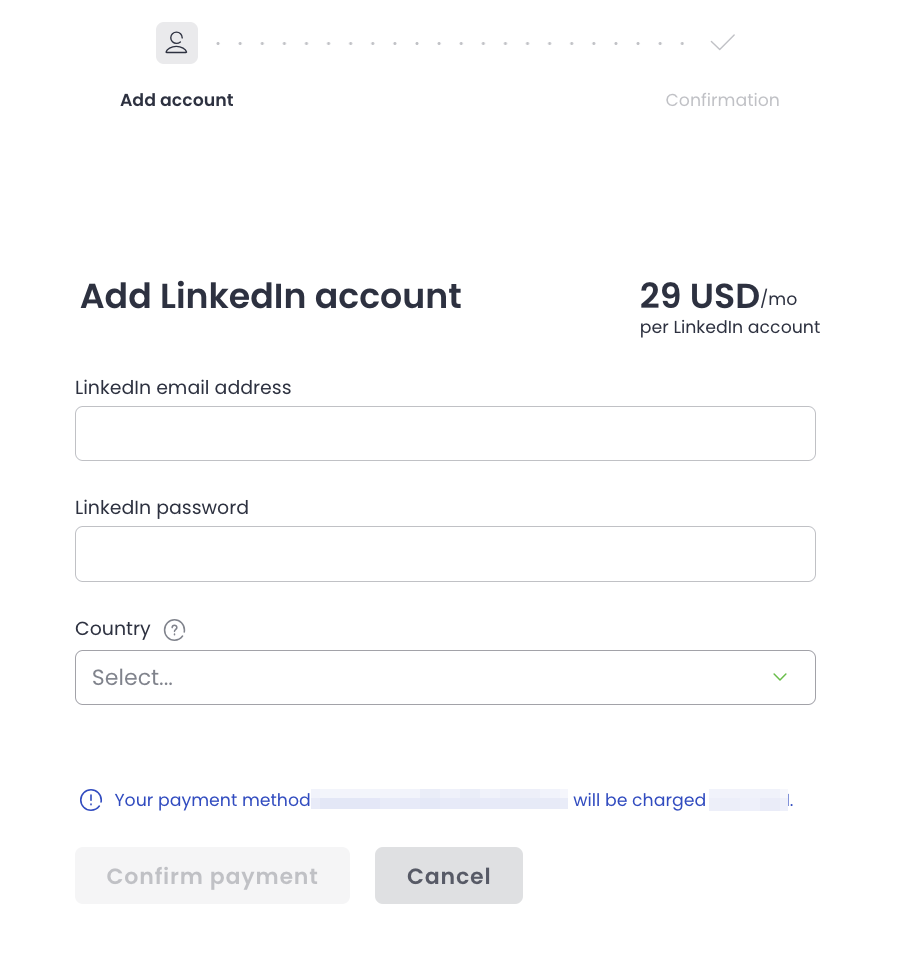
Woodpecker’s built-in 1 billion+ lead database can also cross-reference LinkedIn profiles with verified emails, which removes a step. And you can automate LinkedIn Outreach in Woodpecker.
Event-based lead generation
Conferences, webinars, roundtables, podcast guests – anywhere your ICP gathers. People who attend events in your category are typically mid-funnel prospects: aware of the category, comparing options, signaling some level of intent.
Event leads are usually high-quality but limited by event scale. A well-run webinar might add 50-200 prospects to your list; a conference booth might add 100-500 scans. For smaller ICPs this is significant; for teams needing to reach 10,000 prospects, events are a supplement, not a primary source.
Manual prospect list construction
For top-priority accounts, manual research – building a list of 50-100 named accounts with named contacts – often outperforms any automated approach. The time investment per contact is high, but the contextual quality is far deeper.
This is how most senior AEs still build their key account lists. It’s not scalable for SDR-driven outbound, but it’s the right tactic for ABM (account-based marketing) motions where the account list is tight and the value per account is high.
Read also about account-based sales development.
When organic list-building is the right choice
Small, tightly-defined ICPs. If your target market is 500 companies total, organic research covers it at depth no provider can match.
High-value accounts. Enterprise sales where a single deal pays for months of research time.
New markets you’re learning about. The research process of building the list teaches you the market, which is valuable beyond just the list itself.
Teams with content capacity. If you’re publishing regularly and ranking for ICP-relevant searches, inbound list-building compounds in your favor over time.
Approach 2: Licensing from a data provider
The fastest way to get volume. B2B data providers sell access to large contact databases – tens or hundreds of millions of contacts, often with firmographic and intent data layered on top.
The major players in 2026 include Cognism, ZoomInfo, Apollo, Lead411, Clearbit, and several others, each with different regional strengths, different pricing models, and different levels of data freshness.
What you’re actually buying
A data provider typically sells:
Contact records – name, title, email, phone, LinkedIn URL.
Company firmographics – size, industry, revenue, headquarters, tech stack.
Intent or signal data (at some providers) – buying signals, research behavior, recent changes.
Filtering and export capability – the ability to slice the database by ICP criteria and export the slice.
The price range is wide. Entry-level access from budget providers can start around $100-300/month for limited usage; enterprise contracts with premium providers routinely run $30,000-100,000+ per year depending on seat count and export volume.
The quality question
Data providers vary enormously in quality, and quality varies by region and ICP within the same provider. A database that’s strong in US mid-market can be weak in EU enterprise or vice versa. A 2026 report from Nagra evaluated major providers and found email accuracy ranging from 68% to 93% depending on provider and segment – a huge range, and one that has massive downstream implications for campaign performance.
Before committing to a multi-year contract, always run a test: export 500-1000 contacts in your specific ICP, verify them through a third-party service, and measure the real accuracy rate. Sales reps at data providers will quote best-case accuracy numbers; the actual accuracy for your specific ICP is what matters.
When licensing is the right choice
Larger ICPs where volume matters. If your ICP is 50,000+ companies and you need to reach a meaningful slice, organic building won’t scale.
Teams without research capacity. If you don’t have an analyst or researcher dedicated to list-building, buying time from a data provider is often cheaper than hiring for it.
When you need firmographic filtering. Specific combinations (headcount growth, tech stack, funding stage) that would take hours to research per prospect are one query at a good data provider.
When intent or signal data matters. The providers with strong intent data add a layer you can’t replicate organically – knowing which accounts are actively researching your category.
Approach 3: Using a platform with built-in lead data
A third path that’s become more common in 2026: outbound platforms that include their own lead databases, so you build the list inside the tool you’ll send from.
Woodpecker includes a B2B lead database of over 1 billion contacts as part of the platform. Filter by company size, industry, geography, role, and other firmographic criteria; the matching contacts export directly into your campaign. One less tool to integrate, one less CSV to push around.
Automated lead generation covers the broader context of how this shifts the outbound workflow.
The built-in database approach works best when:
You’re primarily running cold email. The integrated list + sending tool is most valuable when cold email is the dominant channel. For multi-channel motions where you also need LinkedIn-specific filtering or phone number lookup, you may need additional tools.
You want fast time-to-first-send. No integration work, no CSV imports, no data mapping. Filter, select, send.
Your ICP is well-covered by the platform’s data. This varies – some platforms have stronger US data than EU, or better mid-market than enterprise. Always test coverage for your specific ICP before committing.
The limitation is flexibility. A dedicated data provider gives you more sophisticated filtering, deeper firmographic detail, and usually higher accuracy on specific niches. A built-in database gives you speed and integration. The right choice depends on what matters more for your motion.
Verification: the step most teams skip
Whatever source you use, verify the list before sending to it. Unverified lists are the single most common cause of deliverability failures in new cold email campaigns.
Why verification matters
Inbox providers – Gmail, Microsoft, Yahoo – watch bounce rates closely as a signal of sender quality. A bounce rate above 5% will damage your sender reputation; above 10% will tank it quickly. Even a single bad campaign can require weeks of recovery.
Data decays at roughly 3-5% per month. Even a freshly-licensed list from a quality provider has some percentage of bad addresses by the time you use it. Internal lists from 6+ months ago might have 20-30% invalid contacts.
Verification catches these before they damage reputation. The math is straightforward: spend 5 minutes running a list through a verifier, avoid weeks of deliverability recovery later.
What verification tools do
Email verifiers run multiple checks on each address:
- Syntax validation – is this a correctly-formatted email?
- Domain checks – does the domain exist, does it have MX records, can it receive mail?
- Mailbox checks – does the specific mailbox exist, or will mail to this address bounce?
- Role-based detection – is this a generic address (info@, sales@, support@) rather than a person?
- Catch-all detection – is this domain set up to accept all emails regardless of whether the mailbox exists (which makes verification harder)?
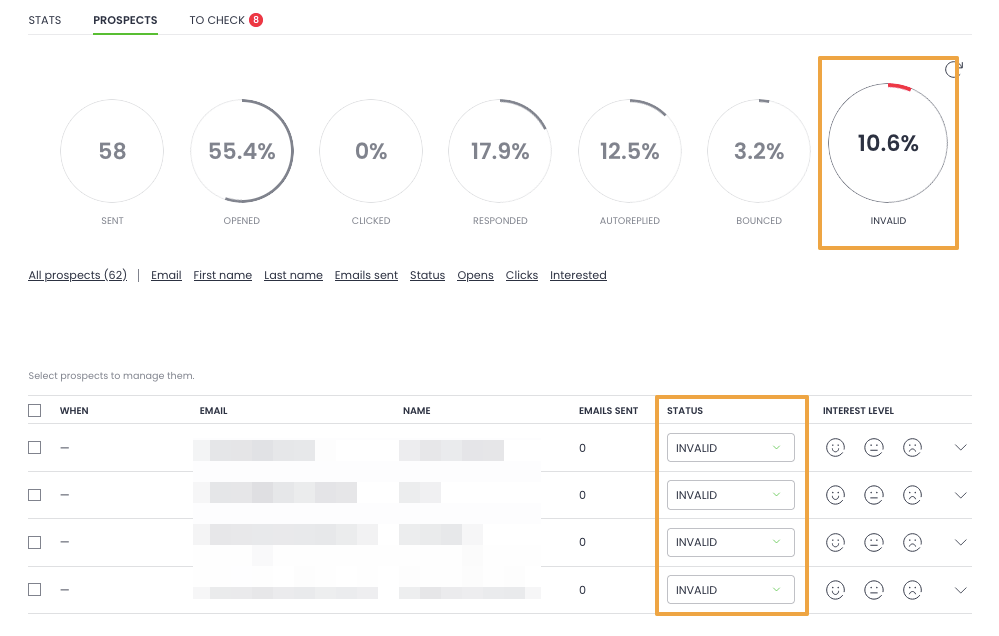
Most verifiers categorize each address as valid, invalid, risky, or unknown. Remove the invalid; usually remove the role-based; consider the risky and unknown case by case.
Who does verification
Dedicated verification services – NeverBounce, Bouncer, ZeroBounce, MillionVerifier – handle batch verification at per-address pricing, usually $0.0005-$0.005 per address depending on volume.
Woodpecker includes free catch-all email verification as part of the platform – unlimited. The verification runs before sending, so bad addresses are filtered out automatically rather than requiring a separate tool in the workflow. For more on the broader deliverability picture, inbox placement covers what bounces do to deliverability and how to manage both.
The verification workflow
For any new list, regardless of source:
- Export the list with email addresses, names, and at minimum company/domain
- Run through a verifier (or use a platform with built-in verification)
- Remove addresses flagged as invalid
- Typically remove role-based addresses unless you have a specific reason to target them
- Consider risky/unknown addresses based on campaign volume and risk tolerance
- Re-verify periodically (every 60-90 days for active lists)
Compliance: what you actually need to know
B2B email regulations vary meaningfully by jurisdiction, and the consequences of non-compliance have gotten more serious through 2024-2026. The brief version:
United States (CAN-SPAM). Cold B2B email is legal. Requirements: accurate headers, clear unsubscribe mechanism, physical mailing address in the email, no false subject lines. Enforcement is primarily through FTC complaints; fines can reach $50,000+ per violation but are rare in practice for compliant-but-cold outreach.
European Union (GDPR). More restrictive. B2B cold email is permissible under “legitimate interest” for contact at corporate email addresses where the contact’s role makes your message relevant. Key requirements: easy unsubscribe, data minimization, ability to fulfill data subject requests. Personal email addresses (gmail, etc.) require explicit opt-in. And Woodpecker is fully GDPR-compliant.
United Kingdom (PECR + UK GDPR). Similar to EU GDPR. Legitimate interest applies for B2B at corporate addresses. PECR specifically regulates electronic marketing, with the ICO as the enforcer.
Canada (CASL). Stricter than US. Generally requires prior consent (express or implied) before commercial electronic messaging. Implied consent applies in specific B2B contexts – existing business relationships, inquiries, publicly-available business contact information.
The February 2024 changes to Gmail and Yahoo bulk sender requirements added another layer: senders over 5,000 messages/day to Gmail or Yahoo must have authenticated domains (SPF, DKIM, DMARC), one-click unsubscribe headers, and spam complaint rates under 0.3%. These aren’t technically “compliance” in the legal sense but effectively are if you want your mail to land in the inbox.
Our article about Is cold email illegal? covers the legal landscape in more detail.
Practical compliance checklist
For any B2B cold email list across jurisdictions:
- Accurate sender identification
- Clear unsubscribe mechanism (one-click where possible)
- Physical mailing address in the email
- Suppression list honored across all campaigns (if someone unsubscribed from one campaign, don’t email them from another)
- Data minimization (only keep what you need, for as long as you need it)
- Ability to handle data subject requests (delete, export) within regulatory timeframes
- Authentication (SPF, DKIM, DMARC) configured on sending domain
The biggest compliance failures typically aren’t the outreach itself – they’re sloppy suppression lists and inadequate data management after the initial email.
Common mistakes that kill B2B email lists
Patterns that appear across failed list-building efforts.
Buying from the cheapest provider you can find
Low-cost B2B data providers often sell lists that are either scraped (gray-zone legal) or heavily recycled (same addresses sold to hundreds of other buyers who also cold-emailed them). The bounce rate and complaint rate on cheap data is usually catastrophic. The savings on the data are dwarfed by the cost of deliverability recovery.
Learn also why emails bounce and stay ahead of these most common issues.
Skipping segmentation
Treating the list as one homogeneous block. Sending the same email to enterprise CIOs and startup founders. Results: generic messaging, low reply rates, high unsubscribes. Even small lists (1,000 contacts) benefit from segmenting into 3-5 groups with tailored sequences.
Never refreshing
Building a list, using it for 18 months, and wondering why performance is declining. B2B data decays; lists need refresh cycles. Budget quarterly refreshes for active lists, and full re-verification before any major campaign.
Not suppressing across channels
Someone unsubscribes from your cold email. You add them to a nurture sequence because they’re still “in the database.” They complain. Your sender reputation drops. Single suppression list, honored across every outbound effort, forever – no exceptions.
Blending cold and opt-in lists
Running cold outreach through the same infrastructure as your opt-in newsletter. The deliverability models for these two types of email are completely different, and mixing them damages both. Separate sending domains, separate tools where appropriate, separate workflows.
Sending before warming up
New list, new sending domain, sending to 5,000 contacts on day one. Every inbox provider flags this as obvious mass-mail behavior. Ramp volume gradually over 2-4 weeks on a new domain – even on a well-verified list.
How Woodpecker fits in the list-building workflow
Woodpecker covers the list-building workflow end-to-end for teams whose primary outbound channel is email.
Built-in 1 billion+ B2B lead database. Filter by firmographic criteria (industry, size, geography, role, seniority) and export directly into your sequence. No separate data provider contract to negotiate for teams that don’t need specialized enterprise data.
Free unlimited catch-all email verification. Every address on a list is verified before sending – removes the most common cause of bounce-driven deliverability damage. Runs automatically; no separate verification tool required.
Integration with external data. For teams using licensed data providers or enrichment tools, Woodpecker imports CSV lists and syncs with CRMs (HubSpot, Pipedrive, Salesforce) bidirectionally. Your list can come from anywhere.
Deliverability layer that protects the list. Adaptive Sending, inbox rotation across multiple mailboxes, free warmup via partnerships with Warmy and Mailivery and Deliverability – the infrastructure that turns a clean list into actual inbox placement.
Read also Email deliverability best practices as they cover why these matter together.
Suppression list management. Automatic across all campaigns – someone who unsubscribes from one sequence is suppressed across the whole account. Prevents the cross-campaign compliance failures that damage both reputation and sender trust.
LinkedIn integration for multi-channel list activation. Once your list is built, Woodpecker runs email + LinkedIn touches (profile visits, connection requests, messages) inside the same sequence. The list feeds a multi-channel motion, not just an email-only one.
For teams building B2B email lists as part of a cold email motion, sign up to Woodpecker to run list-building, verification, and outreach in one workflow.
FAQ
What is a B2B email list?
A B2B email list is a collection of email addresses for professional contacts at target companies, used for outbound sales, marketing, or business development. Good B2B lists include more than just addresses – they typically have firmographic data (company size, industry), role information (title, seniority), and sometimes behavioral signals (recent activity, intent data). The list is infrastructure for cold email, not a standalone asset.
How do you build a B2B email list from scratch?
Three primary approaches: build organically through content, events, and manual research; license from a B2B data provider; or use a platform with built-in lead data. Most teams combine approaches – organic for top accounts, data providers or built-in databases for volume. The critical step regardless of source is verification before sending, which prevents the bounce-driven deliverability damage that kills campaigns.
Is it legal to buy B2B email lists?
Buying lists is legal in most jurisdictions for B2B contacts, but the quality is often poor and compliance requirements vary by region. In the EU under GDPR, cold B2B email at corporate addresses is permitted under legitimate interest, but you need to honor unsubscribes and data subject requests. In the US, CAN-SPAM permits cold B2B email with proper sender identification and unsubscribe mechanisms. Canada’s CASL is stricter. Regardless of legality, list quality from low-cost providers is often catastrophic for deliverability.
How much does a B2B email list cost?
Highly variable. Low-end list providers start around $100-300 per month for limited access; mid-market B2B data providers run $500-3,000 per seat per month; enterprise data platforms with deep features and large databases can reach $30,000-100,000+ per year. Built-in lead databases inside outbound platforms (like Woodpecker’s 1B+ database) are included in platform pricing starting at $29/month per slot.
What’s a good email bounce rate for B2B lists?
Under 2% is healthy. 2-5% is acceptable but worth investigating. Above 5% damages sender reputation and should trigger immediate re-verification of the list. A single campaign with a 10% bounce rate can require weeks of reputation recovery. Verification before sending is the primary lever for keeping bounce rates low.
How often should I refresh my B2B email list?
B2B data decays at roughly 3-5% per month as people change roles and companies. For active lists, re-verify every 60-90 days. For lists that sit dormant between campaigns, re-verify before every major send. Full list refreshes (replacing stale contacts with current ones) are typically appropriate every 6-12 months depending on ICP turnover.
Is it better to buy a B2B email list or build one?
Depends on your situation. Building organically produces higher-quality, more targeted lists but scales slowly. Buying produces volume fast but quality varies. For small ICPs and high-value accounts, building usually wins. For larger ICPs where volume matters, licensing or built-in databases are more practical. Most teams end up combining both approaches.
What should be in a B2B email list?
At minimum: verified email address, full name, job title, company name, company domain. Better lists add: seniority level, department/function, company size, industry, geography. The best lists include context: recent company activity, role changes, specific signals that inform the outreach angle. The more context per contact, the better the outreach can be – but only if you use it.
Can I use my CRM contacts for cold outreach?
Generally no, unless those contacts are cold-outreach prospects who haven’t engaged yet. Existing customers, active pipeline contacts, and people who’ve opted into marketing should not be on a cold outreach list – they’re at a different relationship stage and cold-style outreach to them damages trust. Maintain separate workflows: cold outreach for prospects who don’t know you, nurture for opted-in contacts, account management for existing customers.
What’s the difference between a B2B email list and a B2B email database?
A “list” usually refers to a curated subset of contacts for a specific campaign or use case. A “database” is the larger underlying pool from which lists are drawn. You might have a database of 10,000 contacts and build a list of 500 for a specific campaign. In common usage the terms often overlap, but the distinction matters operationally – you build lists; you maintain a database.