


As a pricing analyst, I often meet founders and sales reps who feel lost in the sea of outreach tools.
In 2026, the email marketing tool market is full of platforms promising better response rates with more personalized emails and easy multi-channel outreach.
SmartReach.io is a prominent name.
It sells separate packages for cold emails, combined email-phone-LinkedIn sales outreach, and agency management. The tool promotes features such as inbox rotation, AI agents that write copy, and automated follow ups.
But with many tiers and add‑ons, it can be hard to know what you are buying.
In this review, I summarise SmartReach’s pricing for Email Outreach, Sales Engagement and Agency plans.
I’ll point out what stood out to me when reading the fine print and explain when a tool like Woodpecker might suit you better.
My goal is to give you a simple guide to help you decide whether SmartReach’s packages and customer support fit your sales process.
TL;DR:
- SmartReach is a sales engagement platform that lets you run email sequences and LinkedIn outreach alongside calls.
- It has tools for improving email deliverability and doing spam testing, with multiple inboxes and verified emails to help your emails land safely.
- You can build lists using merge tags and custom columns, track click through rates, and see performance metrics and advanced analytics to monitor performance.
- The plans include a meeting scheduler, lead management for customer interactions, and lead generation agencies can use detailed analytics to guide outreach efforts and closing deals.
- Each tier has different pricing plans, and there is a free plan to try things out.
- SmartReach’s user-friendly interface reduces repetitive tasks and helps many users manage campaigns.
- Some will still compare with other tools to find which gives the best key features and valuable insights for subject line testing, LinkedIn messages, and building meaningful relationships.
Email Outreach plans: cold emails and email campaigns
SmartReach’s Email Outreach product targets teams sending many cold email campaigns.
There are four tiers: Basic, Plus, Pro and Scale. They differ mainly in how many contacts you can reach and in the level of automation and support.
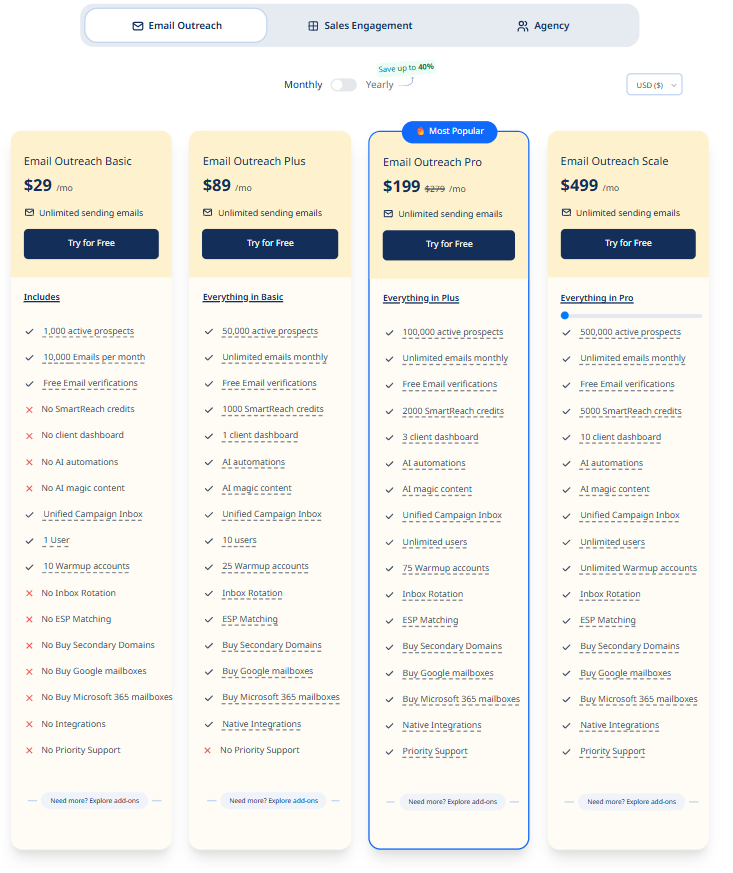
- Basic costs $29 per month. It includes unlimited sending emails but only 1 000 active prospects and 10 000 emails per month. You get free email verifications, ten warmup accounts, and just one user. There are no SmartReach credits, client dashboards, AI features or inbox rotation, so you do most tasks manually.
- Plus is $89 per month. It removes the email cap, raises prospects to 50 000, adds 1 000 SmartReach credits, one client dashboard, and ten users. AI‑powered content, inbox rotation, and ESP matching appear here, along with 25 warmup accounts. It suits small teams that want to automate cold emailing but don’t yet need advanced support.
- Pro, the most popular plan, costs $199 per month. It supports 100 000 prospects, 2 000 credits, three client dashboards, unlimited users, and 75 warmup accounts. AI automations, unified inbox, native integrations, and priority support are included. Agencies with multiple clients often choose Pro because it scales without per‑user fees.
- Scale is $499 per month. It jumps to 500 000 prospects, 5 000 credits, ten client dashboards and unlimited warmup accounts. It keeps all automation and deliverability tools and is aimed at high‑volume agencies.
All Email Outreach tiers come with a 14‑day free trial requiring no credit card. Annual contracts can be up to 40% cheaper. The price you pay depends on how many prospects you wish to contact. If you need more than your tier permits, you must upgrade or purchase add‑ons.
Sales Engagement plans: multiple channels and CRM tools
SmartReach’s Sales Engagement packages add voice and LinkedIn to the mix.
Here, the four tiers mirror the Email Outreach hierarchy, but include calling seats and LinkedIn manual seats, with automation unlocked through credits.
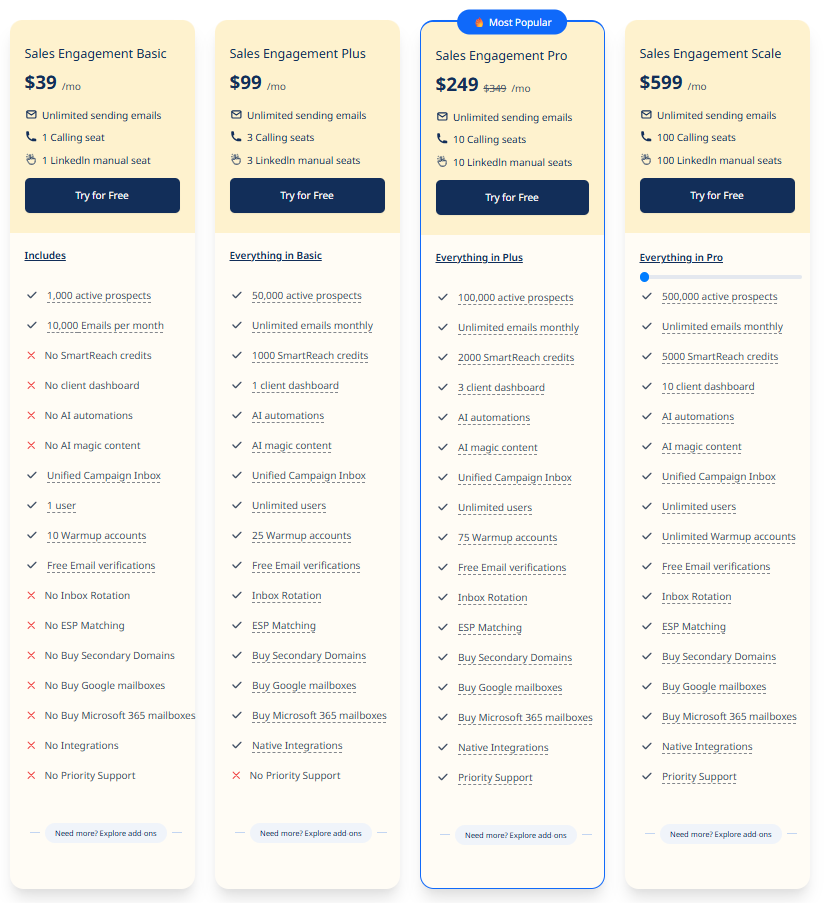
- At $39 per month, the Basic tier offers unlimited sending emails, one calling seat, and one LinkedIn manual seat. Prospects and email volumes are limited to 1 000 and 10 000 respectively. There are no credits or AI features, so this plan is really a simple test bed.
- The Plus tier costs $99 and raises limits to 50 000 prospects, three calling seats, three LinkedIn seats, unlimited emails, and 1 000 credits. It also introduces AI content, a client dashboard, and integrations. With 25 warmup accounts and unlimited users, it suits small sales teams that work across multiple channels.
- Pro is $249 and offers 10 calling seats, 10 LinkedIn seats, 100 000 prospects, 2 000 credits, three dashboards, and 75 warmup accounts. It adds priority support, which is valuable when mixing channels.
- Scale costs $599. It jumps to 100 calling seats, 100 LinkedIn seats, 500 000 prospects, 5 000 credits, and 10 dashboards. This package is reserved for large enterprises or agencies.
None of these plans include LinkedIn automation by default. You must buy the LinkedIn Automation add‑on. Prices are tied to your prospect count, so, as your outreach grows, you need to upgrade or add Active Prospects. This makes budgeting less predictable, especially when your sales reps are reaching out via several channels.
Agency plans: multiple clients, customer support and advanced controls
SmartReach offers Agency editions of its email and sales plans.
These are designed for agencies that handle multiple clients and need dashboards to keep projects separate.
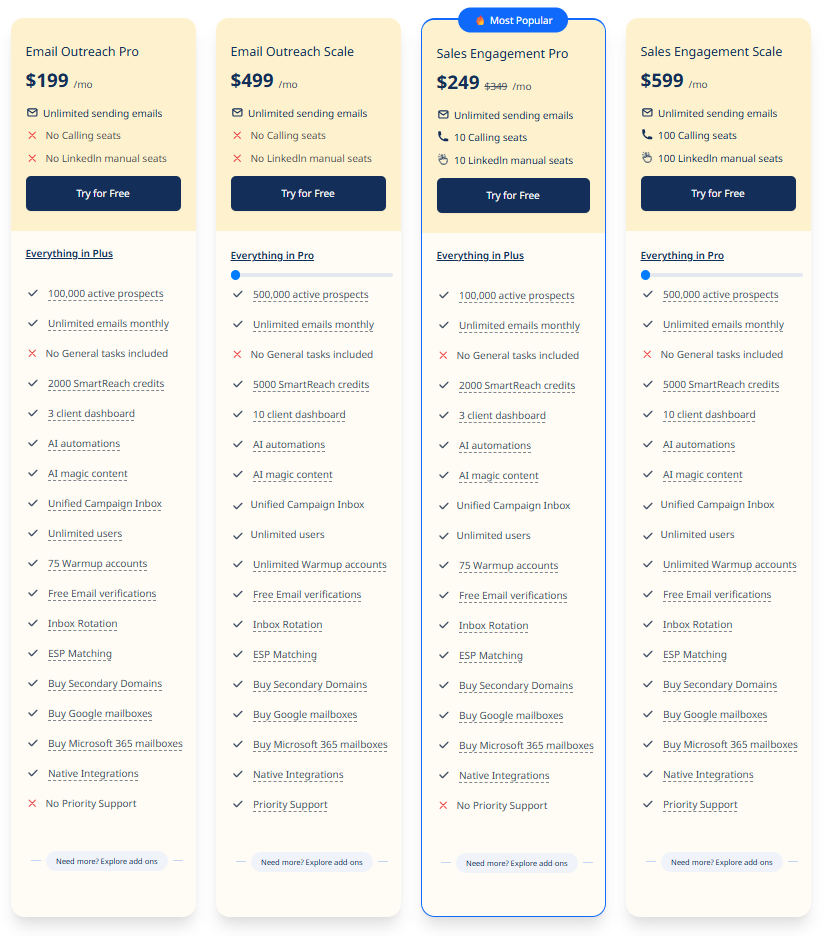
- In the Agency Email Outreach Pro plan you pay $199 per month for 100 000 prospects, 2 000 credits and three client dashboards. It is identical to the regular Pro plan but removes calling and LinkedIn seats, since email agencies may not need them. Unlimited users and warmup accounts are included.
- Agency Email Outreach Scale is $499 per month, and increases limits to 500 000 prospects, 5 000 credits, and ten dashboards. Like the regular Scale plan, it includes all AI features and support.
- On the sales side, Agency Sales Engagement Pro costs $249 and offers 10 calling seats, 10 LinkedIn seats, 100 000 prospects, and 2 000 credits.
- Agency Sales Engagement Scale is $599 and expands to 100 seats, 500 000 prospects and 5 000 credits. Both include priority support.
All agency and non‑agency plans share some core benefits:
- unlimited free email verifications,
- A/B testing,
- inbox rotation,
- a mobile calling app,
- prospect timezone sending,
- open and click tracking,
- advanced reports,
- do‑not‑contact lists,
- Zapier integration,
- and workflow automation.
Optional add‑ons include extra prospects, more client dashboards, LinkedIn Automation, CRM integrations, extra storage and additional calling seats.
A few important notes from the FAQ on their website:
- a prospect contacted means any person reached by email, call, LinkedIn, WhatsApp or text.
- Warmup accounts are extra sending addresses used to improve deliverability.
- If you hit your limits you have to upgrade or buy an add‑on.
- CRM integration is available in all plans except Basic.
- SmartReach does not support free email providers like Gmail or Yahoo, and the company recommends sending fewer than 70 emails per day per address, despite allowing up to 200.
Reflection on SmartReach pricing
SmartReach offers a wide range of features.
AI agents create personalized emails, sales automation schedules automated follow ups, and deliverability aids like domain health reports and a holiday calendar help messages reach the inbox.
CRM integrations and advanced reports mean you can monitor campaign performance and move leads into your pipeline. The interface feels modern and the support team is more attentive in the higher tiers.
The downside is complexity.
Prices depend on how many prospects you contact and how many credits or seats you need. LinkedIn automation and extra prospects require add‑ons, and priority support only begins at the Pro level.
Small teams might find themselves paying for features they don’t use just to unlock support or more warmup accounts.
Keeping track of quotas for prospects, domains, users, and dashboards can be tiring.
If your outreach revolves around sending many personalized cold emails across several domains, these restrictions could slow you down.
Practical considerations
Having looked at SmartReach’s pricing, I cannot help but highlight a few important aspects:
Customer support
When evaluating outreach software, I always look at how responsive the support team is. SmartReach gates customer support behind higher tiers.
Only Pro and Scale plans include priority support, which means Basic and Plus users may wait longer for help.
In contrast, all Woodpecker plans provide assistance by chat and email.
If quick answers to deliverability issues or bug fixes matter to you, factor this into your budget. A good support team can make the difference between a successful campaign and lost revenue.
Managing email accounts and cold emails
Cold email success often comes down to how you manage your email accounts.
SmartReach’s lower tiers limit warmup accounts and prospect storage.
Basic includes ten warmup accounts, Plus offers twenty‑five, and you don’t get unlimited accounts until Scale.
Woodpecker lets you connect unlimited mailboxes.
Both tools provide free email verifications to keep your lists healthy.
Think about how many domains you need, how often you warm them up, and whether you want the flexibility to add more without extra cost.
Automated follow-ups and AI agents
Automating follow‑up messages can improve response rates.
SmartReach’s AI automations and “magic content” start at the Plus tier. The system writes reply copy and schedules automated follow-ups across different days and times, improving your chances of staying out of spam folders.
Woodpecker also includes automation but emphasises unlimited email verification and warm‑up rather than fancy AI copy.
If you value AI‑generated copy and AI agents that learn from previous interactions, SmartReach might appeal. If you prefer to write your own templates and rely on simple scheduling, Woodpecker could be enough.
CRM tools and team collaboration
Both platforms integrate with popular CRM tools such as Salesforce, HubSpot and Pipedrive. These integrations help you sync leads and tasks automatically, reducing repetitive data entry.
SmartReach’s Sales Engagement plans also include a mobile calling app and task manager, whereas Woodpecker focuses on email and LinkedIn.
Consider how your team collaborates: if your sales reps spend lots of time in the CRM and need to log calls and LinkedIn touches, SmartReach’s deeper integrations and call features may help.
For teams that mainly work on email campaigns and hand off qualified leads to the CRM later, Woodpecker’s simpler approach might be sufficient.
Efficiently engage prospects with an easy to use interface
An easy to use interface helps your team work quickly.
SmartReach’s dashboard is comprehensive but can feel busy. There are many settings for deliverability, warmups, and quotas. This might create a steep learning curve for new users.
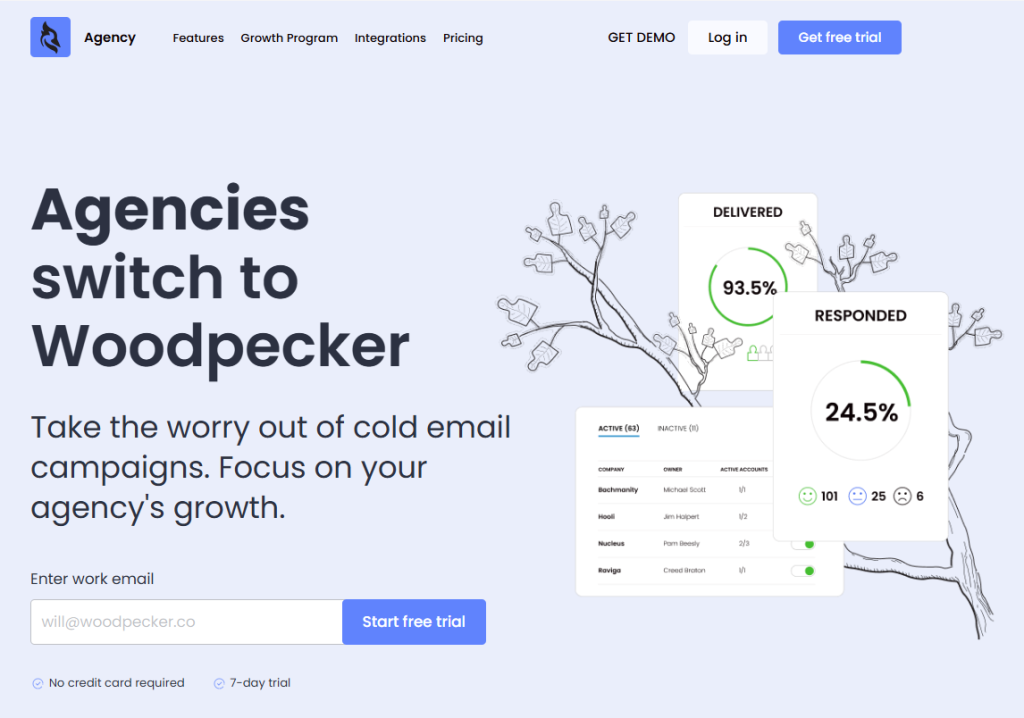
Woodpecker’s interface, according to user feedback, is more streamlined. Onboarding is quicker, and the agency panel keeps campaigns separate.
When comparing tools, ask yourself whether the software will help you efficiently engage your audience or whether you will spend more time figuring out where things are.
Better usability usually leads to higher adoption and better multi-channel campaigns.
Woodpecker: a better alternative to SmartReach in 2026
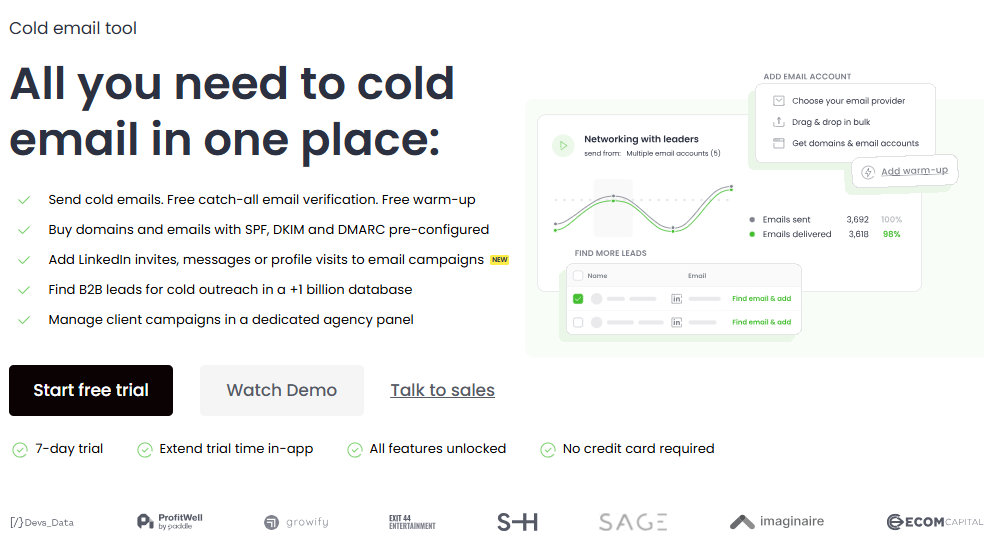
Woodpecker has been around since 2015. This tool has all steps for cold outreach live in one place: you can send emails, verify addresses, and warm up domains without switching tools.
- Email validation is free and unlimited.
- Warm‑up slots are bundled into the plans, and you can connect to databases to find B2B leads or buy pre‑configured domains.
- There is an agency panel that supports separate prospect databases, bulk actions and the ability to send up to 60 million emails per month.
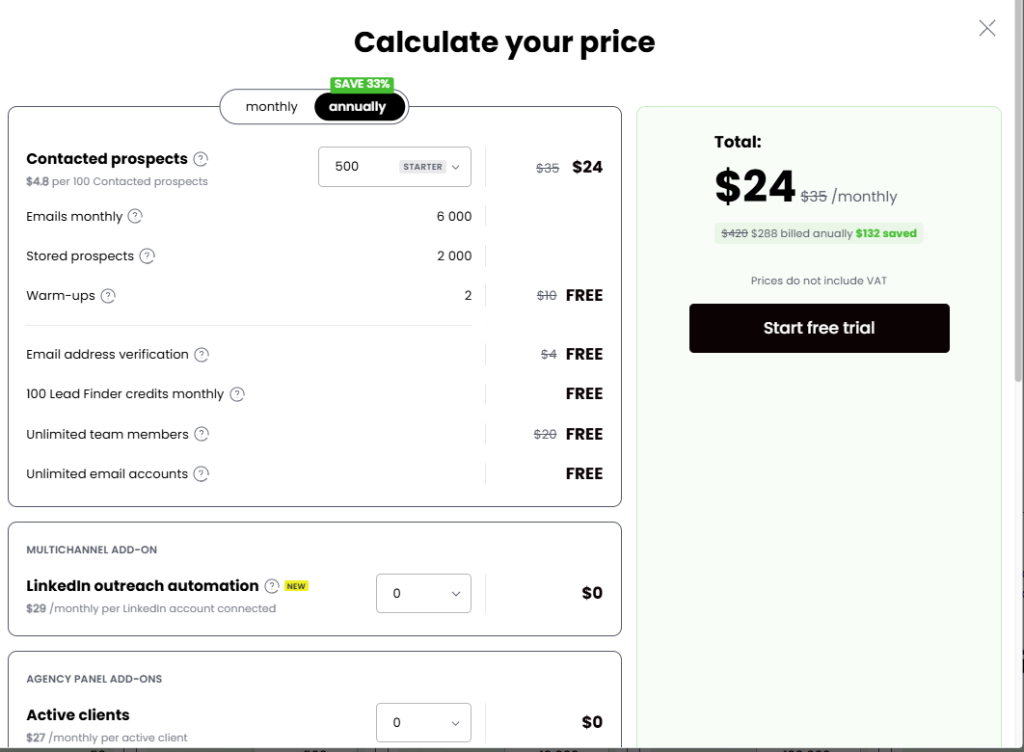
The pricing model is simple. Woodpecker doesn’t charge per user or per mailbox. Every plan has the same features, and you only pay more if you need higher sending limits or a dedicated account manager.
A calculator shows the final price and LinkedIn slots cost $29 per month. Trials last seven days or 50 prospects. This clarity makes budgeting easier, and there are no hidden fees when your team grows.
From my point of view, Woodpecker resolves many of the issues I noted in SmartReach.
- Unlimited mailboxes and users mean you can scale outreach across many domains.
- Free warm‑ups and verification remove surprise costs.
- The agency panel is built for high volume and stops client data from colliding.
Woodpecker does not include a mobile calling app, so if calls are central to your outreach, SmartReach might still be better. But for cold email campaigns and multichannel outreach with email and LinkedIn, the simplicity and transparent pricing are very much compelling.
Conclusion
Choosing a tool for outreach is a strategic decision. SmartReach covers email, phone and LinkedIn with useful deliverability features like inbox rotation, a holiday calendar, and domain health reports. AI content and CRM integration help automate tasks and track leads.
For teams that need calls and like having everything in one place, SmartReach may fit, but the pricing structure is complex.
Costs depend on prospects, seats and add‑ons, and important features such as priority support and LinkedIn automation sit behind higher tiers.
Woodpecker takes a simpler route.
It drops per‑user fees, includes unlimited mailboxes, and keeps the same features across plans.
Its agency panel is made for managing multiple clients.
If your outreach focuses on email and LinkedIn and you want predictable costs, Woodpecker looks appealing. Try it for free now.
SmartReach might still be the right choice for organisations that rely on calls or want extensive AI features.
In the end, choose the tool that fits your workflow and budget and helps you engage your target audience and convert potential leads into customers.