


Looking at a pricing table can feel daunting, especially when you are choosing a tool to run your outreach.
As part of Woodpecker’s team, I often review other platforms to understand how they compare.
In this piece, I look at Snovio and its different tiers, from the trial plan to Custom Ultra, and then reflect on what Woodpecker does differently.
By the end, you should have a clearer picture of whether Snovio’s structure matches your business needs, and you will see how Woodpecker’s approach might be a better fit for many readers.
Snovio, and tools like it, are used by sales and marketing teams to coordinate their outreach efforts. These teams build lists of prospects, run multi‑step sequences, and then track performance.
In the following sections, I write about each tier, noting how credits scale and which functions become available. I also pay attention to how each plan may help you manage email campaigns and whether it can replace other software.
Let’s get started:
Trial plan
Snovio’s trial plan is a free plan that lets you explore the platform.
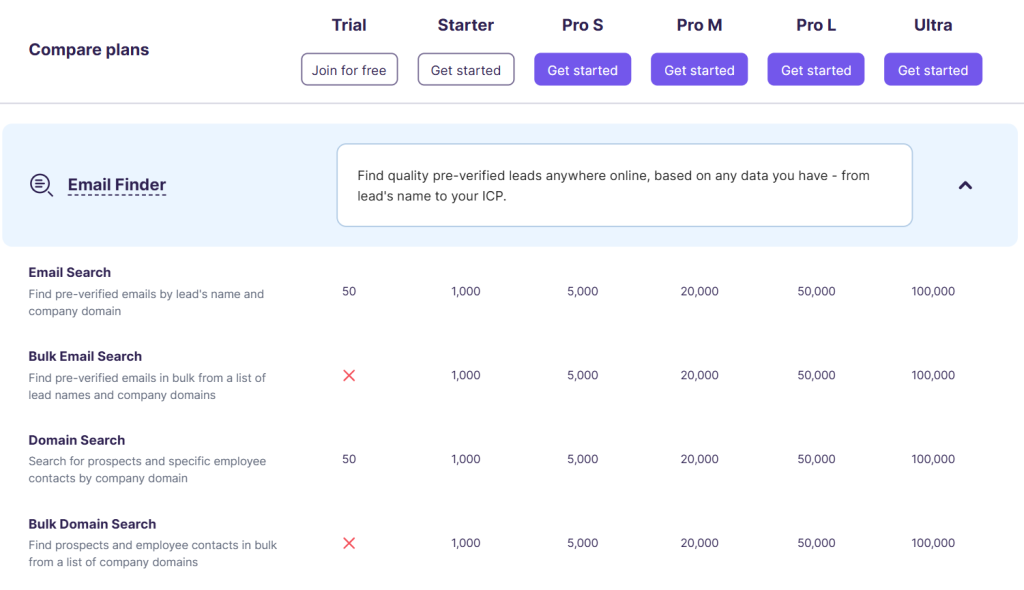
You get 50 email search credits and 50 checks in the verification tool. This means you can look up a few contacts and verify email addresses without paying.
The trial includes one mailbox warm‑up slot with about 15 messages per day. Warm‑up is important because it helps your new mailbox build a good reputation.
You can install the Email Finder Chrome add‑on and a LinkedIn Prospect Finder add‑on to collect leads from websites.
However, bulk email search, domain lookup in bulk, and access to the API are not part of the trial. There is no customer relationship management tool in this tier either, so you will have to track prospects manually.
Still, for a first test the trial shows how the interface works and lets you send a few messages.
Starter plan
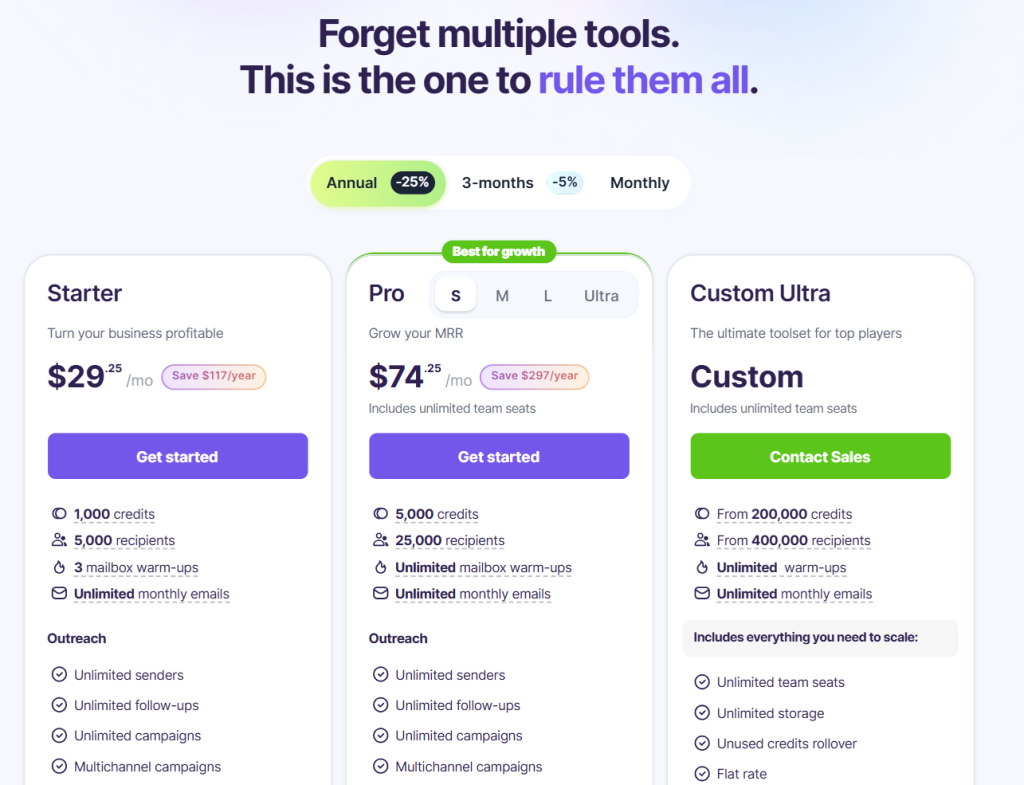
The starter tier is the first paid plan and is priced at about $29.25 per month when billed annually.
- This tier increases the quota to 1,000 email searches, 5,000 recipients and three mailbox warm‑ups. It also includes unlimited monthly emails, so you can run campaigns without extra costs. The plan comes with unlimited senders, unlimited follow ups, and unlimited campaigns.
- You can run multichannel sequences that mix email and LinkedIn actions. A shared inbox called Unibox collects replies from all connected mailboxes, simplifying contact management.
- There are useful extras like booking detection with Calendly, bounce rate safeguards, and an AI tracking pixel. In my view these basic features cover most sales process needs for small teams.
- Lead research on the starter plan uses the email finder extension and LinkedIn Prospect Finder extension.
- The pricing table shows that you have 1,000 email searches, 1,000 domain search credits and 1,000 social URL searches. You can also sync contacts from Gmail into Snovio.
- In the verification menu you get 1,000 checks of the email verifier to clean your list. There is no bulk verification tool at this level.
- Deliverability features include 7‑tier verification, bounce risk detection, a spam word checker, custom tracking domain, DNS record checker, sender reputation check and blacklist checker.
- These tools help you protect sender reputation so your messages land in the primary tab and not the promotions or spam folder.
- The starter plan also includes a basic sales CRM for note taking and deal tracking, but it is limited to 10,000 deals and 200 custom fields.
- Team features let you share credits and recipients, manage access and maintain a shared do‑not‑email list.
- Integrations with HubSpot, Pipedrive, Zapier and webhooks are available, giving you some integration capabilities. Support is available through prioritized 24‑hour channels.
- Lead research on the starter plan uses the Chrome plug‑in and LinkedIn Prospect Finder. The pricing table shows that you have 1,000 email searches, 1,000 domain lookup credits and 1,000 social URL searches.
- You can also sync contacts from Gmail into Snovio.
- In the verification menu you get 1,000 checks of the verification tool to clean your list.
There is no bulk verification tool at this level. Deliverability features include:
- 7‑tier verification,
- bounce risk detection,
- a spam word checker,
- custom tracking domain,
- DNS record checker,
- a check on your reputation,
- and blacklist checker.
Pro S plan
Snovio promotes the Pro S tier as “best for growth.” At roughly $74.25 per month it offers 5,000 credits and 25,000 recipients.
- Warm‑up slots are unlimited, and you can send about 50 warm‑up messages per mailbox daily.
- This tier introduces A/B testing, dynamic personalization and spintax, campaign priority control, volume control and follow‑up priority options. These tools help you build personalized campaigns and manage larger lists.
- Lead research scales to 5,000 searches and domain checks. The quota for the verification tool grows to 5,000, and bulk email verification becomes available.
- Warm‑up volume becomes unlimited and includes premium pool access and AI‑generated content. You also gain access to warm‑up strategies and template warm‑up.
- In campaigns you can run unlimited email drip campaigns, add unlimited mailboxes and schedule unlimited daily sends.
- Reply sentiment analysis, AI writing tools, persona‑driven builder, open and click tracking, and behavioral conditions let you send personalized messages that change based on recipient actions.
- Mailbox rotation shares the sending load across mailboxes, which keeps deliverability high.
These features put Pro S in line with the needs of many sales teams who want more control without jumping to an enterprise tier.
Pro M, Pro L and Custom Ultra
Snovio has two larger fixed tiers – Pro M and Pro L – plus a Custom Ultra tier.
To avoid repetition I will group them here.
Pro M raises quotas to 20,000 searches, 20,000 verification checks and 25,000 recipients.
The number of warm‑up messages per mailbox increases to 100, and warm‑up volume is unlimited.
Premium pool warm‑up, AI content, freemail support and specific provider warm‑up are included.
Pro L pushes these numbers to 50,000 searches, 50,000 verification checks and 50,000 recipients.
You can send 200 warm‑up messages per mailbox and still have unlimited volume.
Both tiers include features like campaign priority control, new recipients volume control, spintax, dynamic content, fallback lines, provider matching and custom tracking domains.
For many users these tiers are about scale rather than new features.
The Custom Ultra tier is a bespoke plan aimed at agencies and enterprises. Credits start at 200,000 and recipient limits begin at 400,000.
Unused credits roll over, and there are unlimited team seats, storage and mailbox warm‑ups.
You also receive a personal implementation manager and top priority support.
The plan includes bulk email account management and flat rate pricing. It retains the same CRM limits (10,000 deals and 200 custom fields), which some large teams might outgrow.
I think of Custom Ultra as a high‑volume plan built on the same foundation as the Pro tiers, rather than a comprehensive suite with expanded CRM capabilities.
It is best suited for agencies that need to run huge campaigns and value dedicated support.
Customer support
Choosing a tool isn’t just about features – customer support can determine how smoothly you launch.
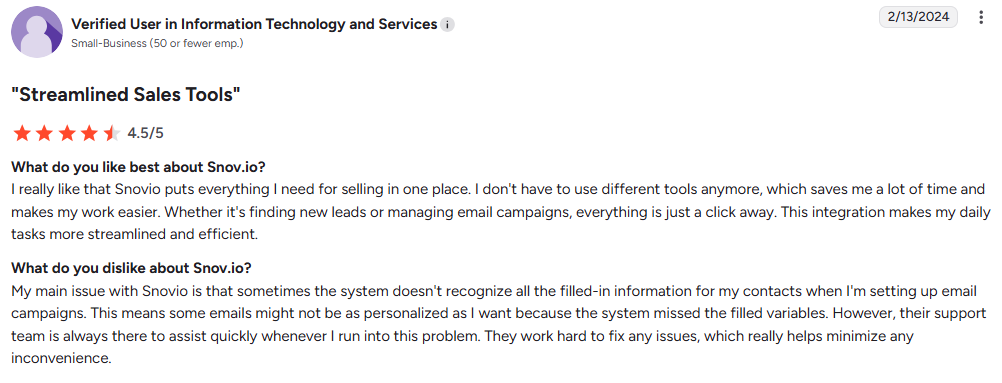
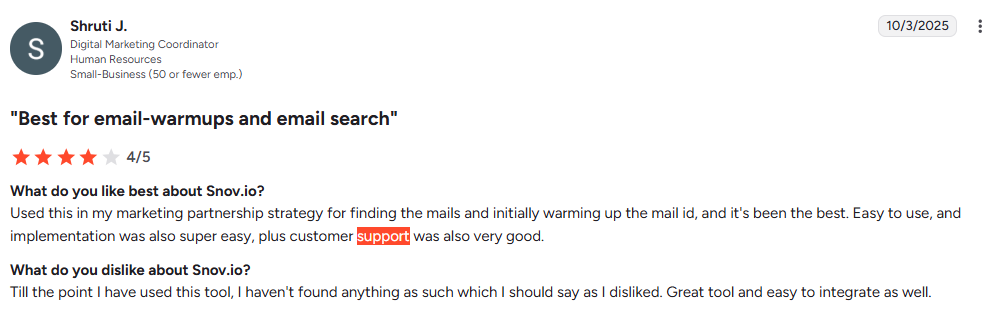
Snovio offers prioritized 24‑hour support across all paid tiers.
Custom Ultra adds a personal implementation manager.
Based on feedback I see in the market, many users appreciate quick answers but still rely on community groups or other consultants for deeper guidance.
At Woodpecker, we focus on one‑on‑one onboarding and training sessions to help users build a sales funnel and set up pipeline management from day one.
Before picking a tool, consider whether you will need extra help and whether that comes at an additional cost.
Multichannel campaigns
One thing I like about Snovio is its support for multichannel campaigns.
Even in the starter plan you can combine email and LinkedIn actions.
Pro tiers bring more LinkedIn features like connection requests, messages, InMail, post likes, connection triggers, spintax and Social Selling Index score tracking.
Each LinkedIn slot costs $69 per month. For teams using LinkedIn heavily this can raise monthly costs quickly.
Woodpecker also supports LinkedIn actions, but our price per slot is $29.
When budgeting, think about how many slots you need and whether the tool offers enough LinkedIn automation to justify the price.
LinkedIn automation
LinkedIn automation includes safety limits and proxy options. Snovio lets you set daily action limits, manage pending connection requests, send connection and message requests, and reach outside your network with InMail.
There are also features like location‑based proxies, IP rotation and spintax for making each message unique.
You can track Social Selling Index score changes and share account slots within your team. These functions help run LinkedIn outreach without triggering platform restrictions.
If LinkedIn is central to your strategy, evaluate whether Snovio’s LinkedIn features meet your needs or if you would prefer a tool with lower slot pricing.
Lead generation
High‑quality lead generation efforts depend on good data. Snovio’s built‑in search covers email, company and social profiles, with quotas that grow as you upgrade plans.
There is also an option to collect leads through the Chrome add‑on, which captures names, company domains and professional email addresses from websites.
The pricing table shows that bulk lead search is available from the starter tier onward.
Database search is another feature that lets you find leads using filters like location or industry.
In my experience the quality of data in these databases varies by region, so you might need to supplement with external providers.
Woodpecker integrates with People Data Labs and other sources, which adds data depth.
If you rely heavily on Snovio for finding leads, remember to factor in the cost of credits and the potential need for other data sources.
Email warm up
Deliverability can make or break an email campaign. Snovio’s email warm up system helps new mailboxes build trust.
As you upgrade from the trial to Pro tiers, the number of warm‑up slots and messages per mailbox increases.
Higher plans include AI‑generated warm‑up messages, premium pool interactions and support for free email providers like Gmail and Yahoo. By spreading warm‑up messages across many mailboxes you lessen the risk of hitting sending limits.
Woodpecker includes warm‑up for free up to the number of prospects in your plan. We partner with Mailivery to run these warm‑ups, and you can purchase additional slots if needed.
If deliverability is your top concern, compare the warm‑up allowances of each platform carefully.
Key features
When I review a tool, I list the key features that matter most. For Snovio I see:
- unlimited senders and campaigns from the starter tier,
- generous warm‑up quotas,
- multichannel outreach,
- built‑in lead search,
- deliverability checks,
- and a simple CRM.
The interface is tidy, which helps non technical users learn quickly.
You can export data, though data export is restricted in the starter plan.
At the same time, some advanced features, such as reply sentiment analysis and dynamic personalization, only appear on Pro tiers.
LinkedIn automation costs extra, and the CRM remains basic even in high tiers. All in all, Snovio offers a solid foundation but leaves room for improvement, especially in the lead management space.
Other tools
It’s natural to compare Snovio to other tools.
Woodpecker offers an all-in-one solution where you can handle every step of your outreach campaigns, from finding leads to warming up mailboxes and sending sequences.
- We don’t charge per user or per email account.
- Every plan has the same features, so you don’t miss out on advanced functions by choosing a smaller package.
- Email validation and warm‑up are free and unlimited up to your prospect limit.
- You can purchase company domains and professional email addresses directly through Woodpecker with SPF, DKIM and DMARC pre‑configured.
- There is also a dedicated agency panel with features for separate prospect databases, bulk campaign actions, lead management at scale and multi‑language organization.
- Our LinkedIn slots cost $29 each.
- Plus, we run a free trial for seven days or 50 contacted prospects.
For many teams, this transparency and predictable pricing make Woodpecker easier to budget.
Multiple tools
The cost of switching between services can be high. Snovio includes many functions, but you might still need multiple tools for deeper CRM features or additional data providers. You may also pay for separate LinkedIn automation or integrate with other systems to fill gaps.
In contrast, Woodpecker combines email delivery, LinkedIn outreach, lead database, CRM and warm‑up into one package. This reduces context switching and helps teams stay focused on closing deals.
If you decide to use Snovio, map your outreach workflows carefully to see if extra tools are needed. If you value simplicity, an integrated platform might be the better choice.
Email finder
Snovio’s email finder helps you discover new contacts by name and domain, and it scales with your plan. You also have bulk company domain search and social URL search, plus a browser extension that pulls data from websites.
One of the limitations is that the data comes from a single source. If you need richer prospect data, you may have to combine it with external providers.
Woodpecker integrates with multiple databases, so you can collect prospects from different sources. This variety increases the chance that you will find the right people.
So, while Snovio’s finder is handy, it might not be enough for niche markets.
Productivity tools
Snovio has a number of productivity tools designed to save time.
- The persona‑driven email builder and AI writing tools help you craft messages.
- Magic pixel and click tracking reveal how recipients engage.
- Behavioral conditions and reply detection let you automate actions based on replies.
- Calendly booking tracking tells you when meetings are scheduled.
Together these tools reduce manual labour and automate tasks. They are not all available in the starter plan, so you may need to upgrade. If productivity is a priority, check which tier includes the features you need.
Browser extension
The browser extension is a core part of Snovio. The Email Finder extension pulls contact information from websites and Google results. The LinkedIn Prospect Finder extension does the same for LinkedIn profiles.
These extensions let you add leads straight into your account without typing. However, extensions sometimes break when sites change.
Woodpecker’s extension taps into multiple data providers, which makes it more resilient.
If you rely on extensions, consider how often you will use them and whether you need backup sources.
Closing thoughts on Snovio pricing
Snovio has a clear pricing ladder with rising quotas and features. The starter plan suits small teams with modest lists. Pro tiers add more control, and Custom Ultra handles volume but keeps the same CRM limits.
I like the generous warm‑up allowances, multichannel support and strong deliverability tools. I also appreciate that even the lower tiers include unlimited emails and a basic CRM.
On the downside, advanced features only appear in Pro tiers, and LinkedIn slots are expensive. The CRM remains basic, so teams with complex lead management or pipeline requirements may need another platform.
When I look at Snov io pricing through the lens of Woodpecker’s flexible pricing plans, I see that we offer more transparency.
Woodpecker charges per number of prospects, not per user or mailbox.
Our plans include the same features across tiers, and we integrate mail, LinkedIn and lead sourcing in one place.
We also let you buy domains with DNS set up, which is good for beginners.
If your sales efforts involve managing many senders and channels, Woodpecker might reduce your tool stack and make budgeting easier. Try it now for free to see it yourself.
Ultimately, the right choice depends on how you plan to use the tool, how many people need access, and how important deep integration capabilities are to your team.