


LinkedIn has become the world’s coffee shop for business‑to‑business networking. Everyone wants to make more connections, start meaningful conversations and turn followers into customers.
In the middle of this buzz are software platforms that promise to do the repetitive work for you.
The phrase Expandi vs Waalaxy pops up often in marketing forums because these two platforms sit at the top of the LinkedIn automation conversation.
Each LinkedIn automation tool claims to help busy professionals send better invitations and keep track of every prospect.
But which one is right for your business, and why do some users swap them for Woodpecker? This deep dive looks at features, safety, costs and usability.
Let’s jump right in:
Why automation matters on LinkedIn
Most outreach today mixes social messages and email. The goal is to run personalised LinkedIn outreach campaigns without burning hours on manual work. Good software helps schedule LinkedIn messages and pairs them with follow‑up emails.
It also coordinates multi channel campaigns so that one lead can receive a LinkedIn invite, an email reminder and a final message that ties everything together. Such tools handle dozens of LinkedIn campaigns at once and monitor who accepts your invitation or opens a message.
When you connect your LinkedIn account to automation software you need to stay within daily quotas. LinkedIn limits the number of connection requests you can send each week. A tool that sends too many messages could get you blocked, so the best systems carefully throttle actions to keep you safe.
The hunt for the best LinkedIn automation tool is really about finding a balance between speed, safety and ease of use. Some beginners only need basic linkedin automation while others want highly personalized messages with dynamic tags and video thumbnails.
Larger teams look for CRM integrations to push prospects into Salesforce or HubSpot. Many professionals worry about LinkedIn account restrictions, which are LinkedIn’s penalties for spammers.
They also want software that helps them generate leads consistently, while advanced users crave advanced features like multichannel logic and account‑warm‑up.
Expandi: cloud‑based automation for growing teams
Expandi sits in the league of modern automation tools that help sales teams and agencies run large campaigns. It includes team management tools so managers can supervise account activity and check campaign performance across multiple seats. The software’s main appeal is its ability to automate outreach across LinkedIn and email.
You can build a sequence, set conditions such as “if accepted then send a message,” and choose when to send email outreach steps. These structured outreach efforts increase LinkedIn engagement and reduce manual work.
One highlight is Expandi’s focus on account safety. It runs from a dedicated cloud‑based server with a local IP address for each user to keep accounts from being flagged. When you need help, you can contact customer service, although some reviewers say response times vary.
The platform lets users build smart sequences that branch based on prospect behaviour. Its search features help you find LinkedIn prospects, and it includes settings to stay within LinkedIn’s daily account restrictions.
Many lead generation agencies like its visual sequence builder, dashboard and variety of pricing plans.
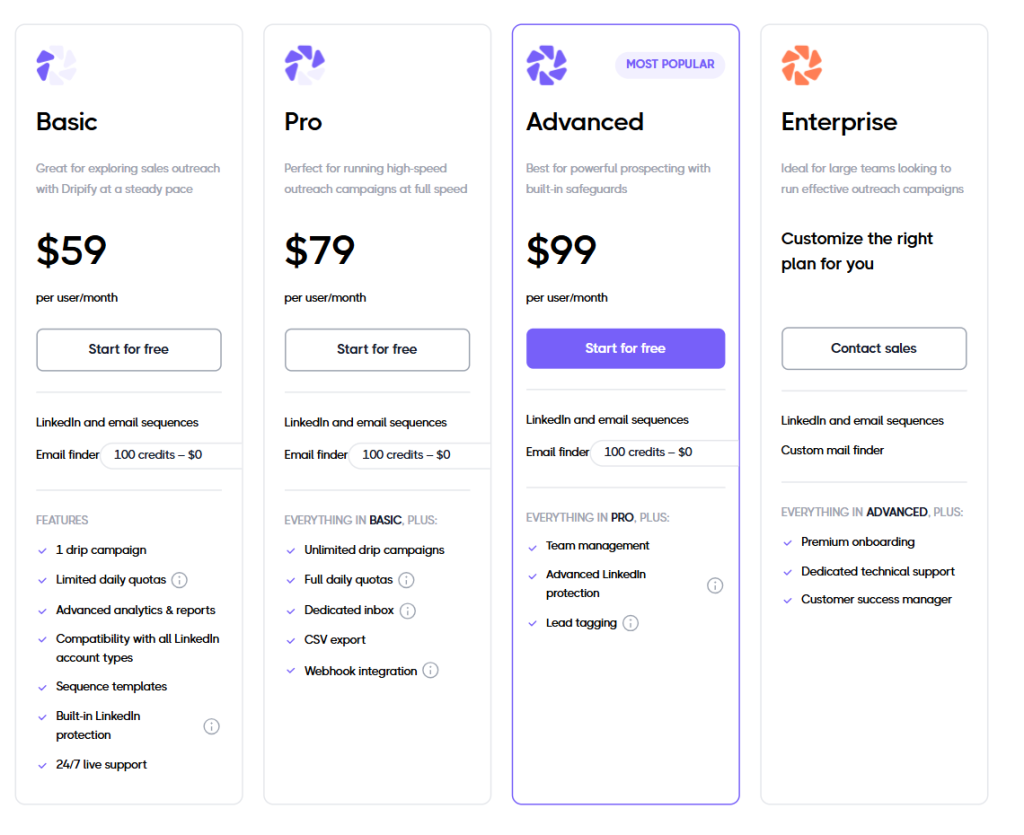
You pay per LinkedIn account: the Advanced plan costs about $99 per month or $79 on an annual contract and includes cloud‑based performance, automatic warm‑up, unlimited campaigns, multichannel and in‑depth analytics.
Agencies with more than 10 accounts can pick the custom plan, which unlocks white‑label features, bulk actions and a dedicated customer success manager. Both plans support multi channel outreach combining LinkedIn and email.
The advantages of Expandi go beyond quota management. It offers a drag‑and‑drop sequence builder, A/B testing for subject lines, dynamic placeholders, tags, image and GIF personalisation (via the Hyperise integration) and even video cards.
You can filter prospects, automatically clean their names and insert variables like job function or company. Export options help you download leads and open them in a spreadsheet or CRM. The platform also has a unified inbox that consolidates messages from multiple accounts.
On the negative side, some Expandi users complain about slow speeds, minor bugs and poor support. The learning curve can be steep for beginners, and costs add up quickly because the price is charged per account rather than per user.
Despite these issues, Expandi remains a robust choice for teams that need advanced control and deeper analytics.
Waalaxy: Chrome‑based LinkedIn outreach with email add‑ons

While Expandi is a cloud app, Waalaxy works through a browser extension. It appeals to individuals and small businesses who value an all‑in‑one solution that monitors attendance and engagement rates without needing multiple logins.
The platform supports multiple campaigns, and its Chrome extension runs in the background as you browse. Waalaxy has been positioning itself as a cloud based solution for the future, though the current product still relies heavily on the browser.
It helps users target future customers by scraping data and then reaching out at scale. Even in its base tier, Waalaxy includes an email finder, making it easier to add email addresses to LinkedIn profiles. You can also automate connection requests by setting rules and time delays.
Waalaxy offers multiple solutions for outreach but emphasises simplicity. Its intuitive interface guides you through creating campaigns with actions like connection requests, messages and emails. Safety comes first: Waalaxy respects daily quotas to respect LinkedIn’s limits and avoid spam flags.
The tool also supports multichannel campaigns that combine LinkedIn actions and emails. Teams can share campaigns and assign roles for better team collaboration. The dashboard presents detailed analytics and reply statistics.
Advanced tiers integrate with Sales Navigator search, and high‑tier users receive priority support.
Waalaxy markets itself as a cloud based automation tool but in practice it relies on a Chrome plug‑in that must run on your computer. That means you need to keep your laptop on for actions to queue.
Waalaxy’s pricing starts with a low‑cost plan that includes automated follow‑up messages, unlimited campaigns, smart reply detection, CRM sync and imports from LinkedIn Basic and Sales Navigator.
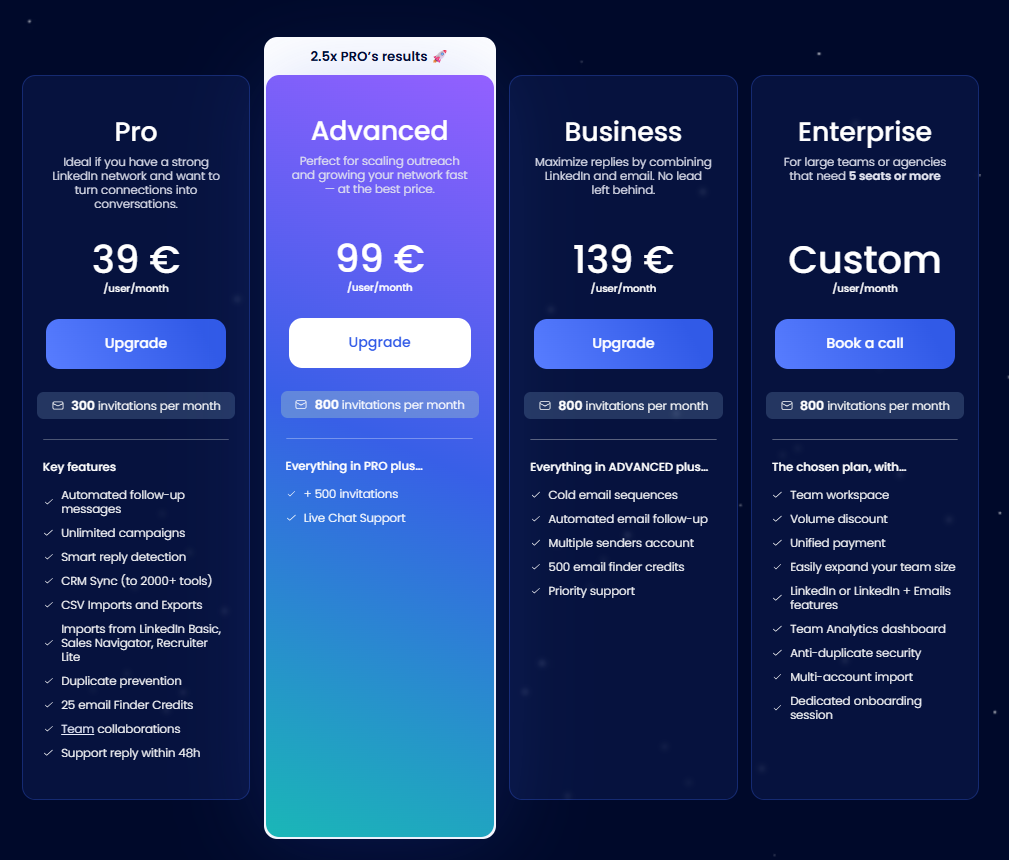
The mid‑tier adds more invitations per month, live chat support and extra email credits. The Business plan adds cold email sequences, automated email follow‑up and multiple sender accounts, plus 500 email finder credits.
Enterprise customers get a team workspace, volume discounts, a unified payment method, the ability to expand team size, LinkedIn or LinkedIn plus email features, a team analytics dashboard, anti‑duplicate security, multi‑account import and dedicated onboarding.
Waalaxy also offers a free trial but its free plan has strict limits, including 10 invites a week and no automated emails. Many users like the Chrome plug‑in because they can control everything from LinkedIn, but some find it less stable than a native app. The focus on LinkedIn means the email component feels secondary, and there is no direct integration with HubSpot.
This might be a drawback for marketers who want deeper CRM sync and more advanced sequences.
Expandi vs Waalaxy: which automation tool fits your needs?
Expandi centralises replies from multiple channels, giving you a centralized inbox that helps you never miss a response.
Waalaxy also has an inbox, but messages are tied to your Chrome session. When you compare the two, the decision often depends on scale.
Waalaxy serves small businesses that run fewer campaigns and want built‑in follow ups. The Business plan even includes a unified inbox, though it still needs your browser to be open. Expandi, unlike Chrome extensions, runs entirely in the cloud and can handle heavy loads, though it costs more. Expandi provides chat support through live chat. Waalaxy’s basic plan only promises a reply within 48 hours.
Both tools handle sending connection requests, but Expandi can build more complex branches and automated follow ups. Waalaxy includes some compliance features to avoid crossing LinkedIn thresholds, while Expandi’s algorithm monitors these limits automatically and stops campaigns when limits are close.
Audience targeting works differently as well: Waalaxy scrapes search results and Sales Navigator lists, whereas Expandi can import targeted audiences from CSV files or third‑party sources. If you like to track performance in detail, Expandi’s visual analytics, funnels and time series might appeal to you more than Waalaxy’s simplified charts.
For message personalization, Expandi connects to Hyperise so you can insert custom images and GIFs. Waalaxy only supports basic placeholders. Expandi’s software has the software’s ability to support video personalisation, while Waalaxy cannot.
However, Waalaxy’s simpler approach means there are fewer settings to break, which reduces repetitive tasks during setup.
When evaluating custom pricing options, keep in mind that Expandi’s agency plan is the only one that adjusts per seat.
Waalaxy uses flat pricing per user and there is no transparent discount for large deployments. In terms of communication, both tools combine LinkedIn and email steps, but Expandi’s orchestration engine is stronger.
Let’s recap a few key features across the board:
- Expandi has a dynamic sequence builder with if‑then logic, A/B testing, auto warm‑up and smart campaign prioritisation.
- Waalaxy has an intuitive dashboard, message templates and a simplified drag‑and‑drop editor, and the Business plan includes an email finder and multiple sender accounts.
- Expandi stands out for allowing users to manage multiple accounts under one roof, while Waalaxy licences one account per user.
Other differences revolve around how each platform interacts with other tools:
- Expandi connects natively to Zapier and has webhooks, while Waalaxy requires CSV exports.
- Expandi builds true email automation into its sequences, whereas Waalaxy only sends one follow‑up email in most tiers.
- Waalaxy has a free plan, but the restrictions make it more of a test.
- Expandi includes all the features in its trial, though actions are capped for safety.
Both tools handle email follow ups, but Expandi’s conditional logic is more sophisticated. Another advantage of Expandi is the built‑in account warm up, which gradually increases your sending volume to avoid flags. Waalaxy sells extra warm‑up credits as add‑ons.
Both platforms have CRM sync options, but Expandi integrates directly with HubSpot and Pipedrive. Waalaxy mainly relies on exports and imports. Waalaxy’s user reviews occasionally cite billing issues, while Expandi’s main complaint is pricing per account.
Expandi supports dynamic tags, including job title, which help with personalisation. In contrast, Waalaxy uses simpler variables. For those who rely on third party tools like Zapier or an external CRM, Expandi’s webhooks make integration easier.
Woodpecker: a smarter alternative
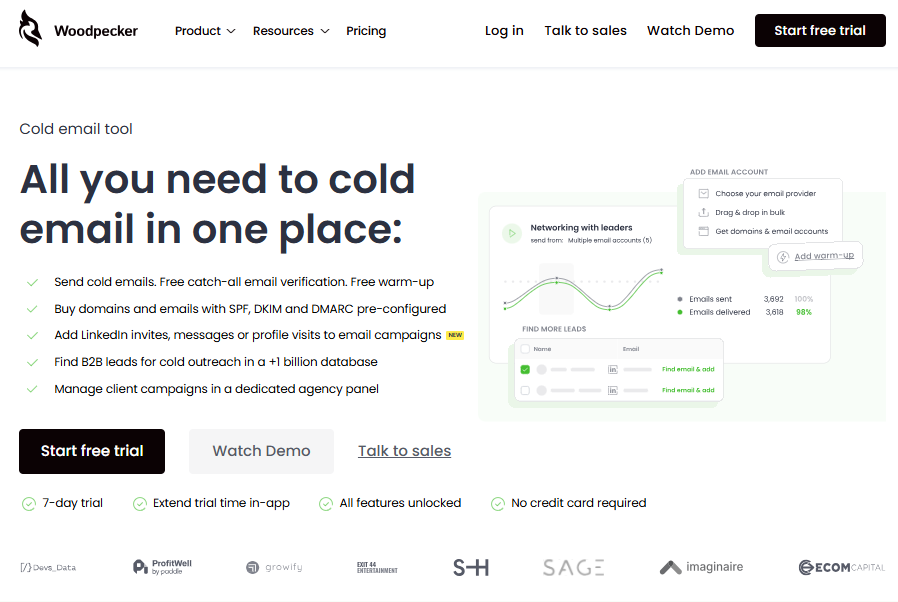
So why would someone looking at Expandi or Waalaxy switch to a different platform? Woodpecker is a multi‑channel sales suite that covers cold email and LinkedIn in one place.
Unlike the two tools above, it has transparent pricing rather than a custom pricing matrix.
Each plan includes unlimited email verification, warm‑up and outreach.
Woodpecker connects LinkedIn and email steps in one sequence, and its key features include automation of sending, verifying and warming email addresses.
The intuitive dashboard displays your pipeline and lets you create message templates that combine conditional logic, time zones and AI‑powered snippets. The platform also stands out by allowing users to control multiple mailboxes and assign them to campaigns. There is no per‑mailbox fee. Compared with other tools, you get integrated email automation with free verification and warm‑up, plus a huge B2B database that generates leads.
Woodpecker’s pricing is clear: you pay for the number of prospects you contact, not per seat. There is no free plan, but there is a seven‑day free trial or 50 contacts to test the system.
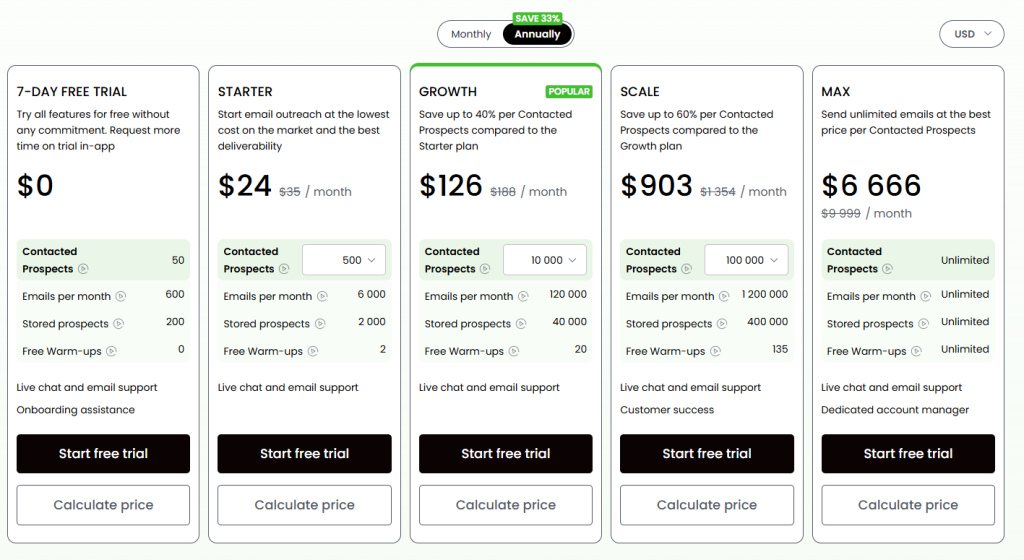
All users get all the features from day one. Automated email follow ups can branch based on replies or conditions. The built‑in account warm up and deliverability monitoring help maintain inbox placement.
The tool also integrates with CRMs through CRM sync and offers advanced reporting for opens, clicks and replies. Because there are no hidden seat fees, you avoid unexpected billing issues. Woodpecker uses dynamic placeholders for company or job title and pulls data from your list to tailor messages.
Finally, it connects seamlessly with third party tools through webhooks and native integrations, so it’s really a compelling alternative to both Dripify and Waalaxy.
Agencies appreciate features like a global prospect database, shared templates, bulk actions, global blacklist and separate databases for each client.
Time to make your choice
Whether you choose Expandi, Waalaxy or Woodpecker, remember that success still hinges on authentic conversations, clear targeting and respectful engagement.
Automation can make your life easier, but real connections require a thoughtful human touch.
Make your choice now (we recommend Woodpecker – get a free trial here) and enjoy the benefits of outreach efforts done right.