


Your email open rate tells you how many people opened your messages. It doesn’t tell you how many people ever saw them. Those are two different numbers, and the gap between them is usually wider than anyone realizes.
Inbox placement is the metric that closes that gap. It measures what percentage of your sent emails actually reach the primary inbox – not spam, not the promotions tab, not quietly filtered into oblivion. It’s the single most honest indicator of whether your email program is healthy, because everything else downstream (opens, clicks, replies, conversions) depends on the email being seen in the first place.
For cold email specifically, inbox placement has shifted from a nice-to-have metric to a survival metric. Gmail and Yahoo tightened bulk sender enforcement in 2024. Microsoft followed through 2025. AI-powered spam filtering has become aggressive enough that campaigns which worked fine two years ago now quietly land in spam with no visible error. If you send cold email without actively monitoring inbox placement, you’re flying blind.
This guide covers what inbox placement actually measures, how to test it, the diagnostic process to run when it drops, and the specific recovery steps that work in 2026. You’ll also see how Woodpecker handles this automatically.
What is inbox placement rate?
Inbox placement rate is the percentage of your sent emails that land in the primary inbox rather than in spam, junk, promotions, or getting filtered out entirely.
If you send 1,000 emails and 720 reach the primary inbox, your inbox placement rate is 72%. The remaining 280 might be in spam folders (where they’ll almost certainly never be read), in secondary tabs like Gmail’s “Promotions” (where they’ll be read by a fraction of recipients), or dropped by filters before arrival (where they’ll never be read).
Inbox placement vs. delivery rate – a critical distinction
Delivery rate and inbox placement rate get conflated constantly. They measure different things.
Delivery rate is the percentage of emails that don’t bounce – they technically arrived at the recipient’s email server. Most email tools report 97–99% delivery rates, which sounds great.
Inbox placement rate is the percentage of those delivered emails that landed in the primary inbox. This number is almost always lower than the delivery rate, and often significantly so. A campaign can have a 99% delivery rate and a 40% inbox placement rate at the same time – meaning 99% of your emails reached the server, but only 40% of those reached the actual inbox.
When a sales team says “our emails are being delivered,” what they usually mean is “they’re not bouncing.” That’s not the same as saying recipients are seeing them.
The four destinations for a sent email
When your email hits the receiving server, one of four things happens:
Primary inbox. The destination you want. High visibility, high open rate, strong reply rates.
Secondary tabs (Gmail Promotions, Updates, Social). Better than spam but significantly worse than primary. Open rates drop to roughly one-third of primary inbox placement.
Spam/junk folder. Functionally dead. Less than 5% of recipients check spam regularly, and when they do, they’re deleting, not engaging.
Dropped entirely. The receiving server decided the email was spam confidently enough that it never appeared anywhere. The sender doesn’t get a bounce; the email just vanishes. This is increasingly common with Gmail and Microsoft in 2026.
The only destination that matters for cold email is the primary inbox. The other three are different shades of failure.
Read also: How To Manage All Your Replies in Woodpecker Inbox
Why inbox placement matters more in 2026 than it used to
A few things changed between 2020 and 2026 that raised the stakes.
The Google/Yahoo/Microsoft bulk sender requirements. Rolled out February 2024 and enforced progressively through 2025. Senders who exceed 5,000 messages a day to Gmail or Yahoo users must have authenticated domains (SPF, DKIM, DMARC), one-click unsubscribe, and keep spam complaint rates under 0.3%. Failure to meet these requirements doesn’t produce an error – it produces silent throttling and spam folder placement.
AI-powered spam detection. Inbox providers have moved from rule-based filtering to machine learning models that evaluate patterns across millions of senders. These models catch templated content, unusual sending patterns, and mismatches between email content and sender reputation that older filters missed. A well-written cold email can now land in spam purely because it structurally resembles mass marketing.
Sender reputation weighs more than content. The biggest shift of the last three years. A well-warmed, authenticated domain with clean sending history will land in the inbox almost regardless of what the email says. A new or damaged domain will land in spam almost regardless of how carefully the email is written. Content matters; reputation matters more.
The margin for error has shrunk. A 2020 campaign that had 80% inbox placement was doing well. In 2026, the same campaign might hit 50% – not because anything changed in your setup, but because the environment shifted. What used to work is no longer enough.
For the broader context on deliverability trends, email deliverability best practices and how to improve email deliverability cover the full picture.
How to measure inbox placement
Most email tools don’t give you a true inbox placement number. They give you delivery rate (which is different, as covered above) or a proxy based on opens. Real inbox placement measurement requires testing.
Method 1: seed list testing
The traditional approach. You send your email to a controlled list of seed addresses across all major inbox providers (Gmail, Outlook, Yahoo, AOL, Apple Mail, various workplace domains). After sending, a tool checks each seed address to see where the email actually landed – inbox, spam, promotions, or missing.
The strength: it gives you a real sample of where your emails go, including the breakdown by provider. The weakness: the sample is small and not always representative of your actual recipient list.
Seed list testing is available through dedicated tools like GlockApps, MXToolbox, Mailtrap, and Allegrow. Cost is typically $10–50 per test.
Method 2: Google Postmaster Tools and Microsoft SNDS
Free tools from Google and Microsoft that give you sender reputation and placement data for their respective platforms. Not a real-time inbox placement number, but authoritative data on how the two largest inbox providers treat your domain.
Set these up once for every sending domain you use. They’re free, and without them you’re missing data that’s available for the asking. Both require domain verification.
Method 3: built-in deliverability monitoring
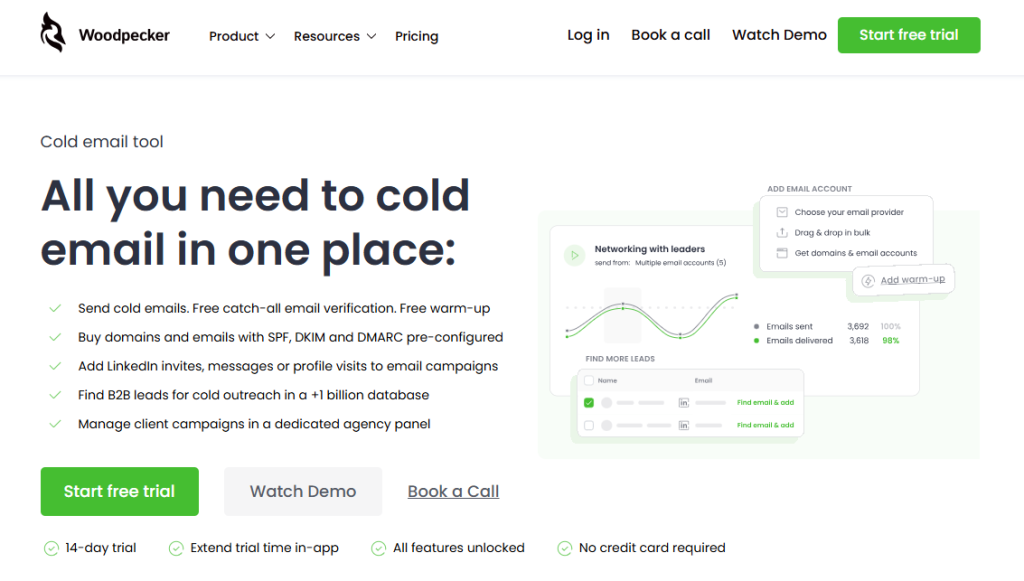
Modern cold email platforms include deliverability monitoring as part of the product. Woodpecker’s Deliverability tracks your sending patterns, warning signs, and trends over time – not a one-time test but continuous monitoring. When something changes – bounce rate spike, drop in engagement, unusual complaint patterns – you see it immediately rather than after a campaign has been underperforming for a week.
Which method to use when
For a one-time check of a specific campaign: seed list test.
For ongoing monitoring of a sending domain: Google Postmaster and Microsoft SNDS, ideally combined with a platform-level monitoring tool.
For cold email specifically, where you’re sending to recipients who aren’t on your seed list: platform-level monitoring plus occasional seed tests for calibration.
The factors that determine your inbox placement
Inbox placement is the output of a dozen upstream variables. Understanding which ones matter most helps when something drops and you need to figure out what broke.
Sender reputation
The single biggest factor. Your sending domain and IP develop a reputation over time based on how recipients engage with your emails. High opens, low spam complaints, low bounces = good reputation = primary inbox. Low opens, high complaints, high bounces = bad reputation = spam folder.
Sender reputation is persistent. A bad reputation takes weeks to recover, and during that time nearly every email you send from that domain will land in spam regardless of content.
Authentication
SPF, DKIM, and DMARC have to be configured and aligned. Misconfigured authentication is one of the fastest ways to tank placement. In 2026, a missing or failing DMARC record alone is enough to send your emails to spam at major providers.
Sending patterns
Abrupt spikes in volume, sending at unusual hours, or sending from a domain that suddenly starts mass emailing after being dormant – all get flagged by modern filters as suspicious. Steady, gradual ramps look legitimate. Spikes look like compromised accounts.
Engagement signals
Inbox providers watch what recipients do with your emails. Opens, replies, and moves-out-of-spam all signal a wanted message. Deletes-without-opening, spam-button clicks, and unsubscribes signal an unwanted one. Over time, these signals shape your sender reputation.
List quality
Sending to bad addresses produces bounces, which hurt reputation. Sending to people who didn’t expect your email produces complaints, which hurt reputation faster. List quality is one of the highest-leverage factors – a clean, well-targeted list can outperform a poorly targeted one 10:1 on inbox placement.
Content signals
Keywords associated with spam (“free,” “limited time,” “act now”), excessive use of caps or exclamation marks, broken HTML, and unusual image-to-text ratios all signal spam. Modern filters are smarter about this than rule-based filters were, but great content still matters at the margin.
The inbox placement diagnostic: what to check when placement drops
When your inbox placement drops – suddenly or gradually – there’s a specific order to diagnose the problem. Going through these checks in order will identify the issue faster than random investigation.
Work through this systematically. Don’t skip steps.
Step 1: confirm the problem is real
Before chasing a fix, confirm you’re actually seeing a placement drop and not just a drop in opens.
Check your open rate trend over the last 30 days. If opens dropped sharply 7–14 days ago, and bounces or spam complaints spiked at the same time, you likely have an inbox placement problem. If opens are down but bounces and complaints are stable, the problem might be targeting or subject lines rather than placement.
Run a seed list test against your current campaign. The result tells you whether emails are landing in primary, promotions, or spam. If the test shows 90%+ primary inbox and your opens are still low, the problem isn’t placement – it’s the message or the targeting.
Step 2: check authentication
The most common cause of sudden placement drops is an authentication problem. Check:
Does your SPF record include all current sending sources? If you added a new tool or changed providers, the SPF record may be stale.
Is your DKIM signature validating correctly? Use a tool like mail-tester.com to send a test email and verify DKIM passes.
Is your DMARC policy aligned? A DMARC record with p=reject will drop any email that fails SPF or DKIM – including ones that would have been fine under p=none. If you recently tightened your DMARC policy, that might be the cause.
Step 3: check sender reputation
Open Google Postmaster Tools. Look at the IP reputation and domain reputation graphs for your sending domain over the last 30 days.
If reputation has dropped from “high” to “medium” or worse, you have a reputation problem. The cause is usually one of: a spike in spam complaints, a surge in bounces, a list of unengaged recipients, or a recent unusual sending pattern.
Microsoft SNDS gives you similar data for Outlook/Hotmail. Check both.
Step 4: check bounce rate
A bounce rate above 5% will damage reputation fast. Look at your bounce trend over the last two weeks:
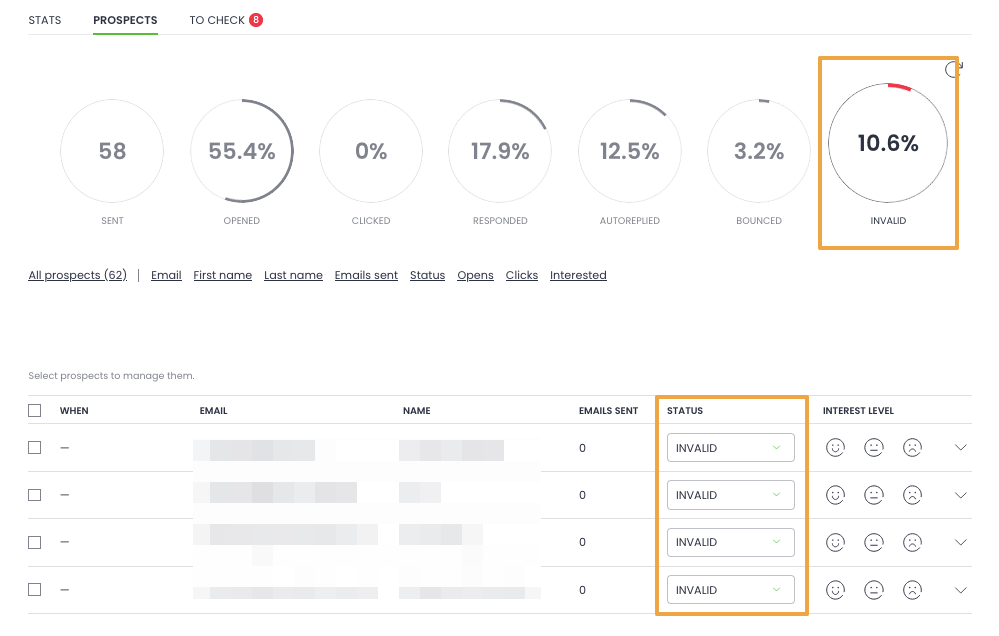
If bounce rate jumped suddenly, you probably loaded a list of unverified or outdated addresses. Pause the campaign, re-verify the list, and resume.
If bounce rate is gradually creeping up, your list is aging – contacts have left their roles, companies have changed domains. Refresh the list.
Woodpecker’s free catch-all email verification runs before sending, which prevents most of this. If you’re not running verification, add it as a pre-send step.
Step 5: check spam complaint rate
Spam complaint rate above 0.3% is the threshold that triggers throttling at Gmail and Yahoo. Above 0.1% is a warning sign. Any complaint at all is worth investigating.
Where to check: Google Postmaster Tools shows complaint rate per day. Most email platforms, including Woodpecker, also surface this metric.
If complaints spiked, ask: was the list targeted? Did the message feel spammy to recipients? Did the unsubscribe link work? A complaint is almost always a signal that the sender misjudged relevance.
Step 6: check engagement trends
Low open rates and low reply rates, sustained over time, signal to inbox providers that your emails aren’t wanted – which pushes future sends toward spam.
If your open rate has been declining for weeks, the fix isn’t better deliverability tactics – it’s better targeting and better content. Tighten your ICP. Segment your list more. Rewrite your subject lines and openers.
Step 7: check your warmup and sending patterns
Have you sent an unusual volume recently? Did you jump from 50 emails a day to 500 in a week? Are you sending at times you haven’t sent before?
Abrupt pattern changes trigger filter scrutiny. If you need to increase volume, ramp gradually – 20% increases per week rather than step-jumps.
Step 8: check your list freshness
Lists degrade at roughly 3–5% per month as people change roles and companies. A list you bought or built six months ago is materially worse than the day you got it.
Run your list through a verification service. Remove addresses that haven’t engaged with any of your emails in 90+ days – sending to dormant addresses actively hurts reputation.
The inbox placement recovery playbook
If you’ve confirmed a placement problem, the recovery path depends on severity.
Light recovery (placement dropped from 75% to 60%)
Pause the current campaign. Re-verify your list. Tighten targeting. Reduce sending volume by 30–50% for two weeks. Focus on segments with the highest engagement. Monitor daily.
In most cases this is enough to stabilize within two weeks.
Medium recovery (placement dropped from 75% to 40%)
Stop all sending from the affected domain for 3–5 days. This gives sender reputation a chance to recover.
Run a fresh seed list test to confirm current placement. Check authentication end-to-end. Check Google Postmaster and Microsoft SNDS data.
Restart with a small, highly-engaged segment of your list – people who have replied to previous emails, or prospects you have a warm connection to. Send 20–30 emails the first day, ramp gradually over two weeks.
Expect the recovery to take 3–4 weeks to reach pre-drop placement levels.
Deep recovery (placement below 30% or domain flagged)
At this point, continuing to send from the damaged domain is usually a bad idea. The reputation damage compounds with every additional send.
Options:
- Rest the domain for 6–8 weeks. Send nothing from it. Fix whatever caused the problem. Restart with heavy warmup and a fresh list.
- Switch to a new sending domain. If the original domain is too damaged to recover quickly, buy a new domain, configure authentication, warm it up for 3–4 weeks, and migrate your outreach. Keep the old domain parked.
Woodpecker sells pre-configured domains with SPF, DKIM, and DMARC already set up, which is useful when you need to spin up a replacement domain without spending a day on DNS configuration.
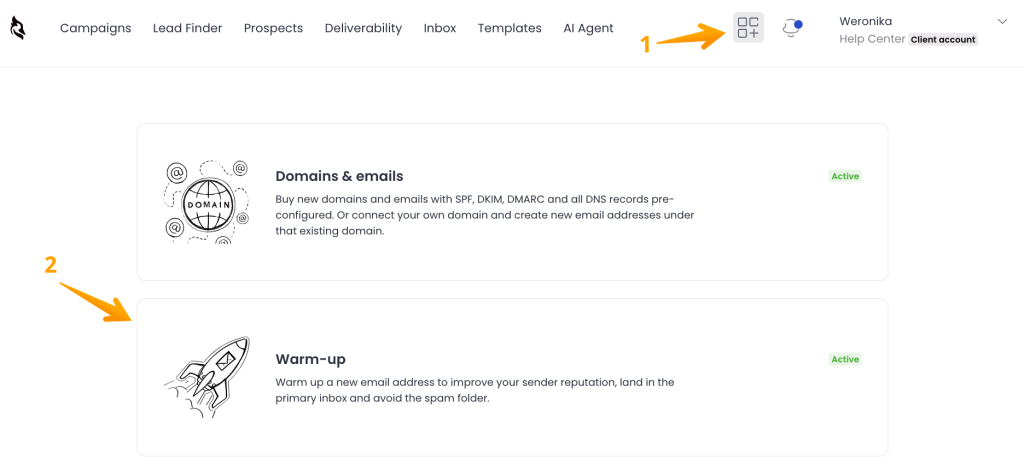
The free email warmup – handled through Woodpecker’s partnerships with Warmy and Mailivery – starts automatically when a new mailbox is connected, which means the 3–4 week warmup phase runs in the background rather than requiring manual setup.
Deep recovery is expensive in time and opportunity cost. Which is why prevention matters more than recovery – and why continuous monitoring is worth more than the best diagnostic tool.
The inbox placement checklist: run this before campaigns
A pre-launch checklist that catches most placement problems before they start.
Authentication
- SPF record includes all current sending sources
- DKIM signature is generated and added to DNS
- DMARC record is in place (start with p=none, move to p=quarantine or p=reject once aligned)
- All three authenticate correctly (verified via mail-tester or similar)
Domain
- Sending from a separate domain, not your main domain
- Domain has been warmed up for at least 2–3 weeks
- Domain has at least 90+ days of sending history
- Domain is not on any major blacklists (check at mxtoolbox.com)
List
- List has been verified (bounces removed)
- No role-based addresses (info@, sales@) unless intentional
- No duplicates
- Addresses collected within the last 90 days (for cold lists)
- Segmented into at least 2–3 groups
Sequence
- Unsubscribe header is configured and working
- Sequence auto-stops on reply
- No spam trigger words in subject lines (free, urgent, act now)
- HTML is clean (no broken tags, reasonable image-to-text ratio)
- Test email sent to Gmail, Outlook, and Yahoo seed addresses
Monitoring
- Google Postmaster Tools configured for the sending domain
- Microsoft SNDS configured
- Platform-level deliverability monitoring active
- Baseline metrics captured before launch (for post-launch comparison)
If any item isn’t checked, the campaign is at elevated risk.
How Woodpecker handles inbox placement
Placement monitoring and recovery are the kind of operational work that benefits enormously from being built into the tool rather than bolted on. Here’s what Woodpecker handles automatically rather than leaving to manual setup:
Deliverability. Continuous tracking of sender reputation signals – bounce rates, complaint rates, engagement trends. Surfaces warning signs before they become campaign-ending problems.
Free email warmup. Starts automatically when a new mailbox is connected. Handled through partnerships with Warmy and Mailivery – both specialized warmup providers white-labeled into the platform. You pick which provider inside Woodpecker; no separate account needed.
Free catch-all email verification. Every address on your list is verified before sending, not after a bounce. Removes the most common cause of placement drops: sending to bad addresses.
Adaptive Sending. Randomized intervals, personalized send times, automatic throttling when bounce rates spike. Mimics human sending patterns, which is what modern spam filters look for.
Inbox rotation. Automatically distributes sends across multiple connected mailboxes to keep per-mailbox volumes safe. Necessary for any campaign over 100 emails a day.
Pre-configured domains. Buy domains and mailboxes directly through Woodpecker with SPF, DKIM, and DMARC already set up. Removes the most common source of authentication errors – manually configured DNS records that are close-but-not-quite right.
What Woodpecker doesn’t do on the placement side: it doesn’t run third-party seed list tests (you’ll use GlockApps or Mailtrap for that if you need one), and it doesn’t replace Google Postmaster Tools for platform-specific reputation data. Think of it as the continuous monitoring and automation layer on top of the native tools Google and Microsoft provide.
For teams running cold email at any real volume, inbox placement is the metric that determines whether everything else in your sales motion works or fails quietly.
Sign up to Woodpecker and see how the monitoring handles what used to require a dedicated deliverability person.
FAQ
What does inbox placement mean?
Inbox placement is the percentage of sent emails that reach the primary inbox rather than spam, promotions tabs, or being filtered out. It’s different from delivery rate (which just measures whether the email reached the server). Inbox placement is the more honest metric for whether recipients are actually seeing your email.
How is inbox placement calculated?
Inbox placement rate = (emails delivered to primary inbox / total emails sent) × 100. The tricky part is that most email tools don’t report this directly – they report delivery rate or open rate, which are related but different. Accurate measurement typically requires seed list testing or a dedicated monitoring tool.
What is a good inbox placement rate?
For cold email in 2026, 70%+ primary inbox placement is healthy. 50–70% is workable but needs attention. Below 50% signals a real problem that should be diagnosed and fixed before continuing to send. For transactional or opt-in email (newsletters, account emails), healthy placement is typically 90%+.
What is the 30/30/50 rule for cold emails?
The 30/30/50 rule isn’t universally defined, but the common version refers to benchmarks: aim for 30%+ reply rate on highly targeted outreach, 30%+ open rate on cold campaigns, and 50%+ primary inbox placement at minimum. These are directional rather than strict targets. Your actual numbers should be tracked against your historical baseline rather than an external rule.
How do I test my inbox placement?
Three options: (1) seed list testing via tools like GlockApps, MXToolbox, or Mailtrap – send your email to a controlled list of seed addresses and see where each one lands; (2) Google Postmaster Tools and Microsoft SNDS for platform-specific reputation data (free, but requires domain verification); (3) continuous monitoring through a platform like Woodpecker’s.
Why is my inbox placement dropping?
The most common causes in order of frequency: authentication problems (SPF/DKIM/DMARC misconfiguration), a spike in bounces from a bad list, a spike in spam complaints, a drop in engagement signals (opens, replies), an abrupt change in sending volume or pattern, damage to sender reputation from a previous campaign. Run the diagnostic steps in order to identify which applies.
How long does it take to fix inbox placement?
Light recovery (placement dropped by 10–20 points): 1–2 weeks with pauses and targeted adjustments. Medium recovery (dropped by 30+ points): 3–4 weeks with domain rest and careful ramp. Deep recovery (below 30% placement or domain flagged): 6–8 weeks, often requiring a switch to a new domain.
Does the content of my email affect inbox placement?
Less than you’d think in 2026. Sender reputation, authentication, and engagement patterns matter far more than specific words in the email. That said, content still matters at the margins – spam trigger words, broken HTML, heavy image-to-text ratios, and excessive links can push otherwise-good emails into spam.
Is inbox placement the same as deliverability?
Deliverability is the broader concept – it covers authentication, sender reputation, list quality, and inbox placement. Inbox placement is the measurable outcome of all the deliverability work. When someone asks “is our deliverability good?” they usually mean “is our inbox placement good?”
Can I improve inbox placement without changing tools?
Usually yes. The biggest wins are: fix authentication if it’s misconfigured, clean your list aggressively, slow down sending volume, focus on your most engaged recipients, and monitor sender reputation through Google Postmaster. Tools help with monitoring and automation, but placement recovery is primarily about sending patterns and list quality – which any team can work on.