


There are roughly 40 cold email tools on the market in 2026. Most of the “best cold email software” articles you’ll find list 10-20 of them, arrange them in a loose ranking, and leave you with the same problem you had before reading: which one do you actually buy?
This guide takes the opposite approach. Instead of another ranked list with three-sentence reviews, it gives you the framework buyers use internally when they evaluate cold email software – the specific criteria that separate tools that work from tools that waste budget, the pricing benchmarks by category, and the use-case fit that determines which features matter for your situation.
The honest truth about cold email software: the “best” tool depends entirely on what you’re using it for. A solo founder sending 50 emails a day needs a different product than a 30-person agency running 200,000 emails a month across 40 client accounts. Most ranking lists ignore this entirely and recommend the same top three to everyone.
This is a buyer’s guide built around the real decision: what are you actually trying to do, and which software architecture serves that best? By the end, you’ll have a clear framework for evaluating any cold email platform on its merits, and a sense of which category of tool fits your specific motion.
What “best” actually means in cold email software
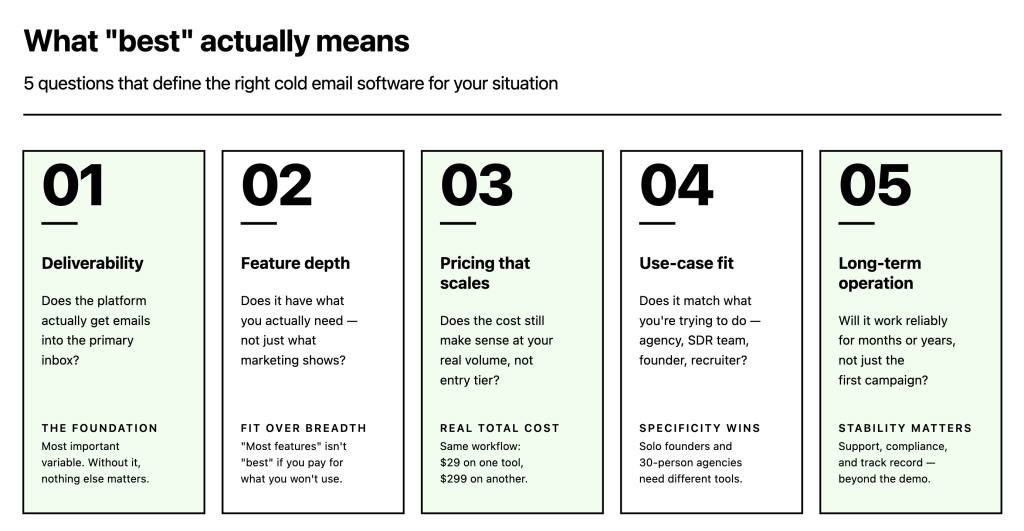
Before the evaluation framework, a working definition. “Best cold email software” isn’t a single thing – it’s the answer to five different questions that matter differently depending on your situation.
- Best deliverability. Whether emails actually reach the primary inbox rather than spam, promotions tabs, or the void. This is the single most important variable for any cold email tool. Software with poor deliverability infrastructure is worse than no software at all because it burns sender reputation at volume.
- Best feature depth. Multi-step sequences, conditional logic, A/B testing, integrations, reporting. Different teams need different feature sets; “most features” isn’t always “best” when you’re paying for capabilities you won’t use.
- Best pricing for your volume. Cold email software pricing varies enormously across providers – the same workflow can cost $29/month or $299/month depending on which tool you pick. Price scaling at higher volumes matters as much as entry-level pricing.
- Best fit for your use case. Agency, in-house SDR team, solo founder, recruiter, enterprise sales. Each use case has specific needs that general-purpose tools handle differently.
- Best long-term operation. Cold email isn’t a one-campaign activity. The software you pick needs to work reliably for months or years – which means its stability, support, and compliance track record matter beyond the initial evaluation.
For the broader context on what makes outbound email actually produce pipeline, 10 factors that make cold emails work covers the fundamentals that no software can substitute for – targeting, timing, message quality. Software handles the execution; the strategy still needs to be right.
The 7 criteria that actually matter when evaluating cold email software
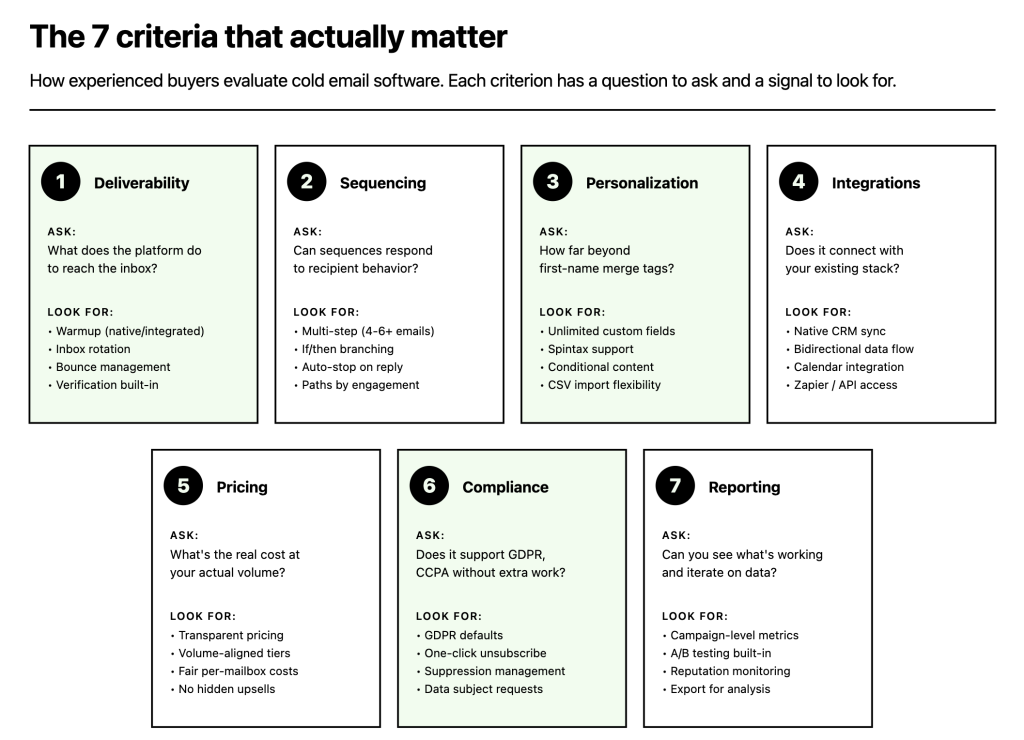
The framework below is how experienced buyers evaluate cold email tools. Each criterion has a specific question to ask and a specific signal to look for.
1. Deliverability infrastructure
The question: What does the platform do to make sure emails reach the inbox instead of spam?
What to look for:
- Native or integrated email warmup (not just a partnership reference)
- Adaptive or intelligent sending with randomized intervals and inbox rotation
- Bounce management that automatically catches hard bounces before they damage reputation
- Deliverability monitoring that surfaces reputation drift early
- Email verification built in (catch-all verification is the highest standard)
- Support for authentication setup (SPF, DKIM, DMARC)
Red flags: A platform that markets heavily on AI copywriting and lead databases but doesn’t mention deliverability infrastructure prominently is typically weak on the part that matters most. Cold email is a deliverability problem before it’s a copywriting problem.
2. Sequencing and conditional logic
The question: Can the platform run multi-step email sequences with logic that responds to recipient behavior?
What to look for:
- Multi-step sequences (minimum 4-6 steps)
- If/then branching based on opens, clicks, and replies
- Auto-stop on reply (mandatory – without this, you’ll email people who already responded)
- Different paths for positive vs. negative engagement
- Easy sequence editing without breaking in-progress campaigns
Red flags: Platforms with only linear sequences and no conditional logic limit what you can realistically automate. A modern cold email workflow needs to handle “opened but didn’t reply,” “clicked but didn’t reply,” and “didn’t engage at all” differently.
3. Personalization depth
The question: How far can personalization go beyond first-name merge tags?
What to look for:
- Custom field support (unlimited custom fields, not just name/company)
- Spintax or snippet variation natively supported
- Conditional content within emails (show different paragraphs based on prospect attributes)
- CSV import with field mapping
- AI-assisted personalization integration (pulling in research from external tools)
Red flags: Tools that limit personalization to 3-4 merge fields or charge extra for basic custom field support are usually building on older architecture that will limit what you can do later. 3 steps to personalized cold emails covers what personalization actually needs to accomplish.
4. Integrations with your existing stack
The question: Does the platform integrate with the CRM, calendar, and other tools your team already uses?
What to look for:
- Native CRM integrations (HubSpot, Pipedrive, Salesforce – the major three)
- Bidirectional sync (data flows both ways, not just one-way import)
- Calendar integration for meeting booking flow
- Zapier or API access for custom integrations
- LinkedIn integration if you run multi-channel sequences
Red flags: Platforms that require CSV exports to move data into or out of your CRM create operational friction that compounds at volume. A manual weekly export is a manual weekly mistake waiting to happen.
5. Pricing that scales sensibly
The question: What does the platform cost at your actual volume, not just the entry tier?
What to look for:
- Transparent pricing on the website (not “contact sales”)
- Pricing tiers aligned with real usage (contact count or mailbox count, not arbitrary feature gating)
- Reasonable per-mailbox costs if you need multiple sending accounts
- No separate charges for basic deliverability features (warmup, verification should be included)
- Clear pricing for agencies with multi-client needs
Red flags: Aggressive upsell structures where basic features are locked behind enterprise tiers, or pricing that jumps 10x between tiers. Also watch for “unlimited” claims that have hidden fair-use clauses.
6. Compliance and security posture
The question: Can the platform support GDPR, CCPA, and emerging regulation without extra work on your end?
What to look for:
- GDPR-compliant data handling as a default setting
- One-click unsubscribe built into email templates
- Suppression list management across all campaigns automatically
- Data export and deletion capabilities for subject access requests
- SOC 2 compliance or similar security certification
Red flags: Platforms that treat compliance as an afterthought (“you’re responsible for compliance”) rather than building it into the product. Regulations are getting stricter; software that doesn’t help you comply creates downstream legal exposure. For context on the legal side, is cold email illegal? covers the jurisdictional differences that matter.
7. Reporting and iteration tools
The question: Can you see what’s working and iterate on campaigns based on data, not guesses?
What to look for:
- Campaign-level metrics (open rate, click rate, reply rate, meeting rate)
- A/B testing built in with statistical significance indicators
- Deliverability reports separate from engagement reports
- Sender reputation monitoring
- Export capabilities for your own analysis
Red flags: “Real-time dashboards” that show vanity metrics (opens, clicks) without deeper analytics on what’s actually converting to meetings or pipeline. Open rates have become an increasingly unreliable metric since iOS Mail privacy changes; platforms still presenting them as primary KPIs are using outdated thinking.
The categories of cold email software
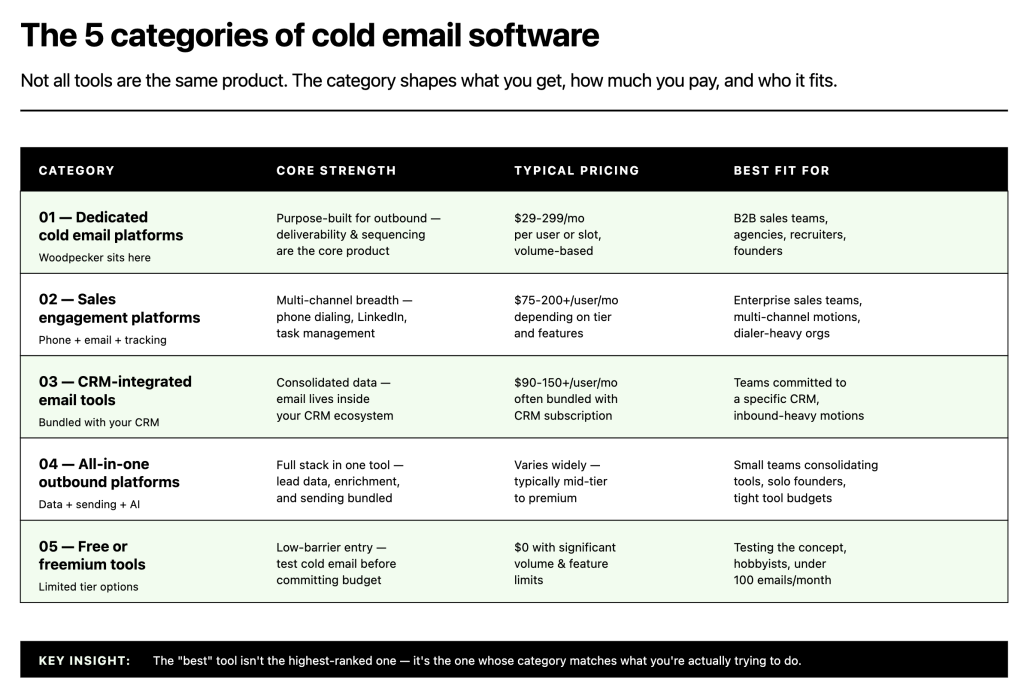
Not all cold email tools are the same product. Understanding the category helps filter which specific tools are worth evaluating.
Category 1: Dedicated cold email platforms
Tools built specifically for outbound cold email. Sequencing, deliverability, and personalization are the core product. This is the category where most B2B cold email buyers end up, and where Woodpecker sits.
Best for:
- B2B sales teams doing outbound prospecting as a primary motion
- Agencies managing cold email for multiple clients
- Recruiters running outreach to passive candidates at volume
- Founders running founder-led sales with outbound as a pipeline source
Typical pricing: $29-299/month per user or slot, depending on volume and features.
What you’re trading off: Dedicated platforms optimize for cold email depth but don’t replace CRMs or marketing automation tools. You’ll still need a CRM for pipeline management and customer data.
Category 2: Sales engagement platforms with cold email modules
Larger platforms built around broader sales engagement workflows – phone, email, LinkedIn, task management, activity tracking. Cold email is one module among many.
Best for:
- Enterprise sales teams where phone dialing and activity tracking are as important as email
- Organizations that need tight integration between email outreach and CRM activity
- Teams where multi-channel (email + phone + LinkedIn) is the core motion, not just email
Typical pricing: $75-200+/user/month depending on tier.
What you’re trading off: Significant budget and complexity for workflow breadth. The email-specific capabilities are often less deep than dedicated cold email tools.
Category 3: CRM-integrated email tools
Email automation built into or tightly coupled with a CRM – typically HubSpot Sales Hub, Salesforce Sales Engagement, or similar.
Best for:
- Teams already committed to the CRM vendor’s full ecosystem
- Inbound-heavy motions where outbound is secondary
- Organizations prioritizing consolidated data over specialized workflows
Typical pricing: Bundled with CRM subscription, often $90-150+/user/month at mid-tier.
What you’re trading off: Depth in cold email specifically. CRM-native email tools typically lack the deliverability infrastructure, personalization depth, and sequence flexibility of dedicated cold email platforms.
Category 4: All-in-one outbound platforms
Newer platforms bundling lead databases, enrichment, cold email, and sometimes AI SDR agents into a single product.
Best for:
- Teams wanting the full outbound stack in one tool
- Situations where separate tools for data and sending create too much operational friction
- Solo founders and small teams managing limited tool budgets
What you’re trading off: Best-in-class depth in any specific capability. All-in-one tools are by nature generalists; specialists usually outperform in specific categories.
Category 5: Free or freemium cold email tools
Tools with genuinely free tiers or very low-cost entry points. Examples exist but are usually heavily limited on volume, deliverability features, or sequence depth.
Best for:
- Testing cold email as a concept before committing to paid tools
- Very low-volume sending (under 100 emails/month)
- Learning cold email mechanics without budget risk
What you’re trading off: Most of what makes cold email work at scale. Free tools typically lack serious deliverability infrastructure, making them risky for anyone trying to build a real outbound motion. “Best free cold email software” is almost always a short-term bridge, not a long-term solution.
Use-case selection matrix: which category fits your situation
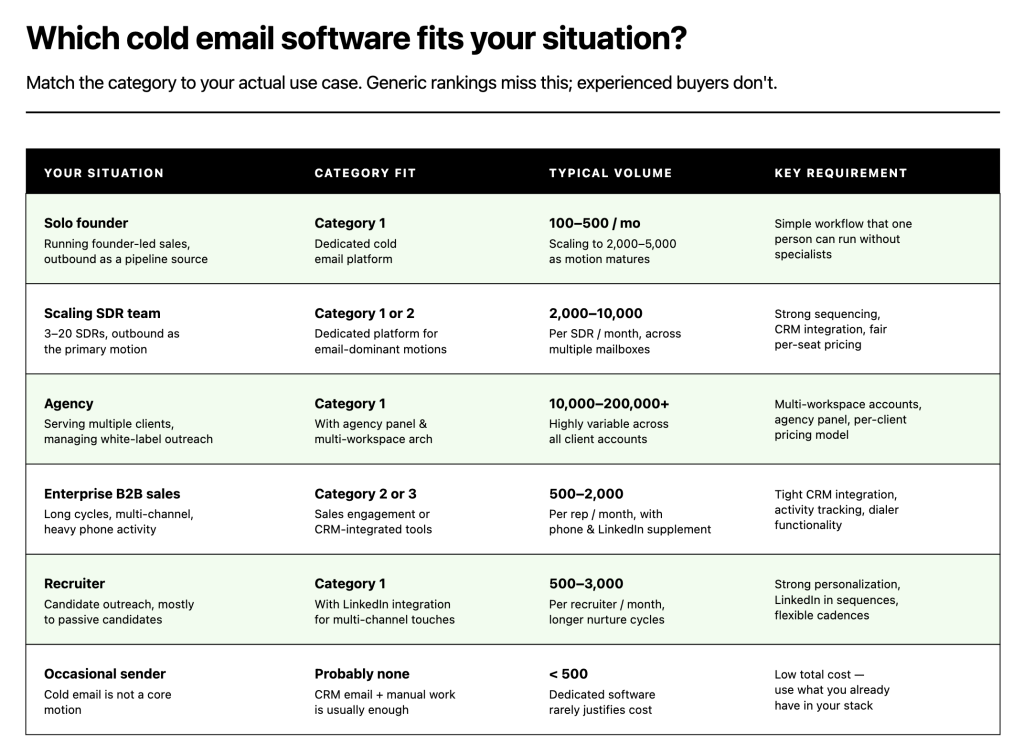
The most important part of choosing cold email software is matching the category to your actual use case. Below is the framework used internally by revenue ops teams when they evaluate tools.
If you’re a solo founder doing founder-led sales
You need a dedicated cold email platform. Category 1. The workflow needs to be simple enough for one person to run without specialists, deliverability needs to be handled by the platform rather than requiring separate tools, and pricing needs to make sense at 1-3 sending mailboxes. Multi-channel is optional; most founders start with email-only and add LinkedIn later.
Volume expectation: 100-500 emails/month typically, scaling to 2,000-5,000 as the motion matures.
If you’re building or scaling an SDR team
You need a dedicated cold email platform with strong sequencing, CRM integration, and per-seat pricing that makes sense for 3-20 SDRs. Category 1 or 2 depending on whether your SDRs are email-only or multi-channel. For email-dominant motions, Category 1 (dedicated cold email) wins on depth and cost.
Volume expectation: 2,000-10,000 emails/month per SDR, across multiple sending mailboxes for inbox rotation.
If you run an agency serving multiple clients
You need a platform with multi-workspace architecture (separate accounts per client), agency panel with white-label capability, and pricing that scales with client count rather than per-seat. Category 1 cold email platforms with agency features are typically the right fit. Agency panel is a specific feature – not every cold email tool has it, and the ones that do vary significantly in quality.
Volume expectation: Highly variable; 10,000-200,000+ emails/month across all clients.
If you’re in enterprise B2B sales
You probably need Category 2 (sales engagement platforms) or Category 3 (CRM-integrated), not Category 1. Enterprise deals involve long cycles, multi-channel outreach, detailed activity tracking, and tight CRM integration that dedicated cold email platforms don’t specialize in. The cost is higher but matches the deal size.
Volume expectation: Lower volume, higher-touch. 500-2,000 emails/month per rep with significant phone and LinkedIn supplement.
If you’re a recruiter running candidate outreach
You need a dedicated cold email platform with LinkedIn integration, strong personalization, and flexible sequencing. Category 1 with multi-channel features. The recruiting use case is close to sales outbound in mechanics but needs slightly different sequence patterns and longer nurture cycles.
Volume expectation: 500-3,000 emails/month per recruiter.
If cold email is an occasional activity, not your core motion
You probably don’t need dedicated software. A combination of your existing CRM’s email automation and manual sending will cover the use case without additional tool overhead. Buying cold email software for under 500 emails/month rarely makes financial sense.
Pricing benchmarks for cold email software in 2026
What you should expect to pay, by category and volume.
These are ranges based on publicly available pricing across the category – individual tools vary.
Entry tier (1-3 mailboxes, under 5,000 emails/month):
- Category 1 dedicated cold email: $29-79/month
- Category 4 all-in-one platforms: $40-100/month
- Category 5 free/freemium: $0 with significant volume limits
Mid tier (5-15 mailboxes, 10,000-50,000 emails/month):
- Category 1 dedicated cold email: $79-299/month
- Category 2 sales engagement: $75-165/user/month
- Category 3 CRM-integrated: $90-150/user/month (often bundled with broader CRM spend)
Upper tier (20+ mailboxes, 100,000+ emails/month):
- Category 1 dedicated cold email: $299-999/month with volume pricing
- Category 2 sales engagement: $150-250+/user/month with enterprise features
- Category 3 CRM-integrated: $180-300+/user/month typically
Agency tier (multi-client, white-label):
- Category 1 with agency features: $199-599/month for agency panel, often with per-client add-ons
- Dedicated agency platforms: custom pricing
The pricing trap to avoid: tools that look cheap at entry tier but scale aggressively on features you’ll need immediately (warmup, verification, additional mailboxes). Calculate real total cost at your expected volume, not the advertised starting price.
The red flags that should disqualify a cold email tool
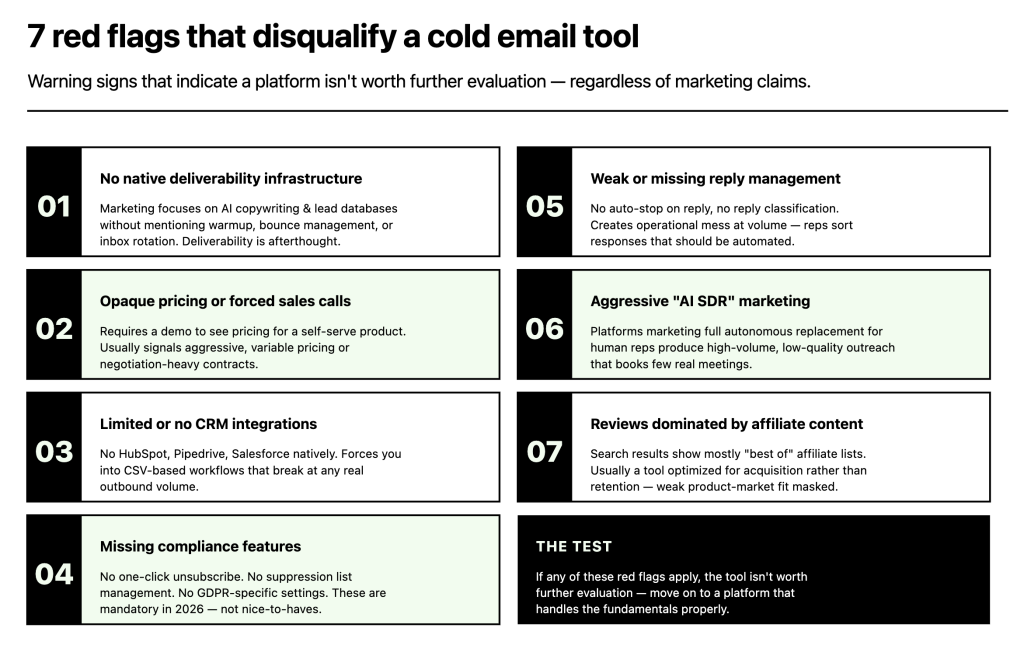
Beyond positive criteria, specific warning signs that indicate a tool isn’t worth further evaluation regardless of marketing claims.
🚩 Red flag 1: No native deliverability infrastructure
Tools that market on features (AI copywriting, lead databases) without mentioning warmup, bounce management, or inbox rotation are typically weak on deliverability. Cold email without deliverability infrastructure burns sender reputation fast.
🚩 Red flag 2: Opaque pricing or mandatory sales calls
If a tool requires a demo call to see pricing on a self-serve product, the pricing is probably aggressive, variable, or requires negotiation. For cold email software specifically, this is unusual and usually indicates a platform targeting enterprise exclusively.
🚩 Red flag 3: Limited or no CRM integrations
Cold email data needs to flow into your CRM for the motion to work. Tools without HubSpot, Pipedrive, and Salesforce integrations (at minimum) force you into CSV-based workflows that break at any real volume.
🚩 Red flag 4: Missing compliance features
No one-click unsubscribe. No suppression list management across campaigns. No GDPR-specific settings. These aren’t nice-to-haves in 2026 – they’re mandatory. Tools lacking them create legal exposure that doesn’t show up until it’s a problem.
🚩 Red flag 5: Weak or missing reply management
Cold email generates replies that need to be classified and routed. Tools without reply detection (auto-stop on reply, positive/negative classification) create operational mess at volume – salespeople manually sorting inbox responses that should have been handled automatically.
🚩 Red flag 6: Aggressive “AI SDR” marketing without substance
Platforms marketing themselves as “AI SDRs that replace humans” typically produce high-volume, low-quality outreach that damages sender reputation and books few real meetings. The AI genuinely helps in cold email at specific tasks (research, personalization, reply classification) – not as a full autonomous replacement for sales judgment.
🚩 Red flag 7: Reviews dominated by affiliate content
If searching for the tool returns mostly affiliate-driven “best of” lists, and the tool’s own content is thin, that’s usually a tool optimized for acquisition rather than retention. Real users tend to leave reviews on G2, Capterra, and Reddit; affiliate dominance can mask weak product-market fit.
How to run a cold email software evaluation
Most buyers skip the evaluation process and pick based on “best of” lists or peer recommendations. The teams that end up happy with their choice run an actual pilot. Here’s the process that works.
- Week 1: Shortlist to 3 tools. Use the criteria above to narrow the full market of 30-40 tools to 3 that plausibly fit your use case. Ignore the ones that fail on red flags or don’t match your category.
- Week 2: Set up free trials or pilots. All three tools in parallel. Connect a test mailbox to each. Import a small sample list (100-500 contacts). Build a 3-email sequence. Run it.
- Week 3: Measure deliverability honestly. Send to a seed list of your own addresses across Gmail, Microsoft, and Yahoo. Check where emails land – primary inbox, promotions, spam. Repeat the test 2-3 times per tool to account for variance.
- Week 4: Evaluate the workflow. How easy is it to build a sequence? Edit one? Duplicate one? Handle a reply? Pause a campaign? Export data? These operational moments matter more than feature lists – the tool you’ll use every day needs to not fight you.
- End of month: Decide based on evidence. Whichever tool delivers the best inbox placement, fits your workflow, and integrates with your stack. Not whichever tool the “best of” list ranked first.
This process takes a month and costs nothing but time. Compared to the cost of picking wrong – either paying for tool that doesn’t work or replacing it in six months – it’s worth doing every time.
How Woodpecker fits as cold email software
Woodpecker is a dedicated cold email platform (Category 1) built for B2B outbound – sales teams, agencies, recruiters, and founders running cold email as a primary pipeline channel.
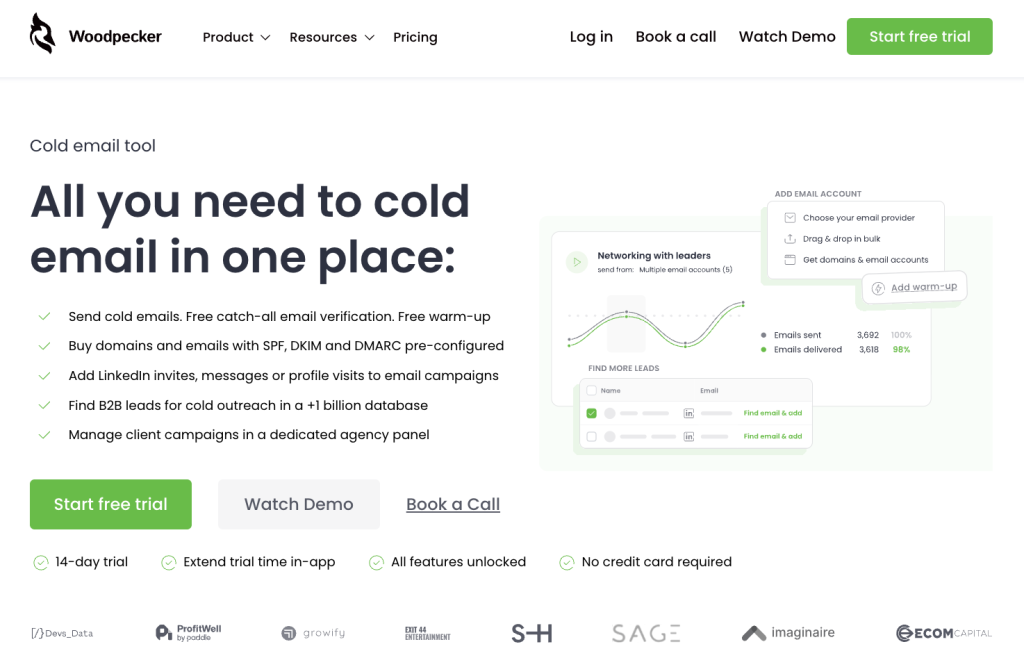
Specifically, here’s what Woodpecker handles against the 7 criteria above:
- Deliverability infrastructure. Free email warmup via partnerships with Warmy and Mailivery (user picks which provider to activate, both white-labeled inside the Woodpecker interface). Adaptive Sending for inbox rotation and randomized intervals. Bounce Shield for automatic bounce management. Deliverability Monitor for continuous reputation tracking. Free unlimited catch-all email verification. Domain purchase with pre-configured SPF, DKIM, and DMARC as an option for teams starting fresh.
- Sequencing and conditional logic. Multi-step sequences with if/then branching based on opens, clicks, and replies. AI-based reply detection that classifies responses (positive, negative, out-of-office, question) and stops sequences automatically on any reply. Different sequence paths for different engagement patterns.
- Personalization depth. Unlimited custom fields, native spintax support for subject-line and content variation, CSV import with flexible field mapping, conditional content within emails.
- Integrations. Native bidirectional CRM sync with HubSpot, Pipedrive, and Salesforce. LinkedIn integration (profile visits, connection requests, messages as sequence steps). Zapier and API access for custom integrations. Calendar integrations for meeting booking workflow. The built-in 1 billion+ B2B lead database eliminates the need for a separate data provider for most use cases.
- Pricing. Transparent tiered pricing starting at $29-39/month per slot for entry tier, scaling with prospect count and mailbox needs. Free email warmup, catch-all verification, and lead database included rather than gated behind higher tiers. Agency panel with white-label for multi-client operations.
- Compliance. GDPR-compliant by default, one-click unsubscribe in all templates, suppression list management across all campaigns (critical for multi-campaign operations), data export and deletion capabilities for subject access requests.
- Reporting. Campaign-level metrics separated into engagement and deliverability categories, A/B testing built in, sender reputation monitoring, exportable data for external analysis.
What Woodpecker doesn’t do: built-in phone dialer, SMS/WhatsApp channels, native AI copywriting that generates full emails from scratch, autonomous “AI SDR” agents. Teams needing those specific capabilities typically look at Category 2 sales engagement platforms instead – the tradeoff is depth versus breadth in the cold email layer specifically.
Use cases where Woodpecker is the right fit
- B2B SaaS sales teams running outbound prospecting (3-50 SDRs)
- Agencies managing cold email for multiple clients (agency panel with white-label)
- Recruiters running passive candidate outreach with LinkedIn integration
- Founders running founder-led sales with cold email as a primary pipeline source
- Any B2B outbound motion where deliverability matters more than AI-SDR marketing claims
Use cases where a different category might fit better
- Enterprise sales with heavy phone and in-person activity → Category 2 sales engagement platforms
- Teams committed to HubSpot or Salesforce ecosystem as the primary workflow hub → Category 3 CRM-integrated tools
- Very low-volume occasional sending (under 500 emails/month) → often doesn’t need dedicated software
For teams evaluating cold email software as part of building or scaling an outbound motion, check Woodpecker reviews or sign up to Woodpecker to run a real pilot against the deliverability and workflow criteria that actually separate good tools from bad ones.
FAQ
What is the best cold email software in 2026?
The best cold email software depends on use case. For B2B sales teams and agencies running outbound as a primary motion, a dedicated cold email platform (Category 1) typically wins on deliverability depth and cost. For enterprise sales with multi-channel activity, Category 2 sales engagement platforms fit better. For teams already invested in a specific CRM ecosystem, Category 3 CRM-integrated tools may be more practical. There’s no single “best” – match the category to your motion, then evaluate specific tools against the 7 criteria in this guide.
What should I look for in cold email software?
Seven criteria matter most: deliverability infrastructure (warmup, bounce management, verification), sequencing with conditional logic, personalization depth beyond first-name merge tags, CRM integrations that sync bidirectionally, pricing that scales sensibly with your volume, compliance features for GDPR and CCPA, and reporting that separates engagement from deliverability metrics. Tools that fail on deliverability infrastructure should be disqualified regardless of other strengths – cold email is a deliverability problem before anything else.
Is there free cold email software worth using?
For testing cold email as a concept or very low-volume sending (under 100 emails/month), free or freemium tools can work. For anything approaching real volume, free tools typically lack the deliverability infrastructure needed to prevent sender reputation damage, which ends up costing more than the savings. The better “affordable” path is entry-tier paid platforms ($29-39/month) that include deliverability features from the start.
How much does cold email software cost?
Entry tier typically runs $29-79/month for 1-3 sending mailboxes and 5,000 emails/month. Mid-tier scales to $79-299/month for 5-15 mailboxes. Enterprise and high-volume operations run $299-999+/month. Sales engagement platforms (broader category) cost more at $75-250/user/month. Pricing varies enormously across tools – calculate real cost at your expected volume, not advertised starting prices.
How do I choose between cold email platforms that look similar?
Run a 2-4 week pilot on the top 3 shortlisted tools. Connect a test mailbox to each, import a small sample list, build identical sequences, and measure inbox placement across Gmail, Microsoft, and Yahoo. The tool with the best deliverability in your specific use case wins. Feature lists and marketing claims look similar across tools in the same category; actual deliverability doesn’t.