


A cold email generator can help you get past a blank page.
It can turn rough research notes into a first draft, suggest a subject line and create a followup without making you rewrite the same structure from scratch. Used well, AI saves time at the beginning of the process.
Used badly, it creates cold emails that sound polished, generic and easy to ignore.
That is why this page is not a one-click free cold email generator that asks for a company name and produces a message in five seconds. Strong outreach needs better inputs than that.
Use the framework and prompts below with your preferred AI tool. They will help you generate cold emails with AI, then edit the result into something a real prospect might actually reply to.
What a cold email generator should do for cold emails
A cold email generator should help you create a draft faster. It should not decide your target audience, invent a pain point or send a message before someone checks it.
A useful generator starts with information you already know:
- who the prospect is
- why they are on your list
- what signal you noticed
- what problem you may be able to help with
- what next step feels reasonable
That is enough for AI to produce a starting point.
It is not enough for AI to create a finished email without review.
A cold email generator uses AI to organise your thinking and turn research into email copy. It cannot replace the research itself. Start with a clear ideal customer profile and a focused account list rather than asking AI to find anyone who might be interested.
Generate cold emails with AI: start with inputs, not a blank page
The best way to generate cold emails with AI is to give the model a structured brief.
Do not type:
Write a cold email for my SaaS product.
That request gives the AI almost nothing to work with. It will fill the gaps with broad claims, vague pain points and copy that’s easy to spot as automated.
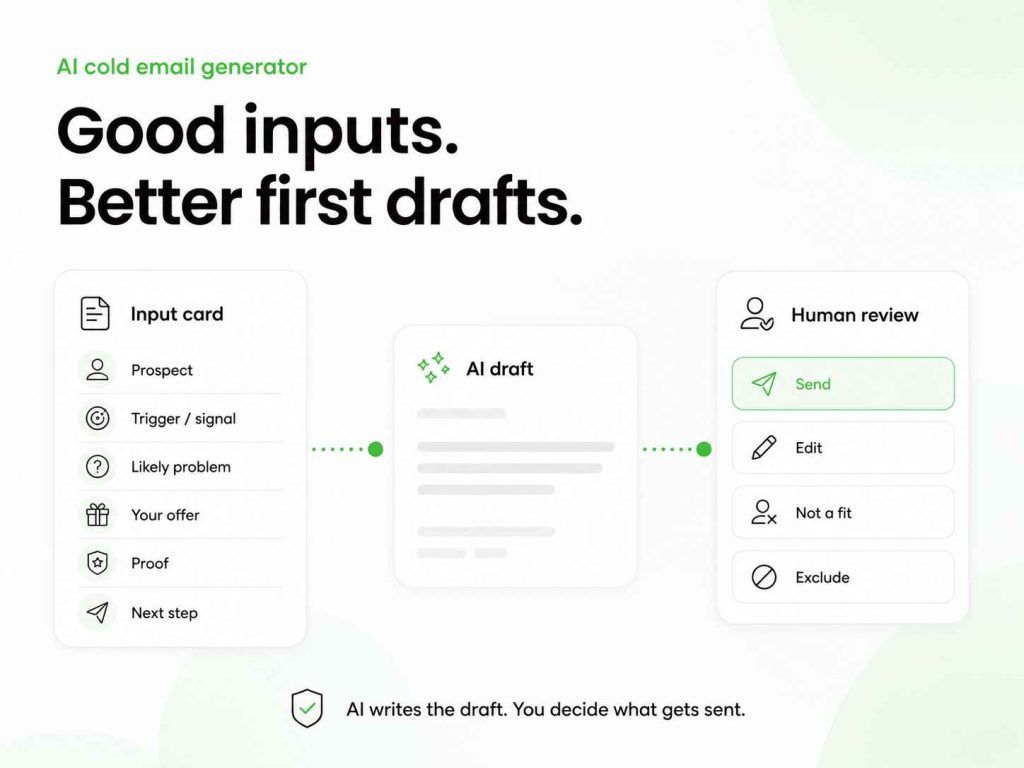
Instead, give it a short input card.
The blank page input card for an AI email
Before you use an AI email writer, collect these details:
| Input | What to add |
|---|---|
| Prospect | Name, role and company |
| Trigger | One recent, relevant signal |
| Likely problem | A specific challenge connected to that signal |
| Your offer | What you help with, in plain language |
| Proof | One short example, result or customer type |
| Next step | A low-pressure call to action |
For example:
Prospect: Maya Chen, VP Sales at a SaaS company
Trigger: Hiring six SDRs while opening a DACH office
Likely problem: Keeping outbound onboarding consistent during fast hiring
Offer: A platform that helps teams run personalised cold outreach with deliverability controls
Proof: Used by sales teams that need campaigns managed across several reps
Next step: Ask whether standardising early outreach is on the roadmap
That input gives the AI enough context to create a useful first draft.
Woodpecker’s guide to personalised cold emails can help you improve the trigger and pain-point parts before you start prompting.
Personalize outreach: the difference between a personalised email and a personalised cold email
AI can personalize outreach quickly. That does not mean every AI-generated line feels personal.
For example:
I saw your company is growing quickly and wanted to reach out.
That could go to thousands of companies.
A more useful opening might be:
Noticed you are hiring SDRs while expanding into Germany. Teams at that stage often need to standardise outreach before every new rep builds their own process.
The difference is not the tool. It is the level of research.
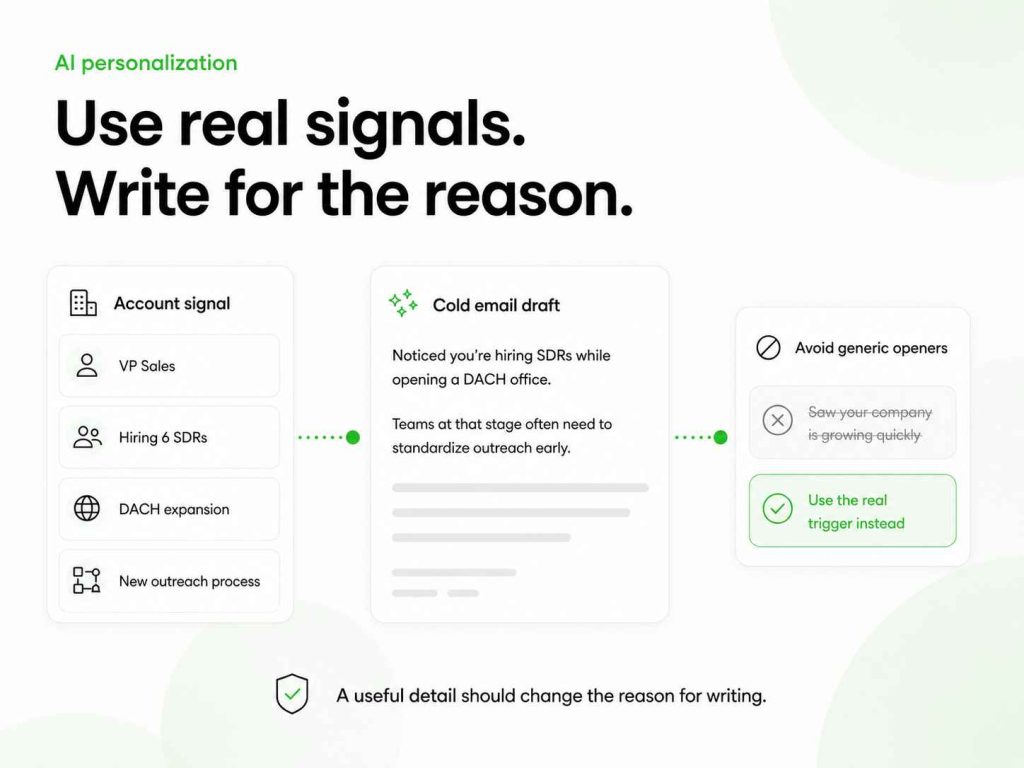
A personalized email uses a detail. Personalized cold emails use a detail that changes the reason for contacting the recipient.
Before asking AI to draft the message, check the research. Woodpecker’s guide on how to personalise cold emails through research can help you find usable signals. Its guide on turning research into better copy explains how to avoid forcing those details into an awkward opener.
Prompt: personalize outreach without making false claims
Write a short cold email for this prospect.
Keep it under 110 words.
Use the account signal as the reason for writing.
Do not claim that the prospect has a problem unless the information confirms it.
Do not use phrases such as “I hope this email finds you well”, “revolutionise”, “game-changing” or “just wanted to reach out”.
Use a conversational tone.
End with one low-pressure question.
Prospect:
[Name, role, company]
Account signal:
[Specific signal]
Possible challenge:
[Relevant but unconfirmed challenge]
What we help with:
[Your offer]
Proof point:
[Short proof]
Desired call to action:
[Question or next step]
This prompt helps the AI draft outreach messages without pretending it knows more than it does.
Subject line prompts and an email subject line generator
A subject line has one job: give the recipient a reason to open the email without sounding like clickbait.
An email subject line generator can produce options quickly. But do not ask it for “high-converting subject lines” without context. You will usually get vague phrases such as “Quick question” or “Idea for [Company]”.
A better subject line uses the same context as the email.
Prompt: use an email subject line generator with real context
Create 12 subject line options for a cold email.
The recipient is:
[Role and company]
The email is about:
[Specific issue or trigger]
Use 2–5 words where possible.
Avoid clickbait, fake urgency, all caps and vague lines such as “Quick question”.
Give me:
- 4 direct options
- 4 curiosity-led options
- 4 context-led options
Then choose the subject line that fits the actual message.
Woodpecker’s cold email subject line guide and subject line examples can help you judge AI suggestions instead of choosing the flashiest option.
Free AI, free cold email generator and AI-powered tools
A free AI cold email generator can be useful for drafts, rewrites and prompt testing.
Free AI is often enough when you are working on a small number of carefully researched accounts. You can use it to create ideas, compare angles or rewrite an email after a sales call.
But “free” does not mean the output is ready to send.
A free tool may lack your CRM context, your prospect history, your email performance data and the deliverability controls that help campaigns run safely. An AI-powered cold email generator may produce cold emails in seconds, but the quality still depends on what you give it.
That is why it helps to separate two jobs:
- AI writing support for creating drafts
- outreach tools for preparing, sending and managing campaigns
A sales platform should do more than generate text. It should help you organise email campaigns, manage reply handling and protect sending health.
Woodpecker’s cold email sequence guide shows how the email itself fits into a wider outreach process instead of acting as a one-off message.
AI email writer prompts for different outreach situations
An AI email writer is most useful when the prompt reflects a real sales situation.
Below are prompts for common outreach needs.
Generate cold emails with AI for a new prospect
Write three versions of a cold email for a new prospect.
Each version should:
- stay under 120 words
- use a different opening angle
- avoid generic praise
- include one clear reason for writing
- end with a simple question
- avoid suggesting a meeting too early
Prospect:
[Name, role, company]
Relevant signal:
[Signal]
Possible problem:
[Problem]
Offer:
[What you help with]
Tone:
[Direct, practical, conversational]
Use AI to write a followup
A followup should not simply say, “Did you see my last email?”
Ask the generator to add something new.
Write a followup to the cold email below.
Do not repeat the original pitch.
Add one new angle, proof point or useful observation.
Keep it under 80 words.
Do not use “just checking in”.
End with a low-pressure call to action.
Original email:
[Paste email]
New information to add:
[Case study, signal, insight or question]
For more ideas, see Woodpecker’s cold email follow-up formula and sales follow-up email examples.
Generate sales emails after a call
Write a follow-up email after a discovery call.
Use these notes:
[Paste short call notes]
Include:
- a brief recap of the problem discussed
- one agreed next step
- any material the prospect asked for
- a clear question or confirmation request
Keep the tone professional and direct.
Do not overstate outcomes or add features that were not discussed.
A good post-call email can reinforce what the prospect actually said. It should not turn into a second sales pitch.
Outreach prompts for a clear call to action
The call to action is where many AI-generated cold emails become too demanding.
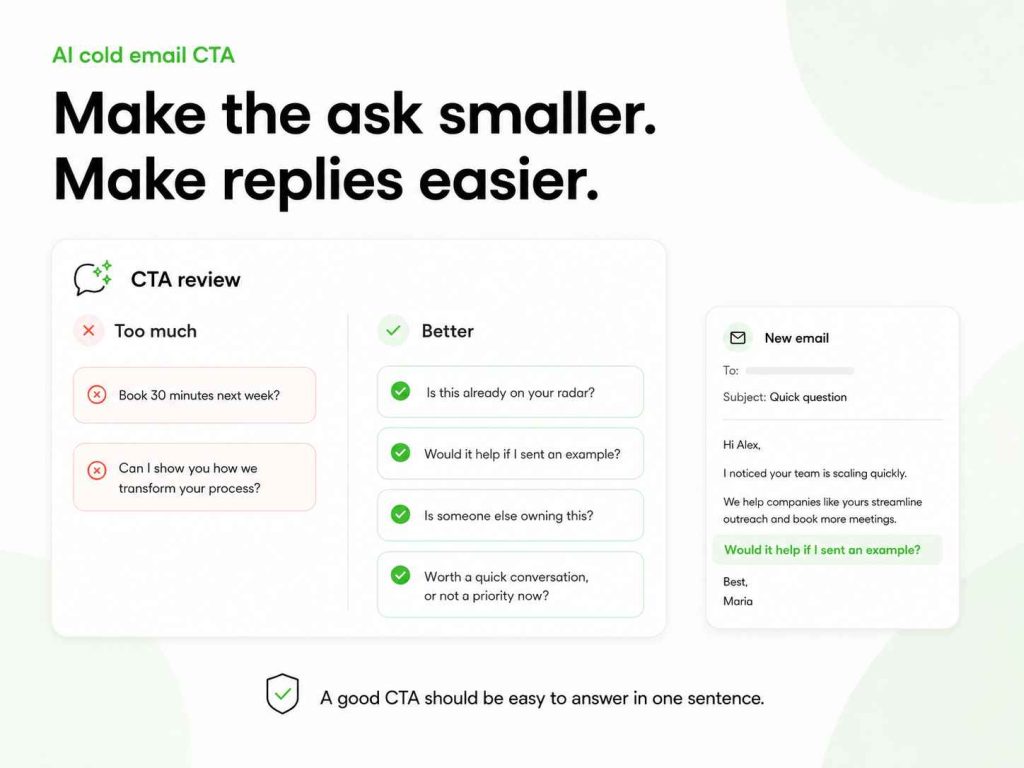
A generated draft may end with:
Can we book 30 minutes next week to show you how we can transform your process?
That is often too much for a first email.
A stronger call to action gives the prospect an easy way to respond.
Examples:
- Is this something your team is already reviewing?
- Would it be useful if I sent over a short example?
- Is there someone else who owns this?
- Worth a quick conversation, or not a priority right now?
Prompt: make the call to action smaller
Rewrite the call to action below.
Make it easy to answer in one sentence.
Avoid asking for a meeting unless the prospect has already shown interest.
Give me five alternatives:
- two direct
- two low-pressure
- one referral-style option
Current CTA:
[Paste CTA]
Context:
[Cold email, followup, post-demo email, referral request]
Woodpecker’s guide to cold email CTAs can help you choose the right level of ask for each stage.
Generate effective cold emails, not emails instantly
A promise to create cold emails instantly sounds attractive.
But speed is only useful when it does not remove the thinking that makes the email relevant.
An AI generator creates a draft quickly. A strong sender still needs to check:
- Is the account signal accurate?
- Does the message sound specific to the recipient’s role?
- Does the pitch match the likely problem?
- Is the email short enough to scan?
- Is the call to action appropriate?
- Would this sound credible if the recipient replied with questions?
This is how you generate effective cold emails rather than simply more emails at scale.
The best AI output is often not the first version. Ask for three angles, choose the strongest one, then edit it with a human eye.
Woodpecker’s cold email templates can give you proven structures to use alongside AI-generated drafts.
Emails with AI: how to edit copy before sending
Emails with AI should still sound like someone on your team wrote them.
Before you send anything, remove language that feels too polished, too broad or too confident.
Watch for phrases such as:
- “I came across your impressive company”
- “I wanted to reach out”
- “We are the leading solution”
- “This will revolutionise your workflow”
- “I would love to pick your brain”
- “Can I steal 15 minutes?”
Those phrases are not always wrong. They are simply overused and easy to ignore.
A better edit asks:
Does this email give the prospect a real reason to read the next line?
Use plain language. Keep the email focused on one idea. Remove claims you cannot support.
Woodpecker’s cold email format guide and email structure guide can help you turn an AI draft into a cleaner message.
AI-powered cold email generator prompts for a variety of emails
The same prompt should not be used for every email.
A first-touch email, a referral request, a post-event message and a reactivation email all need different inputs.
Here are a few examples of what the generator provides when you give it the right context:
| Email type | Useful AI input |
|---|---|
| First cold email | Account signal, likely problem, offer |
| Followup | Original email, new angle, timing |
| Referral request | Existing relationship, who you want to reach, why |
| Post-event outreach | Event context, conversation point, next step |
| Reactivation email | Previous contact, changed context, reason to reconnect |
A generator to quickly create a draft can be helpful across this variety of emails. But the more specific your input, the less generic the output.
This is one reason AI helps you create more useful copy when it works from research notes, not a generic product description.
Cold email generator uses AI, but deliverability still comes first
A cold email generator uses AI to create email copy. It does not solve deliverability.
You can have a strong personalised email and still land in spam if the list is poor, the domain is new or the sending setup is aggressive.
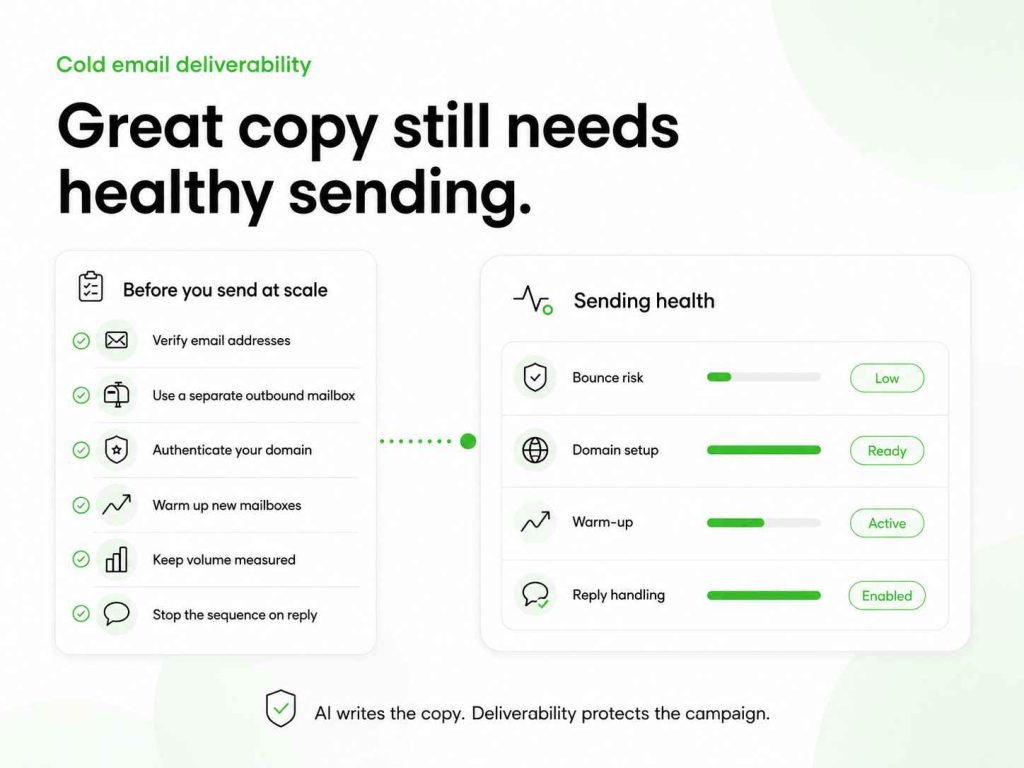
Before you send cold emails at scale, check the basics:
- verify prospect email addresses
- use a separate mailbox for outbound where appropriate
- authenticate your sending domain
- warm up new mailboxes gradually
- keep sending volume measured
- stop the sequence when a prospect replies
Woodpecker’s email verification guide can help you reduce avoidable bounces. Its guides on cold email infrastructure, SPF, DKIM and DMARC and domain reputation explain the sending layer behind healthy outreach.
AI writing assistant vs outreach automation
A writing assistant helps you draft.
Outreach automation helps you send, schedule, pause and organise campaigns.
Both can save time. They should not be confused.
An AI writing assistant may help you draft effective first emails, create followup options and test a different subject line. Outreach automation can then manage the sequence, stop messages after replies and keep the sales team from losing context.
The safest setup is not to use an AI generator as an autopilot.
Use the AI to help you create. Use an outreach platform to manage the workflow. Keep people responsible for deciding who gets contacted and what the message says.
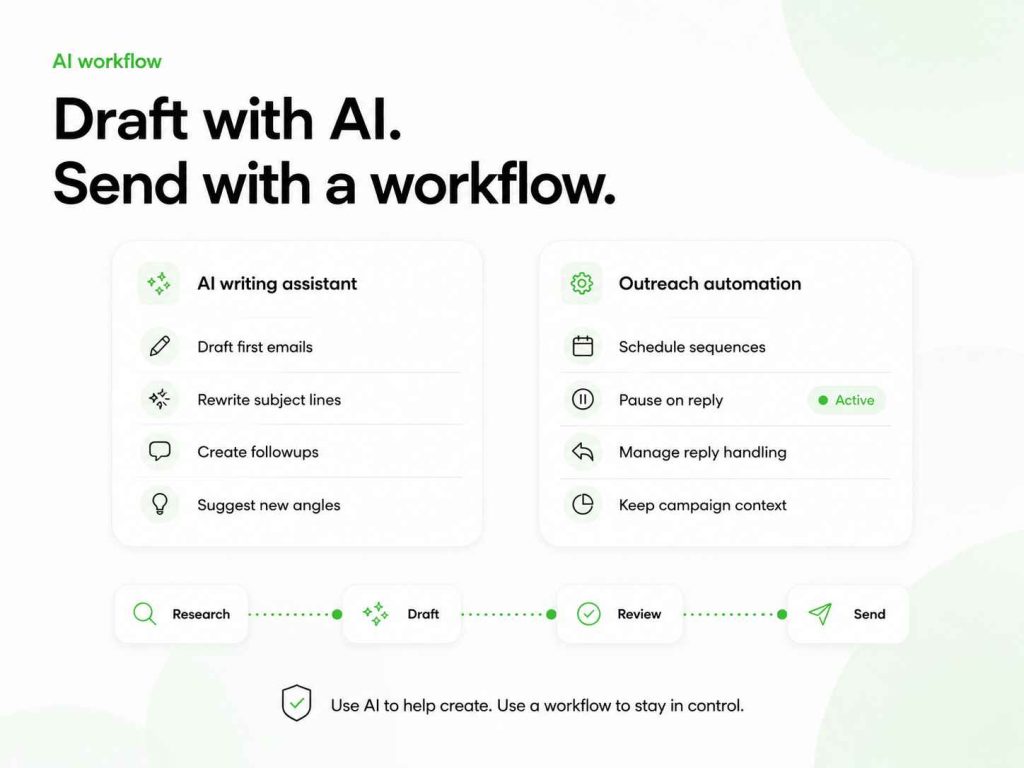
Woodpecker helps teams do that through campaign conditions, reply detection and sequence management. It lets you build outreach without relying on a one-off copy generator alone.
Can AI-generated cold emails boost response rates?
AI-generated copy can boost response rates when it helps you find a clearer angle, remove unnecessary wording or personalise the email more consistently.
It can also lower response rates when the message feels generic, overconfident or disconnected from the recipient’s reality.
The key is not AI itself. It is the process around it.
Good process:
- Research the account.
- Write a clear message brief.
- Use AI for a few draft options.
- Edit the strongest draft.
- Test it with a small segment.
- Review replies, not only open rates.
- Improve the prompt based on what prospects actually say.
That process gives you data-driven improvements without assuming the AI knows your buyers better than you do.
How to get better output from an AI cold email generator
An AI cold email generator creates a draft. Your input decides whether that draft turns into a professional cold email or a generic sales message.
Simply input a product description and the tool will probably produce emails based on broad claims. Add a real prospect signal, a defined audience and a clear next step, and the result has a better chance of sounding relevant.
That is where personalization comes in.
AI can help you create emails that feel specific to a recipient’s role, company or current situation. It can help craft compelling opening lines, suggest a clearer call to action and produce several versions of the same idea. But it cannot know which version will resonate with your target audience unless you give it useful context.
A good prompt should include:
- the prospect’s role and company
- a relevant trigger or research insight
- the problem you want to explore
- the value of your offer
- the clear next action you want the recipient to take
This makes it easier to generate high-converting outreach messages without relying on exaggerated claims.
A free AI-generated draft can be completely free and still save time. The value comes from avoiding the blank page, not from publishing the first output unchanged. AI-driven writing can help with lead generation, sales emails and email marketing, but it should not replace the thinking behind your marketing efforts.
Use the generator to create several emails to start with. Compare the angles. Edit the strongest one. Test it with a small group before sending emails at scale.
The goal is not simply to close more deals through automation. It is to create emails crafted around a real reason to contact someone.
When the input is good, the tool that helps you draft can improve rates and engagement. It may support conversion, engagement and conversions over time. When the input is vague, even high-performing AI will produce copy that sounds like it came from the same template as every other cold email.
AI can help you write emails effortlessly. It cannot replace the work needed to make outreach relevant.
FAQ
Is there a free AI cold email generator?
You can use free AI tools to generate cold email drafts from prompts. The system on this page gives you the inputs and prompts to do that. The output should still be reviewed before you send it to a prospect.
Can AI write personalised cold emails?
Yes, AI can help create personalized cold emails when you provide real account research, a specific trigger and a relevant reason for writing. AI cannot reliably invent that context for you.
What should I put into a cold email generator?
Add the prospect’s role, the company, one relevant signal, a likely challenge, your offer, proof and a simple next step. The better the input, the better the email copy.
Can I use ChatGPT or OpenAI for cold email writing?
Yes. ChatGPT, OpenAI-based tools and other AI writers can help with drafts, rewrites and subject line ideas. The prompt system works across tools because it focuses on the information you provide, not one specific platform.
How do I get replies from cold emails?
Write to a relevant prospect, use a specific reason for contacting them, keep the message short and make the call to action easy to answer. Use AI to speed up drafting, but do not let it replace research and editing.
Use AI to draft better cold emails, not more generic ones
A cold email generator can help you move faster. It can help you draft effective messages, explore different angles and avoid staring at a blank page.
But it cannot replace good research, a clear offer or an honest reason to contact someone.
Use AI to help you write. Use the input card to make the message specific. Edit every draft before you send it. Then measure the quality of the conversations, not only the number of emails sent.
Woodpecker gives sales teams the sending layer behind thoughtful outreach: personalised cold email campaigns, safe cold email scaling and deliverability checks before launch.