Email sequence software that branches on what your prospect does

Woodpecker sends prospects down Path YES or Path NO on opens, clicks or your own data. That is a condition-based campaign: a campaign (sequence) with a condition between two steps, built in email sequence software.

4.5/5

Trusted by 13,000+ professionals in 101 countries

Doodle of a flowchart: an envelope at the top, two branches leading to boxes with question marks, and an arrow down to a diamond decision box

Every automated follow-up replies less than the one before

Email 4 says the same thing to a prospect who clicked and one who never opened.

In 2-email campaigns the follow-up replies at 1.4% against 1.2%, across 1,272 companies. Woodpecker benchmarks: 1,020 companies, campaigns of 4 to 6 emails

One rule between two steps splits your campaign in two

A condition can also sit before the opening email. A campaign with a condition is an If-campaign, tagged IF in your campaign list.

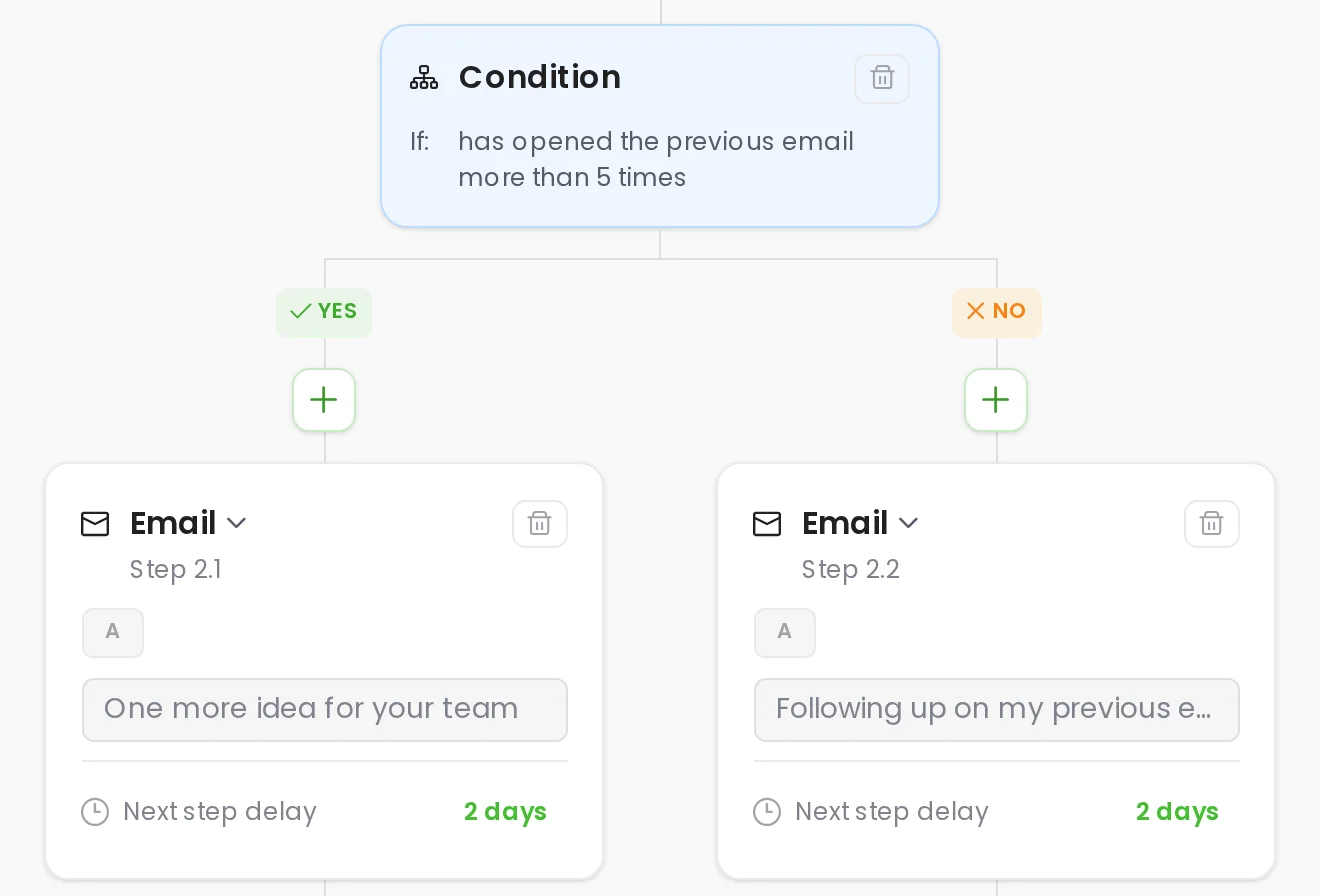
Campaign builder with a condition on email opens branching into a YES path and a NO path, one follow-up email on each
  1. 1

    The rule between two steps

    A condition is a rule you put between two steps. Woodpecker checks it when the next step comes due, at the end of the delay you set.

  2. 2

    Path YES

    The prospects who met the rule take Path YES. An open-based rule asks for more than X opens of the previous email, and 5 is the default Woodpecker fills in.

  3. 3

    Path NO

    The prospects who did not meet the rule take Path NO. The two paths do not rejoin, and each one runs to its own end.

  4. 4

    The Path YES follow-up

    Path YES gets an email of its own, with its own subject line and its own delay before the step that comes after it.

  5. 5

    The Path NO follow-up

    Everyone else gets a different email, written for prospects who did not do what the rule asked. Last Activity shows which path a prospect took.

Choose the signal your email sequence software branches on

A condition reads a signal and compares it to a value you set. Email sequence tools call it branching.

A magnifying glass

Open-based condition

Branch on opens: more than X times, where X defaults to 5, or at least once. Only opens from the last step are counted.

A globe on a stand

Click-based condition

Branch on a click: more than X times or at least once. The previous email needs a tracked link you insert, never one you paste.

A price tag on a string

Snippet-based condition

Branch on your own data: a custom field that equals your value, contains it or is not empty. Every snippet works except Timezone.

A hand bell

Task-based condition

Branch on a manual task you resolve yourself: done sends the prospect to Path YES, ignored to Path NO. Unresolved, they wait.

An electric plug

Connection request-based

Branch on a LinkedIn connection request they accepted, then message them there or by email. Needs a LinkedIn slot at $29 a month.

A funnel with envelopes dropping in

Two rules in one condition

Join several rules in one condition with AND or OR. One operator stays active per rule group, and you can add another group.

Open tracking is a pixel, and pixels get blocked

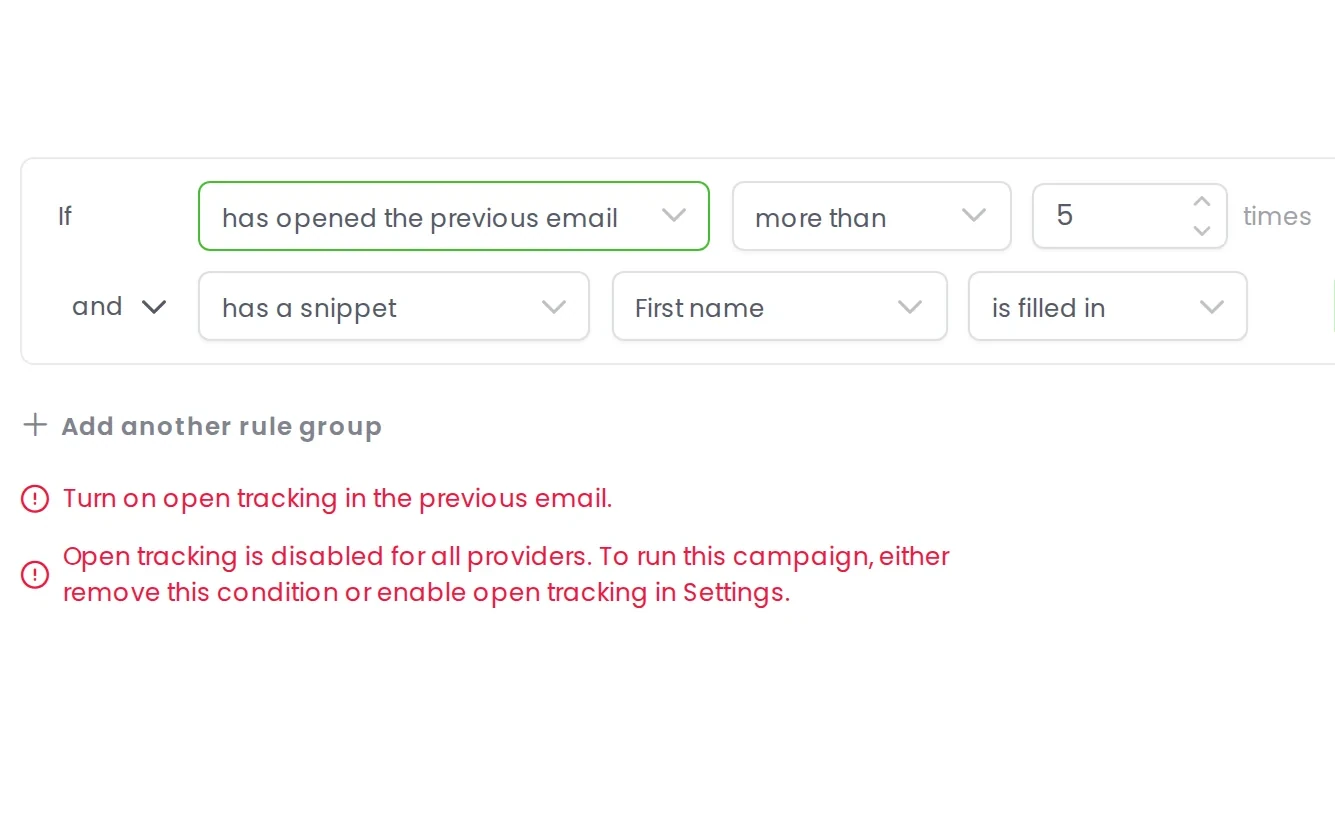
An open-based condition needs open tracking on, and you cannot switch it off while the condition exists. Woodpecker catches it with a notice: Turn on open tracking in the previous email.

Open tracking is a 1x10px PNG in every message. Some clients, Google among them, block images from unknown senders, so a prospect who read every word can land in Path NO. Apple Mail Privacy Protection inflates opens, so Path YES fills with people who never read anything. Our benchmarks page treats reply rate as the number that matters. Where the branch decides something you care about, a click-based or snippet-based condition is the safer signal.

Woodpecker asking for open tracking to be turned on before an open-based condition can be saved

Build an automated email sequence in four steps

  1. A signpost with two arms

    Add a condition, not another email

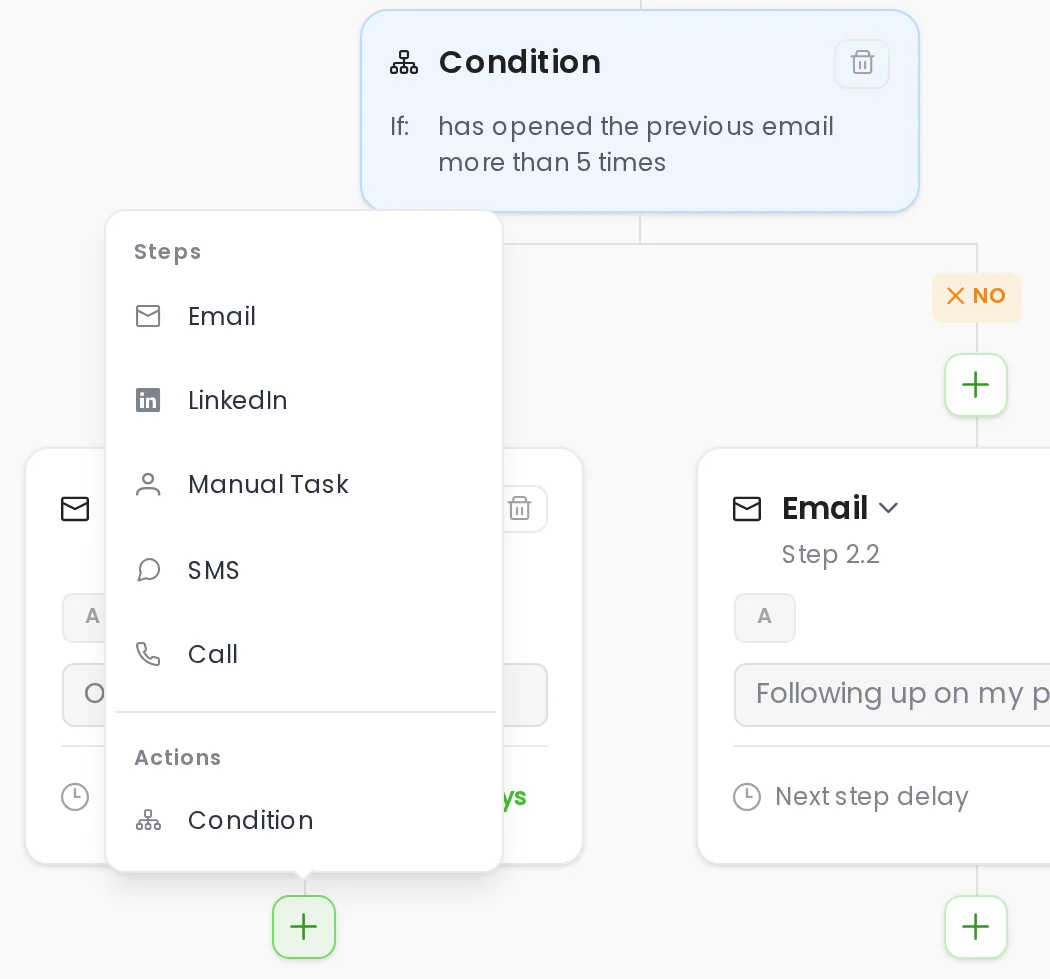
    Click the plus icon below a step and choose a condition instead of another email.

  2. A gauge with its needle halfway

    Pick the signal and the number

    Pick a condition such as clicked at least once, then save it between the two steps.

  3. A check mark in a box

    Write Path YES

    Write Path YES for prospects who clicked: "You checked the pricing page. Want the short version?"

  4. A large X mark

    Write Path NO

    Write Path NO for everyone else, then send: "Maybe pricing is the wrong place to start."

The Add item menu open under a campaign step, with Condition listed under Actions beside Email

Conditional sequences and drip campaigns are not the same

Drip, sequence or cadence software A drip campaign A condition-based campaign
The next follow-up A drip campaign Same email for everyone A condition-based campaign Chosen by what they did
Prospects who never clicked A drip campaign Get the same follow-up again A condition-based campaign Get the Path NO copy
A missing snippet Woodpecker pauses a prospect when a custom field used in the email is empty, so the message never sends. A drip campaign PAUSED (SNIPPET ISSUE), nothing sends A condition-based campaign Path NO, via a snippet condition
A prospect who replies A drip campaign Follow-ups stop, status RESPONDED A condition-based campaign Follow-ups stop, status RESPONDED
Removing the branch later A drip campaign Nothing to remove A condition-based campaign Deletes all Path NO emails

Questions people ask before they build a branch

  • Can a condition check whether someone replied?

    No, and it does not need to. When a prospect replies, Woodpecker sets their status to RESPONDED and every auto follow-up email after that stops on its own. A reply branch would only repeat what already happens. To route people by what they said rather than whether they said anything, use Workflows instead: they move prospects between campaigns on status and, optionally, AI interest level.

  • How many conditions can I add to one campaign?

    More than one. A single condition can also hold several rules joined with AND or OR. One operator stays active per rule group, and adding another rule group gives you the other operator. We do not publish a maximum. In practice you add a condition wherever the answer changes what you would say next, and the campaign editor shows every path you create.

  • Do I need open tracking turned on?

    Yes, for open-based conditions, and you cannot turn it off while one exists: remove the condition first. The honest half is that some clients block the tracking image and Apple Mail Privacy Protection inflates opens, so a click-based or snippet-based condition is the steadier signal.

  • What happens if I remove a condition?

    Removing the condition deletes all the emails from Path NO, so it is worth knowing before you experiment on a live campaign. You also cannot remove a condition once a prospect has met it and the email has gone out. Adding one to a running campaign splits it the same way, so check before you save.

  • Does branching improve reply rates?

    We do not publish a number for that, because we do not have one. Nothing in our data compares campaigns with conditions against campaigns without them. What we do publish is that every follow-up replies less than the one before it, 1.0% on email 1 and 0.5% on email 4 across 1,020 companies. A condition does not add sends. It changes what the next one says to a prospect who has already told you something.

  • Do condition-based campaigns cost extra?

    No. Conditions are included on every plan. Pricing is usage-based on contacted prospects and starts at $35 a month for 500, and your bill is the same whether a campaign branches or not. The one paid dependency is a LinkedIn slot, $29 a month, for connection request conditions. There is no free email sequence tool tier, but every plan includes a 14-day free trial. If you are comparing email sequence tools, our rundown of the best email sequence software is on the blog.