Free Chrome extension by Woodpecker
Free web scraper Chrome extension: turn any list into CSV or Excel
A data scraper that reads the list, then opens its item pages (each record's own page) for what the list leaves out, like an email or phone. It follows the next pages and saves the rows as CSV or XLSX.
- No account
- No row limit
- Nothing leaves your browser
- calls from the extension to Woodpecker or anyone else: no telemetry, no analytics
- 0
- kinds of paging it follows: Next, numbered pages, Load more, infinite scroll
- 4
- file formats, CSV and XLSX, that open in Excel without an import dialog
- 2
- recent runs kept on the Start screen to download again
- 10
How to use the web scraper Chrome extension
-
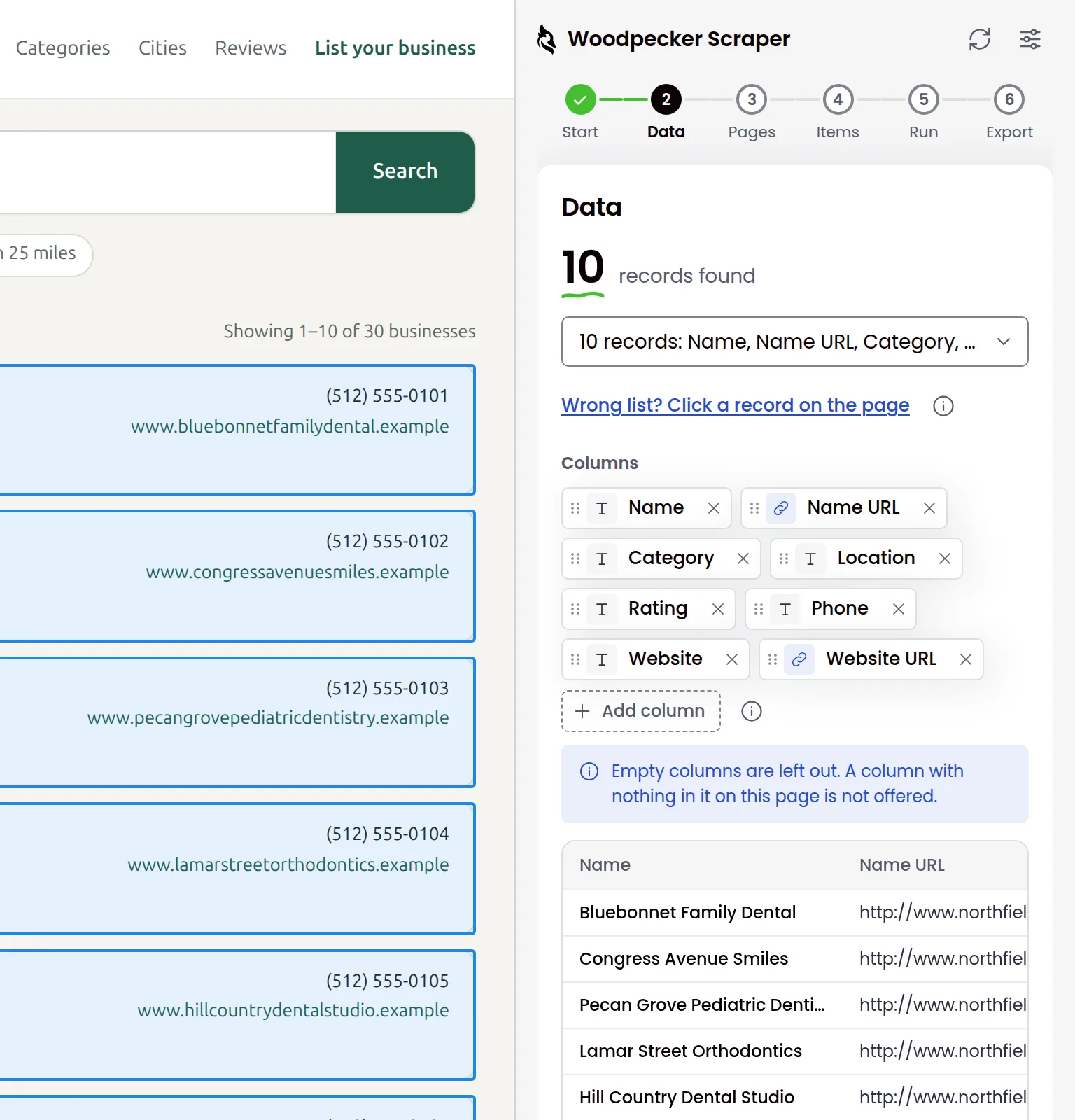
Click Detect Data on This Page
Open the page with the list, click the Woodpecker Scraper icon, then Detect Data on This Page and allow the site. Each record gets an outline and the panel lists the columns. Wrong list? Click one record.
-
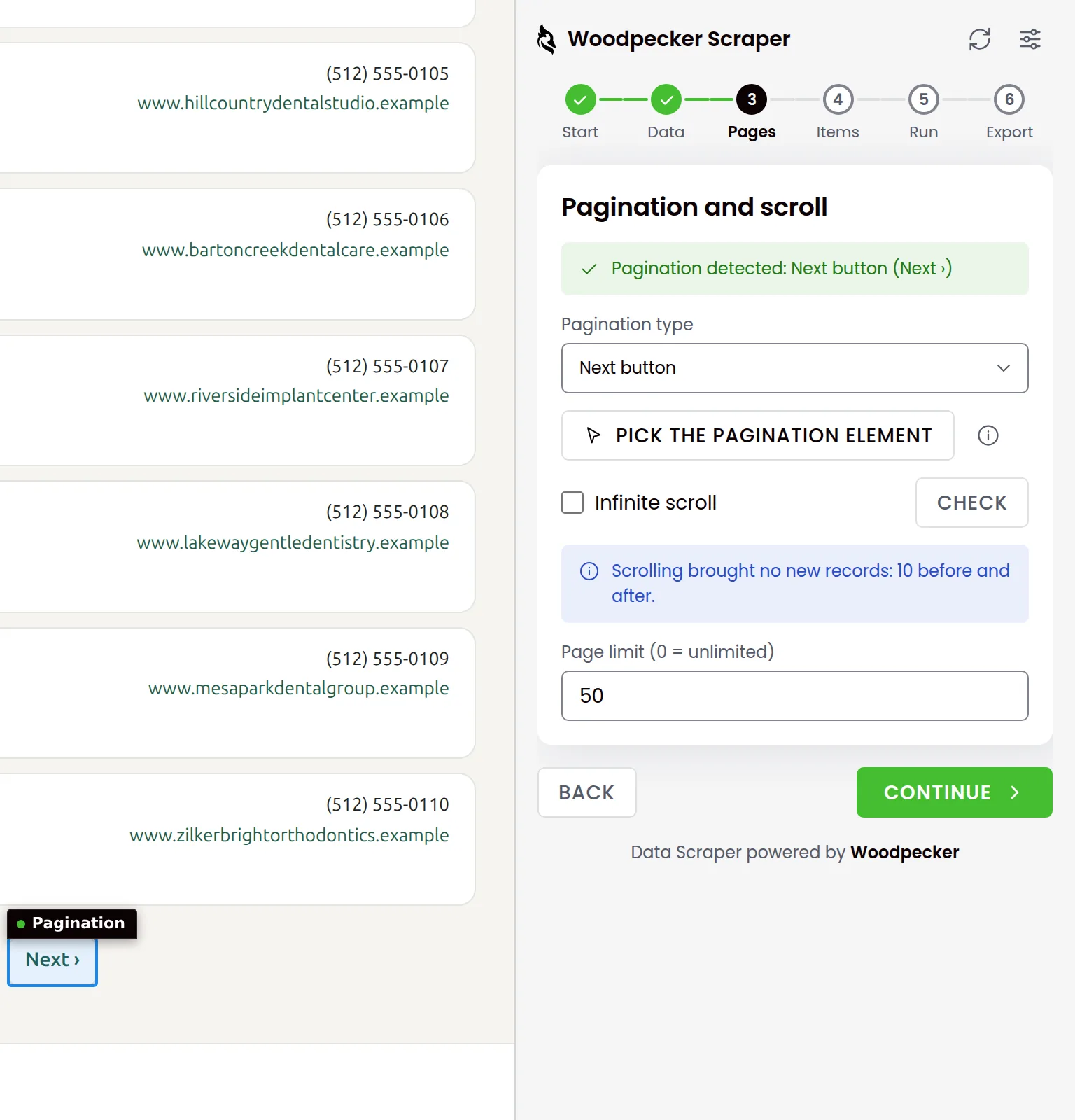
Let it follow the pages
It finds a Next button, numbered pages, Load more or infinite scroll. If it misses one, click Pick the pagination element, then the control on the page. The page limit is 50 unless you change it.
-
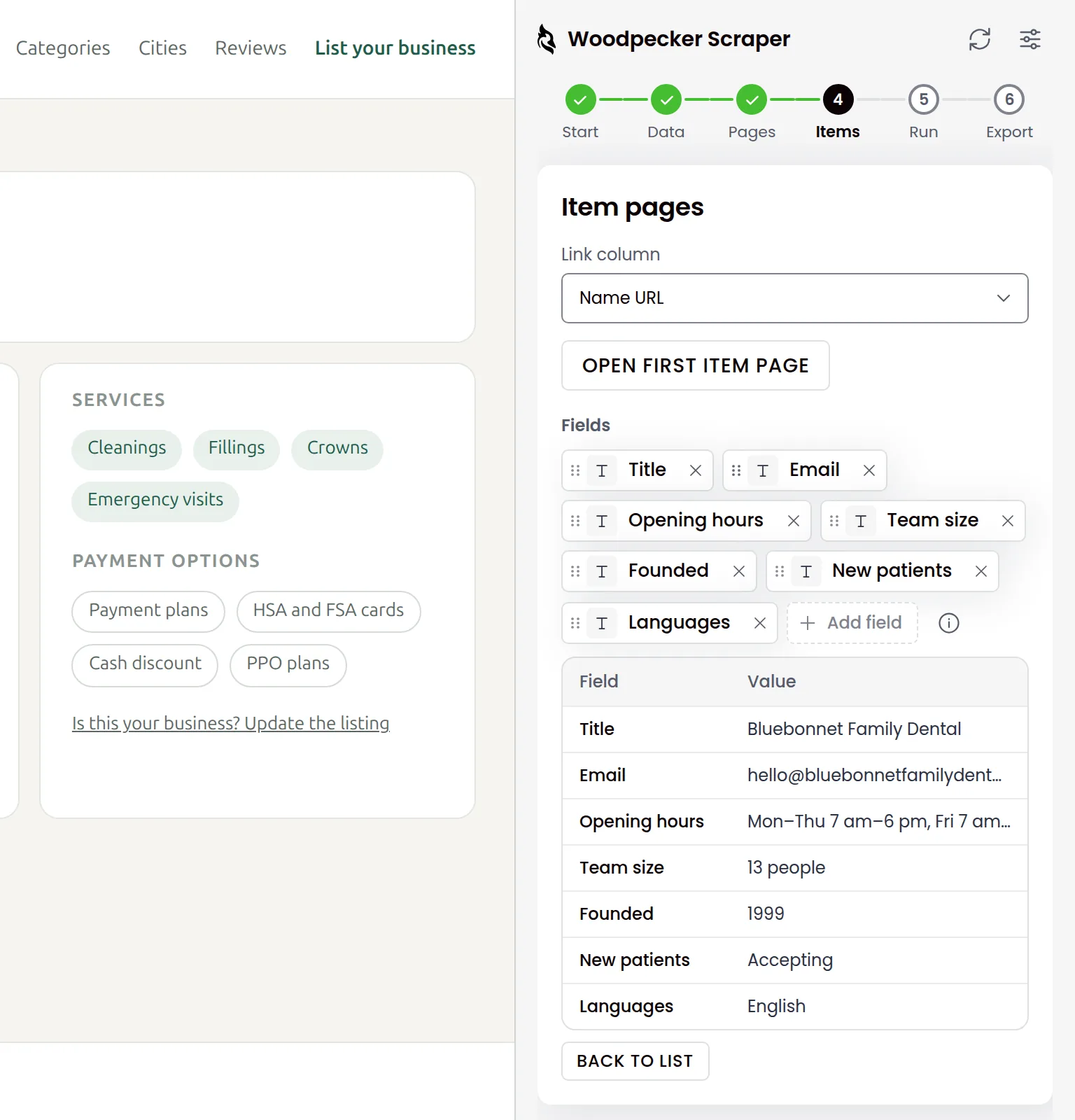
Optional: add columns from item pages
Pick the link column and open the first item page. The panel suggests the fields it can read there, such as Email or Opening hours. Your file gets those columns for every record, though the list never showed them.
-
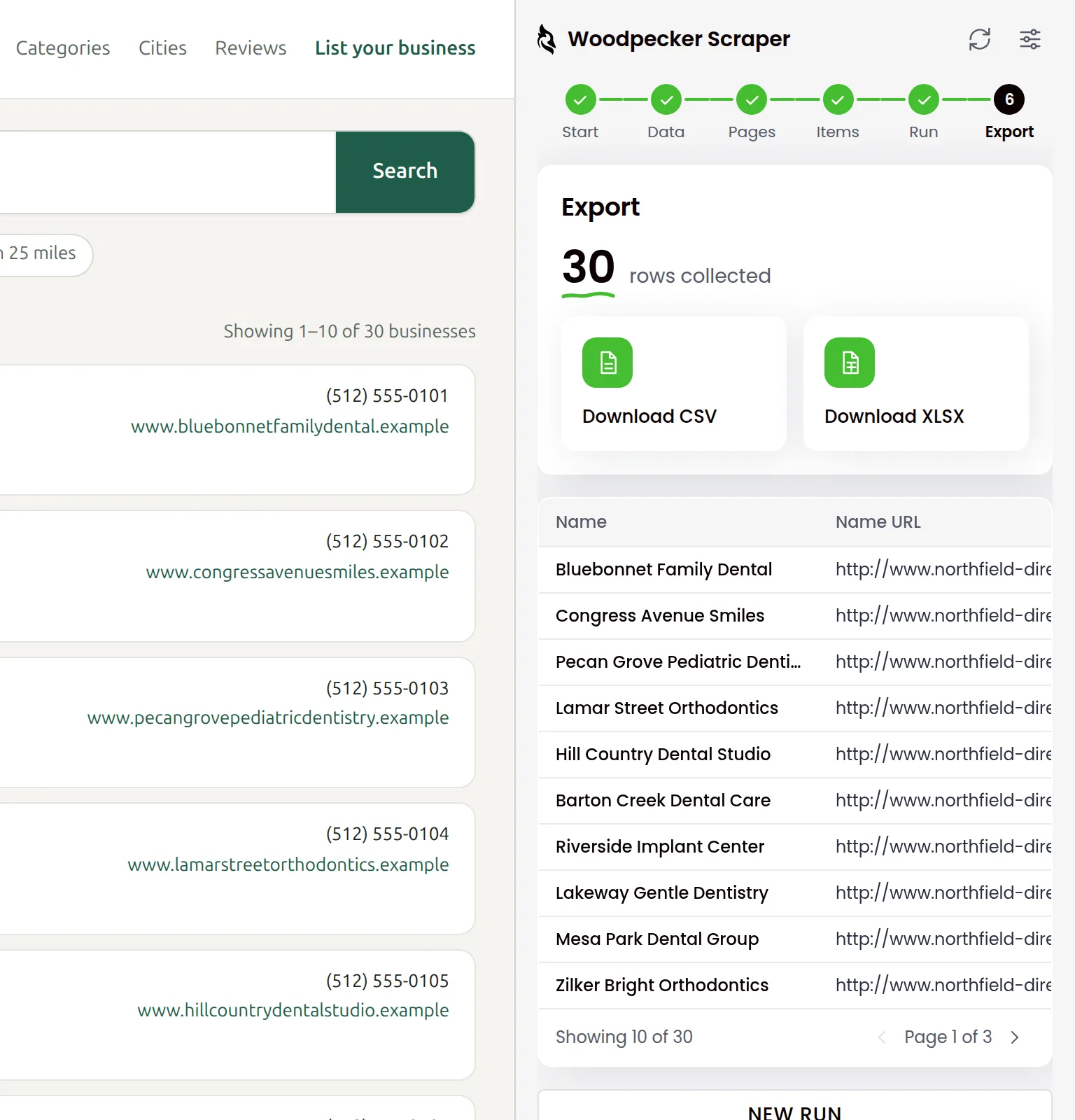
Start Scraping, then download CSV or XLSX
Click Start Scraping, then download the rows as CSV or XLSX. That is how you scrape a website to Excel. The CSV opens in Excel with accented letters intact and no import dialog.
Scrape directories, job boards, shops and tables
Each tab shows one kind of page: what the extension outlines on it and the rows you get in the file. The steps to scrape data from a website stay the same.
Use it as a lead scraper on company directories and search results: name, city, phone and email, when the page shows them. Open item pages to add the fields the list leaves out.
| Company | City | Phone | |
|---|---|---|---|
| Harbor Lane Digital | Chicago | (312) 555-0141 | [email protected] |
| Prairie Signal Media | Evanston | (847) 555-0142 | [email protected] |
| Copper Kettle Creative | Milwaukee | (414) 555-0143 | [email protected] |
| Lakefront Growth Studio | Chicago | (312) 555-0144 | [email protected] |
Scrape job listings into one sheet: role, company, location and date, page after page. Open item pages to read the details each posting shows only there.
| Role | Company | Location | Posted |
|---|---|---|---|
| Sales development rep | Quillmark Software | Denver, CO | Sep 22 |
| Account executive | Tallgrass Cloud | Remote, US | Sep 21 |
| Marketing operations lead | Fieldnote Analytics | Austin, TX | Sep 19 |
| Customer success manager | Ridgeway Payroll | Kansas City, MO | Sep 18 |
Scrape a table from a website and every column takes its name from the header. Merged cells repeat in each row they cover, and data grids like AG Grid work too. The CSV opens in Excel with accents intact.
| Hall | Exhibitor | Booth | Country |
|---|---|---|---|
| Hall A | Quillmark Software | A112 | United States |
| Hall A | Norrsken Freight | A118 | Sweden |
| Hall B | Vistula Robotics | B204 | Poland |
| Hall B | Tallgrass Cloud | B210 | Canada |
It scrolls the whole page or a box inside it, and reads lists that keep only the rows in view. The page limit does not apply here: the run scrolls until the list ends.
| Company | Category | City |
|---|---|---|
| Fieldnote Analytics | Business intelligence | Austin |
| Tallgrass Cloud | Web hosting | Kansas City |
| Quillmark Software | Document software | Portland |
| Ridgeway Payroll | HR software | Denver |
| Saltbox Payments | Payments | Miami |
Product listings turn into a sheet of names and prices, page by page through the catalog. A column of prices is named Price even when the page gives it no header.
| Product | Price | Category |
|---|---|---|
| Ergonomic office chair | $249.00 | Furniture |
| Standing desk frame | $319.00 | Furniture |
| Wireless keyboard | $59.90 | Accessories |
| USB-C docking station | $129.00 | Accessories |
Data scraper Chrome extension features for real pages
What the scraper extension does when the page is not a clean list, or when the first guess is wrong.
-
Emails the list hides, read from item pages
A list with no emails comes back with an Email column when its item pages show one. It opens them by link, or by a click on single-page apps.
-
The right list, even when the first guess is wrong
Click one record on the page and it collects that list instead. Missing a value? Click it and it becomes a column.
-
Phones and emails hidden until you hover
It reads values the page hides until you hover, and turns an email or phone kept in a data attribute into its own column.
-
No fixed rhythm on the site
Every pause lands at random between half and one and a half times the value you set. Randomized pauses are on by default.
-
Two runs at once, your last ten kept
Each tab has its own panel, so two tabs can collect at the same time. The Start screen keeps your last ten runs to download again.
-
Stop any time, keep the rows so far
The run shows the page it is on, rows collected, rows left and time left. Pause, resume or stop it whenever you like; collected rows stay.
Your list does not feed anyone's database
Woodpecker Scraper is a web scraping Chrome extension that sends nothing to Woodpecker or to anyone else. There is no telemetry, no analytics and no account. While a run is on, your tab loads the site's next pages the way it would if you clicked through them yourself.
- Your rows, recipes and settings stay in your browser until you download or delete them.
- Nothing is granted at install. It asks for each site when you click Detect there.
- Even the fonts ship inside the extension, so it has nothing to fetch.
Made by Woodpecker, a cold email tool. The one offer you will see: once per run, a small window offers a free Woodpecker trial. It never takes focus, the run keeps going and it closes by itself after 20 seconds.
- Rows collected
- 30
- Rows sent to Woodpecker or anyone else
- 0
How it compares with other scraper extensions
| Collecting the list | Woodpecker Scraper | Instant Data Scraper | Web Scraper | Ultimate Web Scraper |
|---|---|---|---|---|
| How you start a scrape Woodpecker Scraper: Detect Data on This Page outlines every record and lists the columns; if it picks the wrong list, click one record. Instant Data Scraper's store listing: it "uses heuristic AI analysis of HTML structure to detect data for extraction. If the prediction is not satisfactory, it lets the user customize the selections". Web Scraper's store listing: "open the Web Scraper tab in developer tools", "Create a new sitemap", "Add data extraction selectors to the sitemap". Its extension page: "The AI Wizard can automatically detect lists, tables, and repeating data on a page to create a scraper in one click." Ultimate Web Scraper: "Click one product, one row or one search result, and the extension finds every other one like it". | Woodpecker Scraper Detect finds the list and its columns; click a record if it picks the wrong one | Instant Data Scraper AI detects the data; you can adjust the selection | Web Scraper A sitemap of selectors built in DevTools, or its AI Wizard in one click | Ultimate Web Scraper Click one item and it finds the others like it |
| Fields from item pages Woodpecker Scraper opens item pages by a link column, a URL in the text, an attribute such as data-url, or a click on single-page apps. Instant Data Scraper's how-to: open the first page of listing results, then mark the "Next" button to "retrieve data from multiple pages into one file". Web Scraper: "It can also follow links to scrape data from individual product or detail pages." Ultimate Web Scraper's Page Extractor: "Bulk-extract data from a list of URLs ... one row per page." | Woodpecker Scraper By link, or by click on single-page apps | Instant Data Scraper Its how-to covers the list and its next pages | Web Scraper Follows links to item pages | Ultimate Web Scraper Separate tool: a list of URLs, one row per page |
| Kinds of paging it follows Instant Data Scraper's store listing: "Automatic navigation to next page via buttons or links" and "Support for infinite scrolling". Web Scraper: "Next buttons, numbered pagination, Load More buttons, and infinite scrolling". Ultimate Web Scraper: scroll the page, click a "Next" link or press a "Load more" button. | Woodpecker Scraper Next, numbered pages, Load more, infinite scroll | Instant Data Scraper Next button or link, infinite scroll | Web Scraper Next, numbered pages, Load more, infinite scroll | Ultimate Web Scraper Next, Load more, scrolling |
| Price, files and data | ||||
| Price of the extension Instant Data Scraper's store listing: "This extension is completely FREE." Web Scraper: "completely free for unlimited local web scraping". Web Scraper Cloud plans start at $50 a month, with annual billing shown. Ultimate Web Scraper: "A few advanced options ... are part of a paid plan." | Woodpecker Scraper Free, no paid plan | Instant Data Scraper Free | Web Scraper Free locally; Cloud plans from $50/mo | Ultimate Web Scraper Free; some options paid |
| Download a file for free Ultimate Web Scraper: "File downloads are part of the paid plan; copying the table to your clipboard is free once every 24 hours." | Woodpecker Scraper CSV, XLSX | Instant Data Scraper | Web Scraper | Ultimate Web Scraper Paid plan (free clipboard copy once every 24 hours) |
| Export formats As each maker lists them. Web Scraper Cloud adds JSON and cloud storage exports; the table shows the extension. | Woodpecker Scraper CSV, XLSX | Instant Data Scraper CSV, XLS, XLSX, copy and paste | Web Scraper CSV, XLSX | Ultimate Web Scraper CSV, Excel, JSON, Google Sheets |
| Where scraped data goes Store privacy forms are the makers' own disclosures. Instant Data Scraper's listing: "the scraped data does not leave your browser". Web Scraper: "Data extraction is run on your browser". Ultimate Web Scraper: "Results are saved on your computer". | Woodpecker Scraper Stays in your browser; the extension sends nothing to anyone | Instant Data Scraper Stays in the browser, per the listing; store form declares it handles Web history | Web Scraper Runs in your browser; store form declares it handles Website content; sitemaps can sync to Cloud | Ultimate Web Scraper Saved on your computer; leaves on a Google Sheets export or a Cloud run |
Checked on September 23, 2026. Competitor details come from their own pages.
A free lead scraper for your next cold email list
Addresses on web pages can be old or mistyped. Woodpecker, the cold email app used by 13,000+ professionals, checks each one before it sends.
-
Keep the source of every row
Turn on the Source URL column before the run. Every row then records the page it came from, so you can say where you found each contact.
Cold email and GDPR -
Let Woodpecker check each address
Bouncer verifies each address right before the email goes out, and Woodpecker skips any it marks INVALID. Verification is free on every plan except Unlimited.
How free email verification works -
Add the mailboxes the list needs
Every Woodpecker plan includes unlimited email accounts, so a longer list can go out from more mailboxes at no extra cost in Woodpecker.
How many mailboxes a list of this size needs -
Import the file and send
Go to Add prospects, then Import, and load the CSV or XLSX. Prospects who opted out or sit on your blacklist cannot be added to a new campaign.
Cold email with Woodpecker
Campaigns under a 2% bounce rate get a 1.6% median reply rate; those over 20% get 0.9 to 1.0% (56,614 campaigns, 7,000 companies).
14 days or 500 emails free. All features included. No credit card.
Questions about the free web scraper
Plain answers on price, privacy, the sites it works on and responsible scraping. Collect only the data you need, follow each site's terms and keep the randomized pauses on.
-
Is the web scraper really free?
Yes. The scraper has no paid plan and no row limit. It is made by Woodpecker, a cold email tool, and it shows one offer. During each run, once the first rows are saved, a small window offers a free Woodpecker trial. The window never takes focus, the run keeps going and it closes by itself after 20 seconds or when the run ends. The Export step shows the same offer.
-
Do I need an account?
No. You install the extension and use it: there is no account and no analytics. It needs Chrome 114 or newer; on older versions it will not install or run. The panel is in English or Polish and follows the language of your browser.
-
Does my data leave my browser?
No. The extension sends nothing: no telemetry, no crash reports, no calls to Woodpecker or anyone else. Detection, extraction, storage and export all run in your browser, and your rows stay there until you download or delete them. While a run is on, your tab loads the site's pages the way it would if you clicked through them yourself. The pause settings space those page loads out.
-
Is web scraping legal?
It depends on the site, the data, the country and what you do with the data. Many sites set rules for automated access in their terms of use, and personal data such as names and email addresses falls under privacy laws like the GDPR. The extension does not check any of this for you. Read the site's terms, collect only what you need and ask a lawyer if you are unsure. This answer is not legal advice.
-
Can I use a scraped contact list for cold email?
It depends on where your recipients are and on the law that applies to you. Under the GDPR you need a lawful basis, you must tell people where you got their data and you must honor opt-outs. Keep the Source URL column on so each row records its page, and verify the addresses before you send. Read about cold email and GDPR and our GDPR policy.
-
Which websites does it work on?
It works on company directories, search results, shops, job boards, registries and plain HTML tables. That includes tables with merged cells, data grids like AG Grid and lists that scroll inside a box. It follows item pages by link or by click, even on another site once you allow it. It does not follow item pages that open in a modal or in a new tab. It also does not combine infinite scroll with item pages opened by a click.
-
Does it work on LinkedIn, Google Maps or pages behind a login?
We have not published results for LinkedIn or Google Maps, so we make no promise for them. The extension reads the page open in your own tab, and only after you click Detect there. If you are logged in, it reads the page as your tab shows it. The site's terms of use decide what you may collect, logged in or not. Read them first and collect only what you need.
-
Can it scrape many pages, Load more buttons and infinite scroll?
Yes. It recognizes a Next button, numbered pages, a Load more button and infinite scroll, and you can click the control yourself if it misses one. The page limit is a whole number from 0 to 100,000, 50 by default, and 0 means no limit. Infinite scroll ignores the limit and scrolls until the list ends. You can pause, resume or stop a run at any time and keep the rows already collected.
-
What file formats does it export?
CSV and XLSX, so you can extract data from a website to Excel without a converter. The CSV opens in Excel with accented letters intact and no import dialog, and you can pick comma or semicolon as the delimiter. A value that starts with =, +, - or @ gets a leading apostrophe, so it cannot run as a formula. XLSX has a bold header row and continues on a new sheet after 1,048,576 rows.
-
Does it find email addresses?
It reads the addresses the page contains, including ones kept in data attributes or hidden until you hover, and names that column Email. It is not an email scraper that looks up or guesses addresses a page does not show, and it calls no outside service. When a site has no list to scrape, Lead Finder in Woodpecker searches a B2B lead database instead. Verify any list before you email it.
-
Is there a free alternative to Instant Data Scraper?
Yes, and Instant Data Scraper is free too. Woodpecker Scraper is another free option with no account and no row limit. It exports CSV and XLSX; Instant Data Scraper also offers XLS and copy and paste. The best web scraper Chrome extension for you depends on your pages. Ours opens item pages by link or by click, lets you pick the list by hand, keeps your last ten runs and sends nothing to anyone.
-
Will a site block me?
It can happen, and the extension makes no promise about blocks or CAPTCHAs. You set the page load delay, the pause between pages and a page limit (50 by default). Every pause lands at random between half and one and a half times the value you set. Keep runs modest, leave the randomized pauses on and respect the site's rules on automated access.