


If you’re using La Growth Machine, there’s a good chance you’ve already hit one of its biggest frustrations: pricing that skyrockets as your team grows. What starts as a powerful LinkedIn automation tool can quickly turn into a costly and complicated system, especially when every LinkedIn account and user requires a separate license.
And the price isn’t the only problem.
Many teams discover that La Growth Machine lacks a built-in CRM pipeline, has a steep learning curve, and becomes difficult to manage at scale. Before long, you’re juggling multiple tools just to run simple outreach campaigns – exactly what automation was supposed to eliminate.
The good news? You’re not stuck with it.
In fact, 2026 has brought a wave of cheaper and more powerful outreach tools that outperform La Growth Machine in key areas, from email deliverability and lead data to multichannel automation and workflow simplicity.
In this guide, we’ll be exploring alternatives to La Growth Machine that sales teams are switching to right now.
Whether you want lower costs, better automation, or a true all-in-one prospecting platform, these tools might completely change how you generate leads.
Let’s jump right in:
Why consider alternatives to La Growth Machine?
Although LGM packs advanced features (multichannel sequences, personalized messages and CRM integrations), the platform comes with notable downsides:
- High cost per LinkedIn account and seat. Plans begin at $60 per month for one LinkedIn account and climb to $180 per user for API access and higher campaign limits. Each LinkedIn account requires its own license, so costs skyrocket when teams run multiple LinkedIn accounts.
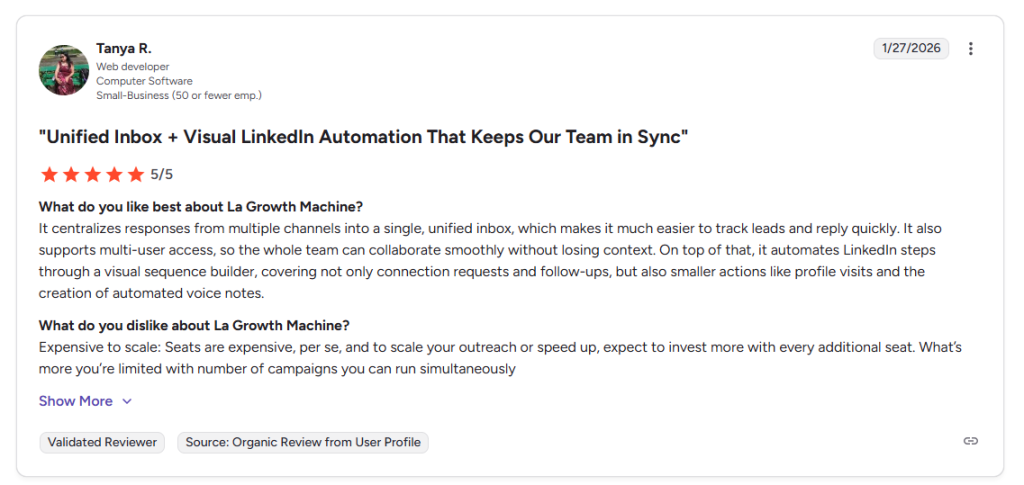
- No built‑in CRM pipeline. LGM integrates with CRMs via Zapier or native syncs, but there’s no native unified inbox or pipeline to manage leads. Users often export data to external tools, hurting workflow efficiency and making contact management harder.
- Complex interface and steep learning curve. Advanced automation features require training; small businesses wanting simple LinkedIn prospecting often find the user experience overwhelming. Setting up domain authentication (SPF/DKIM), building lists and customizing sequences can be overkill for beginners.
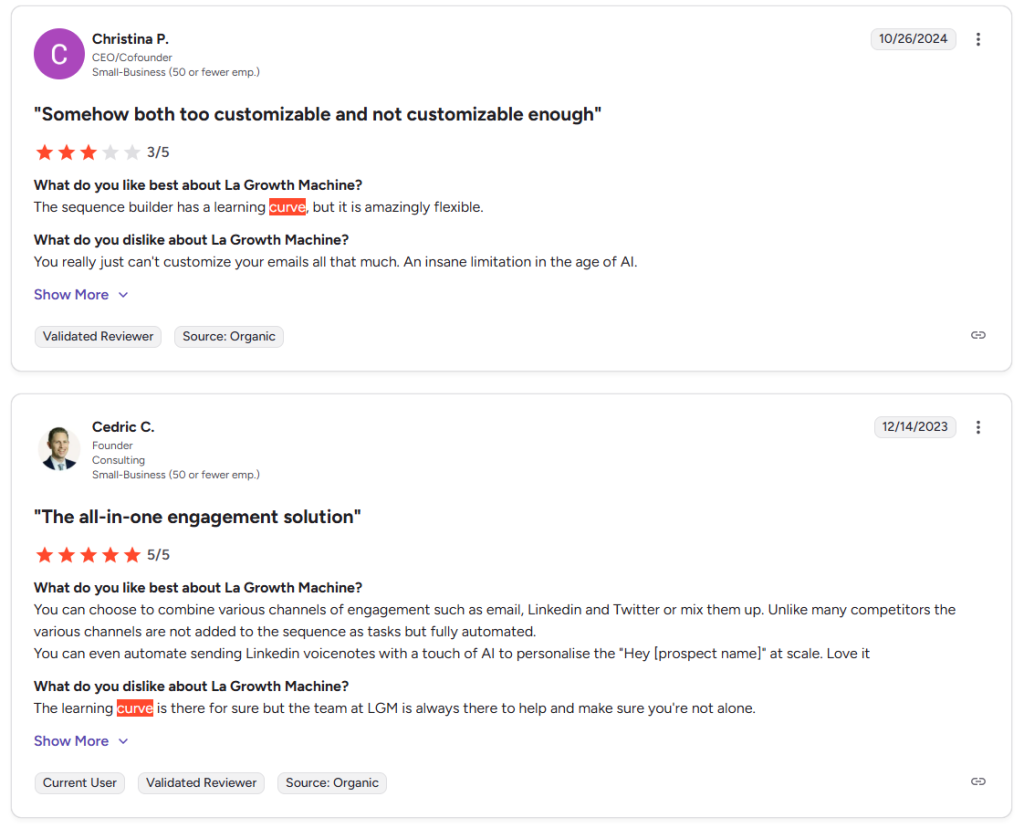
- Limited team collaboration. LGM lacks a shared inbox and granular role management, so agencies managing multiple clients have trouble tracking who engaged with which contact.
- Potential account risks. As with other LinkedIn automation tools, aggressive automation may increase the risk of being flagged by LinkedIn.
Top La Growth Machine alternatives to try in 2026
If you’re facing high budget constraints, scaling challenges or a desire for easier automation tools, here are the alternatives that make most sense:
#1 Woodpecker: email‑first outreach tool with LinkedIn add‑on
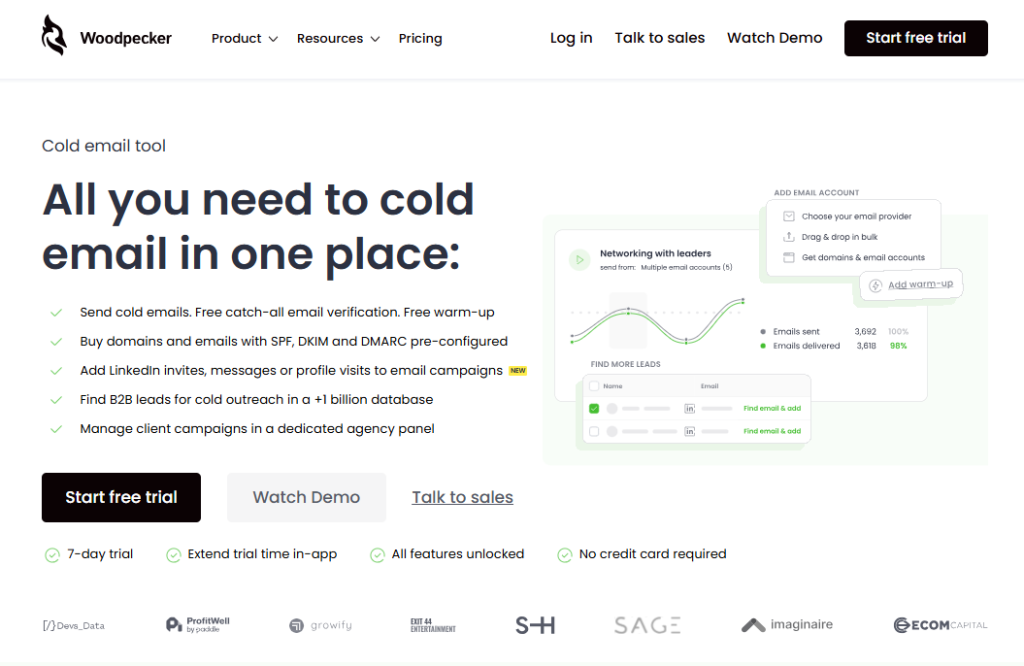
Woodpecker stands out as the most user‑friendly and affordable alternative to La Growth Machine. The tool began as a cold‑email platform but now supports optional LinkedIn outreach automation via an add‑on. It’s ideal for sales teams seeking reliable deliverability and a smooth experience without breaking the bank.
Key features
- Free email verification and warm‑up: Woodpecker includes real‑time catch‑all email verification to maintain high deliverability and automatically warm up new domains.
- Inbox rotation and adaptive sending: the platform rotates between multiple mailboxes and uses adaptive sending limits to maximize inbox placement.
- Centralized inbox and condition‑based campaigns: users can handle replies in a unified inbox and set up logic‑based workflows that branch based on engagement. Add‑ons like LinkedIn automation, agency panels and extra warm‑ups extend functionality.
- Integrations and CRM sync: Woodpecker integrates with CRM platforms such as Pipedrive, HubSpot and Google Sheets, plus Zapier and API/webhooks.
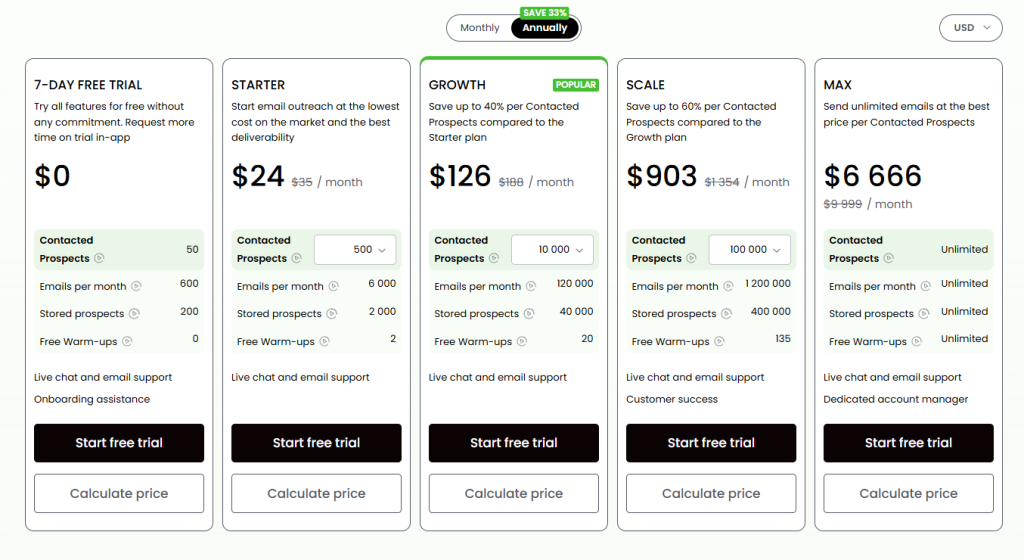
- Affordable pricing: a free trial lets you send 600 emails to 50 prospects, and paid plans start at $24/month for 500 prospects and two warm‑ups; the popular Growth plan is ~$126/month for 10,000–60,000 prospects – significantly cheaper per seat than LGM.
Top highlights:
- Intuitive interface and fast onboarding: reviewers praise its easy campaign builder and minimal learning curve, enabling quick start‑up for non‑technical users.
- Reliable deliverability and analytics: built‑in email warm‑up, email automation and catch‑all verification help maintain domain reputation. Detailed open/click tracking and A/B testing aid optimization.
- CRM integration and basic lead enrichment: the platform offers solid CRM integrations and can append basic contact data, letting you manage simple outreach campaigns without external tools.
- Competitive pricing: flexible plans and a free trial make Woodpecker accessible for small teams, agencies and startups with budget constraints.
Why Woodpecker beats La Growth Machine: Woodpecker offers an easier user‑friendly interface, robust email automation, free verification and warm‑up – all at a fraction of LGM’s per‑seat cost. While its LinkedIn capabilities require an add‑on and data enrichment is modest, its reliability, affordability and intuitive design make it the best overall Growth Machine alternative.
#2 Apollo.io: all‑in‑one platform with huge database
Apollo.io is a sales intelligence and engagement platform combining a massive B2B contact database (over 210 million contacts and 30 million companies) with multichannel outreach and a built‑in dialer. It aims to replace separate tools for data, enrichment, email automation, phone calls and parts of your CRM.
Key features
- Contact database & filters: search by job title, company size, industry, location, revenue, funding stage and buying intent signals. Apollo’s database helps build targeted lists quickly, but data accuracy can vary.
- Email and phone enrichment: waterfall enrichment reveals verified emails (70–80 % success) and phone numbers (at higher credit costs). An email verification score helps filter risky addresses.
- Multichannel sequences: build automated sequences combining emails, task reminders for LinkedIn tasks, phone calls and manual follow‑ups with conditional logic and A/B testing.
- AI‑powered features: AI Research suggests talking points; AI Writing drafts emails; AI Lead Scoring predicts conversion probability; AI Meeting Intelligence summarizes calls.
- Built‑in dialer and call intelligence: call leads from within Apollo, record calls, get AI summaries and sync calls with your CRM.
- CRM and API integrations: integrate with Salesforce, HubSpot, Pipedrive, Gmail, Outlook, Zapier and others.
- Pricing: Free plan includes 1,200 credits/year and two sequences. Paid plans start at $49/user/month (Basic), $79/user/month (Professional) and $119/user/month (Organization). Costs rise as you buy extra credits and phone numbers.
Pros
- Massive, searchable database and buying intent filters: great for building precise target lists.
- All‑in‑one platform: reduces tool sprawl and may save money by replacing separate data, email, dialer and CRM tools.
- Deliverability features: (warm‑up and spam testing) protect sender reputation.
- Intuitive interface and responsive support: easier to learn than enterprise tools like ZoomInfo; support and resources such as webinars help users succeed.
Cons
- Data accuracy issues and weak phone numbers: users report outdated contacts and inaccurate emails/phone numbers.
- Confusing credit‑based pricing: credits control emails, phone numbers and enrichment; running out mid‑campaign disrupts workflows.
- Manual LinkedIn steps: “multichannel” sequences only remind you to manually perform LinkedIn tasks; there is no true automation.
- Learning curve for advanced features and inconsistent support on lower tiers.
When to choose Apollo: Apollo is ideal for teams needing a unified system that combines lead generation, enrichment and outreach. It works best for small to mid‑sized sales teams that prioritize email automation and phone outreach and are comfortable managing credits. It may not fully replace LinkedIn automation tools, but as a sales intelligence platform it’s more comprehensive than LGM and offers better contact data.
#3 Lemlist – personalized email & multichannel outreach
Lemlist focuses on personalized outreach with dynamic images, videos and landing pages. Over time the tool evolved into a multichannel automation platform, adding LinkedIn actions, WhatsApp and phone calls.
Key features
- Email personalization at scale: build custom templates that insert variables like the prospect’s name, logo or screenshots into images and landing pages. This is ideal for standing out in crowded inboxes.
- Multichannel sequences: combine email, LinkedIn visits, connection requests, messages, voice messages, WhatsApp and call reminders in one workflow. Conditional logic can trigger different actions based on recipient behavior.
- Lead database and enrichment: access a 600M+ lead database with filters; waterfall enrichment pulls verified emails and phone numbers. Plans include 200–400 free enrichment credits; extra credits cost extra.
- Lemwarm deliverability tool: free warm‑up and deliverability monitoring; it warms up your domain and provides a health score with actionable recommendations.
- AI copywriting: generate email sequences, icebreakers and content suggestions with Lemlist’s AI assistant.
- Integrations: native syncs with HubSpot, Salesforce and Pipedrive; API and Zapier support; VoIP integrations with Aircall and Ringover.
- Pricing: Email Pro at $69/month/user includes unlimited email follow‑ups, 600M+ database access, 200 enrichment credits and deliverability tools. Multichannel Expert at $99/month/user adds LinkedIn automation, WhatsApp messaging, in‑app calling and more credits. Enterprise plans are custom.
Pros
- Creative personalization: dynamic images and landing pages can significantly boost engagement.
- Built‑in deliverability optimization: Lemwarm helps maintain sender reputation without third‑party tools.
- Unified multichannel sequences: combine email, LinkedIn, WhatsApp and calls in one workflow.
- Strong community & educational content: extensive tutorials and playbooks support your marketing strategies.
- Easy duplication of campaigns: templates and duplication speed up campaign creation.
Cons
- Steep learning curve: advanced personalization, conditional logic and multi‑channel automations take time to master.
- High per‑user pricing: at $69–$99 per seat, costs quickly add up for agencies or large teams.
- Inconsistent database quality: the 600M+ database contains outdated or invalid leads.
- Limited native integrations: heavy reliance on Zapier adds extra cost and complexity.
- Unreliable LinkedIn automation: some users report that connection requests and messages fail to send reliably.
When to choose Lemlist: If your outreach depends on customizable templates and creative personalization with images or videos, Lemlist is a strong choice. It’s well‑suited for small teams willing to invest time into campaign design and ready to pay higher enterprise pricing as they scale. It may not be ideal for teams needing high‑quality data or seamless CRM integration.
#4 Waalaxy: beginner‑friendly LinkedIn automation with email add‑ons
Waalaxy started as a simple Chrome extension to automate LinkedIn actions. Today it’s a cloud‑based platform with optional email outreach and basic lead enrichment.
Key features
- LinkedIn message automation: automatically send profile visits, connection requests and personalized messages.
- Go multichannel with email: add email touchpoints and find addresses, though email campaigns require higher‑tier plans.
- Email finder and enrichment: built‑in tool to discover and verify email addresses.
- Native integrations and team features: supports CRM sync, CSV imports/exports and adding multiple senders. Teams can assign roles, monitor performance in a central dashboard and activate anti‑duplicate to avoid spamming leads.
- Reporting and smart inbox: track acceptance and response rates; a unified inbox is available via add‑ons.
- Pricing: Pro (€39/user/month) allows unlimited campaigns and 300 LinkedIn invites/month; Advanced (€99/user/month) increases invitation limits; Business (€139/user/month) adds cold email sequences, multiple sender accounts and priority support.
Pros
- Intuitive interface: Waalaxy is praised for being easy to navigate; even beginners can launch campaigns quickly.
- Multichannel capability: ability to mix LinkedIn and email outreach in one tool.
- Email finder & native integrations: in‑app email discovery and sync with CRMs simplify lead generation and tracking performance.
- Team collaboration: supports multiple users, anti‑duplicate safeguards and a central dashboard for contact management.
Cons
- High pricing and limited scaling: many users find Waalaxy expensive for what it offers. Campaign limits restrict scalability without costly upgrades.
- Limited customization and templates: you can only choose from pre‑built sequences and can’t design fully custom workflows.
- Browser extension risk: initial login through a Chrome extension increases the risk of detection by LinkedIn.
- Slow support: users report delayed responses from support when issues arise.
When to choose Waalaxy: Waalaxy suits freelancers, recruiters and small businesses seeking a user‑friendly starting point for LinkedIn automation. It provides basic automation tools and smart inbox features without the complexity of LGM. However, teams needing advanced multichannel automation, high sending volumes or deep customization may quickly outgrow Waalaxy or find the pricing restrictive.
#5 Phantombuster: data extraction & automation for growth hackers
Phantombuster is a cloud‑based automation tool focused on data scraping and workflow automation across 15+ platforms. Unlike LGM or Woodpecker, its core strength is extracting and enriching data; outreach functionality is limited.
Key features
- Library of 130+ “Phantoms” covering LinkedIn, Twitter/X, Instagram, Google Maps, GitHub and more. Each Phantom automates a specific task such as profile scraping, connection requests, message sending, or follower extraction.
- Cloud‑based execution: automations run in the cloud, so you can close your laptop while tasks continue.
- Email finder and enrichment: Phantombuster uses external providers to find professional emails when scraping LinkedIn profiles.
- AI‑powered features: AI message writer, profile enricher and post responder generate personalized messages and comments.
- Workflows: chain multiple Phantoms to create custom automated workflows; for example, scrape profiles, find emails, send to CRM and automate connection requests.
- Integrations: direct integrations with HubSpot, Salesforce and Pipedrive, plus Google Sheets, Zapier, webhooks and an API.
- Pricing: Trial includes 2 hours of execution time, 1,000 AI credits and 100 URL finder credits. Paid plans start at €56/month for 20 hours of execution and 10,000 AI credits; Pro (€128/month) and Team (€352/month) increase hours and credits.
Pros
- Extensive platform coverage: few tools match Phantombuster’s breadth of supported platforms and tasks.
- Cloud‑based with generous free trial: you can test automations without leaving your browser open.
- Powerful LinkedIn data extraction: widely praised for accurate scraping of Sales Navigator results and profiles.
- Regular updates: the team frequently adds new Phantoms to keep up with platform changes.
Cons
- Steep learning curve and technical setup: setting up Phantoms often requires understanding cookies, session IDs and technical configurations.
- Execution‑time pricing and slot limits: the pricing model can be confusing and restrictive – running many automations quickly consumes hours. Lower plans limit the number of concurrent Phantoms.
- Limited outreach functionality: Phantombuster excels at data extraction but lacks full outreach tools; you still need external email or multichannel automation platforms.
- Frequent errors and LinkedIn risk: Phantoms sometimes break, requiring reconfiguration; improper use may lead to LinkedIn account flags.
- Expensive at scale: costs rise quickly when you need more execution hours and credits.
When to choose Phantombuster: This tool is best for growth hackers, marketers and data‑driven teams needing to scrape leads from multiple platforms and feed them into CRMs. It’s not a replacement for sales automation tools like LGM or Woodpecker, but it complements them by providing fresh data and enabling custom automation workflows.
Which tool should you choose for multi channel prospecting?
Choosing an outreach is about how efficiently your team can generate opportunities at scale.
While La Growth Machine offers solid multichannel automation, many teams look elsewhere.
Today’s best alternatives focus on what really matters: deliverability, simplicity, and scalable outreach.
That’s where Woodpecker stands out.
With built-in email warm-up, catch-all verification, automation, and an intuitive interface, it allows teams to launch effective campaigns without the steep learning curve or expensive per-seat pricing.
If you’re ready to simplify your outreach and build a more predictable pipeline, give Woodpecker a try and see how quickly you can start generating real conversations with prospects.