


Good leads are for sales what good ingredients are for a delicious meal. You could have the best sales representatives in the world, but they won’t be able to close any deals if the lead data is not of good quality. Bardeen promises to solve this problem, allowing your agents to skip the manual work and do lead generation on autopilot.
The problem is that there are countless tools that do just this in 2026, all with a user-friendly interface and AI tech to back it up. So what makes Bardeen different?
Let’s find out in this Bardeen AI review that covers use cases, pros, cons, pricing, and more to help you make an educated decision about your next sales tool.
What is Bardeen?
Bardeen is a tool that lives inside your browser and automates repetitive tasks you do online, from gathering data from websites to building simple workflows that save you time and effort.
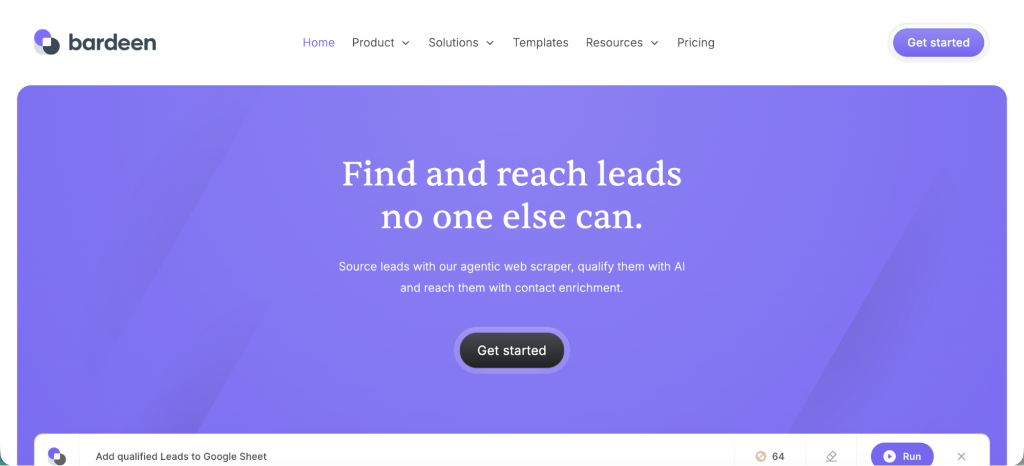
It works by letting you set up automation steps you can run on demand or on a schedule. It’s built for salespeople who spend hours doing research, updating spreadsheets, or copying and pasting data between tools. Bardeen gives them a way to hand those tasks off to a machine and focus on work that actually needs their judgment.
This kind of automation is especially useful for sales, recruiting, customer success, and operations teams who work with lots of web apps and external sites.
Because it runs directly in your browser, Bardeen can interact with content on web pages in real time. That means tasks like scraping data from LinkedIn or Google Search happen where you are already working. It’s fully no-code and helps extract relevant information from popular websites so the sales team can focus on the actual selling.
Note that Bardeen will give you data on your leads, but you still have to use a different tool to actually start sending emails to these accounts. Tools such as Woodpecker help you do just this once Bardeen is no longer enough.
Try Woodpecker for free today.
How Bardeen works as a no-code automation tool
To start using Bardeen, you install a browser extension. Once added, it places a small interface into your browser that lets you see and run workflows, called Playbooks.
These Playbooks are prebuilt automation recipes you can use right away or adjust to match your needs. You can also create your own from scratch using a natural language input tool, where you simply describe the task you want automated. The system interprets your request and builds the steps for you. It has an intuitive interface and doesn’t take long to set up.
Most of what Bardeen does happens inside your browser.
That means it can read information from the pages you have open, interact with elements like buttons and forms, extract data, and then send data to tools like Google Sheets or Airtable. Since it runs where you’re working, it doesn’t depend on APIs for tasks like web scraping. This gives it an edge when you need to pull information from parts of the web that don’t offer formal integrations.
Key features
Here are the features that define Bardeen and make it useful for automating recurring tasks with one click.
Automation creator
You can build workflows without writing any code. The interface lets you chain actions together, define triggers, and set conditions under which your automation will run. This makes it possible to capture data from one place and send it to another without manual steps.
Natural language “Magic Box”
Instead of picking actions from a menu, you can type something like “copy LinkedIn profile info to Google Sheets,” and Bardeen will arrange the steps to do that task for you. This lowers the barrier for people who are not technical.
If you’re looking for something to connect your favorite apps in a no-code/low-code environment, this is an excellent sales-focused alternative to Zapier.
Web scraping and data extraction
Bardeen can collect data from any web page you visit. This is useful for research, lead discovery, competitive intelligence, and lists of contacts. The scraper works on many popular sites without any setup beyond choosing your criteria.
It’s like an AI copilot that can give you the agent data needed to book more meetings and close deals.
Prebuilt playbooks
There are hundreds of ready-made workflows for common tasks. These give you a jump start if you want to automate something typical, like saving job postings from a search result into a spreadsheet.
Many users have set up Bardeen to work for sales processes, and you can simply copy their approach instead of building automations from scratch.
App integrations
Bardeen connects with tools you likely use already, such as Gmail, Google Sheets, Notion, Airtable, and others. These connections let you push data into systems where you want it stored or processed.
While it doesn’t have every tool out there, you’ll have the basics for effective scrape listing and giving your agents enough lead data to work with.
AI Assisted Actions
The tool uses artificial intelligence to help generate content, extract insights, and set up workflows in a way that feels conversational. For example, it can draft personalized outreach messages based on data it gathers during the lead generation process.
If you don’t already use something for generating outreach messages, Bardeen can handle that without switching tools or contexts.
And if you’re wondering how precisely to use Bardeen, there are many reviews showing different ways to get the most out of this platform. These are the best ones.
Automation use cases for Bardeen AI
One of the biggest strengths of Bardeen is that it can support use cases that matter to teams whose workflows are heavy on manual tasks.
Sales prospect research
Instead of scouring LinkedIn or Crunchbase for hours, you can set up a workflow to grab company data, contact info, and other key fields and output that to a spreadsheet. This reduces grunt work in research and lets reps focus on outreach with context ready to go.
Lead enrichment
You can automate data enrichment by pulling additional details like job titles, company size, or industry from web sources and attaching those to your CRM or sheet. This helps keep your data accurate and actionable.
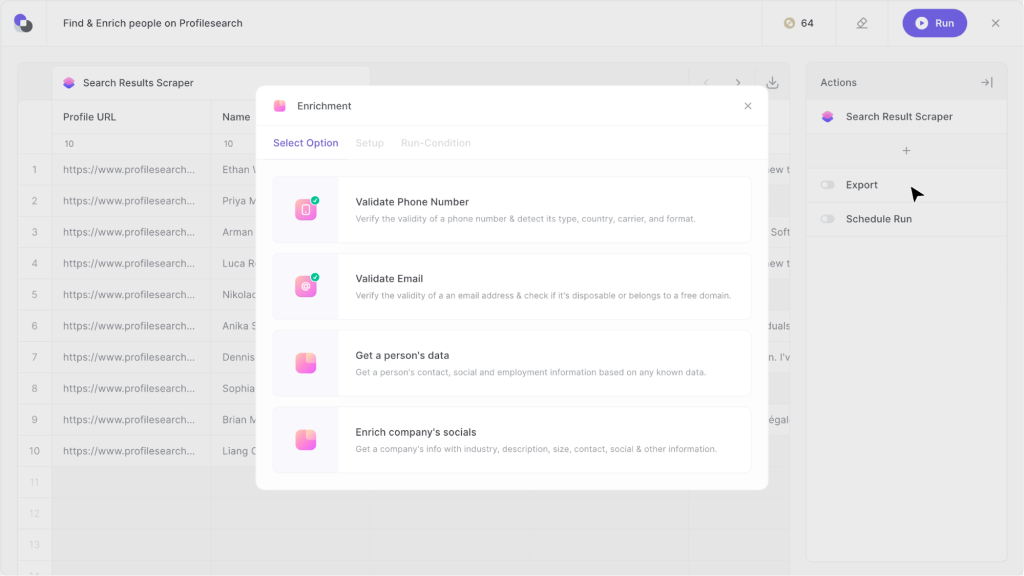
If you already have some data about your leads but want even more information for upcoming meetings or sales calls, you can train Bardeen to fill in the missing fields.
Email drafting and personalization
By feeding profile data into Bardeen’s AI features, teams can create personalized outreach drafts without writing each one manually. This can quicken outreach setup and improve the relevance of messages.
This works with your own existing data or the data that Bardeen gets through scraping and enrichment.
Routine reporting
Daily or weekly summaries can be built to gather metrics from various tools and present them in a unified format without someone copying and pasting numbers.
This is another one of those repetitive tasks that can save time for your reps and let them focus on building meaningful relationships instead.
Customer success preparation
Workflows can collect engagement metrics and usage patterns from dashboards and compile summaries your team can review ahead of calls.
Integrations and supported apps
Bardeen works with a range of tools that many teams already have in their stack.
On the data front, it connects with Google Sheets, Notion, Airtable, and other spreadsheet or database tools. It also interacts with communication tools like Gmail and productivity apps like Trello and Slack.
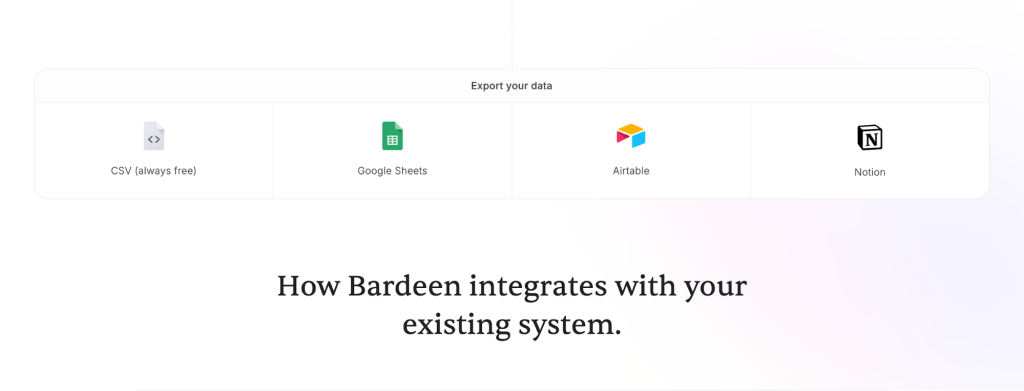
Because it operates at the browser level, it can interact with web versions of platforms even if there is no direct integration. That means it can read information off the page and use that data in workflows.
While this approach gives you some flexibility, it does require you to keep the browser extension enabled and active.
Ease of use and setup
For people new to automation, Bardeen’s entry point is relatively friendly. Installing the extension is a few clicks, and you can immediately begin exploring Playbooks. The natural language input system simplifies creating automations by letting you describe what you want in plain terms.
There is still a learning curve, especially for more complex workflows that involve multiple steps and conditions.
Reading documentation or experimenting with templates can help users get comfortable with the logic and triggers involved. Some users find that the first few custom workflows take time to refine before they run reliably.
Templates and prebuilt playbooks
One of the biggest time savers in Bardeen is access to a library of playbooks. These are pre-configured workflows created for tasks users commonly need to automate. Many of these can be activated with a single click, and then customized if your process requires a different output.
For example, you might find a playbook that extracts contact emails from a list of LinkedIn search results and saves them to a sheet. Instead of building that from scratch, you use the template and adjust it to your criteria. This makes Bardeen accessible even if you are not confident in building automations from the ground up.
Performance and reliability
Because Bardeen runs inside your browser, performance can vary depending on what your machine is doing. Workflows that interact with large datasets can be slower than expected, especially if multiple browser tabs are open or if pages are heavy with content.
Users have reported occasional bugs in the automation editor or connection issues with some services. These issues are often resolved quickly by updates, but it is something to be aware of if you rely on workflows for critical business operations.
Bardeen pricing and plans
There is no free trial period or free tier in Bardeen. There are three paid plans.
Basic 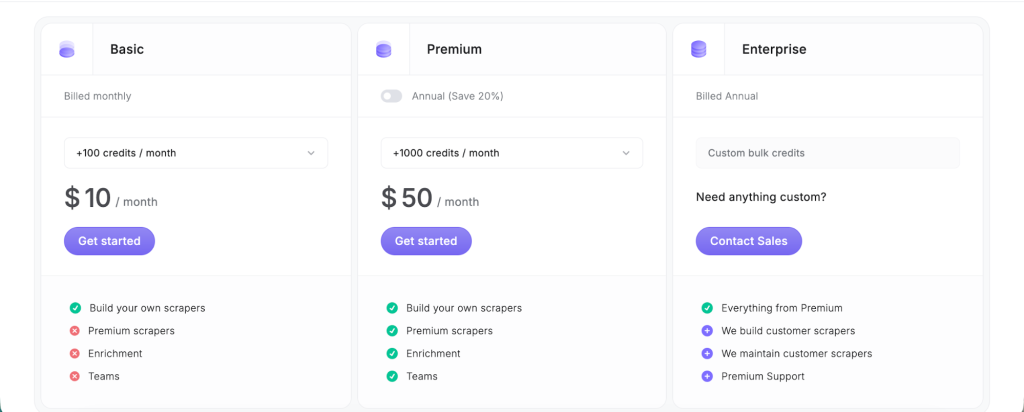 plan – $10 per month (monthly billing)
This tier gives you 100 credits per month and includes the core automation features like custom scraping, enrichment, and the ability to run workflows that move data between apps or scrape web pages. Many teams start here if they want a predictable allocation for regular automations.
Premium plan – $50 per month (monthly billing)
The Premium tier gives you 1,000 credits per month, which is a significant increase over the Basic allocation. This plan is ideal for users or small teams who automate frequently or run larger, multi-step workflows. It includes the same set of core features plus a stronger capacity for enrichment and more runs each month.
Enterprise plan – custom pricing
For larger organisations or teams with heavy automation needs, the Enterprise plan provides custom bulk credits along with premium support, scraper building assistance, and the ability to maintain scrapers on your behalf. Pricing here is arranged directly with Bardeen’s sales team.
Credits and how they work
Credits are consumed when actions run in your automations. Most basic steps cost 1 credit per action, while data enrichment rows cost 3 credits per row. Exporting data and using utilities like CSV downloads do not use credits.
This setup means that the number of automations you can run in a month depends on how many credits your workflows consume, so projects that process large volumes of web data may use credits quickly.
Pros and cons
Bardeen is not for everyone, despite its user friendly interface and a wealth of sales and marketing features. Here are the strongest pros and cons of this AI platform.
Bardeen pros
- Simple automation creation: you can build workflows without coding and with minimal technical knowledge.
- Browser level access: it works on pages you visit and can pull data that typical API based tools cannot.
- Templates ready to use: a large library of ready-made playbooks speeds setup.
Bardeen cons
- Browser dependency: automations only run in the browser and require the extension to stay active.
- Performance can vary: large workflows can be slow or resource-heavy.
- Learning curve on advanced tasks: complex setups may need time to learn and refine.
Who is Bardeen for?
Bardeen works best for people and teams whose work lives largely in the browser and involves frequent manual data handling, research, or repetitive sequences. Sales and recruiting professionals will find data scraping and contact extraction especially helpful.
Customer success and operations teams also benefit when gathering metrics or preparing reports.
Because it relies on web interaction, it is less suited to backend workflows that need to glue multiple cloud applications together without page interaction. In those cases, tools built around cloud APIs might be more appropriate.
Final verdict
If you are spending lots of time copying data from web pages, updating spreadsheets manually, or writing similar outreach messages over and over, Bardeen can pay for itself quickly by automating those tasks. Its natural language input and ready-made playbooks let non-technical users get started fast, and the browser-level access opens up use cases other automation tools do not handle well.
However, if you need something built specifically for email, Woodpecker is a much better choice. With Woodpecker, you can warm up your inbox, create sequences with built-in triggers, verify addresses before sending out emails, follow up automatically and much more so you can turn cold email from a nice-to-have into a revenue-generating machine.