


“AI email automation” is one of those phrases that sounds specific and turns out to mean five different things depending on who’s asking. A sales team hearing it thinks of cold outreach with AI-personalized openers. A marketing manager thinks of Klaviyo with predictive send times. An executive assistant thinks of Shortwave drafting replies. A customer support lead thinks of AI agents handling inbound tickets.
All of those are AI email automation. They solve different problems. They use different tools. And the reason most buyers end up with a Frankenstein stack of half-overlapping products is that nobody stopped to map the categories before they started buying.
This guide does that mapping. It covers the five categories of AI email automation tools that actually exist in 2026, what job each category does, which tools fit each one, and – most importantly – how to put them together into a stack that works for your actual workflow rather than collecting shiny objects.
You’ll find: a clear definition of each category, representative tools for each (with notes on where they excel), the common mistakes teams make when buying, a decision framework for your own stack, and how Woodpecker fits as the cold email automation layer specifically.
The five categories of AI email automation
Before any tool decisions, the map. Every AI email automation tool sits in one of these five categories. Some tools straddle two; most live in one.
Category 1: AI email assistants (inbox-side AI)
Tools that sit inside your personal inbox – Gmail, Outlook – and help you write, reply, summarize, or triage. They’re working on emails you receive as well as ones you send.
What they do: Draft replies, summarize long threads, suggest responses, clean up tone, handle scheduling requests, automatically categorize incoming mail.
Examples: Microsoft Copilot for Outlook, Gemini for Gmail, Superhuman AI, Shortwave, Gmelius, Spark.
Who uses them: Individual professionals, executives, anyone drowning in email volume. Most useful when you’re on the receiving end of a lot of email rather than the sending end.
What they don’t do: Run multi-step outbound sequences. Build prospect lists. Monitor deliverability at the campaign level. These tools are optimized for individual productivity, not outbound operations.
Category 2: AI cold email platforms (outbound-side AI)
Tools built specifically for cold email and outbound sales – sending at scale to people who don’t know you yet, with AI helping with personalization, deliverability, and sequencing.
What they do: Multi-step email sequences with conditional logic, AI-generated personalized openers, domain warmup, deliverability monitoring, inbox rotation, reply detection, integration with LinkedIn and CRMs.
Where Woodpecker fits?
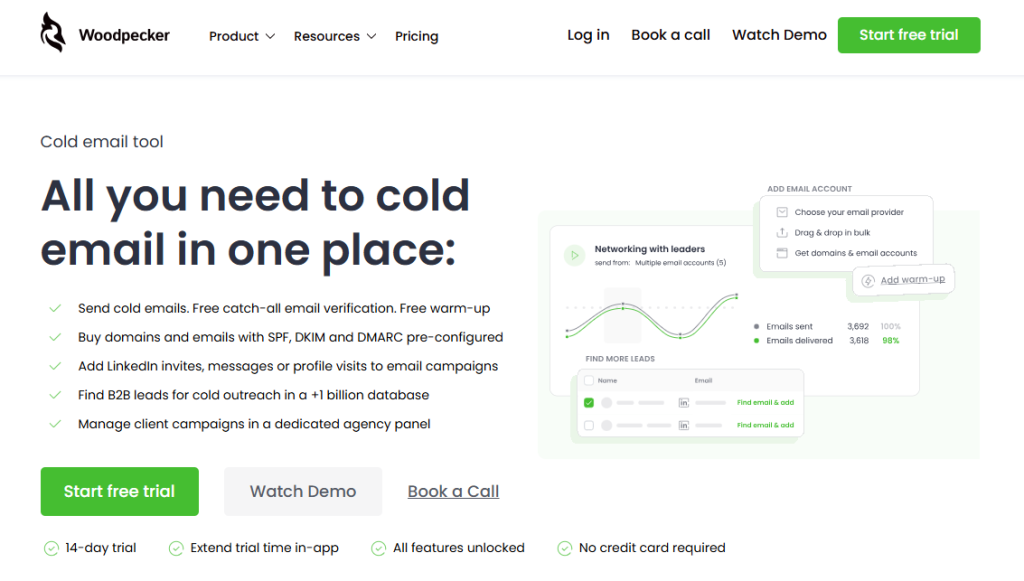
Woodpecker is a cold email automation platform with AI capabilities built around the specific problems of outbound at scale: Deliverability, Adaptive Sending, conditional sequences, free catch-all verification, free warmup via integration with Warmy and Mailivery, and a 1B+ B2B lead database. More on this category below.
Who uses them: Sales teams running outbound, SDR teams, agencies managing outreach for clients, founders doing founder-led sales, recruiters doing cold sourcing.
What they don’t do: Handle inbound email, draft replies for your personal inbox, send newsletters, run transactional email (password resets, order confirmations).
Category 3: AI marketing automation (broadcast email with intelligence)
Tools that send email to lists of opted-in subscribers – newsletters, product updates, nurture sequences, promotional campaigns – with AI helping with send times, subject lines, personalization, and segmentation.
What they do: Segment lists based on behavior, predict optimal send times per subscriber, generate subject line variants, test automatically, personalize content based on past engagement, manage subscriber lifecycle.
Examples: Klaviyo, Mailchimp, Brevo (formerly Sendinblue), Encharge, ActiveCampaign.
Who uses them: Ecommerce teams, SaaS companies running nurture, content businesses, any organization with a subscriber list.
What they don’t do: Cold email to people who haven’t opted in. The compliance model and deliverability model is completely different for opt-in vs. cold outreach.
Category 4: AI transactional email infrastructure
The plumbing layer. Tools that send operational emails – password resets, receipts, shipping notifications, account notifications – with AI helping with deliverability, routing, and content personalization.
What they do: Deliver high-volume automated emails triggered by product events, manage authentication and deliverability at infrastructure level, provide APIs for developers.
Examples: Twilio SendGrid, Postmark, Resend, Amazon SES.
Who uses them: Product and engineering teams. These are developer tools more than marketing tools.
What they don’t do: Run sales sequences, handle cold outreach, work with lists of leads. They’re purpose-built for triggered product emails.
Category 5: AI email research and enrichment (the pre-send layer)
Tools that don’t send email themselves but enrich your contact data and research prospects before you contact them. They feed data into your cold email or sales workflow.
What they do: Find verified email addresses, enrich contact profiles with firmographic data, research prospects at scale, generate personalized research snippets that feed into email templates.
Examples: Clay, Apollo, ZoomInfo (the enrichment side), Smartwriter, Warmer.ai.
Who uses them: SDR teams, sales operations, growth marketers running targeted outbound.
What they don’t do: Replace a sending platform. These tools typically integrate with a cold email platform like Woodpecker – they feed the data, Woodpecker handles the sending.
How to map your stack: a decision framework
Most teams end up with a messy stack because they buy tools reactively as problems appear. A cleaner approach: map your stack intentionally based on your actual workflow.
Ask these five questions in order.
- What’s the primary email job you’re hiring AI to help with?
Sending cold email to prospects → Category 2 is your main tool. Managing your own inbox → Category 1. Sending to an opted-in subscriber list → Category 3. Triggered product emails → Category 4. Researching prospects before outreach → Category 5, plus one of the above for actual sending.
Most teams need more than one category, but one is always primary. Start there.
- What volume are you sending?
Under 50 emails a day total → almost any tool works. Your constraints are elsewhere. 50–500 emails a day → you need dedicated tools for deliverability management. A Gmail-based tool won’t scale. 500–5,000 emails a day → you need a platform with inbox rotation, warmup, and deliverability monitoring as core features. Over 5,000 emails a day → you also need to think about infrastructure-level decisions (separate domains, dedicated IPs, careful compliance).
Volume determines how much of the stack is infrastructure vs. writing.
- Who’s the recipient relationship?
Opted-in → marketing automation (Category 3) or transactional (Category 4) depending on use case. Not opted-in → cold email platform (Category 2). This is where GDPR, CAN-SPAM, and deliverability considerations get serious.
Don’t send cold outreach through marketing automation tools. The platforms are built for different purposes and the deliverability consequences of mixing them are real.
- Where does the data come from?
Self-serve signup → your marketing tool owns the data. Existing customer database → your product database, flowing into your transactional tool. Cold prospecting → an enrichment tool (Category 5) or a built-in lead database (Woodpecker has 1B+ contacts included).
- What’s your team structure?
Solo or small team → fewer tools, more integrations. A sales tool with built-in lead data beats piecing together three tools. Mid-size sales team → specialized tools for each job, coordinated through a CRM. Enterprise → often custom infrastructure on top of tools, or a full sales engagement platform.
What AI actually adds to email automation (and what it doesn’t)
The AI marketing on most email tools has gotten out of hand. Half the features labeled “AI-powered” in 2026 are unchanged versions of features that existed in 2021 under different names. Worth understanding what AI is actually good at in this space and what it’s mostly hype.
What AI genuinely improves
Personalization at scale. Generating unique opening lines for each prospect based on their LinkedIn profile, recent activity, or company signals. This is where AI added real capability that wasn’t possible before – one-off personalization used to take 10 minutes per email. Now it takes 30 seconds at scale.
Reply detection and sentiment. Understanding whether a reply is positive, negative, or a bounce/out-of-office. Older tools needed manual review; current tools route correctly most of the time.
Subject line and copy optimization. Testing and learning from engagement data across thousands of sends faster than manual A/B testing allows.
Deliverability pattern detection. Spotting anomalies in sending patterns, bounce rates, and engagement that indicate deliverability problems before they become full-blown.
What AI is still hype
“AI-generated entire emails.” Full emails generated end-to-end by AI still read as AI-generated to most recipients in most contexts. The uncanny-valley problem is real. AI is much better at augmenting human writing than replacing it.
“AI that knows when to follow up.” Follow-up timing is a rule-based problem, not an AI problem. The tools describing their follow-up logic as “AI” are mostly marketing.
“AI that writes cold emails that get replies.” Cold email reply rates depend primarily on targeting, timing, and relevance – which AI can help with – not on clever word choices, which AI tries to sell.
The distinction matters when evaluating tools. “AI” as a feature label has become so diluted that the specific capability matters far more than the label.
The most common mistakes teams make buying AI email automation tools
Patterns that show up across dozens of buying decisions.
Buying a marketing automation tool for cold email
The single most common and most expensive mistake. Mailchimp, Brevo, Klaviyo, and similar tools are built for opt-in subscribers. Sending cold email through them typically results in account suspension at best, domain reputation damage at worst. The platforms have different deliverability models, different compliance requirements, and different inbox placement expectations than cold email platforms.
If your use case is cold outreach, you need a cold email platform (Category 2). If your use case is nurturing existing subscribers, you need a marketing automation tool (Category 3). Mixing them is a compliance and deliverability problem.
Buying an inbox AI tool for sales outreach
Shortwave, Superhuman AI, and Microsoft Copilot are excellent for managing your own inbox. They’re not built for sending sequences of cold email to prospect lists. Teams that try to use them this way end up sending one-off emails without proper sequencing, deliverability protection, or tracking – and then wonder why their outreach isn’t working.
If your sales team is spending most of their email time replying to inbound, an inbox AI tool is perfect. If they’re doing outbound, they need a different category.
Overlooking the deliverability layer
AI personalization can’t save an email that lands in spam. A lot of tool evaluations focus on the AI features – personalization, subject lines, reply suggestions – and skip the deliverability features, which matter more in practice.
For cold email specifically, deliverability features (warmup, authentication, inbox rotation, bounce protection, complaint monitoring) should be the primary evaluation criteria. AI features are a secondary consideration. Get the deliverability right first; optimize the writing second.
Stacking too many tools
The “I need one tool for enrichment, one for writing, one for sending, one for tracking, one for CRM sync” pattern. Each tool has a reason, but four tools with weak integrations often perform worse than one tool that handles 80% of the work well.
A good heuristic: your primary sending tool should be the hub. Everything else should integrate with it. If your stack requires more than three tools for a single outbound motion, you probably have integration debt rather than capability advantage.
Picking the tool before mapping the workflow
The buying order matters. Teams that pick tools first and then try to fit their workflow around the tools end up with weird constraints that slow them down. Teams that map their ideal workflow first and then pick tools to match it end up with fewer, better-integrated tools.
Spend 30 minutes mapping your actual email workflow before you buy anything. What triggers an email? Who writes it? Who sends it? What happens when someone replies? Where does the data go? The answers guide the tool selection.
How Woodpecker fits as the cold email automation layer
For B2B teams whose primary job is reaching new prospects through email, the cold email automation layer is the load-bearing part of the stack. Here’s what Woodpecker handles inside that layer and how it fits with the other categories.
What Woodpecker handles natively:
- Multi-step email sequences with conditional logic (if/then branching based on opens, clicks, replies)
- Free email warmup via partnerships with Warmy and Mailivery (white-labeled into the platform; one account, two provider options)
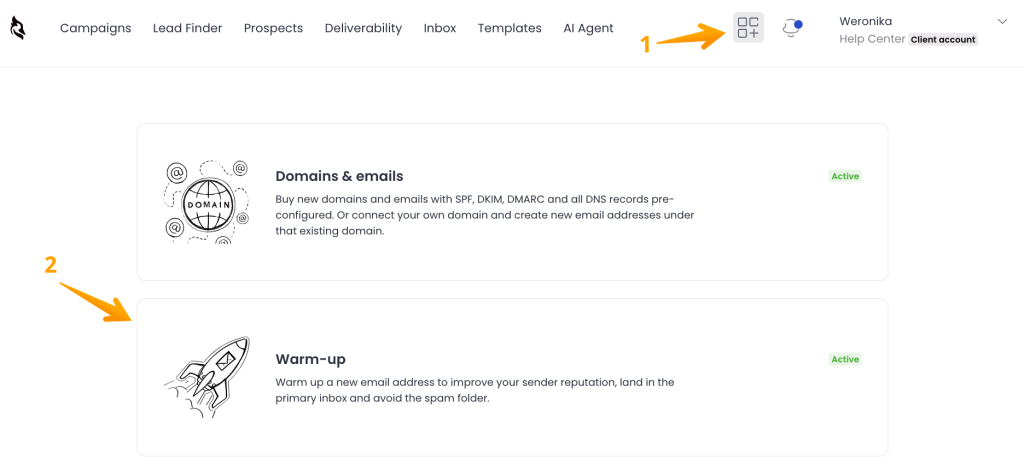
- Adaptive Sending – randomized intervals, automatic throttling, inbox rotation across multiple mailboxes
- Deliverability – continuous tracking of sender reputation and placement trends
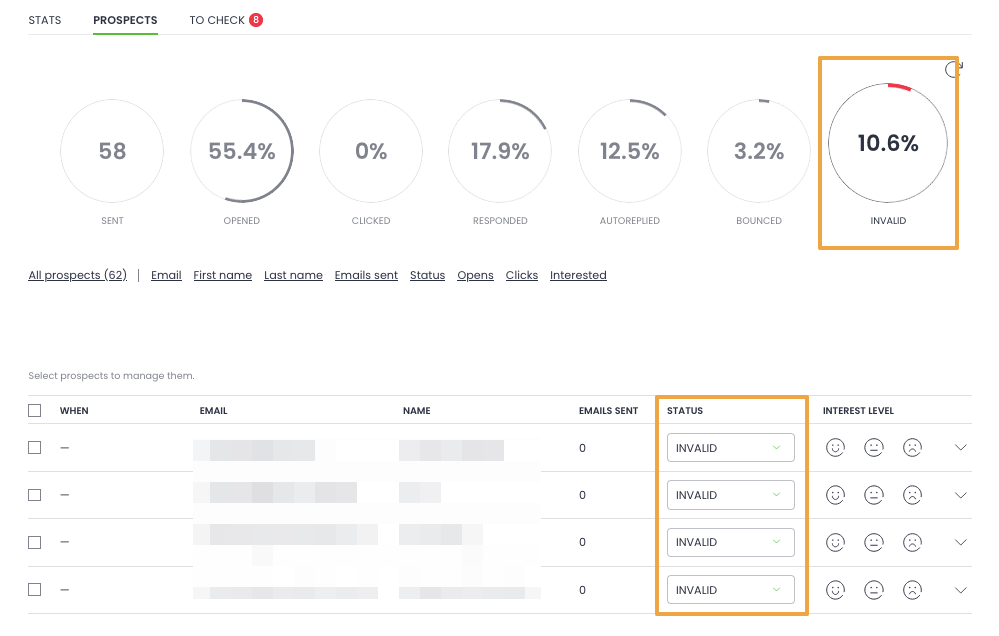
- Free catch-all email verification – removes bad addresses before they bounce
- LinkedIn integration – profile visits, connection requests, and messages as steps inside email sequences
- 1B+ B2B lead database included in the platform
- Domain and mailbox purchase with SPF, DKIM, and DMARC pre-configured
- Agency panel – separate workspaces per client, white-label reporting, per-client billing
- AI-based reply detection and auto-stop on reply
What Woodpecker integrates with?
- Enrichment tools (Category 5): Clay, Apollo, and similar tools can feed enriched prospect data into Woodpecker campaigns through integrations or CSV upload. Woodpecker handles the sending; enrichment handles the pre-send research.
- CRMs: Woodpecker syncs with major CRMs bidirectionally. Replies, engagement, and campaign activity flow into your CRM as first-class data.
- Inbox assistants: Your personal inbox AI (Microsoft Copilot, Gmail Gemini, Shortwave) handles your personal email. Woodpecker handles your outbound campaigns. The two don’t overlap.
- Marketing automation: If your business runs both opt-in nurture and cold outreach, you’ll likely use a marketing automation tool alongside Woodpecker. They serve different purposes for different audiences.
What Woodpecker doesn’t do, and where you’d use another tool:
- Transactional email: product-triggered emails (password resets, receipts) go through a transactional provider.
- Phone dialer, SMS, or WhatsApp: these require separate tools if part of your outreach motion.
- Customer support inboxes: a helpdesk tool handles inbound support.
- Marketing broadcast to opted-in lists: a marketing automation tool is the right category.
The clarity of that boundary matters. Woodpecker is deep on cold email automation specifically. That’s what it’s designed for, and it doesn’t pretend to replace the rest of the stack. If your primary email job is outbound to people who don’t know you yet, this is the layer that needs to work first.
Sign up to Woodpecker and run a cold email campaign with the full automation layer in place.
FAQ
What is AI email automation?
AI email automation is the use of machine learning and generative AI to handle parts of the email workflow – drafting, personalizing, sending, scheduling, replying, or analyzing – that used to require manual work. It spans five distinct categories: inbox AI assistants, cold email platforms, marketing automation, transactional email infrastructure, and enrichment/research tools. Different tools serve different purposes; the common thread is AI replacing or augmenting manual email work.
What are the best AI email automation tools?
The “best” depends on which category you need. For personal inbox management: Microsoft Copilot, Gemini for Gmail, Shortwave, Superhuman AI. For cold email and outbound sales: Woodpecker, which combines AI-assisted personalization with the deliverability features needed for outbound at scale. For opt-in marketing: Klaviyo, Brevo, Encharge, Mailchimp. For transactional email: SendGrid, Postmark, Resend. Pick the category first, then the tool.
Can AI replace a sales team’s email workflow?
Not in 2026, and probably not for the foreseeable future. AI can meaningfully augment the workflow – generating personalized openers, routing replies, flagging opportunities – but the judgment calls that make sales work (who to contact, what to emphasize, when to push, when to back off) still require human context. Tools that try to fully automate the sales workflow tend to produce emails that feel off and convert poorly.
Is AI good at writing cold emails?
Mixed. AI is very good at generating personalized openers based on prospect data, rewriting drafts for tone, and creating variations for A/B testing. AI is less good at generating complete cold emails end-to-end – those tend to read as templated. The best practice in 2026 is to use AI for the research-and-opener layer while keeping the core message human-written.
What’s the difference between AI email automation and email marketing automation?
Email marketing automation usually refers to tools that send email to opted-in subscribers – newsletters, nurture sequences, lifecycle emails. AI email automation is broader: it includes marketing automation, but also cold email tools (for prospects who haven’t opted in), inbox assistants, transactional email, and enrichment tools. Marketing automation is a subset of AI email automation.
Can I use one tool for cold email and regular email marketing?
Usually no – the two have fundamentally different compliance and deliverability models. Cold email goes to people who haven’t opted in and requires specific technical setup (warmed domains, inbox rotation, aggressive deliverability monitoring). Marketing automation goes to opted-in subscribers and uses broadcast-style sending patterns. Mixing the two in one tool typically damages both.
How do I choose an AI email automation tool?
Work through the questions in order: (1) what’s the primary email job, (2) what volume, (3) opted-in or cold, (4) where does the data come from, (5) what’s the team structure. Each question narrows the category. Once you know the category, evaluate tools on the core features for that category, with AI features as a secondary consideration. Deliverability, integrations, and workflow fit matter more than AI bells and whistles.
Do AI email automation tools work for small teams?
Yes, often better than for large teams. Small teams benefit more from automation because the alternative is doing everything manually. The key is picking tools that handle the whole workflow rather than stacking specialized tools. For B2B cold email specifically, a platform like Woodpecker with built-in lead data, warmup, and sequencing covers most of what a small team needs without requiring integration work.
Is AI email automation safe from a compliance standpoint?
Depends entirely on how you use it. AI doesn’t change compliance requirements – CAN-SPAM, GDPR, CASL all apply the same way. The tools that sit on top of proper deliverability infrastructure (authenticated domains, one-click unsubscribe, warmup) are safe. Tools that try to bypass those requirements or send from unverified infrastructure are risky regardless of their AI features.
Will AI make cold email obsolete?
Unlikely in the near term. AI on the receiving side – spam filters getting smarter – does raise the bar for what reaches the primary inbox. But that’s raising the quality bar, not killing the channel. Well-targeted, well-written cold email with proper deliverability still works; mass-blasted generic cold email works less well than it used to. The channel is becoming more demanding, not disappearing.