


The cold email playbook from 2020 doesn’t work in 2026. Not because cold email stopped working – it didn’t – but because the infrastructure layer underneath it has changed in ways that most guides still haven’t caught up with.
Google and Yahoo introduced their bulk sender requirements in early 2024. Microsoft followed with tightened enforcement on authentication and list quality through 2025. AI-generated spam detection has become more sophisticated at spotting templated patterns. And the combination of all three means that a cold email setup that worked fine two years ago will now quietly land in spam folders without any clear error message.
Setting up a cold email campaign in 2026 is more technical than it used to be. The strategic parts – who to email, what to say, when to follow up – are roughly unchanged. But the infrastructure parts matter more than ever, and skipping them doesn’t just hurt response rates. It can get your domain flagged and your campaigns quietly throttled by every major inbox provider at once.
This guide covers the full setup end-to-end: the technical foundations that have to be right before you send a single email, list preparation, sequence design, the launch checklist, and what to monitor in the first two weeks.
It also covers what Woodpecker handles for you automatically, because for most teams in 2026, piecing together the infrastructure manually isn’t the right trade-off.
Before you write a single email: the technical foundations
The biggest shift in cold email between 2020 and 2026 is that infrastructure setup is no longer optional. Gmail and Yahoo both require – not recommend – bulk senders to have SPF, DKIM, and DMARC configured. Microsoft flags messages that fail authentication. One-click unsubscribe is now expected. Domain reputation, always important, is now the single biggest predictor of inbox placement.
Before anything else, your setup needs these six foundations.
1. Use a separate sending domain – not your main one
Don’t send cold email from your primary domain. If something goes wrong – and the probability of something going wrong on a new cold email campaign is non-zero – you’ll tank your main domain’s reputation and your internal email will start landing in spam too.
The standard practice in 2026 is to buy a secondary domain that’s similar to your main one (your-company.io, your-company.co, getyourcompany.com) and use that exclusively for outbound. Some teams use three or four rotated domains for higher volume.
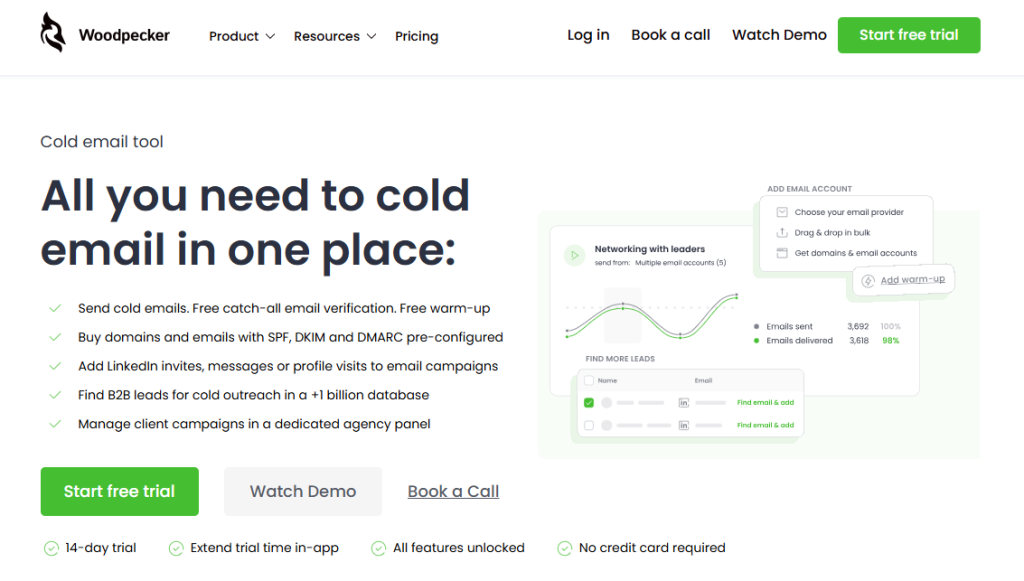
Woodpecker’s platform sells pre-configured domains with SPF, DKIM, and DMARC already set up, which removes most of the setup work – otherwise you’re doing DNS configuration manually through Cloudflare or your registrar, which is fine but slow.
2. Set up SPF, DKIM, and DMARC
These three records are what prove to inbox providers that your email is really from you. Without them, modern spam filters will flag your messages within the first few sends.
SPF (Sender Policy Framework) – a DNS record listing which servers are authorized to send mail from your domain. Every outbound provider (Google, Microsoft, Woodpecker’s platform) will tell you what to add. This is a 30-second task.
DKIM (DomainKeys Identified Mail) – a cryptographic signature that proves the email wasn’t tampered with in transit. Your email provider generates the key; you add it to DNS.
DMARC (Domain-based Message Authentication, Reporting & Conformance) – the policy that tells receiving servers what to do when SPF or DKIM fails. Start with p=none (monitor only) for the first few weeks, then move to p=quarantine once you’re confident everything’s aligned.
3. Warm up your sending domain
A new domain with no sending history will get flagged as suspicious no matter how clean your SPF/DKIM/DMARC setup is. Domain warmup – the process of gradually building send volume to establish a reputation – takes two to four weeks before you should start meaningful cold outreach.
Woodpecker includes free email warmup as part of every plan. The way it works is through partnerships with Warmy and Mailivery – two specialized warmup providers that Woodpecker has white-labeled into the platform. When you enable warmup, your account exchanges emails with other warmup participants in controlled, natural patterns that build sender reputation over time. You pick which provider to use inside the Woodpecker UI; you don’t need a separate account with either. Both perform similarly in Woodpecker’s internal testing.
The mechanics matter here because inbox providers watch warmup patterns. A domain that jumps from zero to 200 emails a day in week one will get flagged. A domain that ramps gradually over 3–4 weeks will build the reputation it needs.
4. Configure one-click unsubscribe
Since February 2024, Gmail and Yahoo both require bulk senders to include a one-click unsubscribe option – not a link to a preference center, not a mailto: address, but an actual header-based unsubscribe that the inbox provider can act on automatically.
For outbound tools this is handled at the platform level. In Woodpecker, every campaign automatically includes the required unsubscribe header. If you’re running cold email through a custom SMTP setup, you need to configure this yourself via the List-Unsubscribe and List-Unsubscribe-Post headers.
5. Verify every email address before sending
Bad email addresses (invalid, outdated, role-based like info@ or sales@) hurt your sender reputation when they bounce. A 2% bounce rate is acceptable; anything above 5% will flag your domain fast.
Woodpecker includes free catch-all email verification, which checks addresses before sending. If you’re using a different tool, run your list through a verification service (NeverBounce, ZeroBounce, Bouncer) before uploading. Skipping this step is one of the fastest ways to tank a new campaign.
6. Plan for inbox rotation if sending at volume
A single mailbox can safely send around 50–100 cold emails per day before pattern-detection algorithms start treating it as suspicious. If you need to reach more than that, you’re rotating across multiple mailboxes.
Inbox rotation – spreading sends across multiple authenticated mailboxes – is now standard practice for any campaign over 100 emails a day. Woodpecker’s Adaptive Sending feature handles this automatically: it distributes messages across your connected mailboxes using randomized timing and throttles automatically if bounce rates spike.
Why this matters? And how to improve email deliverability? Our guide covers the full picture.
Step two: build and prepare your prospect list
The list is the single highest-leverage part of the whole campaign. A mediocre email to the right person outperforms a brilliant email to the wrong one. The inverse is also true: the best-written email in the world won’t save you from a bad list.
Define your ideal customer profile with specificity
“B2B SaaS companies” is not an ICP. “Series A–C SaaS companies with 50–300 employees, headquartered in the US or UK, selling to mid-market or enterprise, with a recent product launch in the last 6 months” is closer to an ICP.
The specificity matters because it determines both who you reach out to and what you say to them. A list that’s too broad forces generic messaging. A list that’s tight enough lets you write something actually relevant to the recipient’s situation.
Build your list
There are three ways to build a prospect list in 2026: scrape it, license it, or find it inside a tool. All three have trade-offs.
Scraping (LinkedIn Sales Navigator exports, Apollo exports, custom scrapers) – most flexible, but data quality varies and some platforms actively block scraping. Legal gray zone in some jurisdictions.
Licensing from a provider (ZoomInfo, Apollo, Clearbit, Cognism) – cleaner data, but expensive at the enterprise level and often overkill for smaller teams.
Using a built-in lead finder – Woodpecker includes a B2B lead database of over 1 billion contacts as part of the platform. Filter by company size, industry, location, role, and other firmographic criteria; export directly into your campaign. For teams that don’t already have a list, this is the fastest path from setup to sending.
Segment before you send
Don’t blast your whole list with one sequence. Segment by at least one dimension – industry, company size, role, or signal (recent funding, recent job change, specific tech stack) – and write a sequence tailored to each segment.
A list of 500 prospects split into 4 segments with 4 different sequences outperforms the same 500 prospects with one generic sequence by a large margin. This is the part most teams skip and wonder why their reply rates are flat.
Verify before you upload
Run the verified list through your tool one more time before launching. Even licensed data from premium providers has a 3–5% decay rate per month as people change jobs. For a list you’re about to invest real time in, the 10 minutes of verification is worth it.
Step three: design your sequence
A cold email sequence in 2026 typically runs 4–6 emails over 3–4 weeks. Not 10 emails. Not one. The exact number varies by context, but the structure below is where most well-performing sequences land.
Email 1: the opening message
Short (80–120 words). Specific to the recipient or their company. Single focused ask. No company pitch.
The mistake most new campaigns make is writing a long Email 1 that covers the product, the company, the value proposition, and the ask all in one go. It reads as a pitch and gets deleted. A strong Email 1 does one thing: gets the recipient’s attention with a specific observation and asks for a small, concrete next step.
Email 2: the reminder (3–4 days later)
Short (50–80 words). References the first email briefly. Adds one piece of new information – a case study, a data point, a different angle – rather than just “following up.”
The “just following up” follow-up is the most common mistake in cold sequences. It signals to the reader that you have nothing new to say and are just trying to nudge them. A good Email 2 gives them a reason to read.
Email 3: the value add (5–7 days after Email 2)
A piece of content, a short resource, or a concrete offer that stands on its own even if they haven’t responded to the first two. Think: “Here’s a framework we developed based on similar situations – useful whether we end up talking or not.”
This is the email that often unlocks replies from prospects who were mildly interested but not enough to prioritize a reply earlier in the sequence.
Email 4: the direct ask (5–7 days after Email 3)
Back to the original ask, more directly. Shorter than Email 3. Acknowledges that you’ve sent several emails and signals it’s the last substantive one.
Email 5: the breakup
The “I’ll stop emailing now” message. Counterintuitively, one of the highest-converting emails in a sequence. Works because it removes pressure, gives the reader an easy out, and sometimes surfaces responses like “sorry, been swamped – happy to chat next week.”
If you are no familiar with follow ups, read our articles on how to send a follow-up email after no response and follow-up emails: how many and how often.
Conditional logic: the 2026 standard
Modern cold email tools support branching sequences – different paths based on whether the recipient opens, clicks, or replies to earlier emails. Woodpecker supports if/then logic inside sequences, which means you can, for example:
- Send a different Email 3 to recipients who opened Email 1 but didn’t reply
- Skip directly to Email 4 for recipients who clicked a link in Email 2
- Branch into a separate nurture track for recipients who opened but never engaged
This is more powerful than simple linear sequences and worth setting up once you have a baseline sequence working. Don’t over-engineer it on your first campaign – get the linear version solid, then add conditional logic on iteration 2.
Step four: personalize without faking it
Personalization is what separates cold email from spam in the reader’s mind. Merge fields ({{firstname}}, {{company}}) are table stakes – they don’t count as personalization anymore; they’re just not-being-lazy.
Real personalization in 2026 means three things:
Personal openers
The first one or two sentences of Email 1 should reference something specific to the recipient or their company. Not “I see you work at [Company]” – actual observed detail. Their recent post, a product launch, a specific challenge the industry is facing, a piece of their content that prompted the outreach.
This is the part that’s hardest to scale. A common pattern in 2026: use AI to generate personalized openers based on each prospect’s LinkedIn profile, company website, or recent activity, and combine those unique openers with templated bodies. The result is an email that opens like a hand-written message and delivers like a scaled campaign. AI guide for writing cold emails covers the framework side of this.
Segment-specific language
If you segmented your list (as you should have), write differently to each segment. The email to a CFO should sound different than the email to a marketing manager. Language, framing, and the specific value proposition should shift across segments. This is where most bulk campaigns fall flat: one sequence, no segment-specific tuning.
Spintax for the rest
The parts of the email that genuinely are the same across recipients (mid-email sentences, sign-offs, structural phrases) should use spintax to vary the exact wording. This isn’t personalization – it’s deliverability. More on this in the spintax for cold email guide. Woodpecker supports spintax natively in the campaign editor.
Step five: the launch checklist
Before you hit send on a new cold email campaign, work through this:
Technical setup
- Sending domain is separate from main domain
- SPF, DKIM, DMARC configured and verified
- Warmup has been running for at least 2 weeks
- List-Unsubscribe header is configured (handled automatically in Woodpecker)
- A test email has been sent to your own inbox and reads correctly
- Sending schedule set for recipient’s business hours, not yours
List quality
- List is verified (bounces removed)
- Segmented into at least 2–3 groups
- No duplicates across segments
- No role-based emails (info@, sales@) unless deliberately targeting them
- Suppression list (people you don’t want to contact again) is applied
Sequence quality
- Email 1 is under 120 words
- Every email has one clear call-to-action
- No “just following up” language
- Breakup email is included
- All merge fields are tested – no {{firstname}} leaking through
- At least one person who isn’t you has read the sequence
Monitoring setup
- Woodpecker’s Deliverability is active
- Baseline metrics are noted before launch (will compare after week 1)
- Reply detection is configured (auto-stop sequence on reply)
If any item isn’t checked, don’t launch. Every one of these is the difference between a campaign that works and one that quietly burns your domain reputation without you noticing.
Step six: what to monitor in the first two weeks
The first two weeks of a new campaign are where most problems show up. Watch for these signals:
Open rate. 40–60% is healthy for a well-targeted cold email list in 2026. Below 30% signals either a deliverability problem (emails landing in spam) or a list/subject line problem (not enough relevance). Above 70% is unusually good – usually a sign of a very warm list or strong subject line work.
Reply rate. 3–8% is the healthy range. Below 2% means something in the message, segment, or targeting isn’t connecting. Above 10% is unusual and usually reflects very strong targeting or an established relationship.
Bounce rate. Under 2% is the goal. Between 2–5% is a warning. Over 5%, pause the campaign immediately and re-verify your list – you’re actively damaging sender reputation with every additional send.
Unsubscribe rate. Under 1% is normal. Over 2% suggests the list is poorly targeted or the message is creating negative friction.
Spam complaints. Any complaint at all is a problem. Over 0.1% is an emergency. Woodpecker’s Deliverability surfaces this automatically; if you’re running outside the platform, monitor through Google Postmaster Tools and Microsoft SNDS.
If any metric trends in the wrong direction, pause and diagnose before continuing. Campaigns that get throttled by inbox providers are much harder to recover than campaigns that are paused, adjusted, and restarted clean.
How Woodpecker handles the infrastructure for you
Setting up a cold email campaign in 2026 involves more technical work than it used to. For teams that want to focus on the message and targeting rather than DNS records, warmup schedules, and deliverability, Woodpecker handles most of the infrastructure layer inside the platform.
Specifically, here’s what’s built in rather than bolted on:
Domain and mailbox purchase with auth pre-configured. You can buy domains and mailboxes directly through Woodpecker with SPF, DKIM, and DMARC already set up. Saves the hour or two of manual DNS configuration and removes a common source of errors.
Free email warmup. Built-in warmup via partnership with Warmy and Mailivery. Starts automatically when you connect a new mailbox; no separate account needed.
Free catch-all email verification. Verifies addresses at campaign launch – removes bad addresses before they bounce.
Adaptive sending and inbox rotation. Automatically spreads sends across connected mailboxes, randomizes timing within your configured windows, and throttles automatically when bounce rates spike.
Deliverability. Tracks your sender reputation and inbox placement over time, flags issues before they cascade.
Conditional sequences (if/then logic). Branching paths based on opens, clicks, replies. More powerful than simple linear sequences once you’ve got the basics working.
LinkedIn integration. Add LinkedIn profile visits, connection requests, and messages as steps in an email sequence – multi-channel outreach from one platform without a second tool.
Agency panel. Separate workspaces for each client, per-client reporting, white-label options. Built specifically for outreach agencies managing 10+ client accounts.
Auto-stop on reply. When a prospect responds, the rest of the sequence doesn’t send. Obvious, still missed by many manual setups.
What Woodpecker doesn’t do: built-in dialer, SMS, WhatsApp, or AI-generated copy. It’s a specialized tool for email (and LinkedIn). If you need phone and SMS inside the same platform, you’re looking at a different category of tool.
If your work involves cold email at any real volume – sales, agency, recruiting, business development – sign up to Woodpecker and run your first campaign. The setup is faster than piecing it together from separate tools, and the deliverability layer is the part you don’t want to get wrong.
FAQ
How do you set up a cold email campaign in 2026?
Setup has six phases: technical foundations (separate domain, SPF/DKIM/DMARC, warmup, unsubscribe headers, email verification, inbox rotation), list preparation (tight ICP, segmentation, verified data), sequence design (4–6 emails over 3–4 weeks), personalization (unique openers, segment-specific language), a pre-launch checklist, and first two weeks of monitoring (open rate, reply rate, bounce rate, spam complaints). Skipping phase one is the most common failure point in 2026.
How many emails should be in a cold email sequence?
The working range is 4–6 emails spread over 3–4 weeks. Email 1 is the opener, Email 2 is the reminder with new information, Email 3 adds standalone value, Email 4 is a direct ask, Email 5 is the breakup. Fewer than 3 emails leaves most of the potential reply rate on the table; more than 7 usually generates unsubscribes without additional replies.
What’s the difference between a cold email campaign and a cold email sequence?
A sequence is the structured series of emails sent to each prospect over time. A campaign is the full operation: list, sequence, segmentation, monitoring, and iteration. One campaign might use different sequences for different segments of the list. In practice the terms overlap – “campaign” usually implies broader scope.
What open rate is good for a cold email campaign in 2026?
40–60% is the healthy range for a well-targeted cold email campaign. Below 30% suggests deliverability problems or weak subject lines. Above 70% typically indicates a very warm list or unusually strong subject line work. Open rate should always be interpreted alongside reply rate – high opens with no replies means the message isn’t converting interest into action.
What reply rate should I expect from cold email?
3–8% is healthy for a well-targeted B2B cold email campaign. Below 2% indicates problems with message, segment, or targeting. Above 10% is unusual and usually reflects very strong targeting, an ICP with high existing demand, or a pre-existing relationship layer.
Is cold email still legal in 2026?
Yes, with conditions. In the US, CAN-SPAM requires truthful headers, a clear unsubscribe option, and a physical mailing address. In the EU, GDPR requires a legitimate interest basis for contacting B2B prospects and respect for opt-outs. In Canada, CASL is stricter and requires prior consent for most cold outreach. Compliance is doable in all jurisdictions, but requires attention – is cold emailing illegal? covers the specifics.
How many cold emails can I send per day per mailbox?
In 2026, the safe range is 30–50 per day for a new mailbox, scaling to 80–150 per day for a fully warmed mailbox. Going higher from a single mailbox increases spam filter scrutiny significantly. Teams sending 500+ per day should rotate across multiple authenticated mailboxes.
How long should email warmup take before I can start a campaign?
Two to four weeks for a new domain and mailbox. The warmup period builds the sender reputation inbox providers use to decide whether your emails land in the primary inbox or spam. Skipping or rushing warmup is the single most common cause of new campaign deliverability failures. Woodpecker includes warmup as part of every plan and starts automatically when a new mailbox is connected.
Do I need a separate domain for cold email?
Yes, almost always. Sending cold email from your main domain risks tanking your primary email reputation if the campaign runs into problems. The standard 2026 practice is to use a secondary domain that resembles your main one – yourcompany.io, getyourcompany.com – purely for outbound. Woodpecker sells pre-configured domains with authentication already set up.
Can I run a cold email campaign without a tool like Woodpecker?
Technically yes – you can configure everything manually through DNS, a custom SMTP provider, and a spreadsheet. Practically, you’re rebuilding a fair amount of infrastructure that specialized tools handle automatically: warmup, inbox rotation, sequence logic, reply detection. For one-off campaigns or very small volumes this can work. For anything ongoing, the tool pays for itself quickly in time saved and problems avoided.