


If you want to make sure your cold emails land in inboxes instead of the spam folder, it takes more than great copy. In most cases, the reason why you’re not making it to the primary inbox is your sender reputation, which has a major effect on email deliverability. One way to solve that is Warmbox.
Launched in 2021, Warmbox is an email warm-up tool that helps businesses get their mailboxes ready for cold outreach. The problem? There isn’t that much online about this tool, and you want to know if you can trust it with your warm-up process.
Here’s everything you wanted to know about Warmbox.
What is Warmbox, and who is it for?
Warmbox.ai is an email warm-up tool built to improve sender reputation before you start running cold outreach campaigns.

Instead of sending large volumes of emails right away and risking spam placement, Warmbox gradually increases your sending activity through automated conversations between inboxes. The goal is to make your email account look natural and trustworthy in the eyes of providers like Gmail and Outlook.
The platform is focused on inbox health rather than outreach itself. It connects to your mailbox and sends and replies to emails on your behalf, marking messages as important and moving them out of spam when needed. This helps build domain and mailbox credibility over time, especially for brand-new inboxes or domains that have no sending history.
Warmbox.ai is mainly for:
- Sales teams that are starting cold email campaigns
- Agencies managing multiple client inboxes
- Founders launching outbound for the first time
- Marketers setting up new domains for prospecting
- Businesses that have previously struggled with spam placement
It is not a full cold email platform. You still need a separate outreach tool to create campaigns, personalize messages, and manage replies. Warmbox is typically used alongside tools like Woodpecker when teams want to protect deliverability before scaling outbound efforts.
Key features to help you stay out of the spam folder
Although seemingly simple, Warmbox has many features and warm-up settings to help you improve your email deliverability score.
Automated warm-up and realistic inbox interactions
Warmbox runs a warm-up activity automatically once you connect your inbox. The system sends emails from your account every day, opens them, bookmarks them, replies to a portion of them, and interacts with them in ways similar to how real recipients would behave.
These engagements help signal to email providers that your account is active and trustworthy, reducing the chance your messages are flagged as spam.
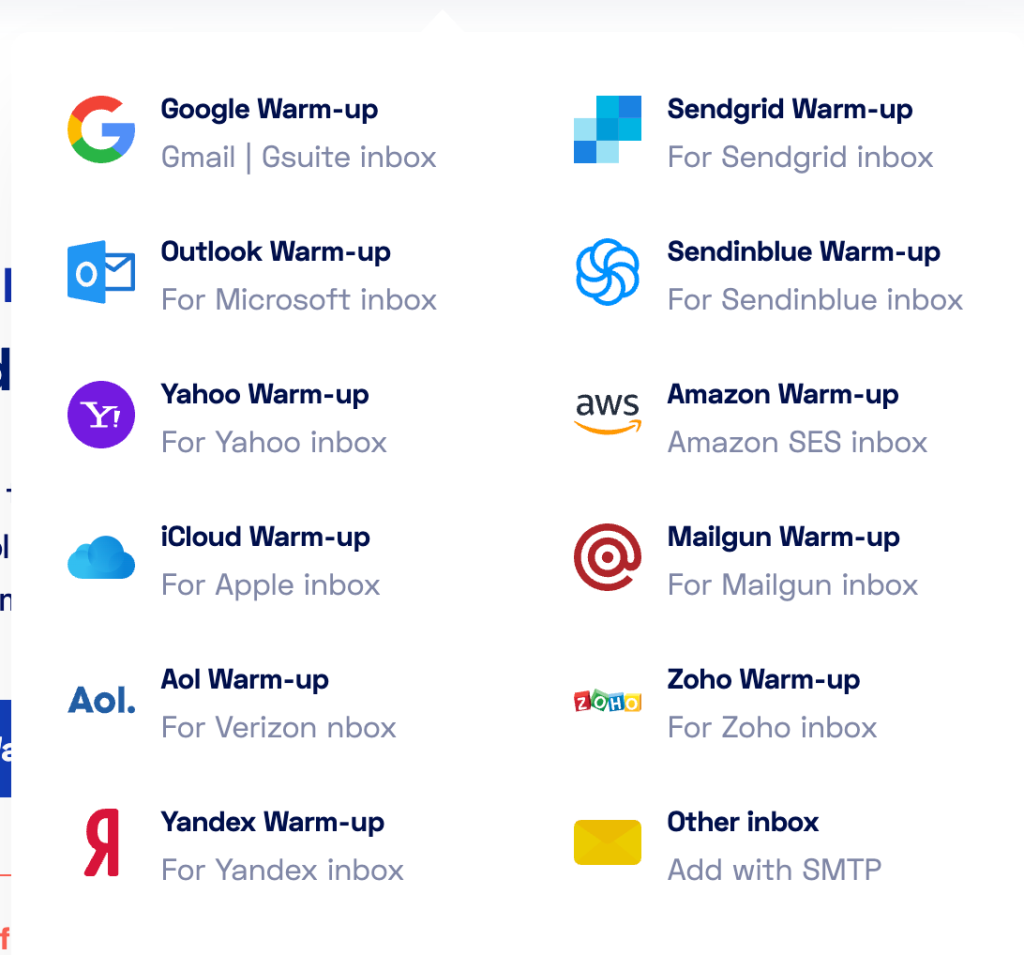
Warmbox can help you warm up emails with multiple email service providers. Here’s what is supported as of early 2026:
- Google/Gmail/G Suite
- Sendgrid
- Outlook
- Sendinblue
- Yahoo!
- Amazon
- iCloud
- Mailgun
- AOL
- Zoho
- Yandex
- And any other inbox you can add with some SMTP setup
In other words, you get plenty of customizable warm-up options, from free Gmail accounts to professional ESPs.
Private inbox network engagement
Warmbox uses a large network of more than 35,000 private inboxes across different providers and countries to exchange messages with your address. Because these interactions mimic real-world email exchanges across a wide range of domains, your sender reputation can improve more naturally than with simple internal tests.
The major benefit is that Warmbox has its own private network, so you don’t need multiple email accounts for warmup. All of the work is done automatically in the background.
Multiple warm-up strategies and customization
You’re not limited to one fixed approach for warm-up. Warmbox offers a variety of warm-up strategies, such as growth-focused settings, flat, consistent pacing, or randomized patterns, so you can adjust the ramp-up to how quickly you plan to send real outreach.
You can also adjust parameters like volume of messages per day and reply rates to match your campaign goals or risk tolerance.
This is ideal for agencies that manage multiple accounts and their domain reputation. While one client may need a huge number of inboxes ready immediately, others may just need to improved inbox placement for a smaller number of accounts, no matter the time it takes.
Detailed deliverability monitoring
Warmbox includes reporting tools that track spam score, warm-up schedule progress, and key engagement metrics right from the dashboard. This lets you see how your inbox reputation changes over time and assess whether your warm-up progress is sufficient before scaling to full cold campaigns.
These detailed analytics dashboards are excellent to understand the mechanics of an email deliverability tool, even if you’re completely new to cold outreach.
Free blacklist and DNS checks
Part of staying out of spam is ensuring your sending domain and IP are correctly configured. Warmbox offers free tools to check whether your domain or IP address is on any blacklists and whether core email authentication standards like SPF, DKIM, and DMARC are set up properly.
These checks can uncover issues that would otherwise make spam filters more likely to block your mail. Even if you don’t plan to warm up new accounts immediately, you can use the DNS settings checker, for example, to check the status of your existing email accounts before continuing to use them for outreach.
Support for multiple inboxes and teams
If you’re managing outreach across several accounts or for clients, Warmbox lets you add inboxes, create workspaces, and invite team members directly from the dashboard. This makes it easier to handle warming projects at scale without losing visibility into the progress of each inbox.
Once again, this is ideal if you want a cost-effective solution for a lead gen agency that sends out a large volume of emails on behalf of their clients.
Warmbox pricing plans
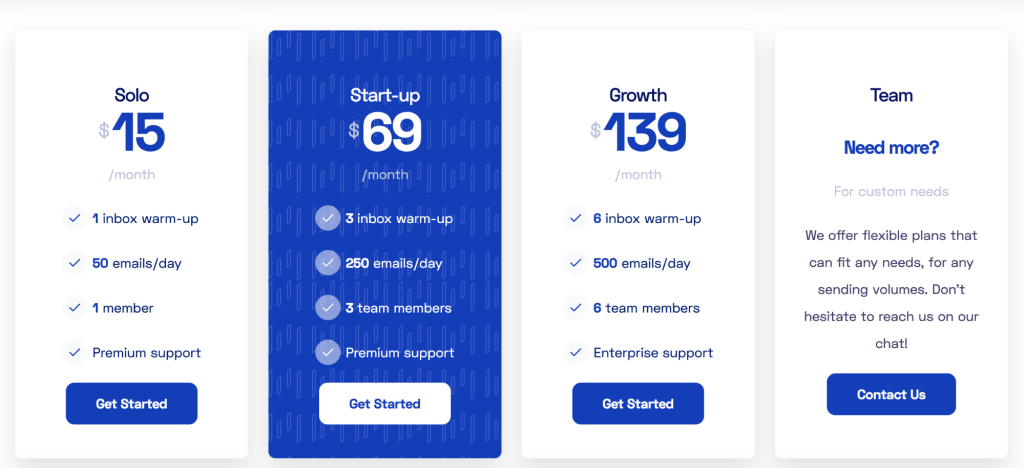
Warmbox uses a subscription pricing model based on how many inboxes you want to warm up and the volume of daily warm-up emails. All plans include the core warm-up features such as automated interactions, removing emails from spam, reply handling, marking favorites, and spam score monitoring.
Solo plan
The Solo option costs $15 per month when billed annually or $19 per month if billed monthly and is designed for individuals and small operators.
It lets you connect one inbox to Warmbox and warm up to 50 emails per day. You also get access for one team member and basic support.
Start-up plan
The Start-up tier is $69 per month on annual billing or $79 per month on a monthly plan. It scales to three inboxes with about 250 warm-up emails per day and support for three team members.
This tier is common for small teams or agencies warming a few accounts at once.
Growth plan
The Growth plan is $139 per month annually or $159 per month if paid monthly. It covers up to six inboxes and provides up to 500 warm-up emails per day with access for six team members and higher-level support.
It’s built for larger teams and companies with heavier sending needs.
Team and enterprise plans
If your needs go beyond the preset tiers, Warmbox offers custom pricing for larger teams, agencies, or enterprises with higher volume requirements. These plans are tailored to your scale and warm-up volume and are available via contact with Warmbox’s sales team.
All Warmbox plans come with in-app chat support and access to the dashboard for monitoring warm-up progress.
What about the actual Warmbox reviews?
We tried searching for them, but couldn’t find any. Warmbox has an official G2 account, and its founders are present in various communities. That’s about it. There are no official reviews of users who actually subscribed and paid for Warmbox.
Even Reddit is filled with users asking about how Warmbox compares with other providers in this space. You’re pretty much left to start using Warmbox on your own. And since there are only paid plans available without a free plan option, you’ll have to spend $10 in just a few days, and see if it lives up to its promises.
Why warmup tools are not enough on their own
Dedicated warm-up services like Warmbox focus just on preparing your mailbox so that your emails don’t get flagged as spam. They automate sending and receiving positive interactions to slowly build trust with internet service providers.
While that’s valuable, it’s just one layer of what you need to succeed with cold outreach.
Cold outreach tools like Woodpecker go further than just a simple warm-up.
Woodpecker combines domain and inbox warm-up with campaign automation, personalization, deliverability monitoring, and follow-up sequencing all in one platform.
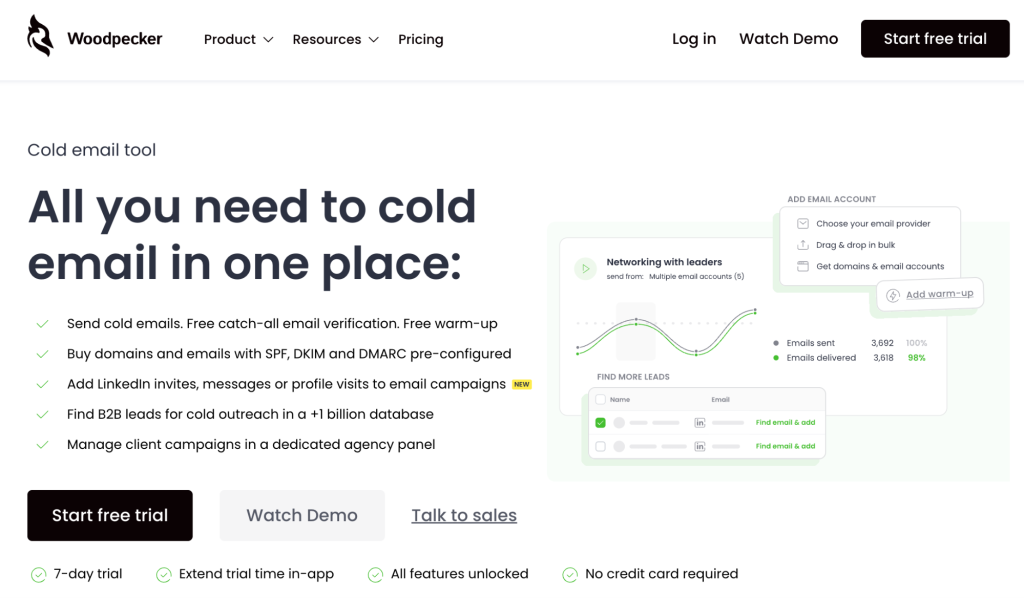
With Warmbox, you still need a separate cold email tool to actually create, send, track, and manage your outreach campaigns. Woodpecker lets you handle all of that together, so you don’t have to stitch multiple services together and hope they work well together.
One reason cold outreach tools are a stronger choice for many teams is that deliverability doesn’t start and end with warm-up. It also depends on list quality, bounce protection, sending behavior, authentication, and ongoing sender reputation.
Woodpecker includes email verification before sending, inbox rotation, adaptive sending that avoids hitting provider limits, and deliverability monitoring to spot issues before they hurt your campaigns. This makes it easier to keep your outreach from ever triggering spam filters once you begin sending real emails.
Warm-up alone still leaves you without the core functions needed to run, iterate, and improve cold outreach.
Woodpecker gives you all of the tools to manage deliverability, send cold emails, and get detailed reports about your email performance.