


You can reply to a forwarded email, but check the recipients before sending. In most cases, selecting Reply sends your response to the person who forwarded the message—not to the person who wrote the original email.
To reply to the original sender, you may need to add their address manually or start a new message. Selecting Reply All includes the sender of the forwarded message and the people listed in the current message’s To and Cc fields. It does not automatically include every person whose address appears inside the quoted, forwarded content.
How to reply to a forwarded email
To reply to a forwarded email:
- Open the forwarded message.
- Read the forwarder’s note and the relevant part of the original email.
- Determine whether you should answer the forwarder, the original sender, or everyone currently included.
- Select Reply or Reply All, or create a new message for the original sender.
- Review the To and Cc fields carefully.
- Acknowledge the forward and answer the question or request.
- State any next step, owner, or deadline.
- Review the quoted content for sensitive information.
- Send the response.
A simple response might look like this:
Thanks for forwarding this, Maya. I reviewed the request and can prepare the revised figures by Thursday. I’ll send them to you for approval before sharing them with the client.
Best,
Alex
The important point is not just which button you select. It is deciding who actually needs your response.
Can you reply to a forwarded email?
Yes. You can reply to a forwarded email just like any other message.
However, your response normally goes to the person who forwarded the email. The original sender is not automatically included unless:
- The forwarder added them to the current To or Cc field.
- You manually add their address.
- The message was redirected rather than forwarded.
- Your organization uses a particular routing configuration that preserves the original sender.
Before sending, expand or inspect the recipient fields. Do not assume that everyone named in the forwarded conversation will receive your reply.
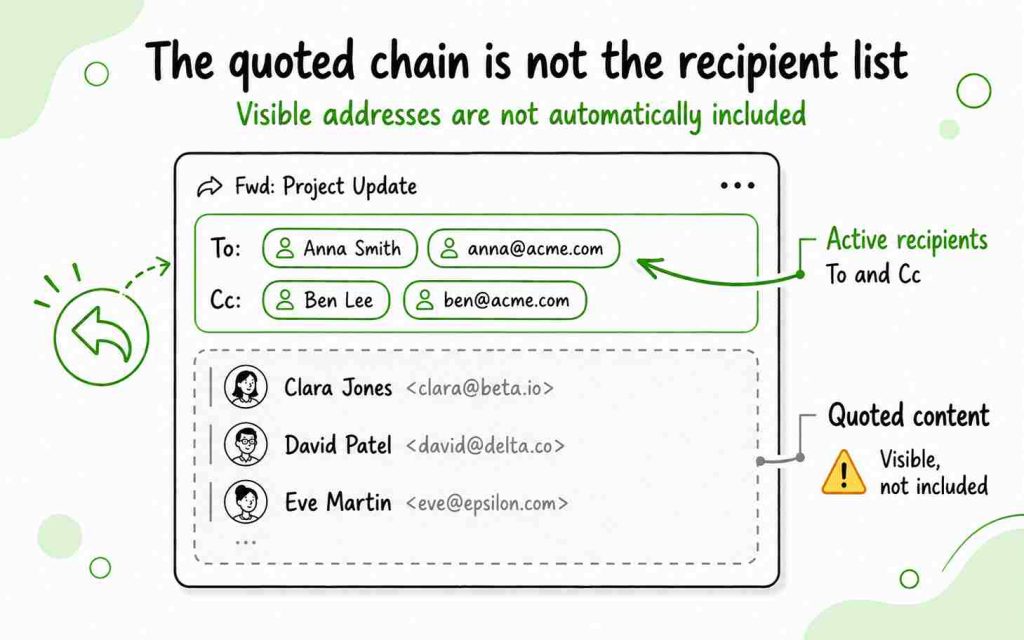
Reply vs Reply All on a forwarded email
| Option | Who normally receives it | When to use it |
|---|---|---|
| Reply | The person who forwarded the message | Your answer, acknowledgment, or question is only for the forwarder |
| Reply All | The forwarder and everyone in the current message’s To and Cc fields | Every currently included recipient needs the response |
| New message or edited recipients | The original sender or another selected person | You need to respond directly to someone listed only inside the forwarded content |
A forwarded email may display the original sender’s name and address in the quoted content. That does not necessarily make the original sender an active recipient of your reply.
How do you reply all to a forwarded email?
To reply all to a forwarded email:
- Open the forwarded message.
- Select Reply All.
- Expand the recipient list.
- Check everyone in the To and Cc fields.
- Remove anyone who does not need the response.
- Add the original sender manually if they should receive it but are not listed.
- Write your response.
- Check the recipients again before selecting Send.
Use Reply All only when the response is relevant to everyone included. For example, it may be appropriate when you are confirming a project decision, correcting information that everyone received, or coordinating an action involving several people.
Do not use Reply All simply because the original message included a long email chain. Addresses visible in the quoted chain may not be active recipients of your reply.
How to respond to a forwarded email in Gmail
To reply to a forwarded email in Gmail on a computer:
- Open Gmail.
- Select the forwarded message.
- Read the forwarder’s note and expand the quoted content if necessary.
- Select Reply at the bottom of the message to answer the forwarder.
- To include everyone listed in the current To and Cc fields, select Reply All.
- Check the recipients displayed above the response.
- Add or remove recipients if necessary.
- Enter your response.
- Select Send.
If the message is part of a Gmail conversation, make sure you are replying to the correct message in the thread. Expand the individual message and check its sender and date before responding.
How to reply to the original sender in Gmail
If the original sender appears only inside the forwarded content:
- Find and copy their email address from the forwarded message.
- Select Compose, or select Reply and edit the recipient field.
- Enter the original sender’s address.
- Add the forwarder to Cc if they should remain involved.
- Briefly explain how you received the message.
- Write your response and select Send.
For example:
Hi Jordan,
Maya forwarded your question about the revised project schedule and asked me to respond. We can move the review to Thursday, but the final delivery date will remain June 18.
Please let me know if Thursday works for your team.
Best regards,
Alex
Do not contact the original sender directly if the forwarder shared the message confidentially or only wanted your internal advice.
How to respond to a forwarded email in Outlook
To reply to a forwarded email in Outlook or Outlook on the web:
- Open Outlook.
- Select the forwarded message.
- Select Reply to respond only to the person who sent you the forward.
- Select Reply All to include the current sender and the recipients in the active To and Cc fields.
- If the buttons are not visible, open More actions and select Reply or Reply All.
- Review the recipient list.
- Add or remove recipients as needed.
- Type your response.
- Select Send.
In Outlook on the web, the original history may be collapsed while you write. Select the option to show the message history if you need to review the forwarded content before responding.
How to reply to the original sender in Outlook
If the original sender is not included in the current recipient list:
- Locate their address in the forwarded content.
- Create a new message or edit the recipient field in your reply.
- Add the original sender to the To field.
- Add the forwarder to Cc if appropriate.
- Explain that the message was forwarded to you.
- Write your answer.
- Review all recipients and select Send.
A normal forward and an automatic redirect are not the same. A reply to a normally forwarded message usually returns to the forwarding address. A redirected message may preserve the original sender as the reply destination.
Who should receive your response?
Before replying, identify the role of each person involved.
Reply only to the forwarder when:
- They asked for your private opinion.
- You are helping them prepare a response.
- Your answer contains internal or confidential information.
- They only wanted acknowledgment.
- You need more context before contacting the original sender.
Reply to the original sender when:
- The forwarder explicitly introduced you.
- You are responsible for resolving the original request.
- The sender needs information only you can provide.
- The forwarder asked you to take over the conversation.
- Direct communication will make the next step clearer.
Reply All when:
- Everyone included needs the same update.
- You are confirming a shared decision.
- The response assigns tasks to several people.
- You are correcting information sent to the whole group.
- Leaving someone out would create confusion.
When in doubt, ask the forwarder:
Would you like me to respond directly to Jordan, or send my comments to you first?
That one question can prevent privacy problems and unnecessary email threads.
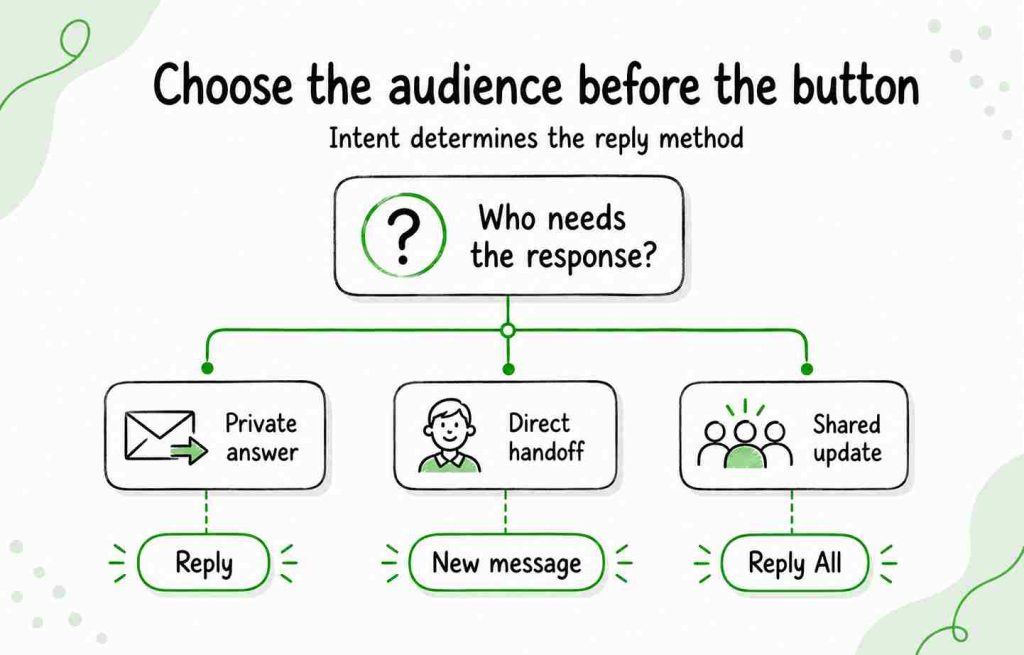
How to structure a reply to a forwarded email
A useful response normally contains four elements:
- Acknowledgment: Confirm that you received and reviewed the message.
- Context: Identify what part of the forward you are addressing.
- Answer or action: Give your decision, feedback, or next step.
- Closing: Explain what happens next and when.
For example:
Thanks for forwarding the client’s question. I’ve reviewed the pricing section, and the amount shown in the proposal is correct. I’ll add a short explanation of the implementation fee and send the revised version by 3 p.m.
Best,
Alex
Keep the response concise unless the situation requires a detailed explanation. These business email format guidelines can help you structure a more formal response.
Examples of how to reply to a forwarded email
Example 1: Acknowledging information
Hi Maya,
Thanks for forwarding this. I’ve saved the report and will review it before our planning meeting on Thursday.
Best,
Alex
Example 2: Providing requested feedback
Hi Maya,
Thanks for sending the proposal. I reviewed the pricing and timeline sections. The timeline looks realistic, but I recommend clarifying which services are included in the monthly fee.
I’ll add my comments to the document this afternoon.
Best,
Alex
Example 3: Confirming that you will take action
Hi Maya,
Thanks for forwarding the customer’s message. I’ll contact them directly today and investigate the account issue. I’ll copy you on the response and send you an update once it is resolved.
Kind regards,
Alex
Example 4: Asking for context before responding
Hi Maya,
Thanks for sending this over. Before I respond, could you confirm whether the customer has already received the revised timeline? I want to avoid giving them conflicting information.
Best,
Alex
Example 5: Responding to the original sender after an introduction
Hi Jordan,
Maya forwarded your question and suggested that I respond directly. The integration supports CSV and XLSX imports, and I can help your team review the required field structure.
Would it be helpful if I sent you an example file?
Best regards,
Alex
Example 6: Replying All with a project update
Hi everyone,
Thanks for including me. I’ve reviewed the schedule and can confirm that the design team will deliver the final files by Wednesday. Jordan can begin implementation on Thursday as planned.
I’ll let the group know if anything changes.
Best,
Alex
Example 7: Replying in a sales conversation
Hi Jordan,
Thanks for the introduction, Maya.
Maya and I have been discussing how your team currently manages follow-ups across several mailboxes. I can show you the workflow we discussed and answer any technical questions.
Would Tuesday or Wednesday work for a short call?
Best,
Alex
When a prospect forwards your outreach to the right decision-maker, treat it as a warm introduction. Do not repeat the entire original pitch. Provide one sentence of context and one simple next step. For more guidance, see how to write a focused cold email.
Example 8: Declining to share confidential information
Hi Maya,
Thanks for forwarding this. I can confirm the overall project status, but I can’t share the individual account details with the full group. I’ll send you a separate summary containing the information you can forward externally.
Best regards,
Alex
Common mistakes when replying to forwarded emails
Replying before reading the complete context
Read the forwarder’s note and the relevant part of the original conversation. In a long chain, check dates carefully so you do not answer an outdated question.
Assuming Reply All includes the original sender
Reply All includes the active recipients of the forwarded message. It may not include people whose addresses appear only inside the quoted conversation.
Contacting the original sender without permission
The forwarder may have shared the message to ask for private advice. If their intention is unclear, ask before bringing the original sender into the conversation.
Leaving unnecessary quoted content
A long forwarded chain may contain unrelated or confidential information. Remove unnecessary content before adding new recipients.
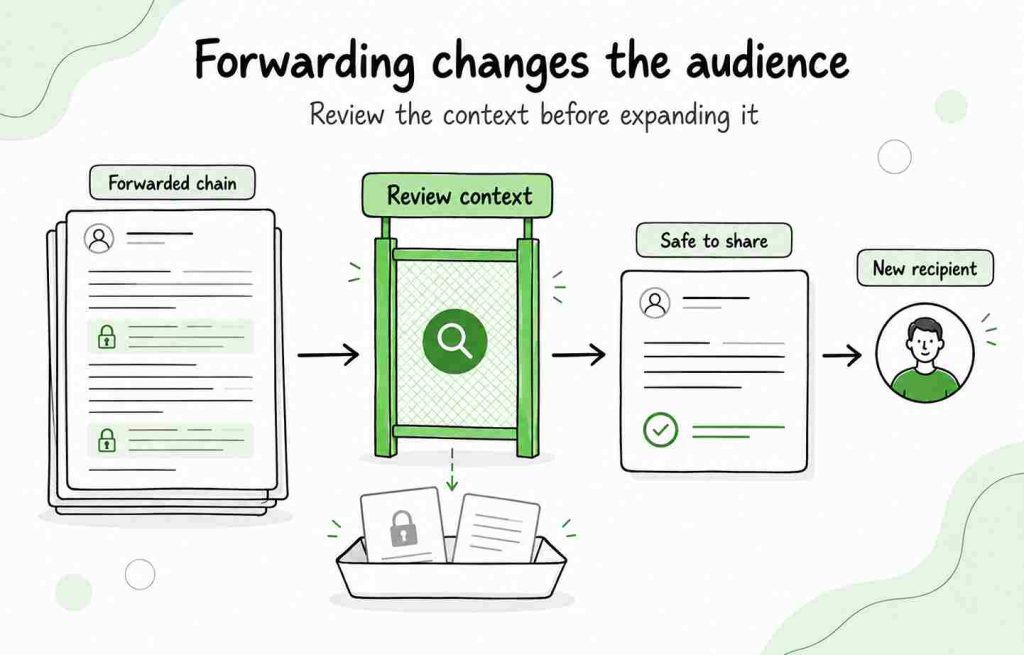
Ignoring the forwarder’s request
If the person wrote “FYI,” “Please advise,” or “Can you handle this?”, respond to that instruction. Do not focus only on the original email.
Using Reply All unnecessarily
Include only people who need the answer or have a role in the next step. This is one of the most important rules of professional email etiquette.
Writing an unclear closing
State who will do what and by when. If you need a professional final sentence, use one of these email closing lines.
Frequently asked questions
Can you reply to a forwarded email?
Yes. Select Reply to respond to the person who forwarded the email. Check the recipient field before sending because the original sender may not receive your response automatically.
Who receives a reply to a forwarded email?
A normal reply usually goes to the person who forwarded the message. The original sender receives it only if they are included in the active recipient fields or you add their address manually.
How do you reply all to a forwarded email?
Open the message, select Reply All, and review the To and Cc fields. Remove unnecessary recipients and add the original sender manually if they need the response but appear only inside the quoted content.
Does Reply All include the original sender of a forwarded email?
Not necessarily. Reply All includes the recipients in the active message’s To and Cc fields. It does not automatically include every address shown in the forwarded email history.
How do you respond to a forwarded email in Gmail?
Open the forwarded email and select Reply to answer the forwarder or Reply All to include the current To and Cc recipients. Review the recipient list, write your response, and select Send.
How do you respond to a forwarded email in Outlook?
Open the message and select Reply or Reply All. If those options are not visible, open More actions. Check the To and Cc fields, write your response, and select Send.
How do you reply to the original sender of a forwarded email?
Locate the original sender’s address in the forwarded content. Create a new message or edit the recipient field, add their address, explain that the message was forwarded to you, and include the forwarder in Cc if appropriate.
Should I use Reply or Reply All on a forwarded email?
Use Reply when only the forwarder needs your answer. Use Reply All when everyone currently included needs the information. Always inspect the recipient list before sending.
Should I acknowledge that the email was forwarded?
Usually, yes. A brief sentence such as “Thanks for forwarding this” confirms that you understand the context. When writing directly to the original sender, explain who forwarded the message and why you are responding.
Can the original sender see that their email was forwarded?
A normal forward does not automatically notify the original sender. However, they may learn about it if someone tells them, includes them in a later reply, or sends them content from the forwarded conversation.