
Use this free email open rate calculator to see what percentage of your delivered emails registered an open.
Enter the number of delivered emails and unique opens above. The calculator applies the standard open rate formula automatically.
Then comes the more useful part: understanding what that percentage actually tells you.
Open rate can help you spot changes across campaigns, subject lines and sending accounts. It is not proof that every recorded recipient read your email.
Privacy features, automatic image loading and blocked tracking pixels can all affect the number. For cold email, replies and positive conversations usually tell you more about real campaign performance.
What is an email open rate?
Email open rate is the percentage of delivered emails that registered an open.
The formula is:
Email open rate = unique opens ÷ delivered emails × 100
For example, imagine you send 1,000 emails. Fifty bounce, leaving 950 delivered emails. Your email platform records 285 unique opens.
285 ÷ 950 × 100 = 30%
Your email open rate is 30%.
Why use delivered emails instead of emails sent?
An email that bounced never reached the recipient.
Including bounced messages in the denominator mixes delivery problems with recipient behavior.
| Metric | Example |
| Emails sent | 1,000 |
| Bounced | 50 |
| Delivered | 950 |
| Unique opens | 285 |
| Open rate | 30% |
If a large share of messages bounce, investigate list quality and deliverability before trying to improve the open rate.
Unique opens vs total opens
Use unique opens when calculating an email open rate.
A unique open counts a recipient once, even when they open the same email several times.
Total opens can include repeat activity from the same recipient.
| Metric | What it measures | Use for open rate? |
| Unique opens | Recipients who registered at least one open | Yes |
| Total opens | All recorded open events, including repeat opens | No |
| Delivered emails | Messages that did not bounce | Use as the denominator |
How email open tracking works
Most email open tracking relies on a small invisible image inside the message.
When that tracking pixel loads, the sending platform records an open event.
Woodpecker’s guide to tracking email opens explains how this works inside an outreach campaign.
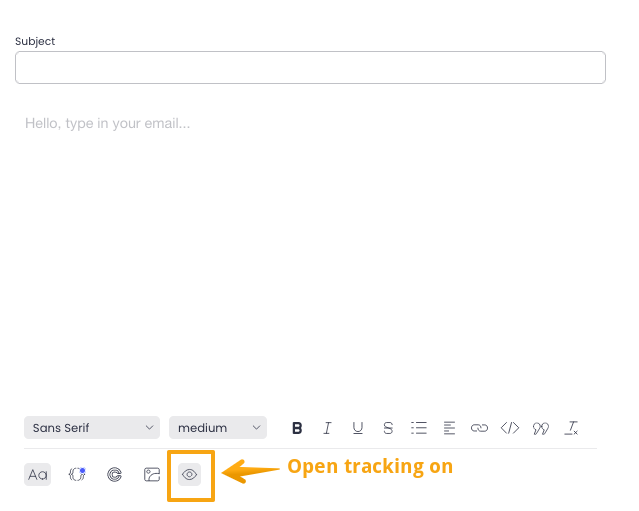
The important word is recorded.
An open event does not always mean a person intentionally opened, read and considered your message.
Why open tracking is imperfect
Several things can affect the data:
- remote images may be blocked
- privacy features may load images automatically
- security systems may scan email content
- email clients can handle tracking differently
Apple Mail Privacy Protection is one reason modern open rates should be treated as directional rather than exact measures of human attention.
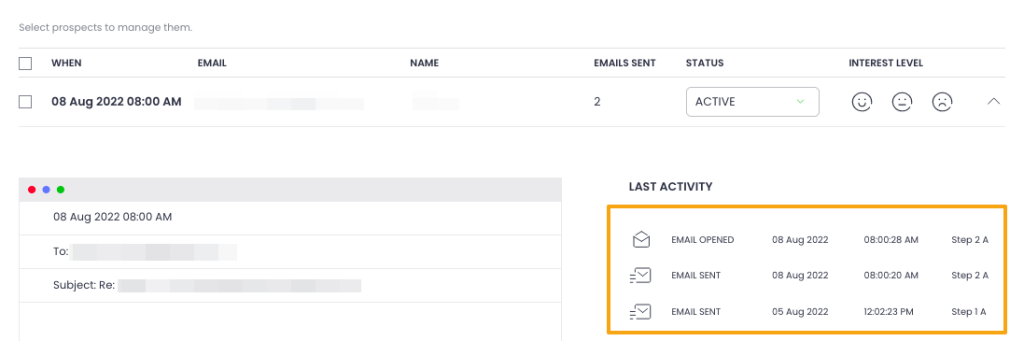
Inside Woodpecker, an open can appear alongside other prospect activity such as sent emails and replies.
What is a good email open rate?
There is no universal good open rate.
The result depends on the audience, campaign type, sender reputation, relationship with the recipient and tracking environment.
Woodpecker’s current cold email statistics show that published benchmark figures vary considerably, which is another reason not to treat one percentage as a universal target.
A better way to read the result is to compare it with similar campaigns.
| What you see | What to do next |
| Much lower than your normal open rate | Investigate deliverability, sender changes, targeting and subject lines |
| Close to your normal result | Look at replies before changing the campaign |
| Much higher than usual | Check whether replies improved too |
For broader context, compare the campaign with Woodpecker’s cold email benchmarks, then compare it with your own historical results for a similar audience.
Do not optimize for opens at the expense of replies
A high open rate can still hide a weak campaign.
Imagine two versions:
| Version | Open rate | Reply rate |
| A | 62% | 2% |
| B | 48% | 7% |
Version A wins if open rate is the only metric.
Version B is much more likely to be the campaign you actually want.
That is why cold email reply rate becomes more useful once the message reaches the prospect.
Low open rate? Run this checklist first
Do not immediately rewrite the subject line.
Check the campaign from the delivery layer up.
1. Check the list
- Did the bounce rate increase?
- Are the email addresses current?
- Did you change the source of your leads?
- Is the audience still a good fit for the offer?
2. Check the sending setup
- Are SPF, DKIM and DMARC configured correctly?
- Did you recently change domains or mailboxes?
- Did daily sending volume increase?
- Is one sender performing noticeably worse than the others?
Woodpecker’s guide to SPF, DKIM and DMARC covers the authentication layer behind email sending.
If the problem appears broader, the domain reputation guide explains the signals connected with your sending history.
3. Check volume and infrastructure
Sending more email through the same setup is not always the right way to scale.
Use Woodpecker’s cold email infrastructure calculator to estimate how many domains and mailboxes a planned campaign may need.
For the wider setup behind sending, see the guide to cold email infrastructure.
4. Check the sender and subject line
Once delivery looks healthy, move to what the recipient actually sees in the inbox.
Ask:
- Does the sender look like a real person?
- Does the From name match the message and signature?
- Is the subject specific enough to make sense?
- Does the subject accurately reflect the email body?
Woodpecker’s collection of cold email subject lines can give you ideas without relying on clickbait.
Open-rate troubleshooting table
| What you see | Possible explanation | Check next |
| Low opens + high bounces | Poor list quality or outdated contact data | Lead source and verification |
| Low opens + low bounces | Inbox placement, sender reputation, targeting or subject line | Sending setup first, copy second |
| High opens + low replies | The subject attracts attention but the message or offer does not | Email body, targeting and CTA |
| High opens + strong replies | The campaign is probably connecting with the audience | Positive reply quality and pipeline |
| One sender performs much worse | Mailbox or domain issue | Sender-specific deliverability |
How to improve your email open rate
Improving open rate is rarely one copywriting trick.
The biggest gains often come from improving the campaign around the subject line, not only the subject line itself.
Send to a relevant audience
A strong subject cannot make an irrelevant email useful.
Narrow the audience and make the reason for contact specific. Woodpecker’s guide to personalized cold emails explains how to go beyond first-name variables.
Protect inbox placement
If messages do not reliably reach the inbox, subject-line optimization will only take you so far.
Review the main cold email deliverability practices before changing copy across the whole campaign.
Make the subject and body work together
A misleading subject line may create more opens and worse results.
The subject should create the right expectation, then the body should deliver on it.
Before sending, use Woodpecker’s email preview tool to review the message as a recipient will see it.
How to A/B test open rate
Subject-line testing can help you understand what earns attention from a particular audience.
Keep the test clean:
- Change one meaningful variable.
- Use comparable prospect groups.
- Keep the rest of the message and sending conditions stable.
- Collect enough data before choosing a winner.
- Compare replies as well as opens.
Woodpecker’s guide to A/B testing cold email covers the campaign setup.
When the data comes in, use the cold email A/B test calculator to check whether the difference between variants is likely to be meaningful.
What should you measure after open rate?
An open is an early-stage signal.
The closer you get to a business outcome, the more useful the metric becomes.
| Metric | What it helps you understand |
| Bounce rate | List quality and delivery problems |
| Open rate | Broad attention and deliverability patterns |
| Reply rate | How often recipients actually respond |
| Positive replies | How often those responses indicate real interest |
| Meetings | How often replies turn into sales conversations |
| Opportunities or pipeline | The commercial outcome of the campaign |
A five-minute open-rate review checklist
After using the calculator, run through this list before making changes.
Deliverability
- Did the bounce rate change?
- Did sending volume increase?
- Is one mailbox performing differently from the others?
- Were there recent domain or mailbox changes?
Audience
- Are you comparing similar prospect groups?
- Did the lead source change?
- Is the offer relevant to this segment?
Inbox view
- Does the sender look credible?
- Is the subject specific?
- Does it match the body of the email?
Outcome
- Did reply rate change?
- Are the replies positive?
- Are more conversations turning into meetings?
Email open rate calculator FAQ
How do I calculate email open rate?
Divide unique opens by delivered emails and multiply the result by 100. For example, 250 unique opens from 1,000 delivered messages equals a 25% open rate.
Should I use sent or delivered emails?
Use delivered emails. Messages that bounced did not reach the recipient, so including them mixes delivery failure with open behavior.
Should I use total opens or unique opens?
Use unique opens. Total opens can count the same recipient more than once.
What is a good email open rate?
There is no universal target. Compare the result with similar campaigns, your historical baseline and reply performance. Privacy features also make modern open-rate tracking less precise than it once was.
Why is my open rate low?
Low opens can result from poor inbox placement, weak list quality, an unfamiliar sender, irrelevant targeting or a subject line that gives the recipient little reason to open. Check delivery before assuming the copy is responsible.
Why is my open rate high but reply rate low?
The subject line may attract attention while the email body, offer or targeting fails to create a reason to respond. A curiosity-driven subject can also increase opens without improving meaningful engagement.
Are open rates still accurate?
They are useful, but not perfectly accurate. Tracking pixels can be blocked, automatically loaded or affected by privacy features. Treat open rate as a directional signal rather than proof that a person read the message.
Can an email open rate be above 100%?
Not when you calculate it from unique opens. One recipient should count once, so unique opens cannot exceed delivered emails. Total open events can exceed the number of delivered messages because one recipient may open an email several times.
Calculate the open rate, then look at what happened next
The formula is the easy part.
Use your open rate to identify changes worth investigating, not to reduce an entire campaign to one percentage.
If opens suddenly fall, check delivery, infrastructure, audience and the inbox view before changing everything at once.
If opens look strong but nobody replies, stop optimizing for more opens and look at the message and offer.
For cold email, the best campaign is not the one that records the most opens.
It is the one that reaches the right prospects and starts useful conversations.