


Choosing a cold outreach platform feels a bit like standing in a buffet line.
There are plenty of dishes, each with different flavours and prices.
As someone who works on the Woodpecker team, I often check other email marketing tools to see how they compare.
In this review, I look at GMass and its pricing in 2026.
I will show you how their individual and team plans stack up and share my thoughts on which users might feel at home with each tier.
After that I will talk about Woodpecker and explain why I think it may be a better fit for many readers.
GMass free trial
Before committing to a paid plan, you can start with a free trial. GMass runs a trial period where you can send up to 50 email messages per day for seven days.
During this time you get access to most features except those reserved for top tiers, like inbox rotation.
There are no free accounts after the trial. Once it ends you must move to a paid tier. I tested the trial and found it is long enough to get a feel for the platform.
You can set up campaigns, connect to Google Sheets, test follow‑ups and see the results. If you need to run more than 50 messages per day or want sequences, you will have to upgrade.
I should note that while GMass labels it as a free trial, there is no cost but there is a time limit.
During the trial you can explore the GMass automates features. This includes automatic personalization, scheduling, and simple analytics.
The Chrome extension works the same as in paid tiers, so you can understand how the interface operates.
Just remember that if your test run ends mid‑campaign, follow‑ups will stop. To avoid a jarring experience for your prospects, plan your trial window carefully or move to a paid tier before sending a long series.
In my view, the trial is a useful handshake rather than a long‑term GMass free account.
GMass Individual plans
The individual plans are meant for solo users or small teams. There are three options:
- Standard plan,
- Premium plan and
- Professional plan.
You can pay monthly plan or annually. Annual prices are discounted compared to monthly billing.
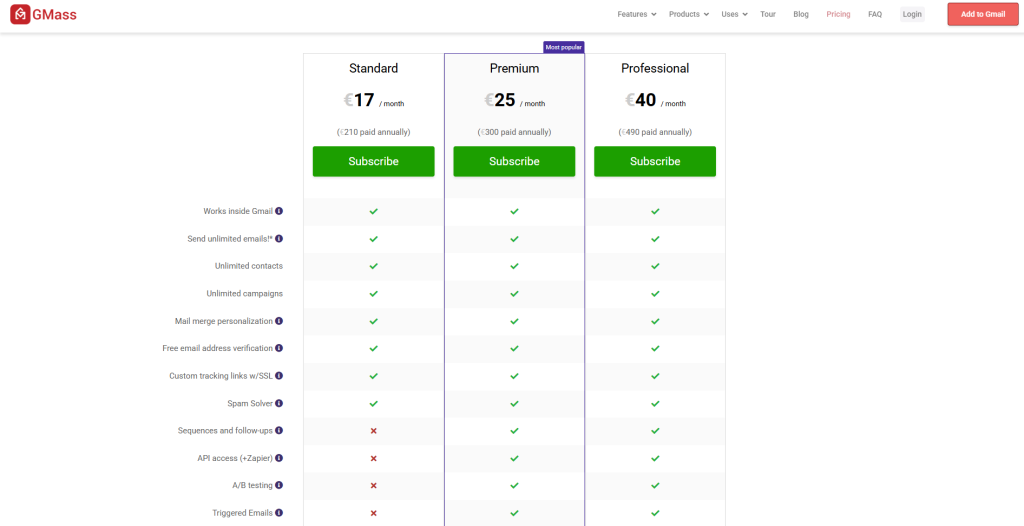
According to the pricing table, the standard plan costs about €17 per month when paid annually (totalling €210 per year). This tier includes unlimited sending, unlimited contacts and unlimited campaigns. You also get basic merge fields, free email verification, and custom tracking links with SSL security.
However, there are some limitations: sequences and follow ups are not part of the standard tier, nor is API access or a b testing.
If you need triggered emails, inbox rotation or high priority support, you will not find them here. I would describe this as an entry point for small senders who need basic features and want to test if GMass fits into their outreach strategy.
The premium plan is priced at €25 per month when billed annually, or about €300 per year. It includes everything in the standard tier plus sequences and follow‑up steps.
You also get API access, a b testing, triggered emails and more advanced analytics. There is still no inbox rotation or high priority support, but for many gmass users this tier hits the sweet spot. You can experiment with subject lines, change sending times and use conditional follow‑ups to refine your message.
When I tested this plan, I liked that I could schedule the entire series of emails and let GMass handle the rest. It felt like a small sales team in your inbox.
The top tier for individuals is the professional plan, priced at €40 per month when paid annually.
The professional tier unlocks everything: inbox rotation (MultiSend), high priority support, API, advanced sequencing, A/B testing, triggered emails and all other features.
Inbox rotation is interesting because it uses multiple sending addresses to distribute your campaigns, which helps avoid Gmail limits and keeps deliverability high.
The professional plan also includes follow ups API access so you can manage sequences programmatically.
In my view this tier suits power users or agencies who send high volumes and need reliability. There is no enterprise plan for individuals, but the professional plan can handle large lists thanks to its unlimited contacts.
While GMass highlights that all plans come with unlimited emails, there are still differences. The standard plan misses out on sequences, and the premium plan misses out on inbox rotation and priority support.
So, if these features matter to you, you may end up jumping straight to the professional plan. The tool also uses a usage based billing model for some extras: if you add an external SMTP or send through a third‑party service, there may be additional costs.
I recommend looking closely at the fine print before deciding.
GMass professional plan
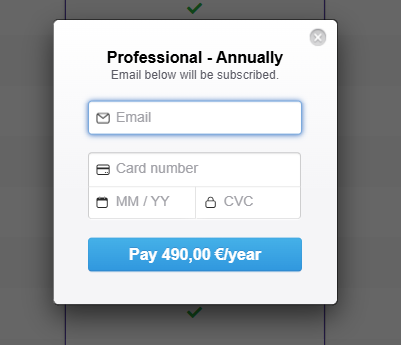
The professional plan deserves its own section because it is the highest individual tier and often compared to agency plans. At €40 per month when paid annually, it includes every available feature, from sequences to API and custom tracking links.
The plan introduces inbox rotation (also known as MultiSend) which spreads your emails across multiple addresses to avoid reputation issues. You also receive high priority support, meaning GMass responds faster to your tickets compared to lower tiers.
There is also an auto follow ups engine that can send messages at different intervals, and you have access to the API for building custom workflows.
Some users choose this tier purely for the API; for example, they might connect a CRM or build a custom dashboard.
Another perk is the follow ups API access, which lets you programmatically create, update or cancel follow‑up sequences. This is helpful for developers who want to automate tasks across multiple campaigns.
You also get access to advanced analytics, which includes domain‑level reporting and deliverability insights.
These advanced features can help you refine subject lines and content. If you frequently run experiments, the professional plan may pay off despite its higher price.
When I tested it, the response time from support was indeed quicker, and the custom tracking links were useful for differentiating between channels.
For freelancers and consultants who manage campaigns for many users, the professional tier may be worth the investment.
GMass cost for teams
The team plans use a per‑seat pricing model and include the same features as the individual premium tier. There is no difference between a 5‑user and a 100‑user plan besides the number of seats.
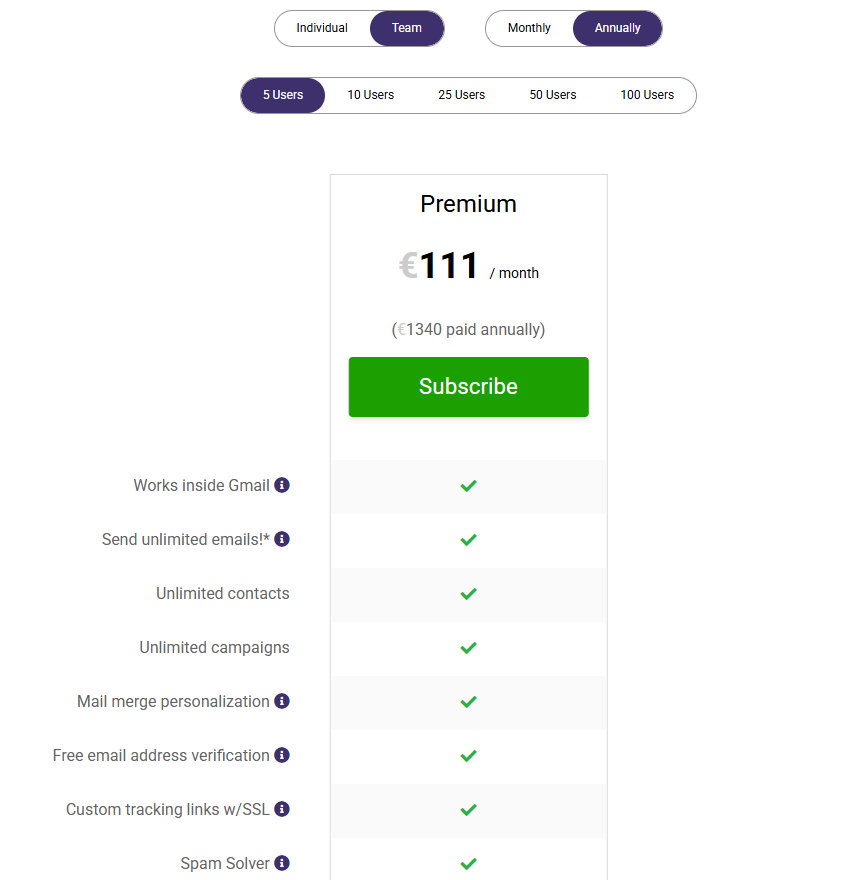
- For example, the five‑user plan costs €135 per month when paying monthly. If you choose the annual billing, the cost drops to €111 per month.
- Ten users cost €245 per month.
- 25 users cost €560 per month.
- 50 users cost €1,020 per month.
- 100 users cost €1,700 per month.
Because there is no discount for scaling, the per‑seat price remains roughly the same as you add seats.
Each seat can connect its own Gmail account and send campaigns with the shared features of the premium tier. Teams can share templates, manage unsubscribes and view joint reports. There is also a feature to centralize unsubscribes across the team, ensuring that once a prospect opts out, none of the senders can message them again.
For teams, schedule follow ups and follow up emails are critical, as multiple people may be working on the same account.
GMass manages this by tracking replies and automatically stopping follow‑ups if someone responds. It also syncs unsubscribes and bounces across seats.
However, there is no central CRM built into GMass. Each user mostly works inside their own Gmail.
This can be a limitation for larger groups who need shared pipelines or contact statuses. When comparing GMass to Woodpecker’s group features, I noticed that Woodpecker includes an agency panel for multiple accounts, letting managers run separate projects for each client.
GMass does not currently have an agency console – you must manually manage each seat.
GMass cost
When evaluating GMass cost, it helps to compare monthly and annual pricing.
Paying annually reduces the effective monthly cost by roughly 15%.
- For instance, the standard tier costs €17 per month when paid annually but €19 if paid monthly.
- The premium plan is €25 per month annually; monthly it jumps to around €27.
- The professional plan costs €40 per month annually, while monthly the figure is closer to €50. These differences add up over a year, so if you plan to stick with GMass it makes sense to pay yearly.
In addition to individual tiers, GMass sells team plans for multiple seats. All team tiers use the premium plan feature set; there is no standard or professional variant. The price scales with seat count.
- For 5 users the annual cost is about €111 per month.
- For 10 users the price is €245 per month.
- For 25 users it’s €560 per month.
- For 50 users it’s €1,020 per month.
- For 100 users it’s €1,700 per month.
These numbers show that the plan price increases proportionally with seat count. Each team plan includes the same features as the individual premium tier, such as sequences, API, A/B testing and triggered emails.
You also get inbox rotation, which is necessary when many senders share the same domain. I think the team pricing is straightforward, but there is no discount for larger groups beyond the per‑seat rate. If you need more than 100 seats you must contact GMass for custom pricing.
GMass emphasises that every tier has unlimited contacts and campaigns, which means you do not pay extra for list size. However, there are still limitations: send speed is capped to abide by Gmail rules, and some features like high priority support are reserved for the professional tier.
Teams may also face extra charges if they use the external SMTP service or add dedicated IPs. Because the pricing is per seat, cost can rise quickly as you add colleagues. I always advise prospects to count how many senders will truly be using the tool before picking a tier.
GMass review and limitations
After running several campaigns, I can summarise my GMass review with a few observations.
First, the tool does what it promises.
- it helps you send personalised mass emails from Gmail
- the interface is intuitive
- the Chrome plug‑in is reliable
- the price for individuals is reasonable
- the combination of mail merge, scheduled send, follow‑ups and deliverability tools makes it a competent email marketing tool for small businesses
On the downside, there are limitations.
- The GMass automates features stop short of deeper analytics or CRM functions.
- Other features like multi‑channel actions require third‑party tools.
- There is also no built‑in Linkedin outreach, which means you must pay for additional software if you want to message prospects on LinkedIn.
- Another limitation is the lack of dedicated IP addresses or domain purchasing. If you want to maintain multiple sending domains, you need to set them up yourself.
- There is also no way to buy company domains or mailboxes inside GMass. This contrasts with Woodpecker, where you can purchase fully configured domains with SPF, DKIM and DMARC records already set up. The absence of a domain management tool may pose a challenge for agencies or advanced senders who need to manage deliverability across several domains.
- When I compare the pricing plans, I also notice that there is no discount for large teams, so cost can climb quickly. Those with many users might find the per‑seat model expensive in the long run.
Other tools and GMass compares
It’s fair to ask how GMass stacks up against other tools.
In my role at Woodpecker, I have looked at many platforms, and each has strengths and weaknesses.
Woodpecker positions itself as a unified outreach platform. We do not charge per user. Instead, we charge based on the number of prospects you contact.
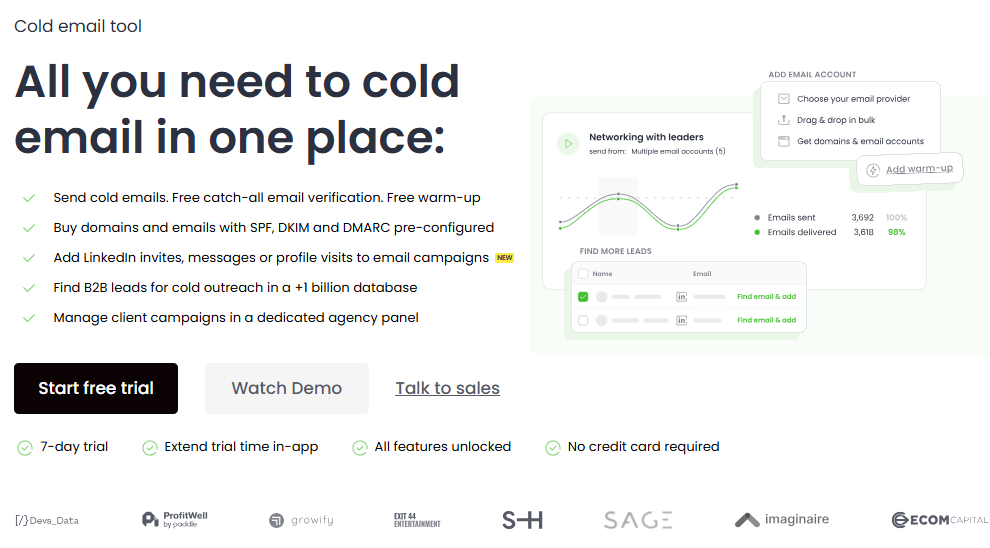
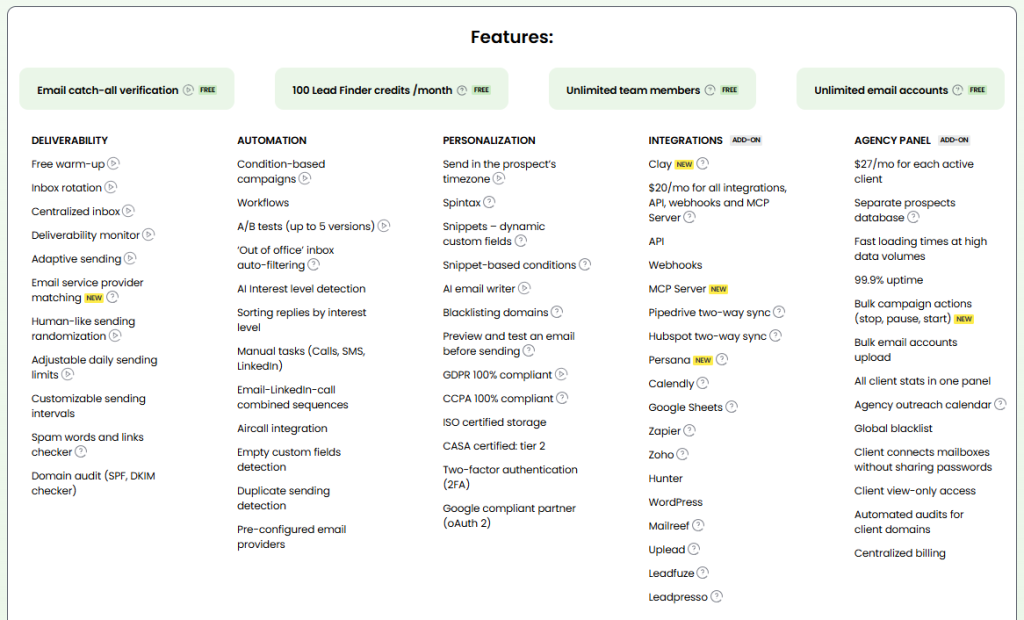
Every plan includes all the features – there is no difference between low and high tiers. Unlimited warm‑up and email verification are built in and free.
We integrate lead sourcing, mailboxes, multiple accounts, LinkedIn actions and a CRM in one package. Our LinkedIn module costs $29 per slot, and we offer a seven‑day trial or 50 contacted prospects.
For agencies, there is an agency panel with support for separate prospect databases, global templates, and flexible reporting.
When you compare the two, you see that GMass is excellent for people who love working in Gmail and need a simple tool for sending email campaigns. It has a straightforward plan price structure and is quick to set up.
However, Woodpecker includes more features out of the box and charges based on the number of prospects rather than seats.
This can lower costs for teams with many users.
Woodpecker also helps you purchase and configure domains, which is a big advantage for deliverability.
In addition, our built‑in LinkedIn module reduces the need for separate tools, and our CRM features support pipeline management. I often see customers switch to Woodpecker when they outgrow GMass or want to centralize outreach campaigns across email and LinkedIn.
Closing thoughts on GMass pricing
GMass remains one of the simplest email marketing tools for Gmail users. It is particularly strong at turning a regular Gmail account into a light‑weight outreach machine, thanks to the GMass button, mail merge and scheduling features.
The pricing for individuals is fair, especially if you pay annually, and the tool is easy to set up. That said, the standard plan omits important features like sequences and A/B testing, which means many users jump straight to the premium plan or professional plan.
Team plans are straightforward but can become expensive due to the per‑seat model. There is also no built‑in CRM, domain purchasing or native LinkedIn module, so you may need additional subscriptions to run a full funnel.
In my experience, the right tool depends on your goals.
If you want to send a few hundred emails per day from Gmail and prefer to manage your data in Google Sheets, GMass is a good fit.
But if you plan to grow, manage multiple accounts, or run a high‑volume outreach strategy across email and LinkedIn, you might reach GMass’s limits quickly.
Woodpecker’s pricing is transparent, its features remain consistent across tiers, and its integrated approach reduces the need for extra tools.
That’s why I recommend exploring Woodpecker with our free trial once you start thinking about scale, deeper analytics and multi‑channel outreach.
At the end of the day, the best decision is the one that matches your workflow, budget, and vision for customer relationships.