


Everyone loves a catchy promise. “Pay little, earn a lot” flashes across the Waalaxy website and invites entrepreneurs to imagine a world where they grow their LinkedIn network with almost no effort.
But scroll down and you’ll find a thicket of plans, invitations per month, email credits, team add‑ons and custom pricing.
If you’ve ever wondered what those numbers really mean (or how Waalaxy compares to other outreach options) this guide breaks it down.
Waalaxy’s pricing tiers & is there a free trial?
Free plan and starter tier
Waalaxy’s pricing begins with a free plan. This tier is a permanent level that gives you about three actions per day, such as profile visits or messages. That might sound generous, but the daily cap makes it hard to run a real campaign – it’s intended to let you test the interface rather than drive revenue.
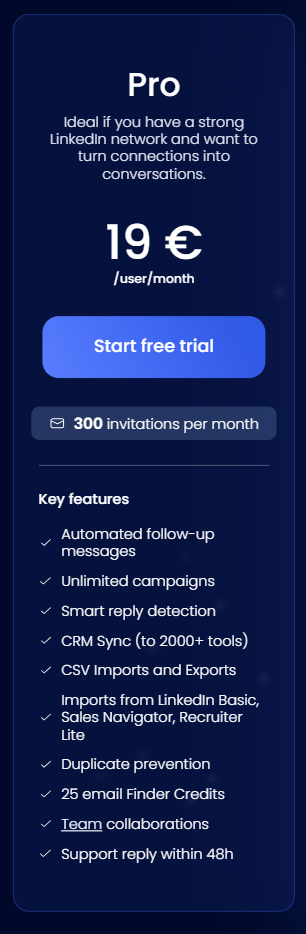
If you decide to commit, the first paid tier is Pro. Waalaxy lists this at about €19 per user each month. On an annual plan (where they discount the price by half) that works out to roughly €9.50 monthly. Pro permits up to 300 LinkedIn invites per month and grants 25 email finder credits. Importantly, it enables full LinkedIn sequence automation – complete with connection requests and reply detection – while synchronizing with CRM platforms. For a solo salesperson learning the ropes, this business plan could be enough.
Advanced and scaling levels
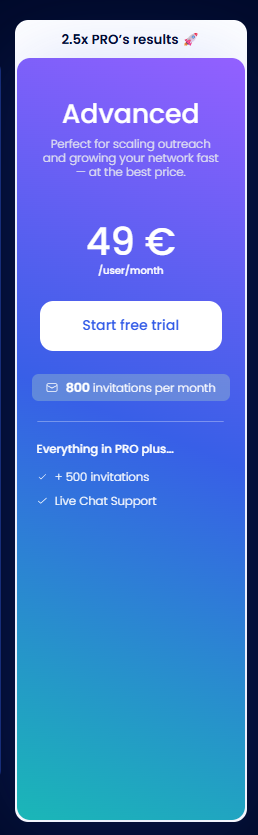
The next tier, Advanced, doubles down on volume. Priced at around €49 monthly for monthly billing (or roughly €24.50 on the annual plan) it lifts the invitation cap to 800 per month.
All of the LinkedIn automation features from Pro carry over, but the quotas are higher. Waalaxy explains that Advanced is best suited for busy recruiters or salespeople who want maximum actions without jumping into email automation.
When you’re running multiple LinkedIn searches and sending a lot of LinkedIn conversations, that extra headroom matters. This package also introduces live chat support, which many users see as a form of priority support.
Business tier and multichannel capability
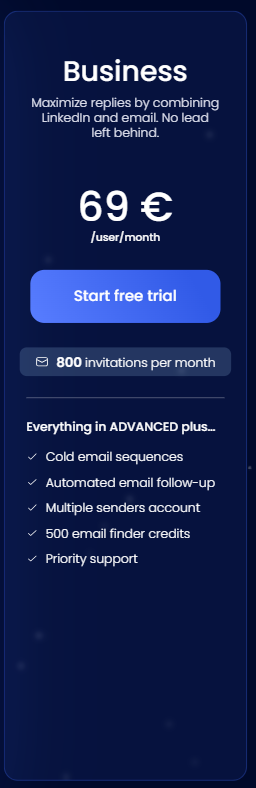
Waalaxy’s Business plan is where things start to feel more “grown‑up.” At roughly €69 monthly (or about €34.50 on the annual plan), Business unlocks true LinkedIn and email outreach. You still get 800 invites per month, but you can now add email steps to your sequences. The package includes 500 email finder credits per month via DropContact.
If you’re chasing bigger deals or looking to integrate email campaigns with social touches, this plan finally lets you use Waalaxy for multi channel prospecting. Business also introduces multiple senders account management, making it easier for teams to coordinate messages under one umbrella.
Since the tool does the heavy lifting of mixing channels, you don’t need advanced technical skills to set it up.
Enterprise for power users
Finally there’s an Enterprise tier for large groups. Pricing here is custom – Waalaxy suggests contacting its team for a quote. Enterprise includes team analytics, anti‑duplicate safeguards and special support during setup.
If you have five or more seats the cost often drops per seat thanks to volume discounts. However, each seat still counts as a licence, so if you manage multiple LinkedIn accounts you’ll need to pay separately for each account.
Payment schedules and discounts
Waalaxy sweetens the deal with quarterly (-20%) and yearly (-50%) billing discounts.
For example, the Pro tier drops from €39 per user each month to €31 when billed quarterly, and to €19 when billed yearly – as shown on their site.
Similarly, Advanced goes from €99 to €79 to €49 depending on the billing cycle. Business drops from €139 to €109 to €69.
Those deep cuts make annual subscriptions tempting. However, keep in mind that paying in advance locks you in. A savvy shopper should weigh whether quarterly billing offers enough savings without committing an entire year.

What features do you actually get?
Core capabilities (Pro tier)
At the Pro level, Waalaxy grants unlimited campaigns and basic safety. The platform automatically pauses sequences when a prospect replies and uses smart reply detection to skip people who have already answered.
It integrates with more than 2,000 tools via CRM sync, so you can move leads into your pipeline without manual copy‑and‑paste. CSV imports and exports help with import leads from LinkedIn prospecting or exporting results. The system supports imports from LinkedIn search via Basic, Sales Navigator or recruiter lite, giving you flexibility in data sources.
A duplicate prevention check stops you from sending the same message twice. You’ll also get 25 credits for Waalaxy’s built‑in email finder, which is useful when you don’t have a direct contact email.
The Pro tier includes team collaboration features: each user has their own login and can coordinate through shared templates. Waalaxy promises support reply within 48h on this level, which is basically standard customer service.
Advanced extras
Advanced builds on everything in Pro and raises the monthly invitation limit. You still get unlimited sequences but now with +500 invitations. Live chat support means real‑time help when you encounter problems.
Although Waalaxy’s site doesn’t emphasise an integrated Linkedin Inbox, the product does surface conversation threads inside its dashboard. This pseudo inbox helps you respond faster without opening each LinkedIn message manually. For busy recruiters juggling numerous LinkedIn conversations, this can save time.
Business plan perks
Business adds features critical for multi channel campaigns. You can create cold email sequences that complement social touches, schedule automated email follow‑up steps and manage multiple senders from the same workspace.
These features support complex outreach campaigns that cross channels – a hallmark of high-performing teams. Additional email finder credits (500 per month) let you look up more addresses without hitting a wall. Because Business includes 800 invites per month, you can run large Linkedin Campaigns without hitting LinkedIn’s weekly limits.
If you want priority support with more responsive agents, this is the first tier to supply it.
Features hidden in the fine print
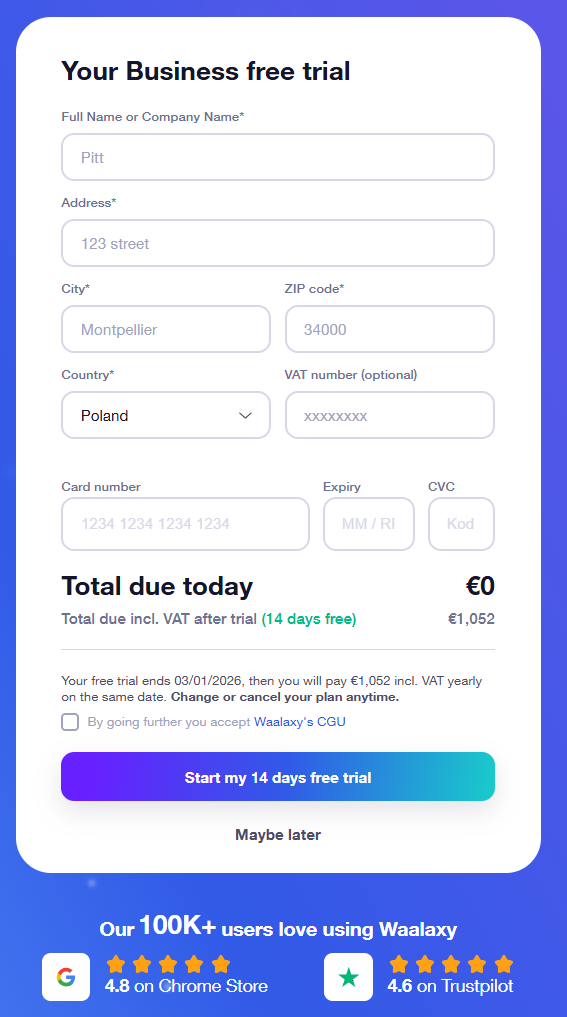
All of Waalaxy’s paid plans come with a free trial period. The trial lasts 14 days and gives you access to Business features. After the trial you must select a paid tier. Waalaxy often runs promotions like Black Friday deals at 50% off annual plans. If you see one, take advantage, but read the terms carefully, because promotions usually require paying up front.
Be aware that Waalaxy still depends on a Chrome Extension for some of its functionality. A note in the pricing section points out that the tool runs when your computer is on. That means if you close your browser, certain automated actions may pause until you reopen it.
The extension itself costs nothing, but your automation will rely on a steady internet connection. Also, each LinkedIn profile needs its own licence – you can’t send messages from multiple accounts without paying for each seat.

What Waalaxy doesn’t shout about
LinkedIn terms and restrictions
Automation on LinkedIn comes with risks. LinkedIn’s rules do not forbid automation entirely, but they do caution users against aggressive or spammy behaviour.
Waalaxy simulates human clicks and delays, but you still need to stick within LinkedIn’s terms by avoiding mass invites or repetitive messages. Overuse of automation can trigger account restrictions such as temporary bans.
Some users report that their profiles were flagged despite being careful. The safest strategy is to keep your invitation numbers below LinkedIn’s weekly cap and to vary your wording.

Schedule messages and follow‑ups
Waalaxy lets you set outreach sequences that drip messages over days or weeks. You can schedule messages for specific times and include timely follow ups. The platform automatically stops a sequence when a person replies.
However, there is no guarantee that LinkedIn’s algorithm will deliver every message to the recipient’s inbox.
To get the most out of scheduling, make sure you customise your message copy for each segment and avoid sounding robotic. Also double‑check that your message templates have custom merge fields filled.
Otherwise, you’ll end up sending “Hello {{first_name}}” to a prospect.
Email credits versus usage
Those extra email finder credits can add up faster than you think. Suppose you’re pulling 1,000 leads a month and verifying them. If your plan includes only 500 credits, you’ll pay for extras every month.
Meanwhile, the Business tier’s 800 LinkedIn invites may not be enough if you’re scaling hard. Calculate how many actions you’ll perform each week and match your plan accordingly.
Campaign performance metrics
Waalaxy’s dashboard tracks acceptance, reply rates and the status of your outreach efforts. But deeper analytics, like conversion rates tied to revenue or segment‑by‑segment comparisons, are minimal.
If you want to measure campaign’s effectiveness or examine campaign performance at a granular level, you might need to export data into another tool.
For small teams this isn’t a deal breaker, but larger companies could find the analytics lacking.
How Woodpecker compares
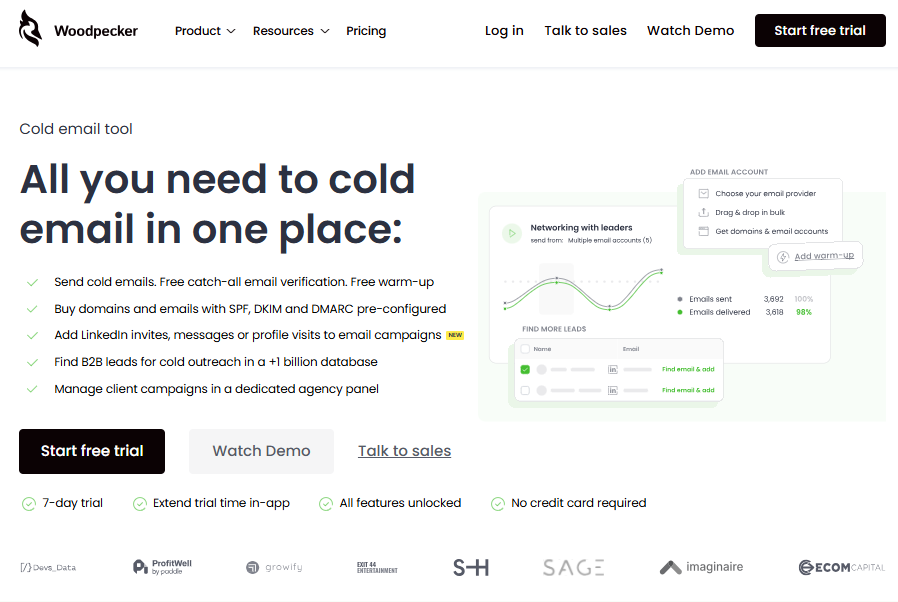
Waalaxy might be a strong LinkedIn tool, but what if you want a single platform that covers cold email end‑to‑end? That’s where Woodpecker stands out.
All‑in‑one cold email infrastructure
Woodpecker’s positioning statement reads like a manifesto: “All the mandatory steps for cold emailing can be done in one place,” and that’s not just marketing fluff.
Unlike Waalaxy, which focuses on LinkedIn first, Woodpecker is built around sending cold email. It’s been in the market since 2015 and has the infrastructure to handle huge volumes without slowing down.
You can throw hundreds of thousands of contacts at it, and the system remains stable. That reliability sets it apart from tools that run through a simple Chrome extension.
Free unlimited verification and warm‑up
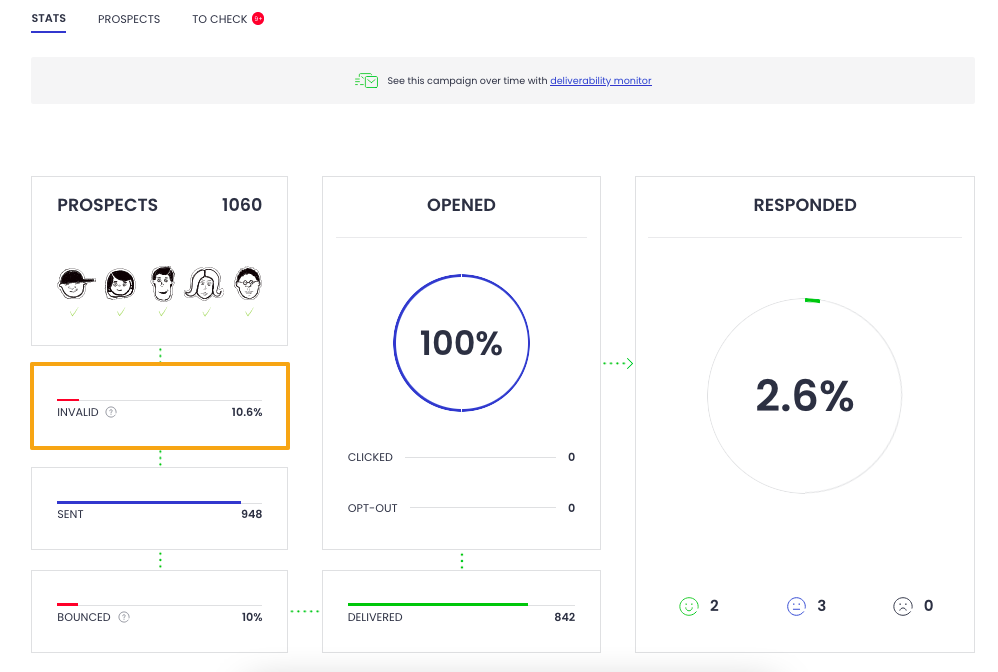
One of the biggest hidden costs in outreach is email verification. Woodpecker tackles this head‑on by offering unlimited catch‑all validation for free.
Many platforms charge per verification, but Woodpecker’s integration with Bouncer means you can validate addresses at no charge. It also includes warm‑up, using Mailivery to warm your domains and IP addresses for free up to a generous cap. Additional warm‑up slots can be purchased but most small to medium teams never need to.
Built‑in lead database and infrastructure
Woodpecker is also a prospect finder. You can search a database of more than a billion B2B contacts sourced from People Data Labs and others.
The system also handles infrastructure details: you can buy domains and mailboxes directly through Woodpecker and have SPF, DKIM and DMARC set up automatically.
For non‑technical users who dread DNS records, this is a lifesaver. You can even choose between private servers for high‑volume sending or shared servers with rotating IPs.
Agency‑specific features
For agencies managing clients, Woodpecker offers a dedicated panel with features like separate prospect databases, team analytics, bulk uploading of accounts and domains, multi channel scheduling (including emails and LinkedIn steps), and an agency outreach calendar.
The platform can handle up to 60 million emails per month without performance degradation. Agencies get bulk domain blacklisting and a global blacklist to avoid contacting the same prospect twice.
There’s also an adaptive sending option that tweaks send times to maximise deliverability.
Transparent pricing and generous trial
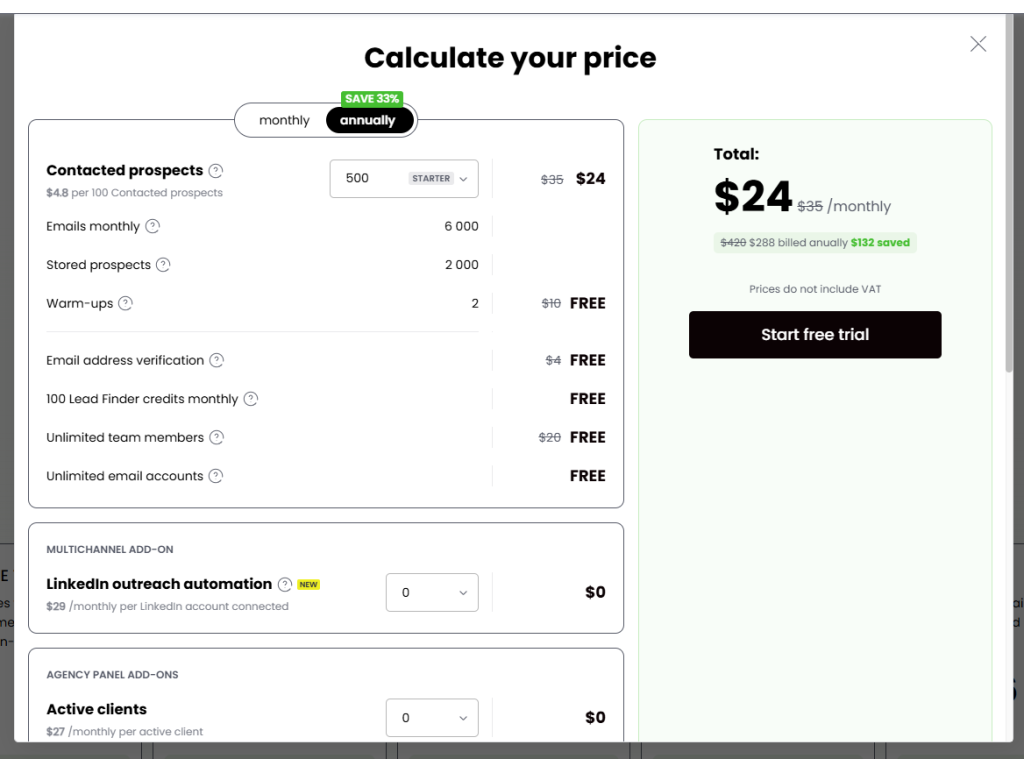
Woodpecker’s pricing model differs dramatically from Waalaxy’s. It does not charge per user. You can invite unlimited team members at no extra cost. Nor does it charge per email account connected. You can add as many mailboxes as you need. All plans carry the same feature set, with the only differences being consumption parameters and whether you have a dedicated account manager.
There’s even a built‑in price calculator that shows exactly what you’ll pay before you commit. LinkedIn slots start at $24 per month, about half the rate of many other LinkedIn automation tools. And you get a generous trial or 50 contacts, whichever comes first. Compare that to Waalaxy’s trial. The difference is that you can test Woodpecker with actual sends, rather than just playing with settings.
In practice
When you combine free verification, warm‑up and a lead database, Woodpecker can often work out cheaper than Waalaxy for cold email tasks.
If you only need LinkedIn automation, Waalaxy might be better.
But if you want to run multichannel campaigns with heavy email sequences, Woodpecker could reduce your total cost of ownership by bundling features you would otherwise pay extra for.

Waalaxy: yes or no?
The answer depends on how you plan to use it. Ultimately, the best plan will be the one that matches your prospecting volume, your channel mix and your workflow.
Compare the numbers, test the trials and pick the tool that helps you build relationships rather than just fill pipelines (psst…it’s Woodpecker – see why for free now).
Growth might start with a connection request, but real success comes from thoughtful conversations and well‑timed follow‑ups.
FAQ
How does Waalaxy handle connection requests on LinkedIn?
Waalaxy supports automated sending connection requests with delays and limits that match LinkedIn activity patterns. You can manage LinkedIn connection requests across campaigns, whether you target one profile or both LinkedIn search results and saved lists.
Does Waalaxy include an email finder?
Yes. Waalaxy includes an integrated email finder with monthly email finder credits, depending on your plan. It helps enrich LinkedIn leads with verified emails, which is useful when you mix social outreach with email actions.
Can Waalaxy run email outreach and cold sequences?
Waalaxy supports email outreach on higher tiers, mainly for light cold outreach combined with LinkedIn steps. It works best for short sequences rather than large-scale outbound email operations.
Is there CRM sync in Waalaxy?
Yes. CRM sync is available, letting you push prospects and replies into popular CRM tools. This helps track replies, manage email campaigns, and keep outreach data in one place.
How does Waalaxy manage email campaigns and replies?
Waalaxy can coordinate LinkedIn actions with basic email campaigns, but it does not function as a full unified inbox. Replies are visible inside the platform, though advanced inbox workflows often need external tools.
Is Waalaxy suitable for cold outreach at scale?
Waalaxy works well for LinkedIn-first cold outreach, especially for solo users and small teams. For high-volume email-driven outreach, many teams look beyond this outreach tool to platforms focused on deliverability and infrastructure.
What are the key features in Waalaxy plans?
The key features include automated sequences, reply detection, CRM sync, an user friendly interface, and LinkedIn automation. Advanced tiers add email steps and collaboration options through a team plan.
What does a typical Waalaxy review highlight?
A typical Waalaxy review mentions easy setup, clear pricing tiers, and fast onboarding through the Waalaxy Chrome extension. Users also note limits around email depth compared to dedicated email platforms.
What makes Waalaxy’s features different from email-first tools?
Waalaxy’s features focus on LinkedIn actions first, with email as a secondary channel. This works well for social selling, but email-heavy teams often prefer tools built primarily for outbound email.
How does pricing work per user month?
Pricing is calculated per user month, meaning each LinkedIn account requires its own seat. Costs increase as teams grow, especially when managing multiple profiles or upgrading to advanced tiers.