


Cold email outreach remains one of the most effective channels for starting conversations with prospects. When done right, thoughtful cold emails open doors and generate revenue. When done poorly, messages hit spam folders and damage your sender reputation.
In 2026 there are dozens of cold email tools competing for your budget, but two of the most popular are Mailshake and Saleshandy.
Both platforms promise to simplify your email outreach and help you scale your cold email campaigns, yet they take very different approaches to pricing, features and deliverability.
This in‑depth comparison looks at how the two stack up across five different categories.
By the end you’ll know which tool is the right fit for your sales reps and cold outreach strategy and whether you should choose Saleshandy, Mailshake or Woodpecker for your small business or enterprise.
#1 Pricing and plans for email outreach
Mailshake and Saleshandy both use a tiered approach to pricing, but the structure of their plans is very different.
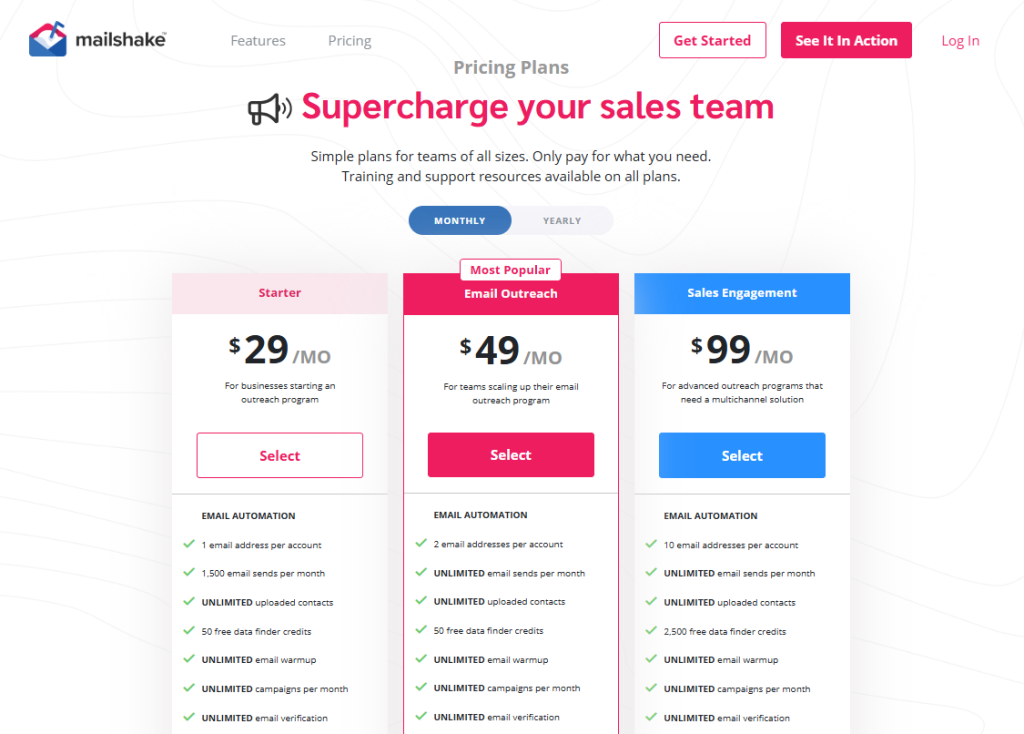
Mailshake offers three standard plans billed annually – Starter ($29 per user/month) with 1 email address and 1 ,500 email sends per month, Email Outreach ($49 per user/month) with unlimited sending and a unified inbox, and Sales Engagement ($99 per user/month) that adds LinkedIn automation, a VOIP dialer and unlimited calls.
The Starter plan includes unlimited email warm‑up, unlimited campaigns and automated sequences but limits you to one sending mailbox.
Upgrading to the Email Outreach plan removes send limits and introduces email rotation across multiple addresses to improve deliverability.
Mailshake does not offer a free plan; all plans require annual prepayment.
Saleshandy’s pricing is structured around the number of active prospects and mailboxes rather than seats.
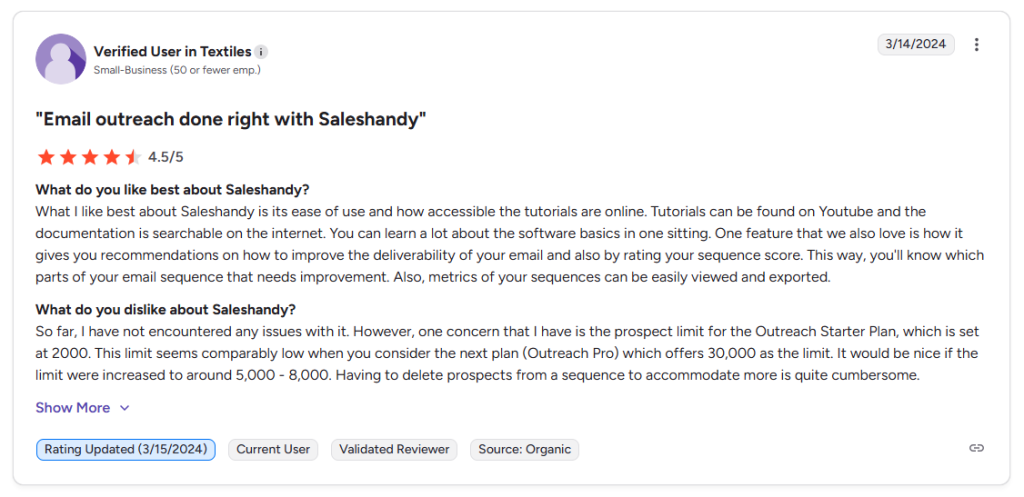
The Outreach Starter plan costs $36 per month and includes 2 ,000 active prospects and 6 ,000 emails/month, the Outreach Pro plan costs $99 per month with 30 ,000 active prospects and 150 ,000 emails/month, and the Outreach Scale plan costs $199 per month with 60 ,000 active prospects and 240 ,000 emails/month.
The Scale Plus plan extends to 100 ,000+ active prospects and 300 ,000+ emails/month. Saleshandy doesn’t charge per user, so you can connect unlimited email accounts and invite unlimited team members without paying extra.
This makes it attractive for agencies or larger teams on a tight budget – and even small businesses can start sending campaigns without worrying about per‑seat fees.
However, CRM integrations like Salesforce and HubSpot are only available on Pro and higher plans, effectively raising the minimum cost for teams that rely on CRM integration. Saleshandy offers a seven‑day free trial, while Mailshake provides a 30‑day money‑back guarantee.
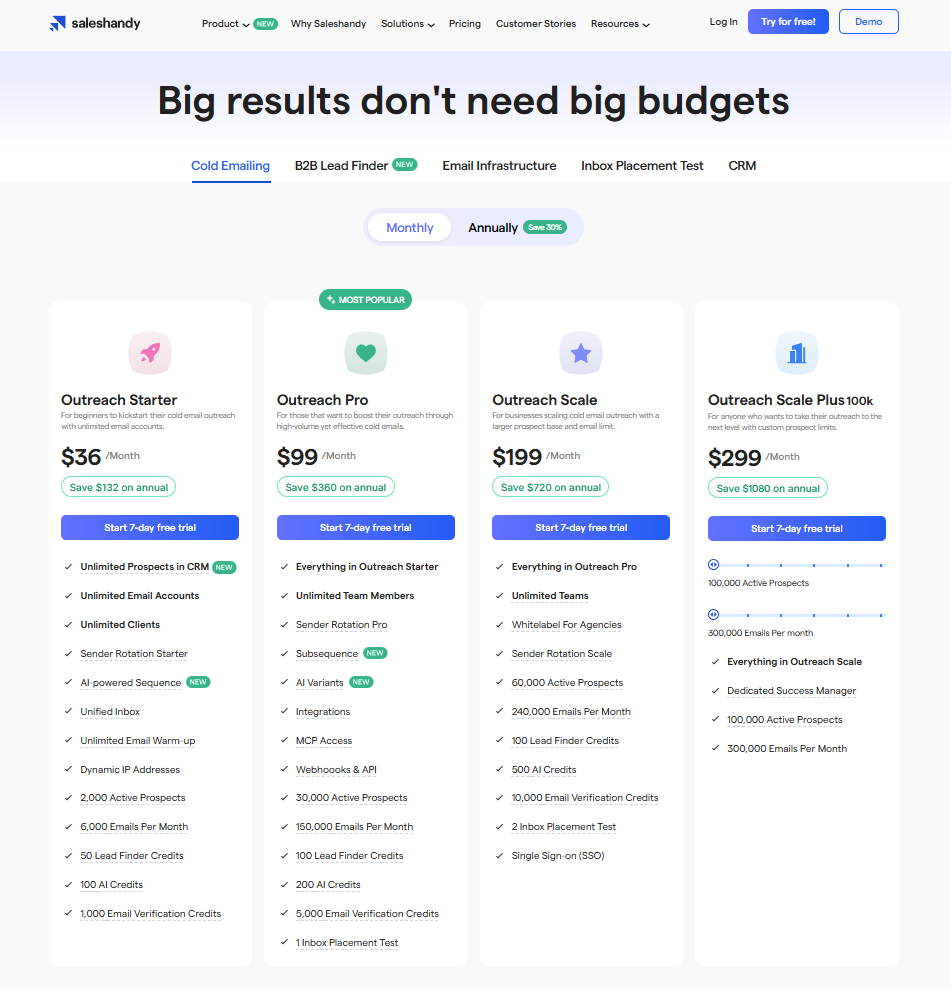
Takeaway: Mailshake has a lower entry price but quickly becomes expensive for larger teams due to per‑user billing and add‑ons like additional mailboxes. Saleshandy’s flat‑rate plans with unlimited accounts suit high‑volume teams, although you need higher tiers for integrations. Budget‑conscious teams should consider how many users and mailboxes they need before committing.
#2 Key features and email campaigns automation
Mailshake positions itself as an all‑in‑one sales engagement platform.
Key features include:
- unlimited email warm‑up,
- unlimited campaigns,
- mail merge,
- A/B testing,
- AI email writing,
- unlimited custom fields for personalization,
- and a unified inbox.
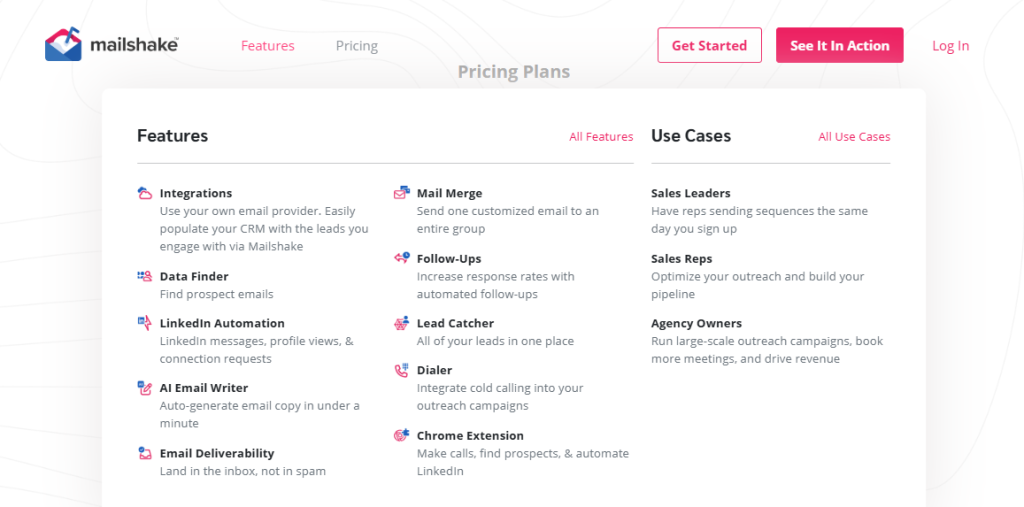
The Sales Engagement plan adds LinkedIn outreach and a built‑in VOIP dialer, allowing sales reps to combine email outreach with phone calls and social touches.
Mailshake also offers automated sequences that pause when recipients reply; these automated follow ups can be triggered by opens, clicks or timed delays, ensuring that follow‑ups are sent at the right moment.
The Lead Catcher tool for managing responses lets teams sign in and collaborate from one place. The platform integrates with popular CRMs like Salesforce, Pipedrive and HubSpot.
Saleshandy differentiates itself by focusing on scalability and AI assistance. Every plan includes unlimited email accounts and unlimited team members.
The tool provides AI‑powered email sequences and an AI variant generator that creates multiple versions of each email for A/B testing.
It comes with built‑in email warm‑up via a partnership with TrulyInbox, plus sender rotation that automatically distributes sends across mailboxes to protect your sender reputation. Saleshandy includes a 700 million B2B lead database and email verification credits.
Agencies can whitelabel the interface and manage multiple clients from one dashboard. Both Mailshake and Saleshandy offer automated follow‑ups, but Saleshandy’s AI sequences can also schedule timed follow ups, so that your warm leads receive messages at exactly the right time.
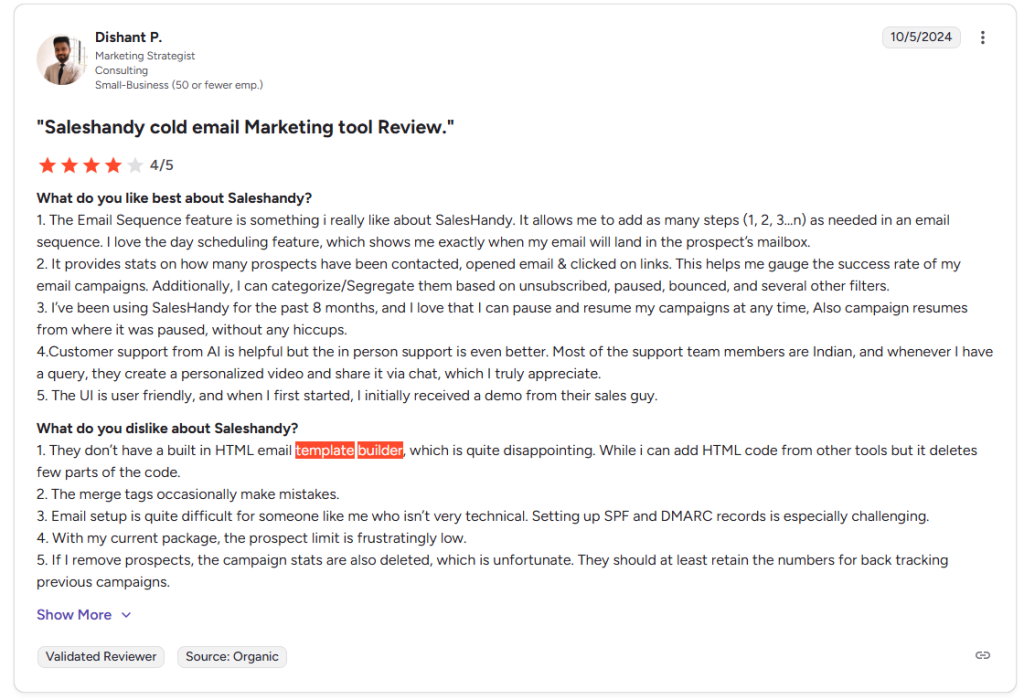
Where Saleshandy falls short is multi‑channel outreach: the platform only handles email and offers no phone dialer, LinkedIn automation or SMS features. Many users report that the interface is basic and the template builder offers limited customization.
Takeaway: If your outreach plan requires phone calls and LinkedIn tasks alongside emails, Mailshake’s higher‑tier plans cover multiple channels. Saleshandy excels at large email sends and AI sequence generation but remains email‑only. Decide whether your campaigns demand multi‑channel capabilities or if a pure email tool suffices.
#3 Email deliverability and cold emails warm‑up
Deliverability is critical for ensuring that cold emails land in the primary inbox instead of the spam folder.
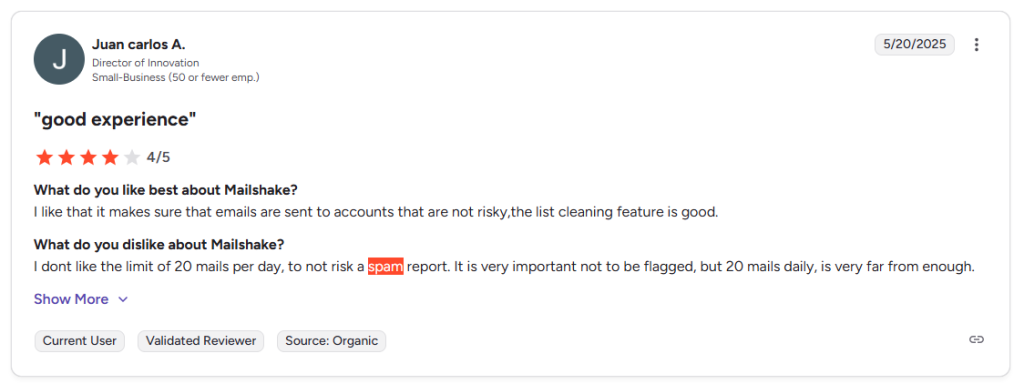
Mailshake includes built‑in tools such as email warm‑up (to gradually increase sending volume), email verification to reduce bounces, list cleaning to remove risky contacts, and a DNS setup assistant that guides you through configuring SPF, DKIM and DMARC.
It also supports customized tracking links and schedule‑based follow‑ups to help avoid spam filters and improve response rates. Despite these features, reviewers note that Mailshake’s deliverability results are inconsistent; some emails still land in spam, and custom tracking domain setup can be complex.
Because Mailshake limits the number of email addresses per plan, high‑volume senders need to purchase extra mailboxes, which increases costs and can throttle sends.
Saleshandy’s deliverability suite is more robust for high‑volume campaigns. The platform partners with TrulyInbox to provide unlimited warm‑up across all plans.
Sender rotation automatically spreads sends across multiple mailboxes to prevent spam filters from flagging your domain.
A unique Sequence Score rates each sequence’s deliverability risk before sending, and the tool includes bounce detection (auto‑pauses sequences when bounces spike), spintax support to randomize content and avoid spam triggers, and custom domain tracking to escape shared tracking domains.
These features collectively help maintain high inbox placement rates even when sending hundreds of thousands of emails per month. The unlimited email account connections also allow you to distribute cold outreach across different domains, protecting your sender score.
Takeaway: Mailshake’s warm‑up and verification tools are adequate for small to medium campaigns but may struggle at scale. Saleshandy’s unlimited warm‑up, sender rotation and spam‑avoidance features make it a better choice for large volumes and agency‑style outreach. If maintaining a healthy sender reputation is a deal breaker, consider which tool offers the best deliverability infrastructure for your needs.
#4 Integrations and multi‑channel outreach
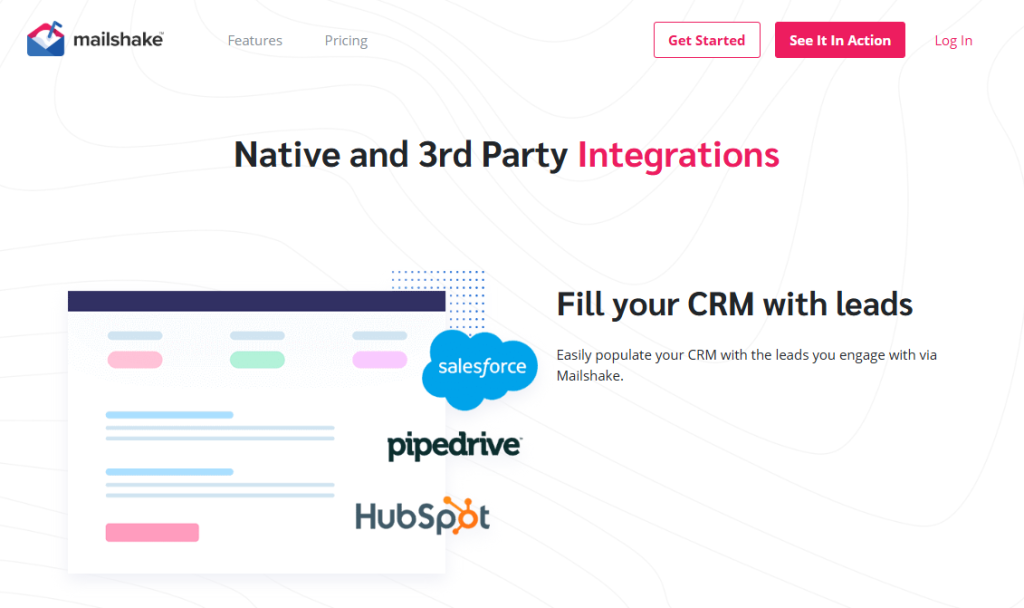
Mailshake integrates with Salesforce, Pipedrive and HubSpot, plus thousands of other apps via Zapier.
On the Sales Engagement plan the platform adds LinkedIn tasks (like connection requests and messages) and a power dialer for phone calls.
These additions allow sales teams to run cold email outreach alongside LinkedIn outreach and phone calls from one tool. Mailshake also offers a unified inbox and email tracking to monitor open rates, reply rates and follow‑ups.
Its custom tracking domain feature also enables you to use your own domain for tracking links, so prospects sign into your brand rather than a shared subdomain.
Saleshandy offers broader CRM integration options but lacks multi‑channel features.
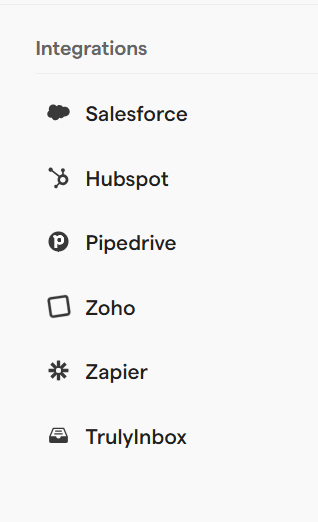
It connects with HubSpot, Salesforce, Pipedrive, Zoho CRM, Slack, Gmail, Outlook and other tools.
However, the Starter plan does not include any integrations, so teams must upgrade to Pro for CRM sync. Saleshandy provides no phone dialer or LinkedIn automation, meaning you’ll need separate tools if your outreach strategy spans multiple channels.
The unified inbox handles messages across connected mailboxes, but it can’t consolidate communications from other platforms. If you rely on automated calls or timed follow ups, you’ll need to access other systems or sign up for additional tools, which reduces the appeal of an all‑in‑one experience.
Takeaway: For multi‑channel campaigns (email, LinkedIn and phone) Mailshake offers more advanced features. Saleshandy provides more integrations overall but remains an email‑only solution, which may require stacking additional tools.
#5 Cold outreach analytics, user experience and support
Mailshake users appreciate the intuitive interface and quick setup; you can build automated email sequences and launch campaigns within minutes.
The platform includes real‑time notifications and a Lead Catcher dashboard for managing responses. Automated follow‑ups with customizable delays and triggered actions help you maintain momentum without manual effort.
However, its reporting is fairly basic; metrics are limited to opens, clicks and replies, and advanced analytics are lacking.
Without deeper analytics it’s harder to measure response rates beyond top‑level open and reply metrics. Template customization is also limited, making it harder to create personalized messages beyond simple merge fields.
Support is responsive and offers live training sessions, but the per‑user pricing can become a deal breaker for larger teams.
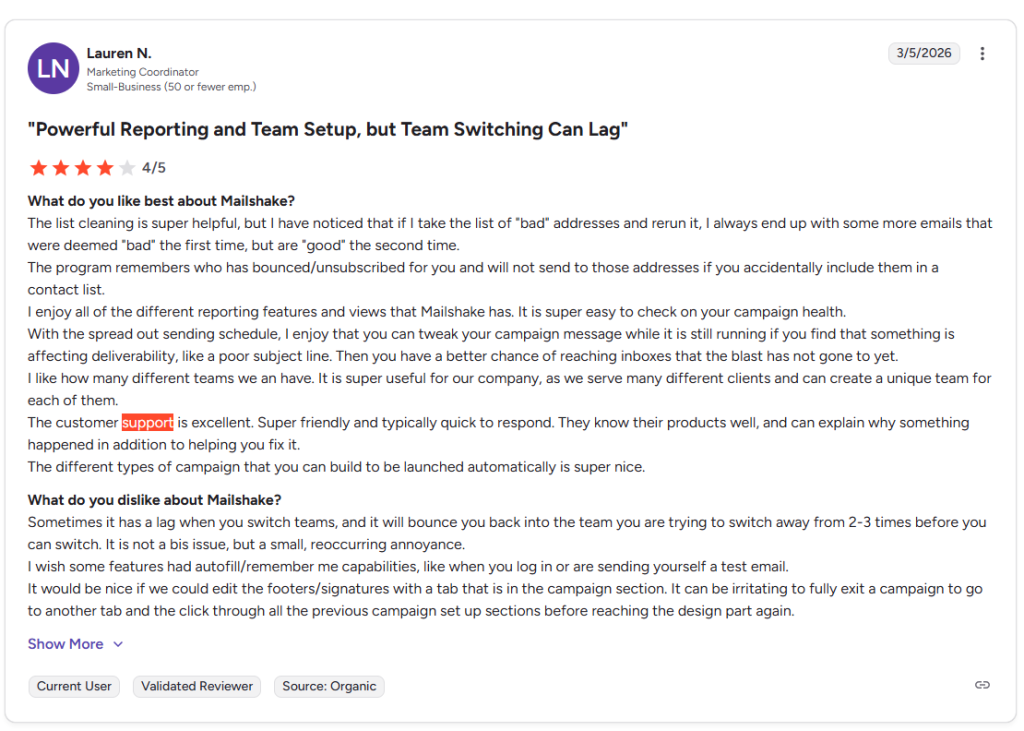
Saleshandy receives praise for its high‑volume infrastructure and unified inbox, yet many users describe the interface as basic and its reporting as shallow.
There is no daily playbook or AI‑powered prioritization to suggest which leads to contact first, so sales reps must decide manually.
The built‑in AI Sequence Copilot does help draft personalized messages, but the final output still requires human editing. Basic CRM integrations are locked behind higher plans, and lead finder credits have strict limits.
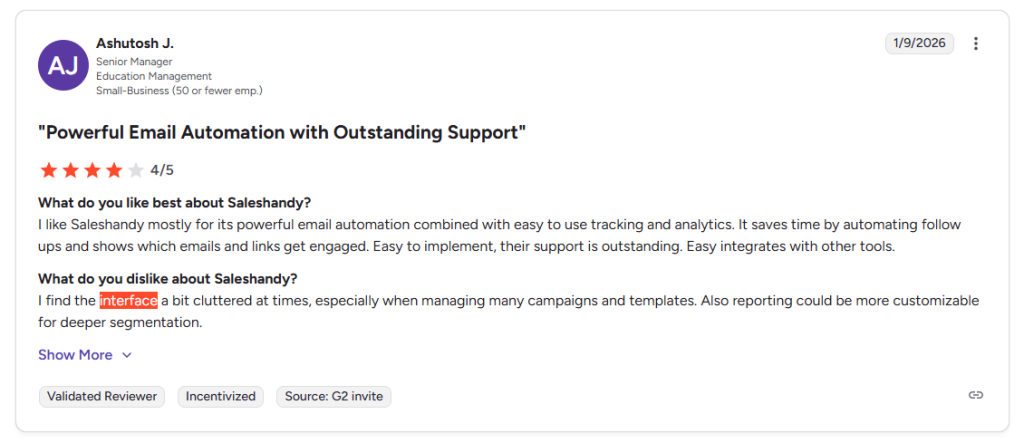
If actionable insights and detailed analytics are priorities, both platforms may underwhelm. Still, for simple cold outreach campaigns or small businesses needing quick access to a reliable email warm‑up tool, Saleshandy remains a cost‑effective option.
Takeaway: Mailshake has an intuitive interface and helpful support but lacks deep analytics and template flexibility. Saleshandy’s AI assistance and high‑volume handling are impressive but the software’s reporting and guidance features are limited. Teams needing detailed analytics or an AI‑guided daily workflow might consider other tools.
Mailshake vs Saleshandy? Pick Woodpecker – the best tool in 2026
While Mailshake and Saleshandy each offer compelling features for cold outreach, many teams still search for a more holistic solution.
Woodpecker is a deliverability‑first platform that prioritizes inbox placement over sheer volume. Its key features include:
- free email verification,
- free warm‑up,
- inbox rotation,
- adaptive sending,
- a centralized inbox,
- and automated condition‑based campaigns.
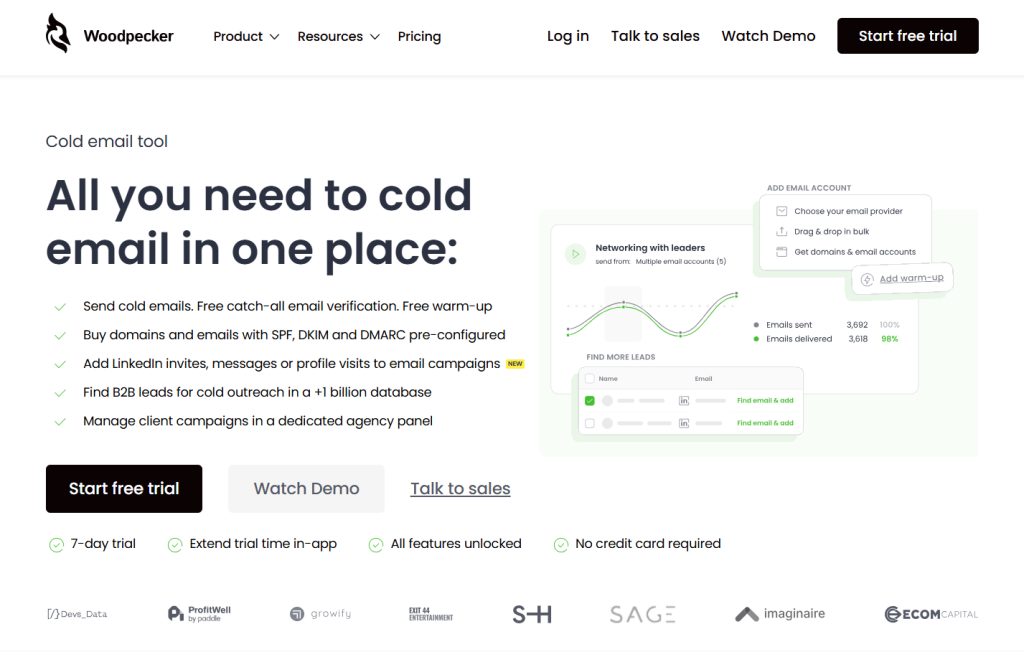
Unlike Saleshandy, Woodpecker allows you to buy domains with SPF, DKIM and DMARC pre‑configured and to add LinkedIn invites, messages or profile visits to your email campaigns, turning your outreach into a multichannel sequence.
The platform also offers a B2B lead database with over a billion contacts and a dedicated agency panel for managing multiple clients.
Every plan includes a domain audit and a deliverability monitor to predict and prevent sending issues. These advanced features make Woodpecker more than just a warm‑up tool – it’s an entire email deliverability platform.
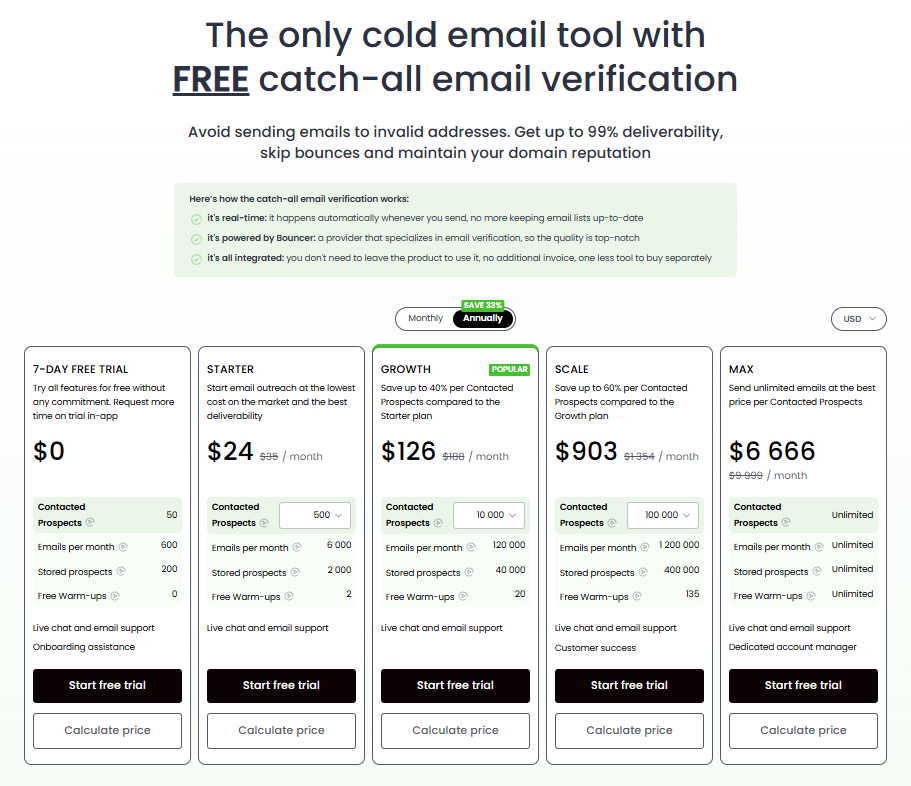
Pricing for Woodpecker starts at $29 per month for the Starter plan, which supports up to 500 prospects and 6 ,000 emails/month with two warm‑ups.
- The Growth plan ($84/month) increases the sending limit to 3 ,000 prospects and 36 ,000 emails/month and introduces A/B testing and advanced automation.
- The Scale plan ($188/month) supports 10 ,000 prospects and 120 ,000 emails/month and adds unlimited email personalization and team collaboration tools.
- Woodpecker’s premium Max plan offers unlimited sending and warm‑ups along with AI‑driven optimization and dedicated support. Although the per‑slot pricing can be expensive, the platform offers high deliverability through built‑in warm‑up, human‑like sending randomization and spam‑word checking. Users can connect multiple inboxes and rotate sends to avoid spam filters, and the tool integrates with HubSpot, Salesforce, Pipedrive and Zapier via API.
Woodpecker’s biggest advantages over Mailshake and Saleshandy include:
- Deliverability‑first design: free email verification, warm‑up, inbox rotation and adaptive sending ensure your cold emails reach the primary inbox instead of spam. Mailshake’s warm‑up tools are good but inconsistent, and Saleshandy relies on external warm‑up partners.
- Multichannel expansion: Woodpecker lets you add LinkedIn invites and messages into your sequences, while Saleshandy is email‑only and Mailshake restricts LinkedIn automation to its top tier.
- Unified system: instead of bolting on other tools, Woodpecker bundles warm‑up, lead generation, email automation, and a centralized inbox in one platform, reducing manual effort and context‑switching.
- Advanced automation: condition‑based campaigns trigger next steps based on prospect behavior, and AI‑powered personalization fields let you craft personalized messages at scale. Mailshake offers AI email writing, but Saleshandy’s AI sequence builder still requires significant editing.
- Agency‑friendly: the dedicated agency panel and unlimited domain add‑ons make it easier for agencies to manage multiple clients without paying per user or per account.
Should you choose Saleshandy or Mailshake?
Choosing the right cold email outreach platform depends on your team’s goals and workflow.
Mailshake works well for teams that want a simple interface and multi-channel outreach with calls and LinkedIn tasks. Saleshandy is attractive for high-volume senders thanks to unlimited email accounts and budget-friendly pricing.
But both tools come with trade-offs. Mailshake can become expensive as teams grow, while Saleshandy remains limited to email-only outreach.
Woodpecker solves both problems.
It combines deliverability-first cold email infrastructure, built-in warm-up, inbox rotation, advanced automation, and multichannel outreach in one platform. Instead of juggling multiple tools, sales teams get a unified system designed to maximize inbox placement and response rates.
If your priority is simply sending more emails, Mailshake or Saleshandy may be enough.
But if you want better deliverability and smarter automation, together with higher-converting outreach campaigns, Woodpecker is the clear winner.
👉 Try Woodpecker for free now and see why it’s the best Mailshake and Saleshandy alternative for modern cold outreach in 2026.