


In the crowded market of LinkedIn and email automation tools, Dripify has become a familiar name. It promises to help sales teams automate prospecting, but how much does it really cost, what do you get at each tier, and is there a smarter way to build relationships in 2026?
This article looks into Dripify’s pricing plans, unpacks its key features, highlights hidden costs, and introduces Woodpecker as a fantastic alternative.
You’ll find answers to all the questions you have been asking about pricing plans, and perhaps a few you haven’t even thought of yet.
What is Dripify?
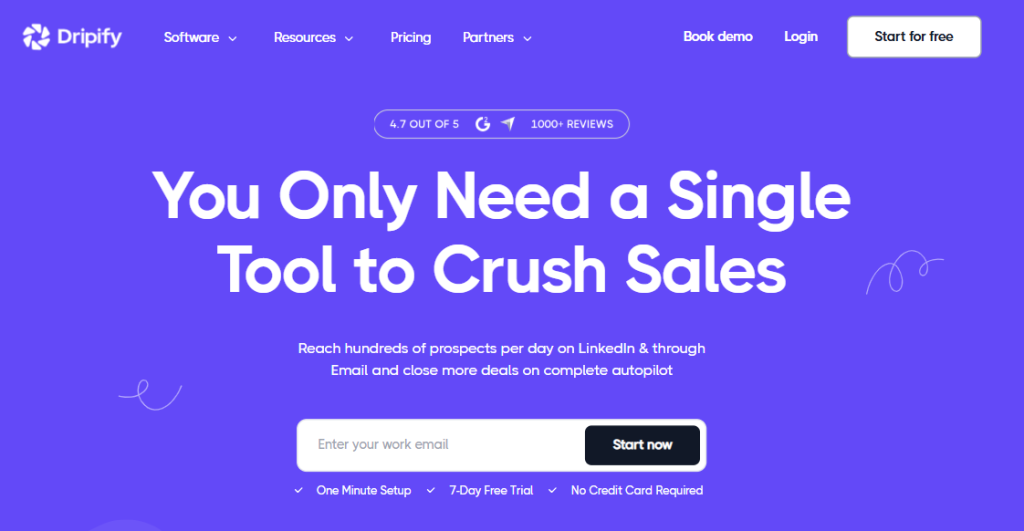
Dripify is a cloud‑based LinkedIn automation and prospecting tool that promises to transform your LinkedIn account into a lead generation machine.
It runs entirely in the cloud, meaning your campaigns operate even when your device is turned off. Its basic automation revolves around creating drip campaigns that combine LinkedIn actions and email steps.
These actions include profile visits, sending connection requests, messages, InMails, and skill endorsements. You can build smart drip campaigns with conditions and delays, import leads from LinkedIn search, events or CSV files and run them 24/7.
The system also integrates an email finder for quickly locating pre‑verified corporate addresses and a built‑in email outreach module to send personalized cold emails.
Dripify’s positioning is very specific: it focuses on LinkedIn only outreach first, with email as an add‑on. Because it is entirely cloud based, the platform can simulate human behaviour and handle repetitive tasks at scale without putting your LinkedIn account at risk.
The company markets advanced account restrictions and safety limits to keep automation actions within LinkedIn’s daily quotas, and the tool includes default safety limits for connection requests, messages and other actions.
For teams, Dripify introduces team capabilities like role assignments and team collaboration, though some capabilities only appear in higher tiers. In short, it’s a robust prospecting tool that sits between pure LinkedIn automation and email marketing.
Dripify pricing: monthly vs. annual plans
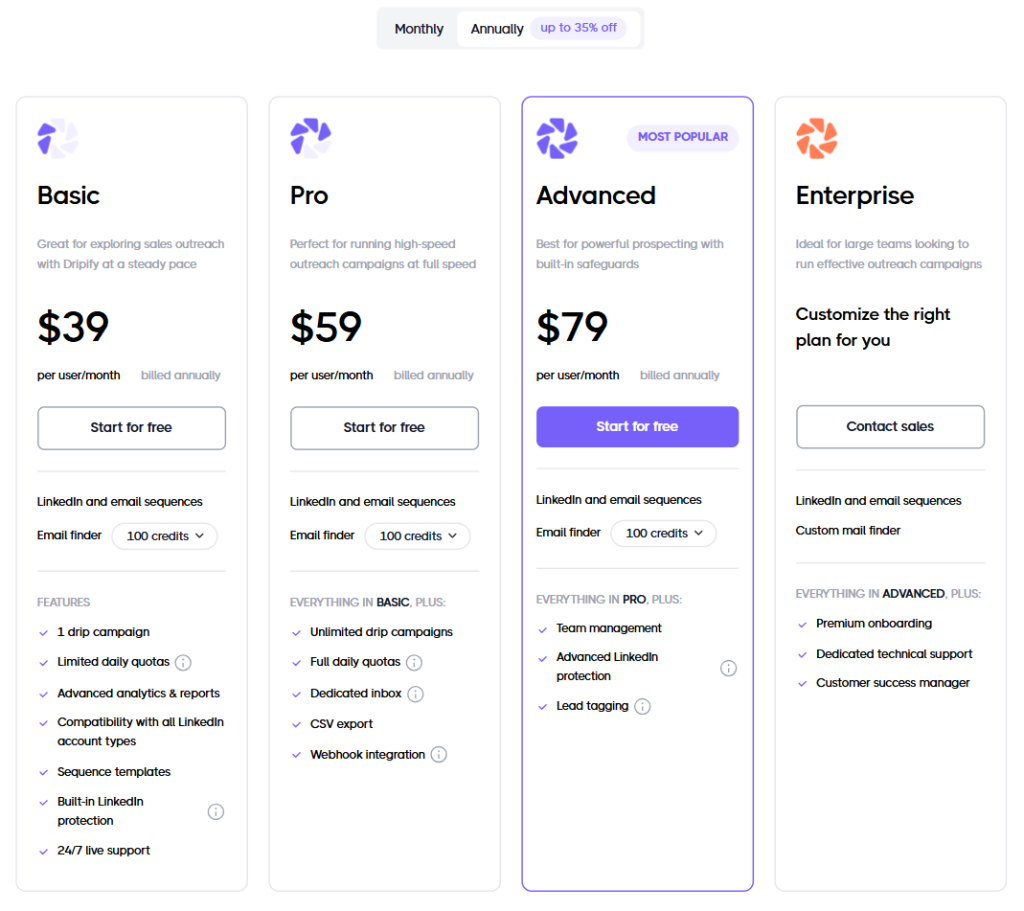
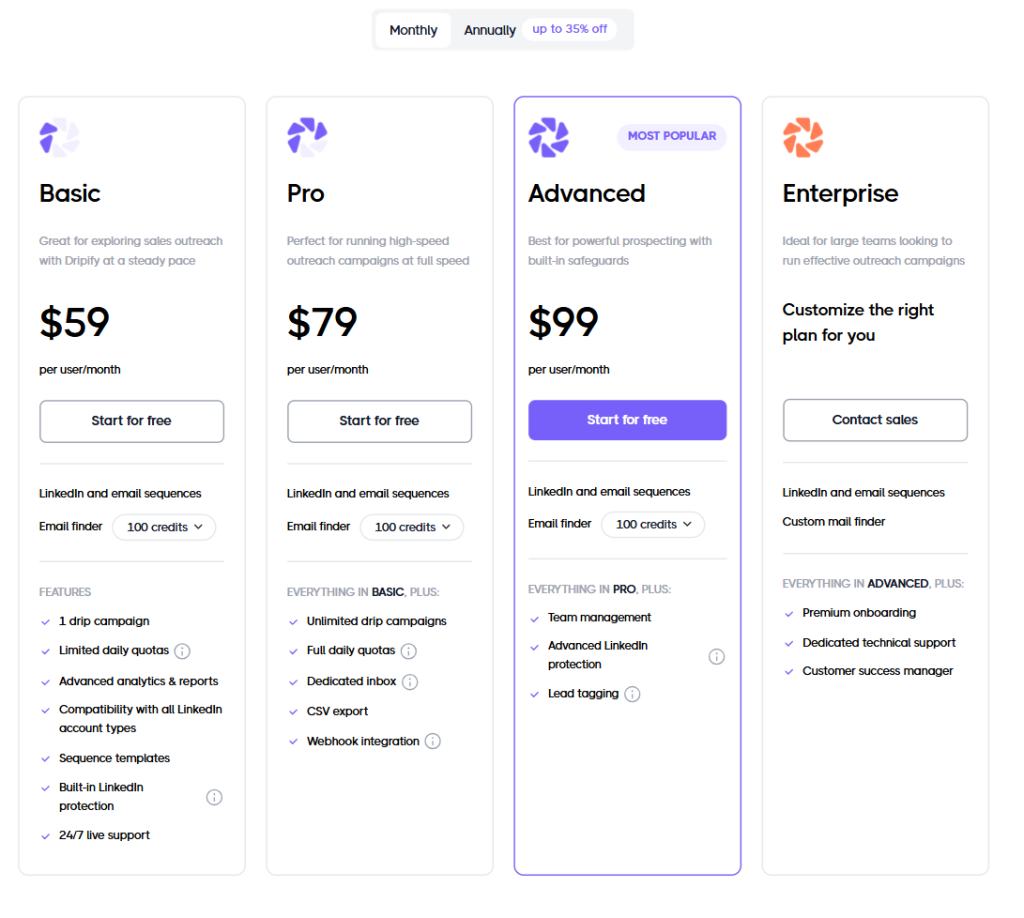
The pricing structure can be confusing because Dripify lists two sets of prices: monthly rates and discounted annual rates. The platform offers four main subscriptions: Basic, Pro, Advanced and Enterprise.
Each plan is priced per user month, meaning you pay for every team member connected.
Basic Plan
The Basic plan costs $59 per user per month when paid monthly and $39 per user per month when billed annually. This entry plan comes with one drip campaign, limited daily quotas, an analytics dashboard that reports on campaign performance, basic CRM features and 24/7 live support.
It includes 100 email finder credits and supports both LinkedIn and email sequences. The plan suits small teams testing automation or individuals exploring LinkedIn outreach, but its limited campaign quota and lack of team management features make it restrictive for larger operations.
Pro Plan
The Pro plan costs $79 per user per month when billed monthly or $59 per user per month on the annual plan. Pro adds unlimited drip campaigns, full daily quotas for LinkedIn actions and a dedicated inbox for managing LinkedIn messages.
You can export leads to CSV and connect with Webhook integration for workflows. The plan is ideal for sales teams needing to scale outreach but still working individually rather than in a coordinated multi‑seat environment.
Advanced Plan
Dripify’s Advanced plan comes in at $99 per user per month or $79 per user per month when billed annually. This tier introduces team management features, advanced LinkedIn protection (safety measures that limit unusual behaviour), and lead tagging for better segmentation.
The plan also includes message automation options like A/B testing. With advanced you start to see features geared toward team performance and prospect engagement, yet you still only get 100 email finder credits per user.
Enterprise Plan
The Enterprise plan is a custom offering designed for organisations with many users. You’ll need to contact sales for a quote, and in return you get everything in Advanced plus premium onboarding, a dedicated technical support specialist and a customer success manager.
Enterprise customers can request a centralized inbox or multi‑user management, get unlimited seats and enjoy agency plans such as consolidated billing. The enterprise tier is best for agencies or large sales teams handling multiple accounts and requiring detailed analytics across portfolios.
Hidden costs and add‑ons
Dripify advertises 100 free email finder credits with each plan, but if you need more there are tiered add‑on fees: 1000 credits for $29, 2000 credits for $49, 5000 credits for $69 and 10,000 credits for $99. These credits are deducted only when the platform successfully finds and verifies an email address. Extra credits can quickly add up if your campaigns rely heavily on email, so budgeting for these add‑ons is important.
You also need to consider CRM integration costs. While Dripify lists basic Zapier support and webhooks, advanced CRM integrations like HubSpot, Salesforce or other third party tools may require additional setup or a separate tool. Extra features like A/B testing are still being rolled out, and some users report that the promised b testing capability is not fully functional. The platform integrates with Google Sheets, but there is no native integration with some CRM giants, so you may need to string together other tools.
Finally, Dripify charges per user. Growing teams will pay proportionally more, and each LinkedIn profile consumes a full seat. For agencies that manage multiple clients, this can mean paying for dozens of seats even when only a handful of people manage those accounts.
This per‑seat structure stands in contrast to some Dripify alternative platforms that charge based on consumption or contact volume rather than headcount.
Deep dive into Dripify features
Drip campaign creation and customization
At the heart of Dripify is its campaign creation tool. The drag‑and‑drop builder lets users connect LinkedIn actions with email steps, delays and triggers. You can import leads from LinkedIn searches, events or CSV files and create outreach sequences that run 24/7.
Dripify’s builder offers pre built campaign templates to speed up launch, but you can also build custom sequences from scratch. A learning curve exists for beginners, yet the interface is relatively intuitive once you get familiar with LinkedIn actions, delays and conditions.
Dripify promises drip campaign customization down to the level of profile visits, messages, connection notes and delays. You can set up follow‑ups that only trigger when a prospect doesn’t respond, and you can insert AI generated messages or variables such as the person’s job title, location or mutual connections.
For those who crave more control, Dripify has recently introduced extensive customization options for splitting sequences and testing up to four message variations through A/B testing. However, some users report that the built‑in A/B testing is still limited, requiring manual workarounds.
Email outreach and deliverability
Dripify isn’t purely about LinkedIn; it also includes a cold email component. Its email outreach module lets users create smart email sequences blended with LinkedIn actions. The drag‑and‑drop builder provides a multi channel experience, letting you design flows where a LinkedIn connection request is followed by a warm email, and then perhaps a follow‑up message. Dripify offers 20+ personalization variables and an AI‑powered icebreaker that crafts unique opening lines based on a lead’s profile.
Deliverability is supported through a built‑in email checker that eliminates invalid and high‑risk addresses, claiming to exceed 98% deliverability. Email addresses are verified at the moment of capture, meaning you only pay for results.
The system tracks deliverability, open and reply rates so you can watch message response rates from one dashboard. However, note that some users complain Dripify only sends through Gmail and lacks direct support for Outlook or other providers.
Email finder and lead generation
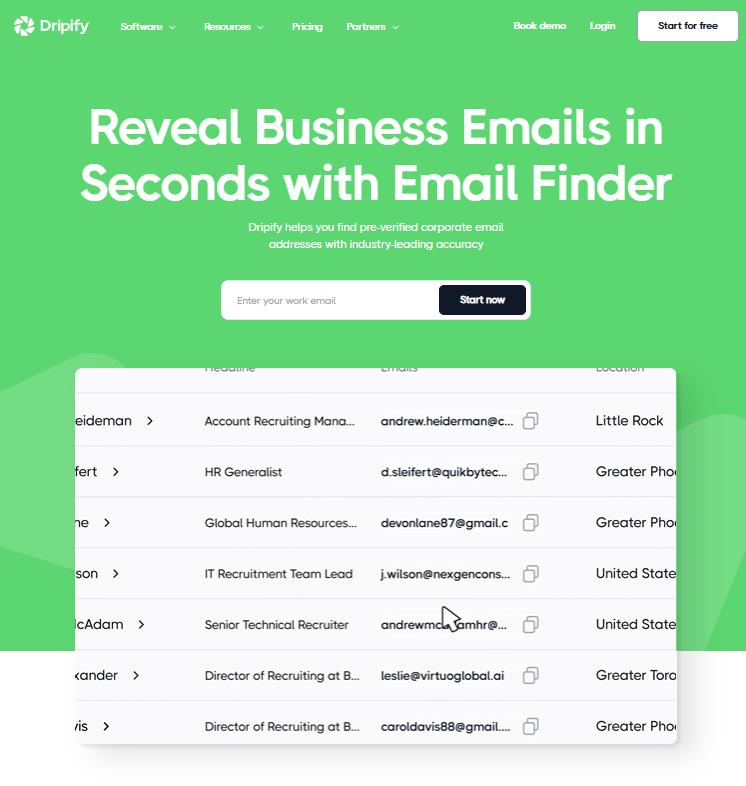
Lead generation is a core selling point. Dripify’s email finder helps you reveal corporate emails quickly with industry‑leading accuracy.
You can search within Dripify’s control panel or insert a “Find Email” action directly into a sequence, and the tool will fetch the contact information in real time. The platform emphasises “pay for success,” meaning you only pay when the email finder successfully returns a valid address.
That said, once the initial 100 free credits are exhausted, you need to purchase additional credits. This cost can surprise users running aggressive lead generation campaigns.
CRM and analytics
Dripify integrates a lightweight CRM dashboard where you can view detailed insights on every campaign. The system allows you to import leads, add notes, tag leads, and resume leads in a sequence.
You can also export data to CSV, though advanced CRM features like deal stages or pipeline views require exporting to external CRM tools. The built‑in reporting includes key metrics such as connection acceptance rates, inMail open rates, and reply rates.
A dedicated analytics dashboard offers basic analytics on daily usage, but if you need robust analytics across teams or campaigns you may have to rely on outside platforms.
Team collaboration and user controls
Team management features appear only in higher tiers. The Advanced plan introduces team management so you can assign roles, monitor team performance, and avoid duplicate outreach by preventing two team members from reaching out to the same prospect.
The Enterprise plan adds account restrictions controls and activity control features for maintaining safe sending patterns, plus a responsive live chat support channel.
For agencies managing multiple clients, Dripify offers agency plans with consolidated billing and multiple accounts support. However, due to its per‑user pricing, agencies can still face high costs as they add more linkedin profiles.
User feedback: praise and pain points
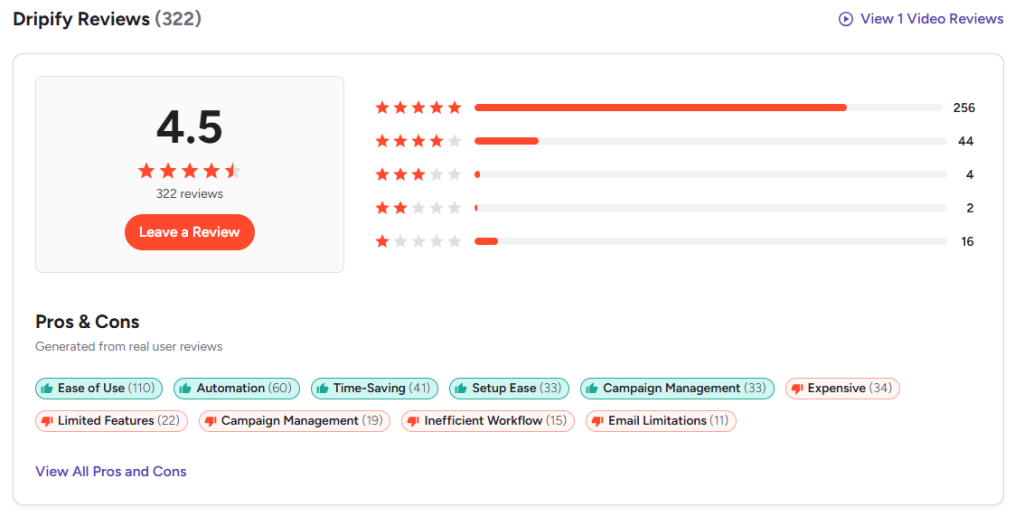
User reviews provide valuable context. Many Dripify users like the simple interface and appreciate features such as sequence templates and integrated AI personalization variables.
They also enjoy the built‑in email verifier that keeps deliverability high. Dripify’s responsive customer support is frequently praised – there’s chat support available from the dashboard and 24/7 live support on Basic and higher plans.
A user on an independent review site described Dripify as a “cloud‑based solution that saves time by automating LinkedIn messages,” but also noted that the level of personalization could be improved and the absence of direct Outlook integration was a drawback.
On the downside, some users lament the learning curve for building sequences and customizing campaigns. Others point out that promised features like A/B testing are “DIY” rather than built‑in. There are also comments about having to run campaigns through Gmail only, and about occasional glitches when dealing with high volumes of leads.
Because Dripify is priced per user, many users mention cost creep as they add seats; each additional team member increases the monthly bill. This per‑seat cost structure contrasts with alternatives that charge per data volume or activity.
Woodpecker: the best alternative to Dripify
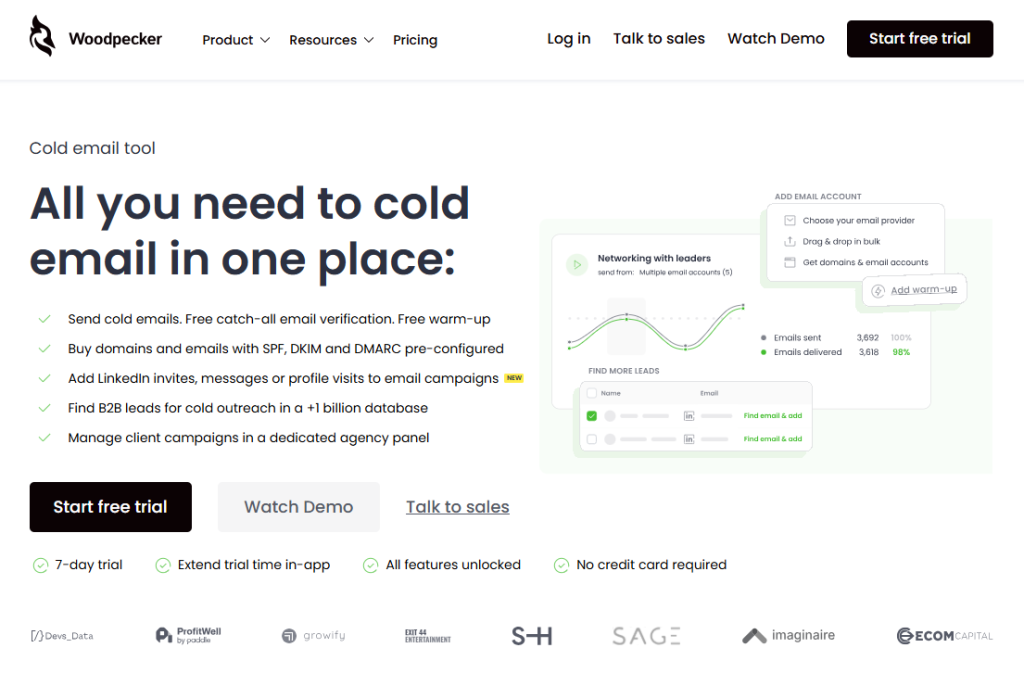
If Dripify’s pricing and limitations leave you wanting more, Woodpecker offers a compelling alternative.
Woodpecker isn’t just another LinkedIn automation tool – it’s an outreach platform where you can perform every step of cold email – and now LinkedIn – in one place.
All mandatory steps for cold emailing can be handled within the platform, “so that you have high deliverability without spending time setting up infrastructure in multiple tools”.
In plain language: you get email sending, email verification, warm‑up, multichannel prospecting (email and LinkedIn), domain management and a lead database under one roof.
Woodpecker places a strong emphasis on deliverability and scalability. The company has been in the market since 2015 and has built infrastructure that can handle extremely high volumes – up to 60 million emails per month for a single customer – without slowing down.
This is appealing for organisations that plan to scale outreach to potential customers across multiple channels. The platform offers free unlimited email verification and includes warm‑up services at no cost up to a certain contact volume. It also has a built‑in B2B leads database connected to People Data Labs, Prospeo and other providers, giving you instant access to over a billion contacts. This eliminates the need for separate paid data tools.
Another unique aspect is infrastructure. You can buy domains and email accounts from Woodpecker with SPF, DKIM and DMARC already configured, saving technical headaches.
You can choose between private infrastructure (dedicated servers) or shared infrastructure with rotating IPs. This flexibility helps maintain deliverability even at high volumes.
Agencies will appreciate features like separate prospect databases, bulk actions (stop/pause/start), bulk email account upload, global blacklists, client domain audits and a centralized billing system.
Most importantly, Woodpecker’s pricing is transparent. It does not charge per user or per email account connected. You can invite as many colleagues as you like without paying for extra seats. All plans include the same features; the only differences lie in consumption parameters (how many prospects you can contact) and the level of dedicated account management.
A LinkedIn slot costs $29 per month, significantly cheaper than what many LinkedIn automation tools charge. There’s a 7‑day free trial (or 50 contacts) that lets you explore the product risk‑free.
From a functional standpoint, Woodpecker also includes advanced features like condition‑based workflows, reply detection, warm up features, email campaigns, AI video personalization, timezone detection and built‑in deliverability monitoring.
The platform helps you nurture leads with human‑like sequences and automatically pauses a campaign when a lead responds. For agencies or large teams, there’s no need to pay a seat fee; you only pay for the number of email campaigns you send.
That makes Woodpecker an attractive choice for those looking to cut costs without sacrificing functionality.
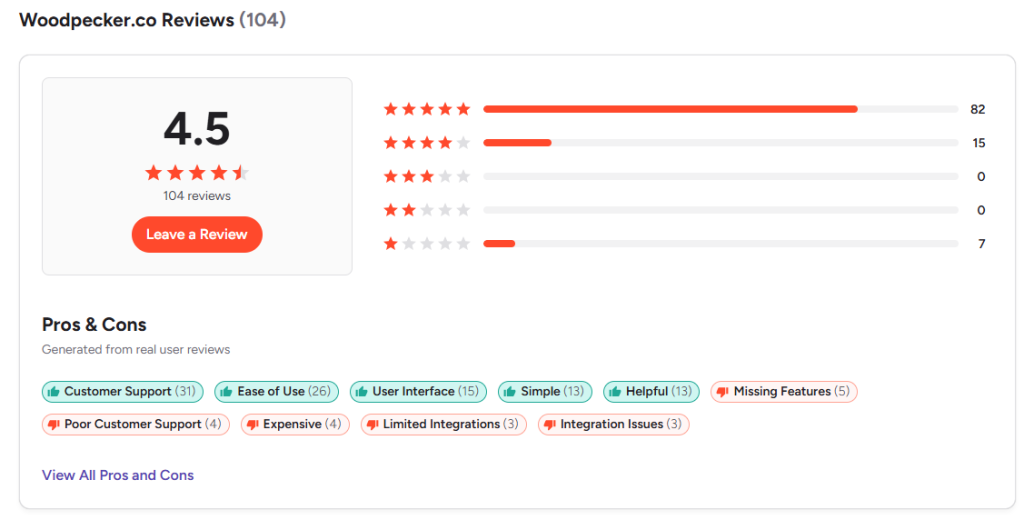
Why Woodpecker is better than Dripify
So, why choose Woodpecker over Dripify? Here are a few points to consider:
- Pricing transparency and cost control – with Woodpecker, you pay for usage rather than headcount. This allows agencies and companies with many accounts to manage costs more easily than with Dripify’s per‑user model.
- Comprehensive cold email infrastructure – Woodpecker does everything from verifying emails to warming them up, storing prospects, sending campaigns and integrating LinkedIn steps. You don’t have to combine other tools to build your pipeline.
- Free and unlimited email verification – Dripify’s 100 email finder credits can be depleted quickly, requiring extra purchases. Woodpecker includes verification at no extra cost.
- Scalability – Woodpecker’s architecture can handle millions of emails without delays, making it suitable for multi channel outreach at any size.
- No seat limits – you can onboard your entire team or agency clients without escalating your subscription cost, which is particularly useful for agencies managing multiple clients.
That said, Woodpecker is primarily an email‑first platform with LinkedIn as an add‑on, so if you’re focused solely on LinkedIn, Dripify’s interface may feel more tailored.
Still, as cold outreach becomes more about combining channels, Woodpecker’s multi‑channel flexibility and cost advantages make it an appealing Dripify alternative.
Final Thoughts
In 2026, automation platforms are evolving rapidly. Dripify offers a polished intuitive interface and robust LinkedIn automation with integrated email steps. Its key features include drip campaign creation, email verification, pre‑built templates and a built‑in dedicated inbox for LinkedIn conversations. But its per‑user pricing and extra costs for email finder credits can be limiting.
If you need deeper analytics, multi‑channel scalability and a flexible cost structure, Woodpecker stands out. It combines cold email and LinkedIn with free verification, warm‑up and a huge data pool.
Agencies or prospecting efforts that juggle multiple LinkedIn profiles, phone numbers, and large contact lists can particularly benefit from Woodpecker’s unlimited user model.
Ultimately, the best tool for you depends on your goals: if you’re experimenting with LinkedIn and want a simple builder, Dripify’s free trial is a low‑risk starting point. If your outreach strategy depends on volume, flexibility and long‑term growth, Woodpecker’s all‑in‑one approach might be the better investment. Try it for free now.