


SMTP, IMAP, and POP3 are protocols used to move and access email.
- SMTP sends and relays outgoing email.
- IMAP accesses and synchronizes email stored on a server.
- POP3 downloads incoming email, usually for local access.
The main difference between SMTP and IMAP is therefore simple: SMTP sends email, while IMAP retrieves and synchronizes it. They are not competing alternatives. A typical email account uses SMTP for outgoing messages and IMAP for incoming messages.
SMTP vs IMAP vs POP3: quick comparison
| Protocol | Full name | Purpose | Direction | Common ports | When it is used |
|---|---|---|---|---|---|
| SMTP | Simple Mail Transfer Protocol | Sends and relays email | Outgoing | 587 with STARTTLS or 465 with implicit TLS for submission; 25 for server-to-server relay | Sending a message from an email client, application, or sending tool |
| IMAP | Internet Message Access Protocol | Accesses and synchronizes messages stored on the mail server | Incoming | 993 with TLS; 143 with STARTTLS or an unencrypted connection | Reading and managing the same mailbox across multiple devices |
| POP3 | Post Office Protocol version 3 | Downloads messages from the server to a device | Incoming | 995 with TLS; 110 with STARTTLS or an unencrypted connection | Storing email locally, often on one primary device |
For most modern email setups, use secure connections. Your provider may require a specific port, encryption method, and authentication method, so follow its current documentation rather than selecting a port based only on a general table.
SMTP vs IMAP: what is the difference?
The difference between SMTP and IMAP is their role in the email process:
- SMTP handles outgoing messages.
- IMAP handles access to incoming messages.
- SMTP transfers messages between sending systems and mail servers.
- IMAP keeps the mailbox state synchronized across devices.
- SMTP does not organize or synchronize your inbox.
- IMAP does not deliver your outgoing message to another mail server.
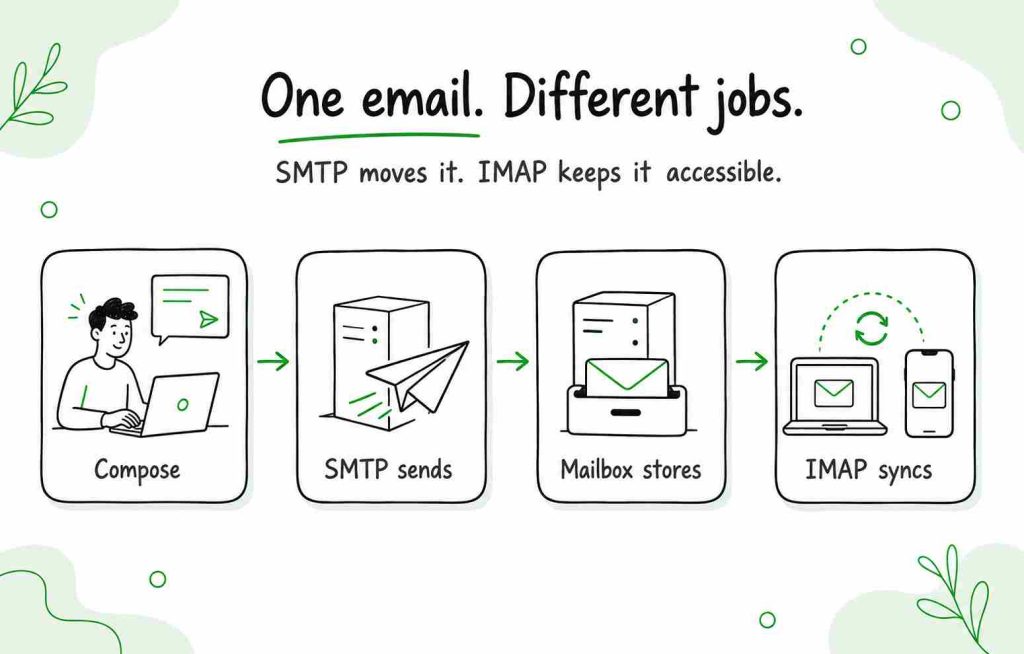
Here is a simplified email journey:
- You compose a message in an email client or sending application.
- SMTP submits the message to your outgoing mail server.
- SMTP transfers the message to the recipient’s mail server.
- The recipient’s provider stores the message in their mailbox.
- IMAP allows the recipient’s email client to access and synchronize it.
If the recipient uses POP3 instead, their client may download the message for local storage rather than continuously synchronizing the server mailbox.
What is SMTP?
SMTP stands for Simple Mail Transfer Protocol. It is the standard protocol used to submit and relay outgoing email.
When you select Send, your email client or application submits the message to an SMTP server. That server checks the connection and authentication, processes the recipient’s address, and routes the message toward the recipient’s mail server.
SMTP may be used at two stages:
- Message submission: Your email client or application submits the message to an outgoing mail server.
- Server relay: Mail servers use SMTP to transfer the message toward the recipient’s server.
These stages often use different ports.
Common SMTP ports
Port 587
Port 587 is commonly used for authenticated message submission. It normally begins with a standard connection and upgrades it to an encrypted one using STARTTLS.
For many email providers, this is the standard choice when connecting an email client or sending application.
Port 465
Port 465 is commonly used for SMTP submission with implicit TLS. The connection is encrypted from the beginning.
Some providers support both ports 587 and 465. Use the option specified by your provider.
Port 25
Port 25 is primarily used for SMTP relay between mail servers. It is frequently restricted by internet service providers and hosting companies to reduce abuse.
It is generally not the first choice when configuring an ordinary email client or outreach application.
Port 2525
Some SMTP providers offer port 2525 as an alternative when ports 587 or 465 are unavailable. It is not an official standard SMTP port, and support depends on the provider.
SMTP settings commonly include:
- SMTP server or hostname
- Port
- Encryption method
- Username
- Authentication method
- Password, app password, or OAuth authorization
Modern providers increasingly use OAuth rather than allowing third-party applications to store the mailbox password directly.
What is IMAP?
IMAP stands for Internet Message Access Protocol. It allows an email client or connected application to access and manage messages stored on a mail server.
Unlike a simple one-time download, IMAP synchronizes mailbox activity. If you read, move, flag, or delete an email on one device, that change can be reflected on your other connected devices.
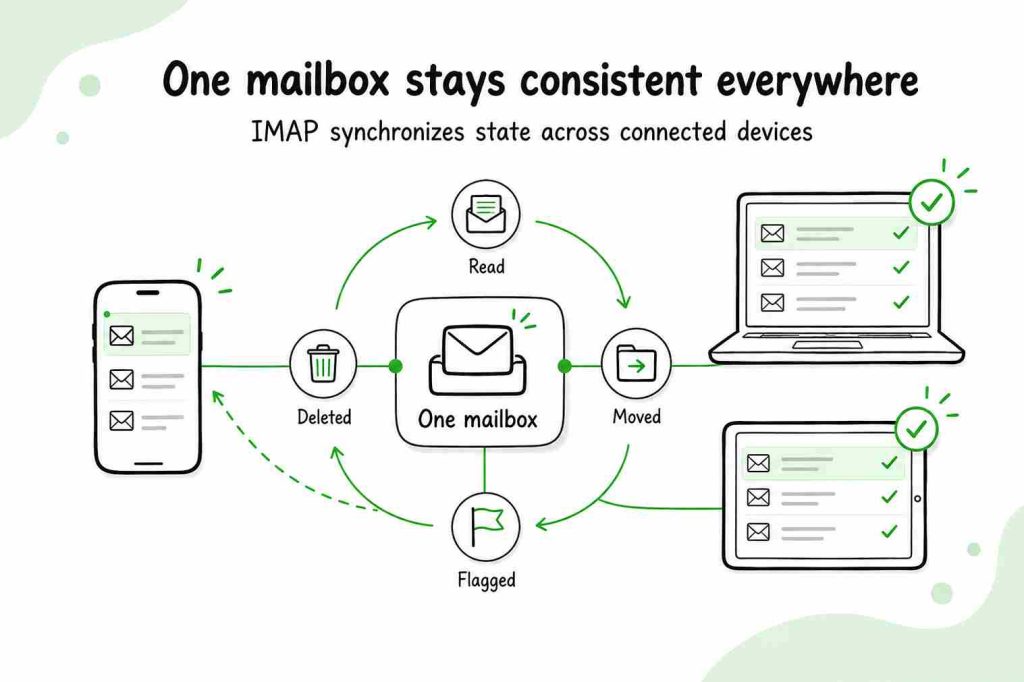
IMAP is useful when you:
- Check the same mailbox on a phone and computer.
- Use several email applications.
- Want messages and folders stored on the server.
- Need read, unread, deleted, and moved statuses synchronized.
- Connect a business mailbox to a tool that needs to detect replies.
The common secure IMAP port is 993, which uses TLS. Port 143 may support STARTTLS, but configuration depends on the provider.
IMAP does not send outgoing messages. An email client configured with IMAP will normally also need SMTP—or a provider-specific API—to send email.
What is POP3?
POP3 stands for Post Office Protocol version 3. Like IMAP, it is used to retrieve incoming email. However, it uses a different model.
POP3 generally downloads messages from the mail server to a local device. Depending on the email client’s configuration, it may remove downloaded messages from the server or leave a copy there.
Because it does not provide the same continuous, two-way mailbox synchronization as IMAP, POP3 is less convenient when you use several devices.
POP3 may still be useful when:
- You primarily access email from one device.
- You want to store messages locally.
- Server storage is limited.
- You need offline access to downloaded messages.
- An older application does not support IMAP.
The common secure POP3 port is 995. Port 110 is used for standard POP3 connections and may support STARTTLS, depending on the provider.
IMAP vs POP3
Both IMAP and POP3 provide access to incoming email, but they handle messages differently.
| Feature | IMAP | POP3 |
|---|---|---|
| Main model | Accesses and synchronizes messages on the server | Downloads messages to a device |
| Multiple devices | Well suited to multiple devices | Better suited to one primary device |
| Folder synchronization | Yes | Limited |
| Read and unread synchronization | Yes | Limited |
| Server storage | Messages normally remain on the server | Messages may be removed after downloading |
| Offline access | Available for locally cached messages | Available for downloaded messages |
| Common secure port | 993 | 995 |
| Best for | Modern multi-device email use | Local or legacy email setups |
For most modern users, IMAP is the more practical incoming-mail protocol because it keeps the mailbox synchronized.
Do you need both SMTP and IMAP?
You generally need both sending and receiving functionality, but that does not always mean you must configure both protocols manually.
A traditional email client may use:
- SMTP to send messages.
- IMAP to access and synchronize incoming messages.
A modern provider integration may use an API and OAuth to manage some or all of this communication. In that case, the application handles the protocol layer for you.
For example, connecting Gmail or Microsoft 365 through a supported OAuth integration may not require you to enter server names and ports manually. A mailbox from a smaller or custom provider may require manual SMTP and IMAP settings.
If you only configure IMAP, you may be able to read email but not send it. If you only configure SMTP, you may be able to send messages but not synchronize the inbox or detect replies.
SMTP and IMAP settings for Gmail and Outlook
Server names, authentication requirements, and supported protocols can change. Always verify them in your provider’s current documentation.
At the time of this update, Google lists the following common settings:
- IMAP server:
imap.gmail.com - IMAP port:
993 - SMTP server:
smtp.gmail.com - SMTP port:
587with TLS or465with SSL
See Google’s current IMAP, POP, and SMTP documentation before configuring the account.
For Outlook.com, Microsoft lists:
- IMAP server:
outlook.office365.com - IMAP port:
993 - SMTP server:
smtp-mail.outlook.com - SMTP port:
587 - Authentication: OAuth2/Modern Auth
Check Microsoft’s current POP, IMAP, and SMTP settings because Outlook.com and Microsoft 365 business configurations may differ.
How SMTP and IMAP work with cold email tools
A cold email platform needs to send messages and recognize what happens afterward.
For a custom mailbox connection:
- SMTP provides outgoing access. The tool uses the connected mailbox’s SMTP server to send campaign messages.
- IMAP provides incoming access. The tool can use IMAP to detect replies and synchronize relevant mailbox activity.
Reply detection matters because an automated sequence should stop when a prospect responds.
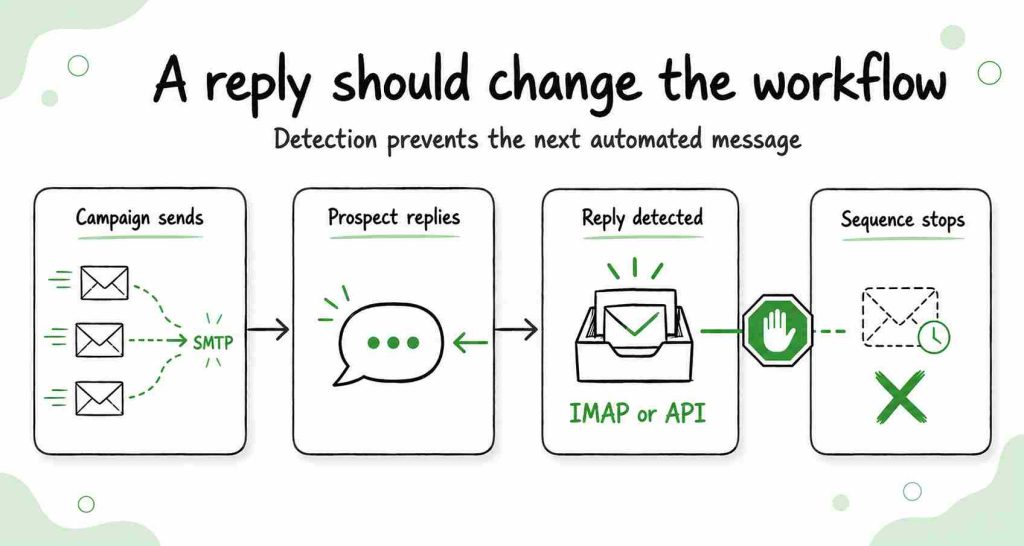
If the incoming connection is unavailable or incorrectly configured, the sending tool may not detect the response correctly.
Native Gmail or Microsoft integrations may use OAuth and provider APIs rather than asking you to enter every SMTP and IMAP setting manually. This is generally easier to configure and avoids sharing a mailbox password directly with the application.
When connecting another provider, you may need:
- Outgoing SMTP server and port
- Incoming IMAP server and port
- Encryption method
- Full email address as the username
- OAuth, an app password, or another supported authentication method
- IMAP access enabled in the provider’s settings
Follow the email provider’s documentation. Do not guess server names or disable encryption simply to make a connection work.
Does SMTP or IMAP affect deliverability?
SMTP and IMAP play different roles, but neither one alone determines whether a message reaches the inbox.
SMTP configuration can prevent messages from sending when:
- The hostname or port is incorrect.
- Authentication fails.
- The connection uses an unsupported encryption method.
- The provider blocks the connection.
- The mailbox has reached a sending limit.
However, successful SMTP submission does not guarantee inbox placement. Deliverability also depends on:
- Sender and domain reputation
- SPF, DKIM, and DMARC
- Recipient quality
- Bounce and complaint rates
- Message content
- Sending volume and consistency
- Recipient engagement
Read our guide to SPF, DKIM, and DMARC to understand how authentication works alongside SMTP.
You can also review these cold email deliverability practices before launching a campaign.
IMAP is not a delivery or authentication protocol. It affects how messages are accessed and synchronized after they have reached a mailbox.
Common SMTP and IMAP problems
I can receive email but cannot send it
The IMAP connection may be working while the SMTP connection is not.
Check:
- SMTP hostname
- SMTP port
- TLS or STARTTLS selection
- Username
- OAuth or app-password requirements
- Whether SMTP access is enabled
- Provider sending limits
I can send email but cannot receive or synchronize it
The SMTP connection may be working while the IMAP connection is unavailable.
Check:
- IMAP hostname
- IMAP port
- Encryption method
- Whether IMAP is enabled
- Folder permissions
- Authentication method
My password works in webmail but not in another application
The provider may require OAuth or an app-specific password for external applications. Do not weaken account security or disable two-factor authentication without first checking the provider’s official connection instructions.
My email tool did not detect a reply
Check whether the mailbox’s incoming connection is active. Depending on the integration, reply detection may use IMAP or the provider’s API.
Also confirm that:
- The reply reached the connected mailbox.
- The original mailbox remains connected.
- The message was not routed to another address or folder unexpectedly.
- The integration still has the required permissions.
My messages send successfully but land in spam
That is normally a deliverability problem rather than an IMAP problem. Review authentication, sender reputation, list quality, sending behavior, and message relevance before changing incoming-mail settings.
For specialized sending infrastructure, see when an external SMTP service for cold email may—or may not—be appropriate.
SMTP vs IMAP: the takeaway
SMTP and IMAP perform different parts of email communication:
- SMTP sends and relays outgoing email.
- IMAP accesses and synchronizes incoming email.
- POP3 downloads incoming email for local access.
- SMTP and IMAP are commonly used together.
- Modern OAuth integrations may handle these connections without manual server configuration.
If you remember only one thing, remember this: SMTP sends; IMAP synchronizes.
Frequently asked questions
What’s the difference between SMTP and IMAP?
SMTP is used to send and relay outgoing email. IMAP is used to access and synchronize email stored on a mail server. A typical email account may use both: SMTP for sending and IMAP for incoming messages.
What is IMAP used for?
IMAP is used to access and manage email stored on a remote server. It keeps folders, read statuses, deletions, and other mailbox changes synchronized across connected devices.
Do I need both SMTP and IMAP?
You normally need both outgoing and incoming email functionality. A traditional setup uses SMTP for outgoing messages and IMAP for incoming messages. Modern provider integrations may handle the same functions through APIs and OAuth without requiring manual protocol configuration.
Is SMTP incoming or outgoing?
SMTP is the outgoing email protocol. It submits messages from an email client or application and relays messages between mail servers.
Is IMAP incoming or outgoing?
IMAP is an incoming-mail access protocol. It lets an email client or application access and synchronize messages stored on the mail server.
Is IMAP better than SMTP?
Neither is better because they perform different tasks. SMTP sends email, while IMAP accesses and synchronizes it. The relevant comparison for incoming email is IMAP vs POP3.
Is IMAP better than POP3?
IMAP is generally better for people who use multiple devices because it synchronizes the mailbox through the server. POP3 may be appropriate when messages should be downloaded and stored primarily on one device.
What ports do SMTP and IMAP use?
SMTP commonly uses port 587 with STARTTLS or port 465 with implicit TLS for message submission. Port 25 is mainly used for server-to-server relay. Secure IMAP commonly uses port 993.
Is SMTP secure?
SMTP can use TLS to encrypt the connection. Ports 587 with STARTTLS and 465 with implicit TLS are commonly used for secure message submission. Security also depends on authentication, provider configuration, and domain-level mechanisms such as SPF, DKIM, and DMARC.