


The success of your cold email campaigns in 2026 depends on more than just writing great emails. To escape the spam folder and maintain a solid inbox reputation, you must take care of your email infrastructure. This means warming up your inboxes before spamming out emails to hundreds or thousands of addresses at once.
You manually warm up one inbox and send a few emails back and forth to make it ready for email comms, but that’s not enough for real cold email campaigns. If you want to have a large number of inboxes for different campaigns and all of them with great email deliverability, you’ll need a dedicated tool for the job, and this is where Warmbox comes in.
Today, we show you how much Warmbox costs.
Warmbox plans depend on how many emails you send per day
Before we get into the individual plans, let’s get two important things out of the way.
There is no free trial to warm up emails and see their performance in detailed reports before paying. You can only book a demo of the warm up tool to see how it works in real life.
Second, you can purchase all Warmbox plans with a monthly or annual plan. Going for yearly pricing will get you a 20% discount on all plans.
Here is the pricing information as of early 2026.
Solo Plan
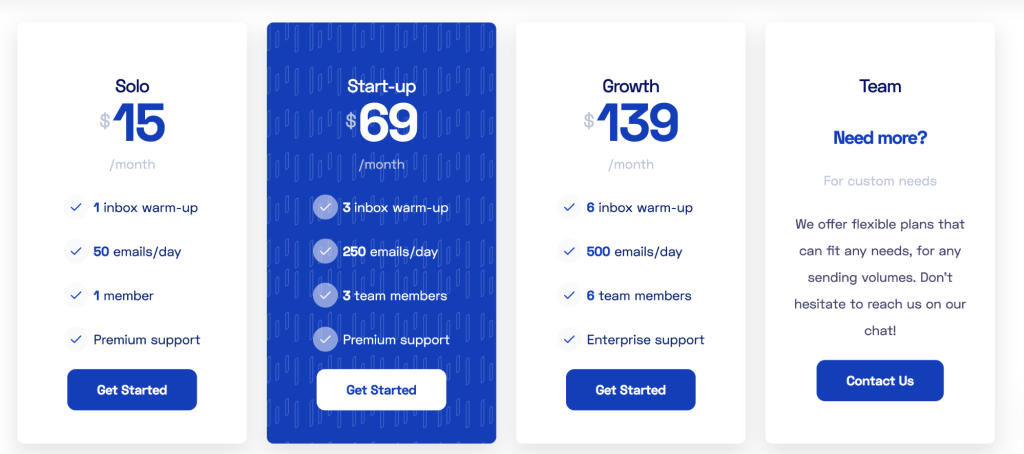
The Solo plan costs $15 per month when billed monthly. It includes warming up 1 inbox, allows 50 emails per day, and supports 1 team member with premium support included. This plan is a good starting point if you only need to warm up a single email account.
Start-up Plan
The Start-up plan is priced at $69 per month on the monthly billing option. It lets you warm up 3 inboxes, send up to 250 emails per day, and includes access for 3 team members with premium support. This plan suits small teams handling a few accounts.
Growth Plan
The Growth plan is $139 per month with monthly billing. It supports warming up 6 inboxes, allows 500 emails per day, and includes seats for 6 team members plus enterprise-level support. This tier is designed for larger teams needing higher volume.
Team / Custom Plan
There is also a Team option, which does not have a listed price and is tailored for custom needs. You can contact Warmbox to get a quote that fits higher sending volumes or specialized requirements.
Key features included in all email warm-up tool plans
Regardless of how many inboxes and emails you need, all of the plans come with all the features to protect your sender reputation and prevent you from landing in spam.
Automated email warm-up
Warmbox automatically sends and interacts with emails from your connected inbox rather than you doing it manually. This matters because gradually increasing sending activity and engagement helps email providers recognize your address as legitimate instead of spammy.
Automated interactions with emails
The system opens emails, bookmarks them, and replies to some messages. These actions mimic how real people behave, which helps boost your sender reputation with email providers so your campaigns are more likely to land in inboxes.
Essentially, it can generate positive interactions on your behalf, slowly building up your email reputation so you can start reaching out manually later.
Removal from spam folders
Warmbox checks warm-up messages and removes those that land in spam. This is important because it reinforces positive engagement signals to email providers, which are influenced by whether your messages are treated as spam.
Spam score monitoring
The platform tracks how likely your messages are to be seen as spam. Seeing this score lets you gauge whether your email domain and sending habits are healthy, which can help you fix problems before they affect deliverability.
This feature can come in really handy for cold outreach lead agencies managing not only multiple inboxes but also multiple clients.
Realistic, human-style interactions and templates
Warmbox uses pre-made and AI-driven templates and patterns that resemble real human conversations. This is useful because predictable or robotic patterns can be flagged by email services, while realistic behaviour improves trust.
You can also get customizable warm-up recipes to create your own warm-up strategies, based on what works well for your business or industry.
Warm-up modes and customization
You can choose from built-in warm-up patterns or customize parameters like daily volume or reply rate. This flexibility matters because different accounts and campaigns need different warming strategies rather than a one-size-fits-all approach.
Warm-up scheduling
Warmbox lets you control when warm-up activity occurs. Scheduling matters because consistent sending behaviour helps build a good sender reputation, and it avoids sending bursts at awkward times that could look suspicious.
Live email checks
The tool checks things like DNS and whether your IP or domain are on blacklists. These checks are important because technical problems, such as missing authentication record,s can cause emails to fail or be marked as spam.
Private inbox network interactions
Warmbox uses a large private network of inboxes to exchange emails with your account. This is relevant because those interactions simulate real engagement at scale, helping strengthen your reputation with multiple providers.
Reporting and analytics
A dedicated inbox dashboard lets you see warm-up progress, reply rates, and deliverability indicators. Seeing these metrics helps you understand how your strategy is performing and where you might need to adjust.
You can get easy access to your email sending reputation in a detailed analytics dashboard. This is an excellent way to show clients how the warm-up process is helping them dodge spam filters.
Inbox provider integrations
The platform supports major providers like Gmail, Outlook, Yahoo Mail and others. This matters because the warm-up must work with your actual sending account; if your provider isn’t supported, you couldn’t use the tool seamlessly.
This can help lead gen agencies prevent deliverability issues, regardless of what their clients use in terms of email service providers.
Get the better (and more affordable) alternative to Warmbox
If you’re looking for a solution that combines warm-up tools with full cold email outreach features in one package, Woodpecker is worth a look.
Woodpecker includes warm-up and recovery capabilities that help build your sender reputation and improve deliverability as part of its core offering, so you don’t need a separate warm-up tool just for that purpose.
The warm-up and recovery feature runs automatically in the background, opening and replying to emails while moving messages out of spam to support healthier inbox behaviour. You also get deliverability monitoring, catch-all email verification, and adaptive sending that help keep your campaigns on track every step of the way.
Woodpecker also lets you manage inbox warming and outreach from a unified dashboard, avoiding the need to switch between tools. This can be especially helpful for teams who want a single place to handle warm-up, campaign sequencing, tracking, and reporting without adding cost or complexity.
For smaller budgets or teams just starting with email outreach, putting warm-up inside the tool you already use can reduce overall expenses and simplify your workflow compared with using a standalone warm-up service.
Try Woodpecker for free today.