


Success in cold email outreach is a lot more than cleverly crafted emails. For your cold email campaigns to reach real inboxes, you need proper infrastructure in place. Mailforge is a popular email infrastructure tool that can help you with inbox placement and achieve a higher ROI from cold outreach.
Today, we show you how much Mailforge costs.
Mailforge doesn’t have a free trial or a free plan
The reason is simple: you need to use domains and mailboxes to set up an email infrastructure. Those don’t come for free, so you really don’t have a chance to try out Mailforge for free.
All of their cold email infrastructure tools boil down to two things: domains and mailboxes. On the Mailforge pricing page, you can choose how many sequences you want to send, from how many mailboxes and to how many contacts. Based on this, Mailforge suggests the right number of mailbox accounts for premium deliverability.
You pay per domain and mailbox
If you want to use Mailforge to manage cold email outreach, you first need to understand your needs. How many people do you want to reach in the primary inbox, and how many emails are you sending? Based on this, you can enter data in Mailforge’s calculator:
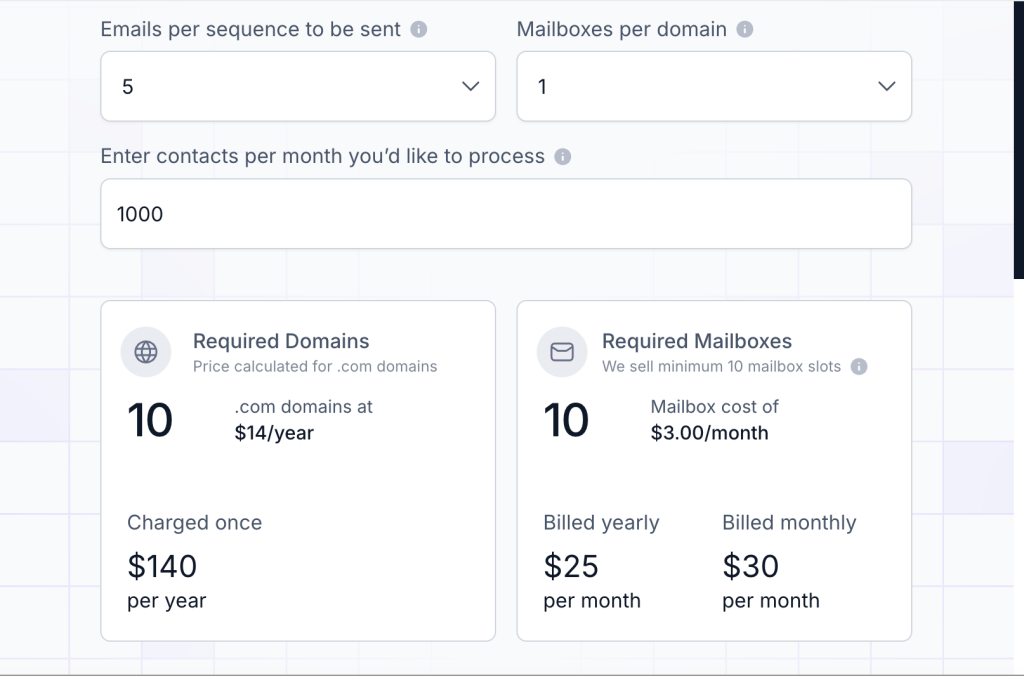
For example, if you want to reach 1,000 contacts with five emails per sequence, and with just one mailbox, you’ll need to pay for 10 domains at $14 per domain and 10 mailboxes, bringing your total cost to $140 per year and $30 per month for mailboxes.
Everything you purchase comes with:
- Automated DNS setup
- Expert customer support team
- Inbox hosting and maintenance
You get all the basics for setting up a cold email infrastructure and having email service providers place you in
Expert sessions
If you need help with your cold email infrastructure, SPF, DKIM and DMARC, SSL domain masking or something else, you don’t have to troubleshoot alone. On top of the mailboxes and domains, you can purchase time slots from the Mailforge team at $500 for two one-on-one sessions.
Available add-ons
You can purchase two different types of addons, both suitable for growing teams that want to scale their outreach efforts.
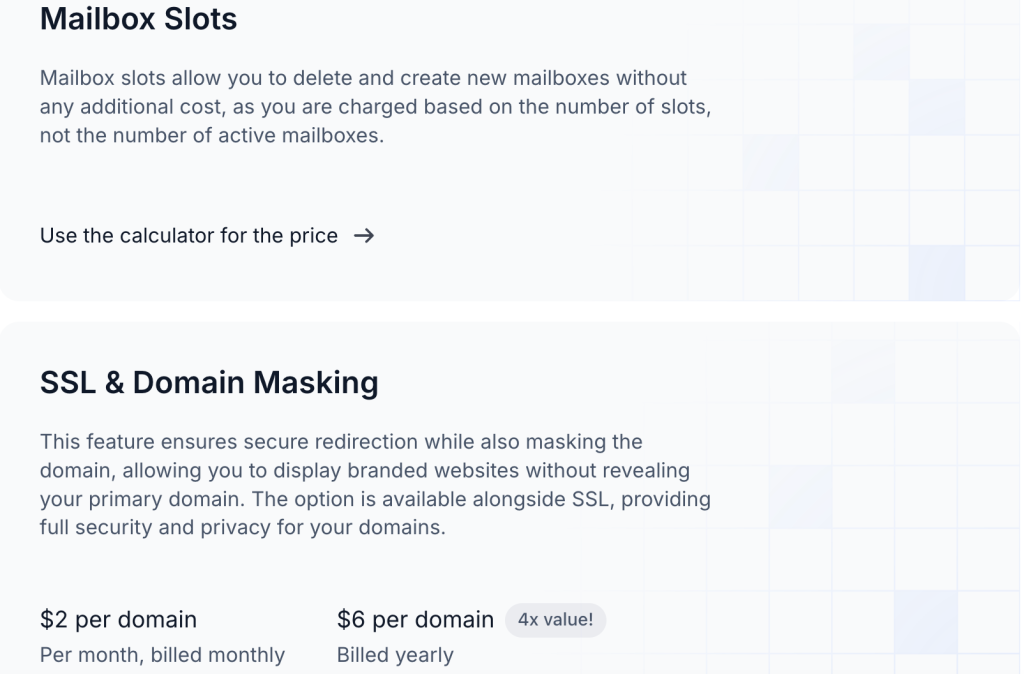
Mailbox slots is essentially the same as purchasing additional mailboxes. Instead of an actual mailbox, you pay for a slot and leave it unused until the moment comes and you need it. This an excellent way to have backup if you manage multiple campaigns and you’re not sure when you’ll need an extra mailbox. The price is the same as a regular mailbox, at $3 per piece.
SSL and domain masking is an option that allows you to mask your domain while sending outreach emails, which is ideal when you have multiple domains and want to protect the primary one. It costs $6 per domain if you pay yearly, or $2 per domain per month if you pay monthly.
Mailforge vs Infraforge
Mailforge and Infraforge solve very different problems, even though their names sound similar.
Mailforge focuses on email infrastructure for outbound sending, giving teams a way to create, manage, and rotate inboxes, domains, and sending setups used for cold email and outreach at scale. It sits close to the email layer and is mainly used by sales and growth teams who need reliable deliverability and control over sending accounts.
Infraforge, on the other hand, focuses on the underlying infrastructure needed to run those email systems, such as servers, IPs, and technical foundations that support large scale sending. It is more relevant for technical teams who want deeper control over how email infrastructure is provisioned and maintained.
In short, Mailforge is about managing sending operations at the inbox and domain level, while Infraforge is about building and maintaining the technical backbone that makes high-volume email possible.
Using Woodpecker on top of Mailforge
Mailforge takes care of the hard technical part of cold email, domains, mailboxes, DNS, and inbox health. What it does not handle is how campaigns are built, sent, and managed day to day. That is where Woodpecker fits naturally.
Woodpecker sits on top of your Mailforge setup and uses the inboxes you have already created.
You connect the mailboxes, define your sending rules, and then run campaigns without touching the infrastructure layer again. Mailforge keeps your sending environment clean and stable, while Woodpecker handles sequencing, personalization, reply detection, and follow-ups.
This works well for teams that want a clear split of responsibilities. Mailforge manages deliverability and inbox readiness. Woodpecker manages outreach execution and campaign logic. You get better control over sending behavior without rebuilding or duplicating infrastructure.
If you already pay for Mailforge, adding Woodpecker makes sense when you want to actually run campaigns, test copy, manage replies, and scale outreach in a controlled way. Together, they form a complete cold email stack, one tool for infrastructure, one tool for outreach.
Try Woodpecker for free today.