


If you’re using Evaboot to power your LinkedIn Sales Navigator prospecting, pricing is a core part of your lead generation economics.
Unlike many tools that bundle unlimited usage into flat subscription tiers, Evaboot’s pricing is credit-based, meaning you pay for each lead export, email found, and verification action you run. And that adds up fast as you scale.
In this guide, we’ll unpack exactly how Evaboot’s pricing works in 2025, break down the costs of different credit levels and tiers, and explain what you actually get at each price point.
You’ll also see how the total cost of using Evaboot compares to other parts of your stack, from LinkedIn Sales Navigator access to downstream outreach platforms, and why teams often evaluate alternatives like Woodpecker that offer broader value for the same or lower spend.
No matter if you’re budgeting for a small SDR team, testing a new lead generation workflow, or auditing spend across tools, this is everything you need to understand before renewing or upgrading your Evaboot plan.
What is Evaboot?
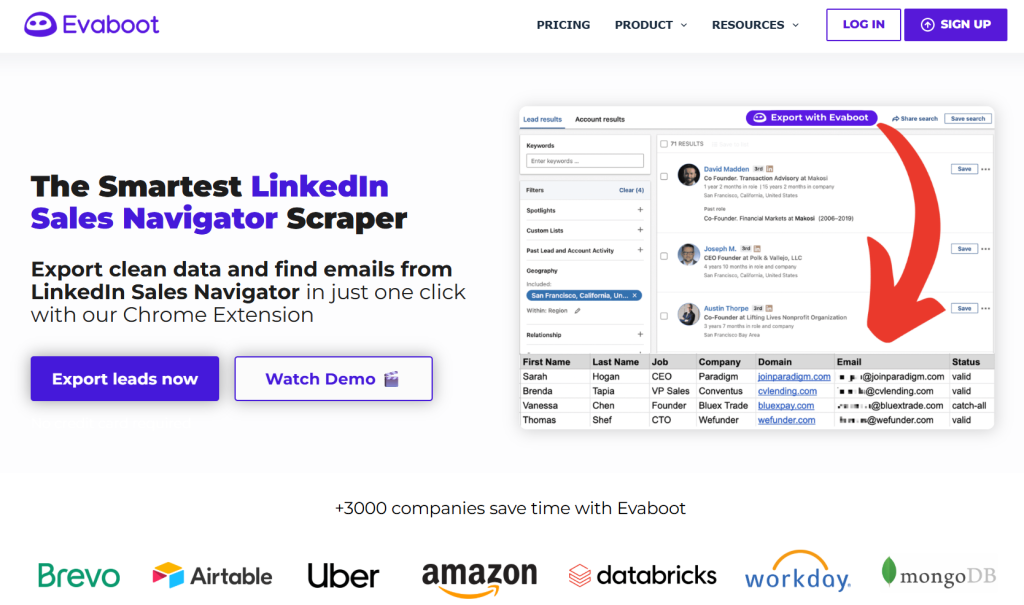
Evaboot is a focused LinkedIn Sales Navigator scraper built for sales professionals and sales teams who want to quickly extract data from LinkedIn and turn it into usable lead lists. It works as a Chrome extension that plugs directly into your Sales Navigator search results and adds an “Export with Evaboot” button so you can pull contact info, company names, job titles, and verified email addresses into a CSV format without weeks of manual work.
Instead of copying profile details one by one, Evaboot automates the lead extraction process. It cleans messy LinkedIn data, checks that each lead matches your search criteria, and helps you export leads that are ready for outreach campaigns, CRM import, or reporting: all with minimal manual labor required.
Evaboot also enriches basic LinkedIn profile data by verifying emails and linking LinkedIn URLs and company information into a structured dataset, making it easier to integrate with email marketing workflows or other outreach tools you use later in your lead generation process.
In short, it’s a specialized tool: excellent for extracting accurate data from LinkedIn’s Sales Navigator when you need to scale lead sourcing, but it doesn’t replace broader pipeline or engagement tools that carry leads further down your sales funnel.
Evaboot pricing: a detailed breakdown
Before we analyze value, here’s what Evaboot’s pricing landscape actually looks like in practice. The platform uses a credit-based model – the number of leads you can extract and enrich each month depends on how many credits you buy or subscribe to.
Credit structure & starting point
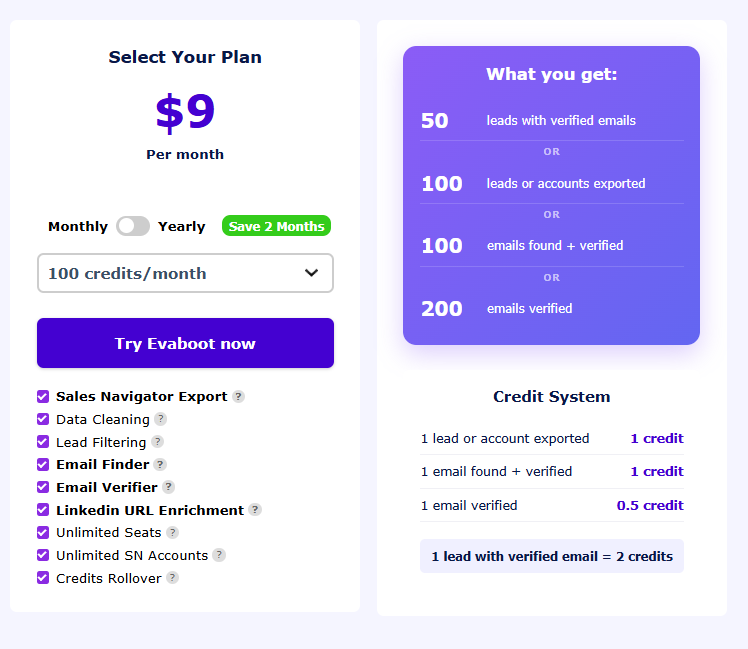
At its most basic, Evaboot offers very low-entry pricing with only a handful of credits, which makes it feel inexpensive at first:
- $9/month for ~100 credits – enough for maybe ~50 scraped leads, depending on how many credits each action uses.
- Free plans and trials also exist where you can access a small number of credits to extract clean data from Sales Navigator searches before committing.
Mid-range incremental pricing
As you grow your demand, Evaboot’s credit plans expand stepwise:
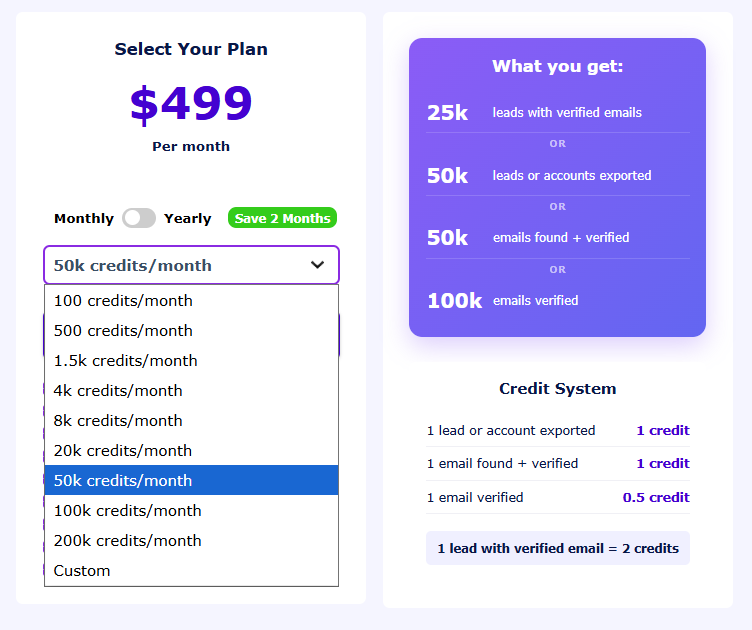
- $29/month for ~500 credits – suitable for basic lead sourcing.
- $49/month for ~1,500 credits – more mid-level usage.
- $99/month for ~4,000 credits – more serious lead extraction volume.
- $149/month for ~8,000 credits – larger datasets and more robust enriching.
Large volume and enterprise tiers
For teams needing serious throughput, there are big bundles:
- $299/month for ~20,000 credits – high-volume prospecting.
- $499/month for ~50,000 credits – enterprise-level extraction and enrichment.
Credits typically let you both extract leads from your LinkedIn Sales Navigator scraper results and enrich them with verified email addresses and cleaned contact info. Unused credits can roll forward as long as your subscription stays active, which helps with month-to-month fluctuations in lead needs.
You’ll also usually pair Evaboot with a LinkedIn Sales Navigator account – the tool doesn’t work without it, and Sales Navigator alone can cost roughly $79–$169+ per month for a Professional or Team tier subscription.
What these prices mean in practice
Because Evaboot’s pricing is tied to credits rather than purely flat tiers, usage can feel unpredictable:
- At low volumes (e.g., $9 or $39), you get very limited extraction capacity – barely enough for a smaller sales rep or business consultant testing lead flows.
- For real lead generation workflows demanding clean data and verified emails, you often need the $79–$239 range just to have breathing room.
- Once you hit the tens of thousands of credits per month, your spend starts to look more like a serious operational budget rather than a simple subscription.
Trial & initial testing
Evaboot frequently offers a free trial or free plan with limited credits so you can test data extraction and the tool’s compatibility with your lead generation process before paying.
Pricing analysis: what Evaboot’s pricing really means for you
Now that we’ve broken down Evaboot’s pricing plans and credit structure, let’s look at what it actually costs you in practice once you factor in the realities of your lead generation process, data quality needs, and the rest of your stack.
Credit-based pricing has hidden complexity
Evaboot’s pricing revolves around a credit system where every lead you export and enrich consumes credits. According to Evaboot’s own pricing page, each exported lead uses 1 credit + 1 credit for a verified email – meaning 2 credits per complete contact.
This design might look inexpensive at first (for example, a $9 plan gives you 100 credits, or the ability to export leads with emails in small batches) but the math shifts quickly when you scale.
In real use, a 500-credit plan (~$39/month) only delivers 250 complete leads with verified emails, assuming you enrich every contact.
Factor in that you need a LinkedIn Sales Navigator subscription for Evaboot to work at all (typically at least ~$99.99/month) and your total cost per month becomes much higher than the headline plan price.
So although the subscription price starts low on paper, as soon as you combine:
- credits used for data extraction and enrichment
- the mandatory Sales Navigator extraction requirement
- the desire for lists large enough to support outreach campaigns
your effective spend building lead lists becomes significant.
Data accuracy & lead generation are not free
One of Evaboot’s key selling points is data accuracy. It cleans the LinkedIn Sales Navigator output and tries to match leads to real contacts with verified email addresses.
However, that enhancement comes at the cost of credits, meaning every improvement in data quality directly adds to your spend. This is unlike subscription outreach platforms where email verification is bundled and doesn’t eat into your target reach.
For sales professionals, business development teams, and marketing professionals focused on generating qualified leads in a very effective manner, this means you’re paying not just for the tool – but for every step of the work your team has to do post-scraping. More credits consumed = more dollars spent.
Scaling quickly gets expensive
As your team grows or you try to scale a lead generation process, the credit-based pricing can feel like a brake:
- Moving from a small starter budget to something that actually supports robust lists requires a leap in credits and costs.
- Even when credits roll over with an active subscription, you still pay month after month for unused potential.
This pricing model forces you to constantly ask: how many leads do we really need this month? rather than letting you focus purely on results. For sales teams that want simplicity, this can feel like managing a utility bill rather than focusing on pipeline growth.
Stack costs add up when you factor in other tools
Another critical challenge is that Evaboot doesn’t cover the entire outbound pipeline:
- You still need an outreach tool if you want to run email campaigns, track replies, or automate sequences.
- Most teams also need a CRM to import data, run segmentation, and track new contacts over time.
- Some workflows layer in advanced integrations or detailed analytics to evaluate campaign performance.
That means Evaboot is often just one of several tools you’re paying for – which can make even its competitive pricing plans feel like the start of a long invoice rather than a must-have tool for your stack.
What Evaboot is good at, and where it stops
Evaboot is undeniably handy as a LinkedIn scraper with email find/verify abilities, especially for teams focused on Sales Navigator extraction and portability of lists. It streamlines a time-consuming earlier manual process of copying and pasting, and its Chrome extension makes data export immediate and user-friendly.
But its value starts to shrink when:
- you need detailed analytics or multi-touch outreach,
- email sequences and campaign tracking matter,
- other tools overlap in functionality you already pay for.
In that sense, Evaboot alone does not generate leads. It prepares data for leads that you then have to engage with other systems.
How pricing feels for different teams
- Solo users or consultants: the low-entry pricing might seem inexpensive tool-like at first, but real-world credit needs push you toward mid-tier.
- Mid-size companies or growing sales teams: credits alone rarely cut it, and you end up budgeting combined spend on extraction, CRM, outreach, and analytics.
- Large teams & heavy users: even with rollover credits, the cost curve becomes steep compared to bundled outreach platforms that handle qualified leads and engagement in one place.
Why Woodpecker might be a better investment than Evaboot alone
Once you’ve seen how Evaboot’s pricing plans stack up and what credit-based spend really looks like, it’s worth contrasting that with how tools like Woodpecker are priced and what problem they actually solve. This helps you understand not just what you’re paying, but what you’re getting for the investment.
Subscription pricing vs credit-based costs
Evaboot’s model charges you per credit – credits you spend on exporting LinkedIn Sales Navigator results and enriching contacts with verified email addresses. While this seems inexpensive at first, the cost to scale up can outgrow smaller budgets fast, especially when you want lists large enough to fuel meaningful email campaigns.
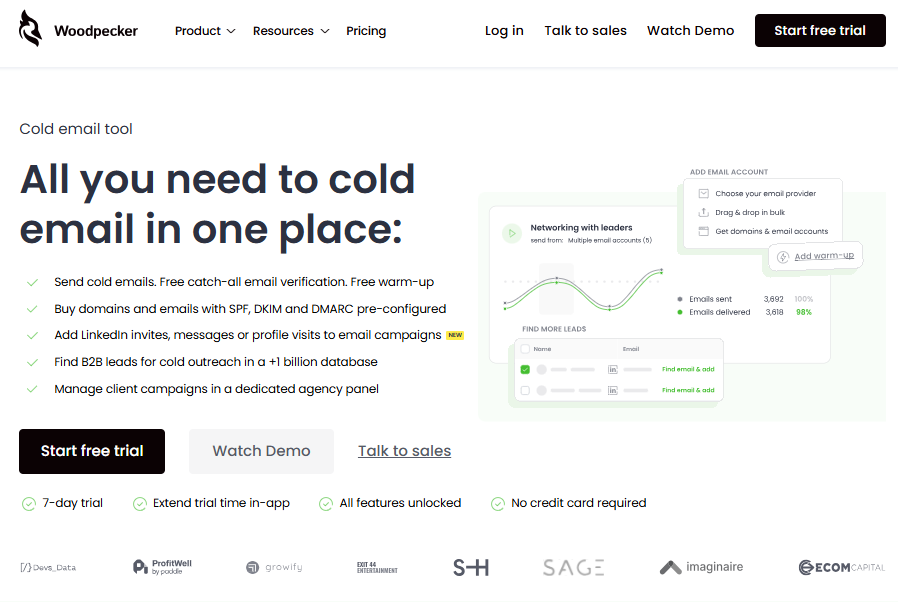
Woodpecker, in contrast, uses subscription pricing rather than credits for raw extraction – and that has implications for predictability and total spend. Its plans start around $29/month with a free trial that lets you send emails to a limited number of prospects before committing.
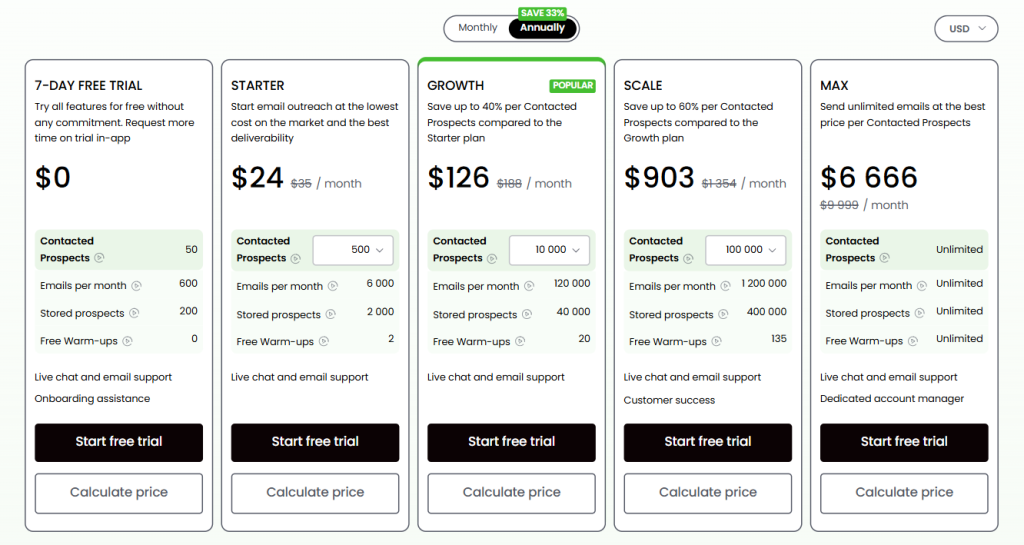
Because Evaboot’s pricing depends on output volume (more exports + email enrichments = more credits consumed), your actual spend can vary widely month to month. Woodpecker’s model is more stable: you pay for the level of outreach capability you need, not how many times you scrape or enrich data.
Value across the entire lead funnel
Evaboot is strong at data extraction and exporting clean LinkedIn data into CSV files, which makes it a must-have tool for teams focused on Sales Navigator extraction.
But once the data is in your system, it doesn’t take you any further. You still need additional systems to run and track email outreach campaigns. That means paying for other tools just to use the leads you worked to gather.
Woodpecker combines email sending, automation, and follow-ups in the same pricing plan. That’s why many businesses and sales professionals choose it over a credit-only model: it moves you from lead extraction to lead engagement without adding a new invoice for every step.
Instead of:
- pay Evaboot for extraction +
- pay a separate outreach platform for campaigns +
- pay a CRM for storage and analytics,
you get one subscription where your email campaigns, sequences, deliverability monitoring, and basic verification are bundled together.
Predictability saves money
Because Woodpecker’s pricing plans are based on tiered levels of outreach capacity rather than credits used, you can budget more predictably for your email efforts. Its plans scale with your needs, from starter tiers into growth and high-volume plans, without tying cost directly to how many leads you import or enrich.
In contrast, with Evaboot you can hit a situation where:
- you buy a mid-level credit bundle,
- but your team burns through credits quickly because they collect data, verify emails, and filter leads, then
- you end up buying more credits just to keep the funnel flowing.
That dynamic makes budgeting harder – especially for mid-size companies and sales teams who want a linear cost = results model.
Feature depth for real outreach
Evaboot’s value lies in saving time on data extraction and initial cleanup, and it does that well with its Chrome extension makes pulling leads faster than manual labor.
But once the data is in your hands, you still have to export, import into other systems, set up email sequences, and track engagements with detailed analytics. That’s a lot of post scraping work if your goal is to generate leads that turn into business opportunities.
Woodpecker includes:
- built-in cold email sending,
- automated follow-ups,
- deliverability tools,
- campaign tracking & analytics,
- and native integrations with CRMs and other systems.
That means less stitching together of other tools and fewer subscriptions to manage, which often results in lower total spend over time, even if the initial monthly price is higher than the lowest Evaboot tier.

Which model works better for you?
Choose Evaboot if:
- Your primary goal is extracting targeted lead lists from LinkedIn Sales Navigator.
- You already have a full stack (CRM + outreach tool) and just need the scraper.
Choose Woodpecker if:
- You want an all-in-one system that takes verified contacts and turns them into email campaigns without extra tools.
- You want pricing that aligns with campaign volume and actual outreach capacity.
- You value predictability over variable credit spend.
Evaboot gives you accurate data at the start of the funnel, which is great. But if you’re already spending on a CRM and an outreach system, you’re paying for the same capabilities twice. Woodpecker combines crucial parts of that stack under one predictable pricing model, often making it a smarter investment for teams that care about both quantity and quality of engagement rather than just data extraction.
Conclusion
Evaboot is a handy tool for rapidly extracting LinkedIn data and helping you obtain company information with an intuitive interface. Its key features make it a solid starting point if your sales efforts focus on list building and you typically write outreach in other systems.
However, for teams facing critical challenges beyond pure extraction, tools that offer additional and advanced features often fit better into a broader business plan.
Evaboot does its job well, but if you want more features than simple export and enrichment, consider solutions like Woodpecker that support the entire process from data to engagement. Sign up for a free trial now.
FAQ
How much does Evaboot cost?
Evaboot’s pricing is credit-based, with plans that let you export data from LinkedIn Sales Navigator starting at low monthly tiers for small lead volumes and scaling up to higher tiers for larger extraction needs, though actual costs depend on how many credits you use and require an active Sales Navigator account to function.
What is the alternative to Evaboot?
A common alternative is a powerful tool like Woodpecker, which not only helps with lead follow-up after you collect a stakeholder list but also supports outreach and campaign automation, whereas Evaboot focuses on data extraction without additional features.
Is Evaboot safe to use?
Yes. When you connect Evaboot to LinkedIn Sales Navigator, it respects LinkedIn’s usage limits and operates within their terms, imposing daily limits on exports to avoid account issues and complying with privacy standards like GDPR and CCPA.
What is the pricing for a Sales Navigator?
LinkedIn Sales Navigator pricing starts at around $99.99/month for the Core (Professional) plan, goes up to around $149.99/month for the Advanced (Team) tier, and has a custom pricing Enterprise plan that can start around $1,600/year per seat. No free version available.