


Looking to reach thousands of people per day through email and LinkedIn? While you could manually write your emails and LinkedIn messages, that won’t get you very far. The truth is, there are many great email outreach tools and LinkedIn automation tools in the market. And if you want one that can do both, Dripify can get you there.
This tool lets you create drip campaigns and combine LinkedIn and email in one and the pricing is pretty affordable for teams that have yet to start with either of those things.
Let’s discuss Dripify pricing in 2026.
Get better value for money from your outreach. Try Woodpecker for free today.
Dripify has four pricing plans
There are four plans in Dripify, with three of them having publicly available pricing. There is no free plan, only a seven-day free trial. You can purchase this LinkedIn automation tool on a monthly or annual basis, and the latter will give you a nice 35% discount.
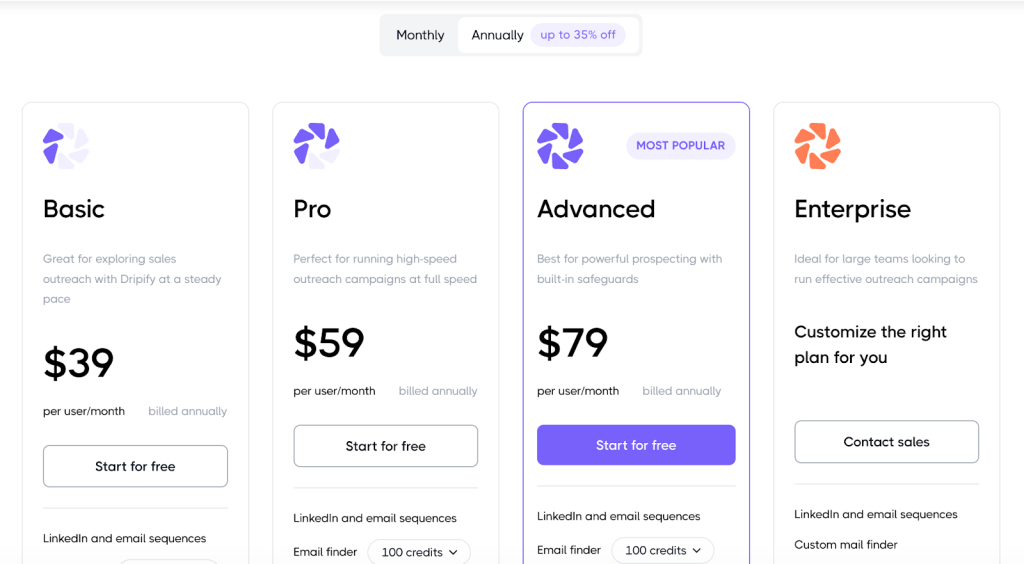
Unlike other LinkedIn automation tools, the pricing is simple with no add-ons. The only thing you can purchase more of is email verification credits.
Here’s how much those plans cost.
The Basic plan starts at $39/user/month and comes with key features for drip campaigns
This is the entry-level plan designed for solo users or anyone new to automated outreach. It gives essential automation tools so you can start running one sequence at a time while testing Dripify’s core capabilities. It’s suitable if you want to automate LinkedIn and email outreach without a large upfront commitment.
Included features
- One drip campaign at a time from your personal inbox
- Limited daily quotas for messages and actions
- Analytics and reporting
- Templates for sequences
- Basic LinkedIn safety protections
- Support access
- Compatibility with all LinkedIn account types
This plan works well for solopreneurs, small in-house sales teams with free LinkedIn accounts and in general, for people who want to tinker with personalized messages on LinkedIn.
The Pro plan starts at $59/user/month and adds more tools for lead generation and email outreach
A step up from Basic at a moderate monthly increase, this plan is aimed at users who need to run outreach at scale. You get everything from the Basic plan, plus expanded automation capacity and some workflow tools that make managing leads and responses easier.
New features added compared to Basic
- Unlimited drip campaigns instead of just one
- Full daily quotas instead of limited quotas
- A dedicated inbox to manage replies, automate follow-ups and track performance metrics
- Ability to export leads into CSV files
- Webhook integration for connecting with other tools
This plan is a good fit for experienced sales teams that want to automate all aspects of LinkedIn conversations, from connection requests to follow-ups. If you want capable tools for multi-channel outreach, this plan gives you the right features so you don’t have to use several tools for multichannel prospecting and outreach.
The Advanced plan starts at $79/user/month
This tier is for teams that want more control and collaboration support. It includes all Pro features while adding tools that help manage multiple users and keep campaigns safe and consistent as outreach activity increases.
New features added compared to Pro
- Team management tools to assign roles and oversee multiple users
- Advanced protective measures to reduce risk of LinkedIn restrictions
- Lead tagging and activity control to organize and filter outreach data
This plan works well for agencies managing multiple clients or in-house teams with multiple LinkedIn accounts. If sales outreach and lead generation on LinkedIn make up for a large part of your revenue, this is the plan to get.
The Enterprise plan has custom pricing
This is the highest level, geared toward larger organizations with complex outreach needs. It builds on all Advanced plan features and includes personalised services to help teams get set up and supported.
What’s added compared to Advanced
- Premium onboarding services
- Dedicated technical support
- A customer success manager to assist with strategy and adoption
- Custom options for mail finder credits and limits tailored to your team’s scale
This plan is built for enterprise orgs that depend on LinkedIn outreach and automation for revenue. You can manage multiple LinkedIn profiles and cover tools for your entire sales team. The concierge onboarding helps with advanced features.
What Dripify reviews are saying
Based on the reviews, Dripify seems like a solid tool for LinkedIn outreach. Ratings are overall fairly positive, except for the pricing. One of the most common complaints about Dripify is that it’s too expensive, especially for its entry-level plans.
“The pricing at $59pm is on the higher end ….. Their billing partner – Fastspring is horrible. Payments don’t go through and your account becomes deactivated. Service quality via chat has deteriorated because of a bunch of AI features that they’ve introduced. You wait for hours to get your payment queries answered. Hence downgraded.” – G2 review
“The only downside that I noticed is that it is a bit too expensive for monthly payments. Other than that everything else is perfect 😍 🤩 👍” – G2 review
“Wasn’t extatic that to get the features I wanted, I had to subscribe to their top plan, but the main thing is I’m on and it’s all working well. And I suppose those are the hooks all businesses use to get you further up their offer ladders!” – G2 review
“Downsize is the price. For a solopreneur, having a sales navigator and in my case, recruiter lite, plus using a pro can eat your cost quickly. There should be a preliminary 3-month plan for reduced costs a trial run at discounted rates so we can build our client/candidate base. After 3-months, fair game.” – G2 review
In other words, it does what it promises but the value isn’t there for many users.
Get better value for money with Woodpecker
Woodpecker focuses on what actually matters for most outbound teams: cold email that reaches inboxes and gets replies. It comes in at a lower price point than tools built around LinkedIn automation, while still covering everything you need to run serious email campaigns.
Why Woodpecker offers better value
- Lower starting price compared to LinkedIn-first outreach tools, without locking core features behind higher tiers
- Email deliverability tools are included, such as inbox warmup, deliverability monitoring, and sending limits that protect your domain
- Unlimited follow-ups so you are not paying more just to chase replies
- Built in AB testing to improve subject lines and copy based on real data
- Simple campaign setup that does not require long onboarding or technical work
Where Woodpecker is the better Dripify alternative
Dripify pricing rises quickly because LinkedIn outreach and automation is built into every plan, even if you do not rely on LinkedIn for outreach. Woodpecker keeps the product focused on email, which means:
- You are not paying for channels you do not use
- You can scale outreach and generate leads without jumping plans early
- Teams can onboard faster and stay consistent thanks to a centralized inbox and detailed analytics
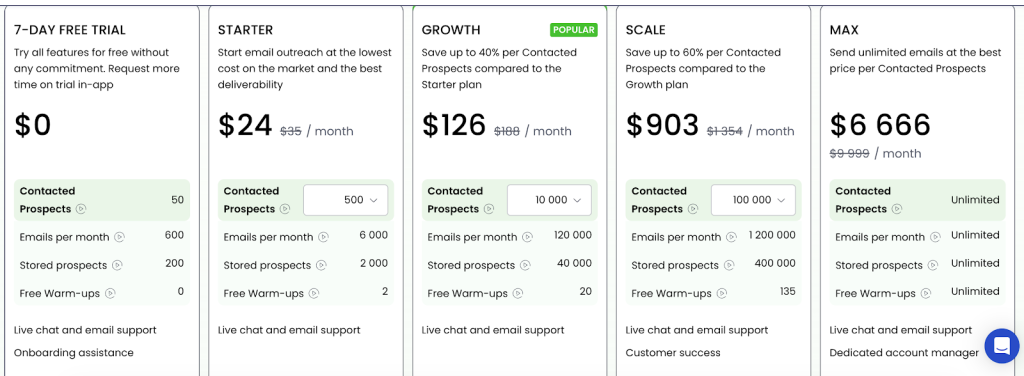
If your goal is predictable outbound email, better reply rates, and clear pricing that scales reasonably, Woodpecker is the stronger choice.
Try Woodpecker for free and see how much outbound you can run without paying for unnecessary features.