



The email warm-up tool your plan already pays for

Woodpecker's email warm-up tool builds sender reputation on a new mailbox. Mailivery or Warmy send mail from it and reply, so deliverability is in place before your first cold email campaign.

4.5/5

Trusted by 13,000+ professionals in 101 countries

A closed envelope kept warm by a small campfire

Turn warm-up on in four steps, then leave it alone

  1. An electric plug

    Open Add-ons and pick Warm-up

    The add-on is on by default, so there is nothing to install.

  2. A mailbox

    Pick a mailbox with a free slot

    Open the account you want to warm up and click Add warm-up.

  3. A signpost with two arms

    Choose Mailivery or Warmy

    Woodpecker asks which of the two warms up this email account. You answer per account, so two accounts can run different providers.

  4. A door key

    Connect the mailbox

    Add your name and a Google App password, or SMTP and IMAP details for any other provider.

The same email warm-up tool you would buy direct

Woodpecker does not run a warm-up network of its own. It connects your email account to Mailivery or Warmy through platform partnerships, so the email warm-up software is theirs. It is the same service both companies sell on their own sites, not a trimmed version of it.

Both providers perform similarly, so pick either one. What changes is the bill and where you set it up. A slot comes with your plan instead of a second subscription per email account. The App password or SMTP details you enter go to the provider that sends the warm-up mail. You can revoke that credential at your mailbox provider whenever you want.
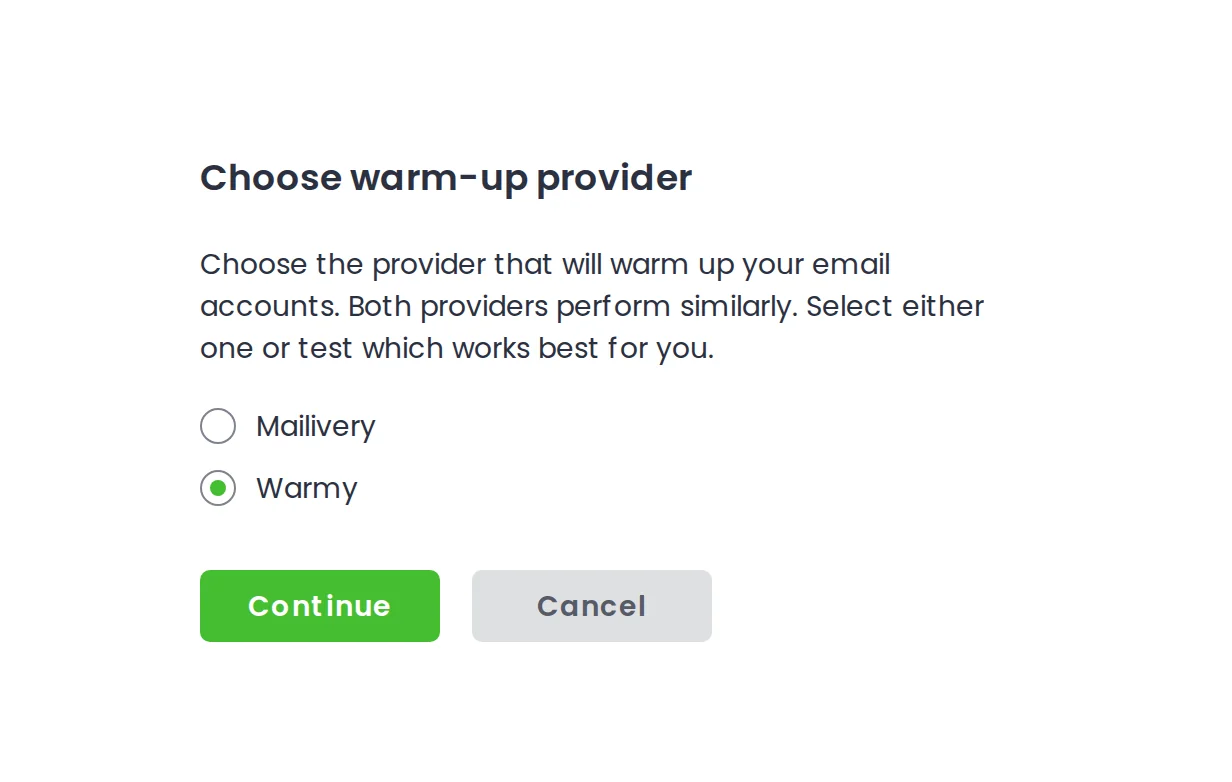
Woodpecker asking whether to warm up this email account with Mailivery or Warmy

Free email warm-up slots on every plan, from 2 to 800

Plan tier Free warm-up slots Extra slots, $5 a month each
500 contacted prospects Contacted prospects is the meter your plan is priced by, and it sets how many free warm-up slots you get. Free warm-up slots 2 Extra slots, $5 a month each Up to 20
4,000 contacted prospects Free warm-up slots 10 Extra slots, $5 a month each Up to 20
20,000 contacted prospects Free warm-up slots 40 Extra slots, $5 a month each Up to 20
100,000 contacted prospects Free warm-up slots 135 Extra slots, $5 a month each Up to 20
1,000,000 contacted prospects Free warm-up slots 800 Extra slots, $5 a month each Up to 20
Unlimited plan Free warm-up slots Unlimited Extra slots, $5 a month each None needed

Start at a few emails a day, reach 50 at full ramp

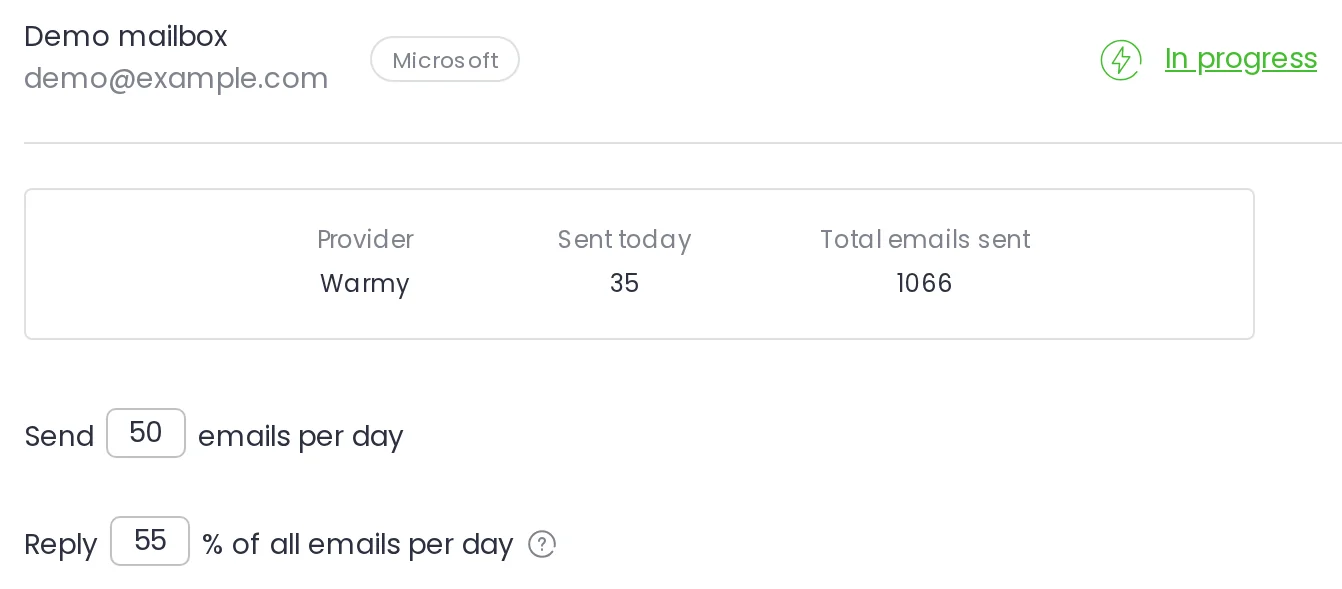
Warm-up opens with a few emails a day. By default it tops out at 50 a day, Monday to Friday, and the target reply rate is up to 55%.

Warm-up tab showing an account in progress, today's sent count, the total sent and the daily limit fields
  1. 1

    The green In progress status

    Warm-up is running on this mailbox. There is nothing to do while it is on: leave it alone until you are ready to send.

  2. 2

    Sent today

    It counts what went out each day, not where the mail landed. Low volume and few replies early on are the process working.

  3. 3

    Total emails sent

    The sending history the mailbox is building. That history is what providers see before your first cold email campaign.

  4. 4

    Send 50 and Reply 55%

    You can change the daily number and the reply rate at any time, though the defaults are best for the first weeks.

After warm-up, daily volume decides your reply rate

Woodpecker medians over 7,676 mailboxes that sent 500 emails or more in 90 days. Opens follow the same curve: 41% at 1–20, 23% at 101–200.

These are sending-volume medians, not warm-up results. We publish no warm-up outcome number. Woodpecker cold email benchmarks, 7,676 mailboxes

How to warm up a new email domain: give it 2 to 3 months

A brand-new domain needs about 2 to 3 months, and it is best to wait about 2 weeks after registering it before warm-up starts. A new email account on a domain that already sends needs 3 to 4 weeks. Email accounts bought inside Woodpecker can start after 3 to 5 days.

A 14-day trial shows warm-up running, not a finished warm-up. Warm-up emails do not count toward the trial’s 100 cold emails. They do count toward the daily sending limit your mailbox provider sets, so turn warm-up off before your first campaign. Warm up first, send afterward, then move the slot to the next email account.

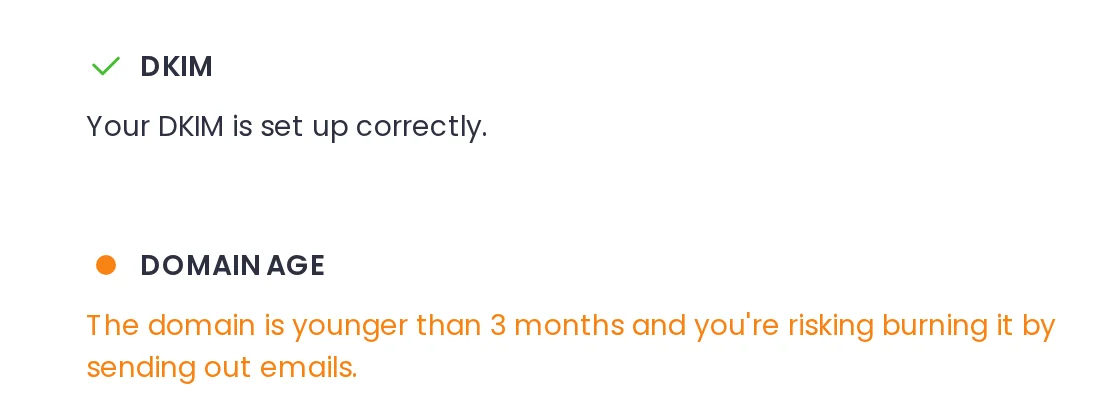
Domain Check-up showing an orange dot next to a domain that is too new to send from

Warm-up will not fix these five things

We do not sell the warm-up itself, so here is the honest list and the real fix for each one.

  • A magnifying glass

    A list you have not verified

    Warm-up builds sending history. It does not make an invalid address valid. Verify first: across 56,614 campaigns, a bounce rate under 2% beats one over 20%.

    60% more replies under a 2% bounce rate

  • A shield with a check mark

    Missing SPF, DKIM or DMARC

    Authentication tells providers the mail is really yours. Without those three records, a warmed-up mailbox still gets filtered. Check the records first.

  • A warning triangle with an exclamation mark

    Copy that reads as spam

    Spam-shaped subject lines and links get filtered whatever your sender reputation is. The spam words and links checker flags them before you send.

  • A globe on a stand

    Marketing and cold email mixed

    Opt-in marketing and cold outreach on one domain pull your domain reputation two ways. Keep them on separate domains, each warmed up on its own.

  • A gauge with its needle halfway

    A reputation already burned

    Warm-up starts from neutral. A domain with real damage starts from negative, so recovery takes longer and needs more than a warm-up.

Questions people ask before turning warm-up on

  • Does email warm-up actually work?

    Yes, as a way to build sending history on a mailbox that has none. Mailivery or Warmy send email from your account and reply to it, so providers see normal activity before your first campaign. Warm-up will not clean a bad list, replace missing SPF, DKIM or DMARC records, or rescue copy that reads as spam. Your email deliverability depends on all of those together.

  • Is Woodpecker's email warm-up really free?

    Yes, up to your plan's free slots. Plans start at $35 a month for the 500 contacted prospects tier, with 2 slots; the 20,000 tier includes 40, and the Unlimited plan has no cap. Past your slots, each email account is $5 a month, up to 20 extra. On the entry tier, 14 email accounts means 2 free plus $60 a month. Pausing a warm-up does not pause the charge, and a downgrade reduces your slots and bills the difference. Full table on the pricing page.

  • Which email warm-up service does Woodpecker use?

    Mailivery and Warmy, and you choose per email account. You can run one on each of two accounts and compare. You get the provider's own warm-up network, and Warmy adds a setting you control in Woodpecker: Provider distribution. Its B2B preset sends 40% to Google Workspace, 40% to Microsoft 365 and 20% to custom SMTP providers.

  • How long does email warm-up take?

    Plan on about 2 to 3 months for a new domain, and 3 to 4 weeks for a new email account on a domain that already sends. It cannot be instant, whatever a tool promises. Volume opens at a few emails a day. The rest of the email warm-up schedule, how fast that volume climbs, stays with the provider, even if you set a higher daily limit. See the setup guide or why volume starts low.

  • Can I run campaigns while warm-up is on?

    No. Our Help Center is direct about it: warm up first, then send, and turn warm-up off before you start a campaign, at any volume. Warm-up is an onboarding step for a mailbox, not something you repeat between campaigns. You warm up again when you add a new mailbox or domain, or when a mailbox needs its reputation rebuilt. While campaigns run, what protects the mailbox is a verified list, sane daily volume and Adaptive sending, which does not replace warm-up.

  • How do I tell warm-up emails from my real ones?

    Every warm-up email carries a code you can filter on. Mailivery creates its own label and folder in your mailbox automatically, and Warmy's emails filter by sender name. You never have to reply; they are archived for you. One rule matters: never mark them as spam, because it affects the whole warm-up network and can get you removed from it. If someone does it by mistake, move the message back to the inbox and ask support to restart the process.