







Email verification software you don't have to buy

Woodpecker's email verification software checks each prospect's address with Bouncer right before the email goes out, inside the campaign. An address found not to exist is never emailed, so it never becomes a bounce.

4.5/5

Trusted by 13,000+ professionals in 101 countries

Two envelopes side by side, one marked with a check mark and one with a cross

Email verification software that runs when you click Send

  1. A stack of four envelopes

    Import your prospects

    Then write the campaign. Bouncer is already switched on in your plan: no separate account, no API key, no integration to connect.

  2. An envelope with a check mark

    Click Send

    Each address is checked right before its own email goes out, follow-ups included. One that fails is marked INVALID and skipped, and the rest of the campaign sends on.

  3. doodle of four bars of rising height

    Check the INVALID list

    No email is sent to an address on it. The list sits in your campaign stats, one per campaign, and exports as a CSV whenever you want it.

You decide what happens to catch-all email addresses

A catch-all domain accepts mail to any address, so nothing can confirm the mailbox exists. Woodpecker makes it a setting on each campaign.

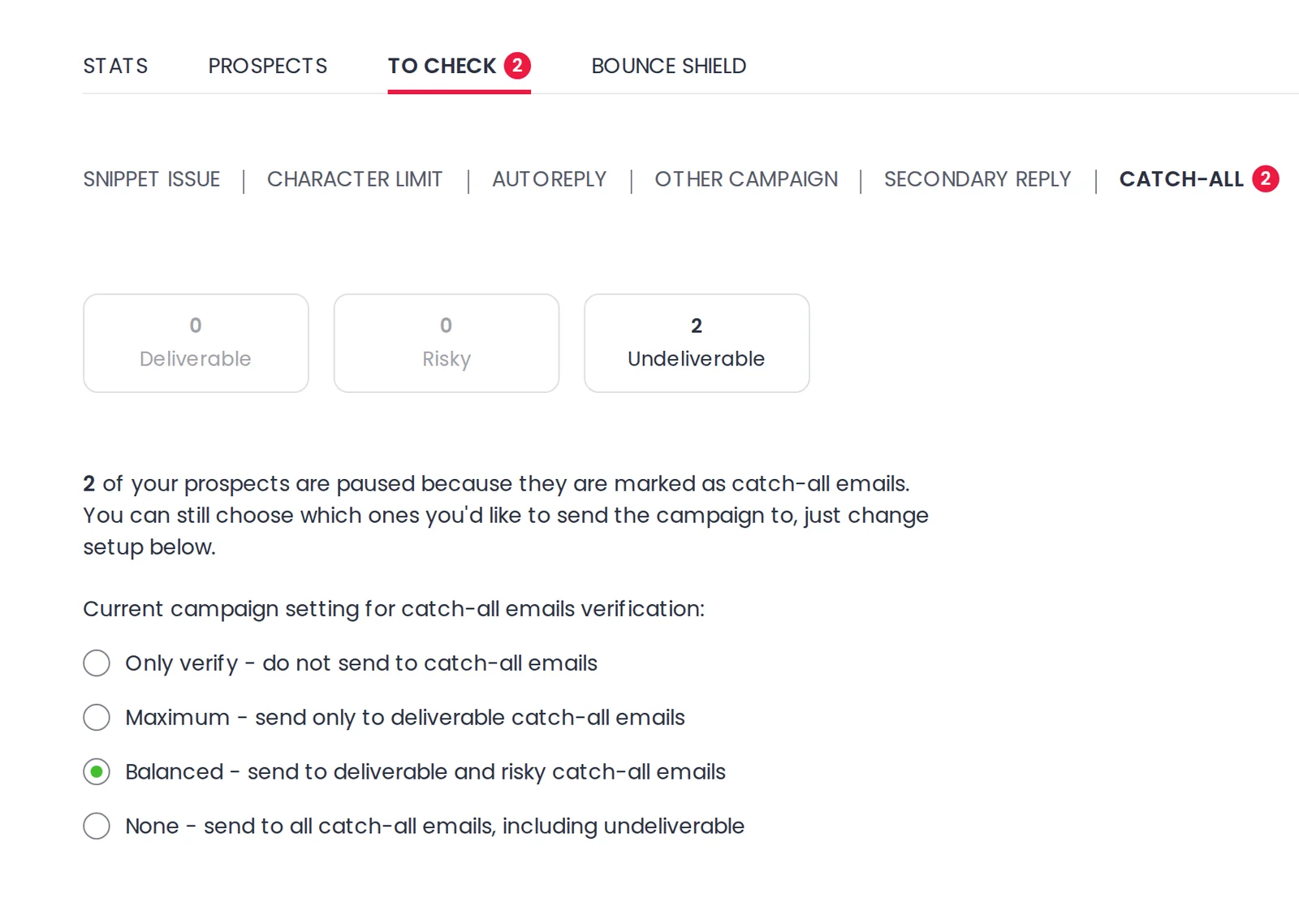
  • The catch-all queue, in To Check

    Held-back prospects get a Paused status and wait in the To Check tab. You can still let them through.

    The To Check tab showing how many catch-all addresses came back deliverable, risky or undeliverable
  • An envelope with a magnifying glass

    Only verify

    Verifies your catch-all addresses with Bouncer and sends no campaign email to any of them.

  • A shield with a check mark

    Maximum

    Sends only to the catch-all addresses that are safe to contact. Pick it on a fresh domain, or one whose reputation you are rebuilding.

  • A balance scale

    Balanced

    Sends to deliverable and risky catch-all addresses, the ones that probably exist but can still result in bounces. It is the default for all users.

  • An envelope with a warning mark

    None

    Sends to all catch-all addresses, including the undeliverable ones, which can result in the most bounces. Nothing is paused for you to review first.

Campaigns under 2% bounce get 1.6% median replies

About 60% more replies than campaigns bouncing over 20%, which sit at 0.9–1.0%. 65% of all campaigns already land in the 0–2% bounce bin.

Reply rate holds at 1.6% up to 10% bounce, then falls. Median open rate slides from 34% to 25% at 20–40%. Bounce Shield pauses a campaign at 2% by default. Cold email benchmarks, 56,614 campaigns / 7,000 companies

An invalid email address never becomes a bounced email

INVALID and BOUNCED are two statuses, and the order between them is the point. INVALID is assigned inside the campaign before anything is sent, when an address is found not to exist. BOUNCED comes after a send, when the email bounces back.

Some bounces still get through: the check is not bulletproof, and a mailbox can fail for reasons an address cannot show. The Bounce Shield tab keeps your Current Bounce Rate. Turn its switch on and set your own threshold, 2% by default. Your campaign list flags the pause, and you restart it. Put your INVALID count beside that rate to see what the check caught and missed.
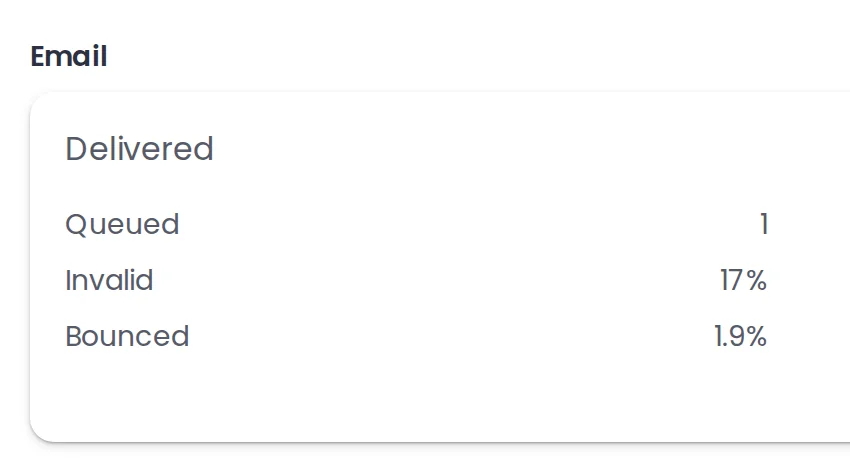
The campaign's Email panel with the INVALID counter at 17% above the BOUNCED counter at 1.9%

Bulk email verification without a second subscription

Two ways to check a list A standalone verifier Verification in Woodpecker
When the check runs A standalone verifier Before you upload the list Verification in Woodpecker Right before each email sends
What you do each time A standalone verifier Upload, clean, re-import Verification in Woodpecker Nothing, it runs itself
Catch-all addresses A standalone verifier A status you interpret Verification in Woodpecker Four settings you choose
What you keep afterwards A standalone verifier A cleaned file for any tool Verification in Woodpecker An exportable INVALID list
Accuracy figure and API A standalone verifier Both, that is their product Verification in Woodpecker Neither, we do not sell them
What it costs Free inside a campaign. Validating a list by hand in Lists is paid: 0.25 credits an address, about half a cent. A standalone verifier Per address or per credit Verification in Woodpecker Free on every plan but Unlimited

What people ask before trusting a verifier they did not buy

  • Can I verify email addresses for free in Woodpecker?

    Yes. Inside a campaign it is free: every prospect is checked before their email goes out, however many you send, with no per-address charge. The one exception is Unlimited, the flat high-volume plan at $9,999 a month, where the Bouncer verification add-on is switched off. Validating addresses by hand in a list is the paid part, at 0.25 credits each, about half a cent. Plans start at $35 a month, and the pricing page has the rest.

  • What is a catch-all email address?

    A catch-all address, also called an accept-all address, is configured to receive all emails sent to a domain, regardless of whether the specific mailbox exists. That is what makes verifying one uncertain: the domain accepts everything, so nothing can confirm that the mailbox behind the address is real. Woodpecker still checks these addresses and reports each one as deliverable, risky or undeliverable.

  • Should you send emails to catch-all addresses?

    It is your call, and you make it once per campaign. Deliverable catch-all domains actively accept and process emails, and the risk of bounces is low. Risky ones may accept the email at first and later bounce it, or discard it silently. Balanced, the default, sends to both. Maximum sends only to the deliverable ones, and the catch-all settings article suggests it on a fresh domain or one you are rebuilding.

  • What is the difference between a hard bounce and a soft bounce?

    A hard bounce is permanent: the address is invalid or otherwise unreachable, and resending is not advisable. A soft bounce is temporary, usually a full mailbox or a mail server that is briefly unavailable, and retrying is an option. Verification is aimed at the first kind, because an address that does not exist can be caught before you send. The second kind can only be handled after it happens. Bounced and invalid explains both.

  • Why do emails bounce if the address is valid?

    Because the address is only one of the causes. The Bounce Shield tab splits your bounces into three groups: sending IP related, sending domain related and prospect related. Only the third group is about your list. The other two are about the infrastructure you send from, so a clean email list will not fix them on its own. Start with your domain records and reputation.

  • Do I still need a separate email verification tool?

    For campaigns you send from Woodpecker, no. The check is built in and runs before every email leaves. A separate email validation service adds an API, bulk list scoring and a published accuracy figure, and we sell none of those. Ours is not bulletproof either, and we say so: it detects most invalid addresses before any emails are sent. Validation in Lists is the paid alternative, and the Help Center's reason for it is that cleaning a list first uses up less of your contacted-prospects limit.