
GDPR cold email, with a one-click opt-out and permanent erasure

GDPR does not forbid cold emailing. Two campaign settings and one snippet put an opt-out in every email you send. Your prospect gets one click from the inbox header, or a link that also erases their data.

4.5/5

Trusted by 13,000+ professionals in 101 countries

A closed envelope with a large closed padlock resting on its front

Europe opens cold email more often than the US does

EU markets open cold email most, so the GDPR setup is worth it. These are open rates, not compliance results; we publish no opt-out rate.

Median open rate by country, agencies excluded. Samples: France 770, Germany 1,200, Poland 7,000, UK 3,000, US 11,000 campaigns. Woodpecker cold email benchmarks, 37,000 campaigns

GDPR does not ask for consent. It asks for three things

For B2B cold email you do not need consent first, which is where most GDPR email marketing advice is wrong. You need three things: a legal basis, usually legitimate interest; the information duty inside each message; and storage limitation. Storage limitation means not keeping data longer than you need it. GDPR protects natural persons, not companies.

The information duty is yours to write. One line covers it: what data you hold, why you are writing, and how to opt out. Legitimate interest is yours to defend: your business activity should be logically connected with your prospect’s. Our GDPR cold email guide works through all three.

A balance scale, an envelope and an hourglass: legal basis, information duty, storage limitation

Erase a prospect's data permanently, in four clicks

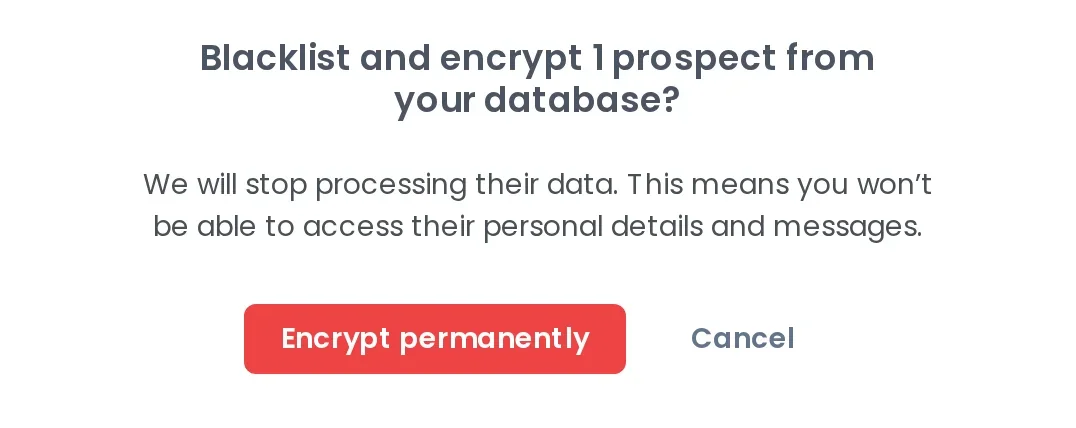
Select one prospect or many in Prospects, open More actions, choose GDPR encrypt, then confirm with Encrypt permanently.

Woodpecker asking to confirm permanent encryption of a prospect's personal data
  1. 1

    Blacklist and encrypt

    The dialog is headed Blacklist and encrypt, so one action does both. GDPR encrypt is what the app calls it, and erasure is what it does.

  2. 2

    We stop processing their data

    You will not be able to open their personal details or messages. In the campaign view a string of bullet points sits where the personal data was.

  3. 3

    Encrypt permanently

    Nobody can put it back. The status becomes OPT-OUT and the row stays under the Encrypted only filter, so you can show which prospects were erased.

Tick two boxes, add one snippet, and the opt-out works

Both boxes live in the campaign, not in your account, and they start off, so campaign 41 needs the same ticks as campaign 1.

  1. A check mark in a box

    Tick GDPR-compliant unsubscribe

    Open your campaign's Settings tab and tick GDPR-compliant unsubscribe.

  2. A padlock with a keyhole

    Tick Enable one-click unsubscribe

    Tick Enable one-click unsubscribe right below it, so mail clients can show the opt-out.

  3. A closed envelope

    Insert the UNSUBSCRIBE snippet

    Insert the UNSUBSCRIBE snippet in every email, or once in each email account's signature to cover every campaign.

List-unsubscribe header carries one-click unsubscribe

The list-unsubscribe header is a line in the header of the emails you send, and it tells your prospect’s mail client how to leave your list. Woodpecker supports both methods, mailto and http. Gmail and Yahoo sender guidelines ask bulk senders for one-click, which is the http method plus a List-Unsubscribe-Post line.

If more than 5,000 prospects are on private addresses like gmail.com and the header is off, Woodpecker warns you in the campaign summary. The API sets both at campaign creation: settings.list_unsubscribe and settings.gdpr_unsubscribe.

One opt-out stops every campaign you run

Woodpecker keeps the suppression list for you: the status, the tags, and the campaigns an opted-out prospect can no longer enter.
Doodle of two light strokes crossing in an X

Follow-ups stop on the click

When your prospect clicks the link, Woodpecker stops the scheduled emails and the planned follow-ups for that person. Nothing for you to catch afterwards.
A globe on a stand

OPT-OUT is a global status

The status updates everywhere in your account at once, in every campaign and in the main prospect list. Only a manual change puts it back to ACTIVE.
A price tag on a string

Tags record who and how

Every opt-out adds the #UNSUBSCRIBED tag, and opt-outs through the header add #method-list. Filter by either to show who opted out and by which route.
A shield with a check mark

New campaigns will not take them

Prospects with OPT-OUT or BLACKLISTED cannot be added to a new campaign. The Safety tab blocks contact with an address or a domain even after a later import.

What the tool does, and what stays your job

Who does what under GDPR You Woodpecker
Put an opt-out in every email You Insert the UNSUBSCRIBE snippet Woodpecker Renders the link, tracks the click
Stop follow-ups after an opt-out You Woodpecker Automatic, in every campaign
Erase a prospect on request You Woodpecker Four clicks, permanent
Keep them out of new campaigns You Woodpecker OPT-OUT blocks re-adding
Have a legal basis to email You are the data controller: you decide whose data you process and why. Woodpecker is the data processor. You Yours to prove Woodpecker We cannot do this for you
Say what data you process You In your own copy Woodpecker Your words, not ours

What senders ask before they turn this on

  • Is cold email legal under GDPR?

    Yes. You can send cold emails to people at companies under GDPR. The regulation sets rules for how you process personal data; it does not ban outreach. Our GDPR compliance page puts it this way: GDPR does not forbid cold emailing, as long as you follow the data processing rules described in the regulation. The three conditions are in the section above, with a link to the full guide.

  • Do I have to add the unsubscribe link to every email?

    Yes. Use the UNSUBSCRIBE snippet in every email in the campaign, or add it once to your account signature. Copying the rendered link from an earlier email will not work, and the prospect will not be able to unsubscribe properly. In a test send the link is inert on purpose; it works once the campaign is live. If the snippet is missing, Woodpecker warns you under the checkbox and again in the campaign summary. Setup guide.

  • What is the difference between the mailto and http methods?

    Both put the opt-out in the message header, and Woodpecker supports both. With mailto, your prospect's mail client generates an email asking to cancel the subscription and sends it to the specified email address. With http, the list-unsubscribe header is followed by a pop-up asking whether your prospect is sure they want to unsubscribe from your emails. Either way the prospect gets the OPT-OUT status and the #method-list tag.

  • I ticked Enable one-click unsubscribe but it is not showing. Why?

    Because it is not entirely ours to guarantee. Sometimes it depends on the email provider of your prospect. That provider checks whether the address your messages come from looks like a mass sender, and whether your domain reputation is good. If both are true, the one-click link is more likely to be visible in the email header. Older campaigns built in the previous editor show the same box under the gear icon, labeled List-unsubscribe header. The domain audit shows where your records stand.

  • What happens to a prospect's data when you GDPR encrypt it?

    It is erased. Neither you nor Woodpecker can process that personal data afterwards, and you cannot see it. It is not stored in the Woodpecker database anymore, which is why the confirmation button reads Encrypt permanently. A prospect can start the same erasure from the unsubscribe page, without asking you first. Nothing purges itself: prospect data stays until you erase or delete it, and Woodpecker deletes your account at the end of the billing period after you close it.

  • Where is your GDPR documentation, and what does it commit to?

    In two places, both linked from this page: the GDPR compliance page and the GDPR statement. The statement commits to storing EU citizens' data on servers in the EU. Transfers to a country without adequate protection carry additional safeguards such as Standard Contractual Clauses, and Woodpecker will not lease, sell, or exchange customer data. We do not publish a signable DPA or a sub-processor list on the site. For either, write to [email protected]. Read the GDPR statement.